sketchucation logo sketchucation
    • 登入
    Oops, your profile's looking a bit empty! To help us tailor your experience, please fill in key details like your SketchUp version, skill level, operating system, and more. Update and save your info on your profile page today!
    🔌 Smart Spline | Fluid way to handle splines for furniture design and complex structures. Download

    [Plugin] BezierSpline - v2.2a - 22 Apr 21

    已排程 已置頂 已鎖定 已移動 Plugins
    460 貼文 183 Posters 2.0m 瀏覽 183 Watching
    正在載入更多貼文
    • 從舊到新
    • 從新到舊
    • 最多點贊
    回覆
    • 在新貼文中回覆
    登入後回覆
    此主題已被刪除。只有擁有主題管理權限的使用者可以查看。
    • H 離線
      helmholtz
      最後由 編輯

      Thank you greatly good sir 😄

      1 條回覆 最後回覆 回覆 引用 0
      • M 離線
        marcel.forum
        最後由 編輯

        Dear Fredo
        Big thanks for this plugin.

        --
        Marcel

        1 條回覆 最後回覆 回覆 引用 0
        • X 離線
          xrok1
          最後由 編輯

          spotted this in another thread. Worth noting:

          http://forums.sketchucation.com/download/file.php?id=67872&t=1

          “There are three classes of people: those who see. Those who see when they are shown. Those who do not see.”

          http://www.Twilightrender.com try it!

          1 條回覆 最後回覆 回覆 引用 0
          • R 離線
            rv1974
            最後由 編輯

            Hi Fredo,
            I recently updated your spline tools set and unfortunately it stopped functioning.
            I get the toolbar, I can activate the commands, but they simply don't draw.
            I'm pretty sure the file's structure is OK, the FredoLib is updated.
            What could be the reason?
            Thank you in advance.
            BTW where could I download the older version?
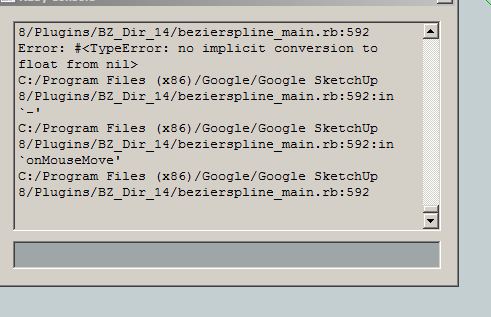

            Capture.JPG

            1 條回覆 最後回覆 回覆 引用 0
            • thomthomT 離線
              thomthom
              最後由 編輯

              Have you tried reinstalling it? Completely removing the existing plugin first and then reinstall to be 100% sure everything is installed correctly.

              Thomas Thomassen — SketchUp Monkey & Coding addict
              List of my plugins and link to the CookieWare fund

              1 條回覆 最後回覆 回覆 引用 0
              • R 離線
                rv1974
                最後由 編輯

                @thomthom said:

                Have you tried reinstalling it? Completely removing the existing plugin first and then reinstall to be 100% sure everything is installed correctly.

                Did it a couple times it didn't help.

                1 條回覆 最後回覆 回覆 引用 0
                • thomthomT 離線
                  thomthom
                  最後由 編輯

                  What is your system info? Windows and SketchUp version?

                  Does none of the drawing functions work?

                  I cannot reproduce it here on my end. Everything appear to work. SU8M1 Pro, Win7.

                  Thomas Thomassen — SketchUp Monkey & Coding addict
                  List of my plugins and link to the CookieWare fund

                  1 條回覆 最後回覆 回覆 引用 0
                  • R 離線
                    rv1974
                    最後由 編輯

                    @thomthom said:

                    What is your system info? Windows and SketchUp version?

                    Does none of the drawing functions work?

                    I cannot reproduce it here on my end. Everything appear to work. SU8M1 Pro, Win7.

                    it's win7x64 + su8 (see the printscreen).
                    none of drawing tools work.

                    1 條回覆 最後回覆 回覆 引用 0
                    • R 離線
                      rv1974
                      最後由 編輯

                      I just downgraded to v1.2. It solved 😕 the problem

                      1 條回覆 最後回覆 回覆 引用 0
                      • Dave RD 離線
                        Dave R
                        最後由 編輯

                        You shouldn't have to do that, though.

                        Etaoin Shrdlu

                        %

                        (THERE'S NO PLACE LIKE)

                        G28 X0.0 Y0.0 Z0.0

                        M30

                        %

                        1 條回覆 最後回覆 回覆 引用 0
                        • thomthomT 離線
                          thomthom
                          最後由 編輯

                          Lets see what Fredo says - there's been no other reports of this issue since it was released in January. Seems that there's some local issue. Have you tried temporarily to run SU with just BezierSpline? In case there is a conflict with some other plugin?

                          Thomas Thomassen — SketchUp Monkey & Coding addict
                          List of my plugins and link to the CookieWare fund

                          1 條回覆 最後回覆 回覆 引用 0
                          • R 離線
                            rv1974
                            最後由 編輯

                            @thomthom said:

                            Lets see what Fredo says - there's been no other reports of this issue since it was released in January. Seems that there's some local issue. Have you tried temporarily to run SU with just BezierSpline? In case there is a conflict with some other plugin?

                            Bingo!
                            I took (my curiosity conquered my natural laziness he-he) the virgin plugins folder and placed the latest spline set. It works.
                            but now I have dilemma: to filter hundreds plugins or comfortably stay with the mess?

                            1 條回覆 最後回覆 回覆 引用 0
                            • TIGT 離線
                              TIG Moderator
                              最後由 編輯

                              Do it 'by halves'.

                              Add half of the Plugins back in and retry.
                              If it fails you know the problem is with that half just moved back.
                              Remove half back into the temp folder and retry.
                              If it fails you know the problem is in the remaining portion left in etc etc

                              It it's still OK try moving over half of what's left... etc
                              Again if it fails you know the issue is with the 'half' just moved back and so on...

                              You can quickly narrow it down to a small group of files so 512 > 256 > 128 > 64 > 32 > 16 > 8 > 4 > 2 > 1 => only 10 steps in the very worst case...

                              TIG

                              1 條回覆 最後回覆 回覆 引用 0
                              • thomthomT 離線
                                thomthom
                                最後由 編輯

                                Meanwhile, take a screenshot of your plugins folder content so we can scan it for known rogue plugins. Matchbox for instance is a known troublemaker.

                                Thomas Thomassen — SketchUp Monkey & Coding addict
                                List of my plugins and link to the CookieWare fund

                                1 條回覆 最後回覆 回覆 引用 0
                                • R 離線
                                  rv1974
                                  最後由 編輯

                                  @tig said:

                                  Do it 'by halves'.

                                  Add half of the Plugins back in and retry.
                                  If it fails you know the problem is with that half just moved back.
                                  Remove half back into the temp folder and retry.
                                  If it fails you know the problem is in the remaining portion left in etc etc

                                  It it's still OK try moving over half of what's left... etc
                                  Again if it fails you know the issue is with the 'half' just moved back and so on...

                                  You can quickly narrow it down to a small group of files so 512 > 256 > 128 > 64 > 32 > 16 > 8 > 4 > 2 > 1 => only 10 steps in the very worst case...

                                  that's smart I'll try it
                                  But I guess the number of plugins itself is a biggest troublemaker.

                                  1 條回覆 最後回覆 回覆 引用 0
                                  • fredo6F 離線
                                    fredo6
                                    最後由 編輯

                                    @rv1974

                                    Maybe you can open the Ruby console and chcek if there is any message displayed that could give me a hint (plugins like Matchbox and old versions of Podium are known to create side-effects).
                                    Also, if you use my other plugins (like FredoScale or RoundCorner), do they function correctly?

                                    In last resort, use TIG's method to find out. Detecting plugin conflicts is always useful for the community of users.

                                    Fredo

                                    1 條回覆 最後回覆 回覆 引用 0
                                    • R 離線
                                      rv1974
                                      最後由 編輯

                                      At the end I restartedmy PC, replaced (portion by portion, TIG's prescription) and magically the things get normalized).
                                      So, let's say it was kind a local turbulence.
                                      Sorry for bothering,
                                      and thank you for replies.

                                      1 條回覆 最後回覆 回覆 引用 0
                                      • majidM 離線
                                        majid
                                        最後由 編輯

                                        these are really great tools, just wish a more descriptive image (tut) 👍

                                        My inspiring A, B, Sketches book: https://sketchucation.com/shop/books/intermediate/2612-alphabet-inspired-sketches--inspiring-drills-for-architects--3d-artists-and-designers-

                                        1 條回覆 最後回覆 回覆 引用 0
                                        • J 離線
                                          Jaebum Myung
                                          最後由 編輯

                                          Dear Fredo,

                                          Thanks for everything.^^

                                          from mooksu

                                          1 條回覆 最後回覆 回覆 引用 0
                                          • X 離線
                                            xellos
                                            最後由 編輯

                                            thank you very much

                                            1 條回覆 最後回覆 回覆 引用 0
                                            • 1
                                            • 2
                                            • 5
                                            • 6
                                            • 7
                                            • 8
                                            • 9
                                            • 22
                                            • 23
                                            • 7 / 23
                                            • 第一個貼文
                                              最後的貼文
                                            Buy SketchPlus
                                            Buy SUbD
                                            Buy WrapR
                                            Buy eBook
                                            Buy Modelur
                                            Buy Vertex Tools
                                            Buy SketchCuisine
                                            Buy FormFonts

                                            Advertisement




