sketchucation logo sketchucation
    • 登入
    Oops, your profile's looking a bit empty! To help us tailor your experience, please fill in key details like your SketchUp version, skill level, operating system, and more. Update and save your info on your profile page today!
    🔌 Smart Spline | Fluid way to handle splines for furniture design and complex structures. Download

    [Plugin] BezierSpline - v2.2a - 22 Apr 21

    已排程 已置頂 已鎖定 已移動 Plugins
    460 貼文 183 Posters 2.0m 瀏覽 183 Watching
    正在載入更多貼文
    • 從舊到新
    • 從新到舊
    • 最多點贊
    回覆
    • 在新貼文中回覆
    登入後回覆
    此主題已被刪除。只有擁有主題管理權限的使用者可以查看。
    • TIGT 離線
      TIG Moderator
      最後由 編輯

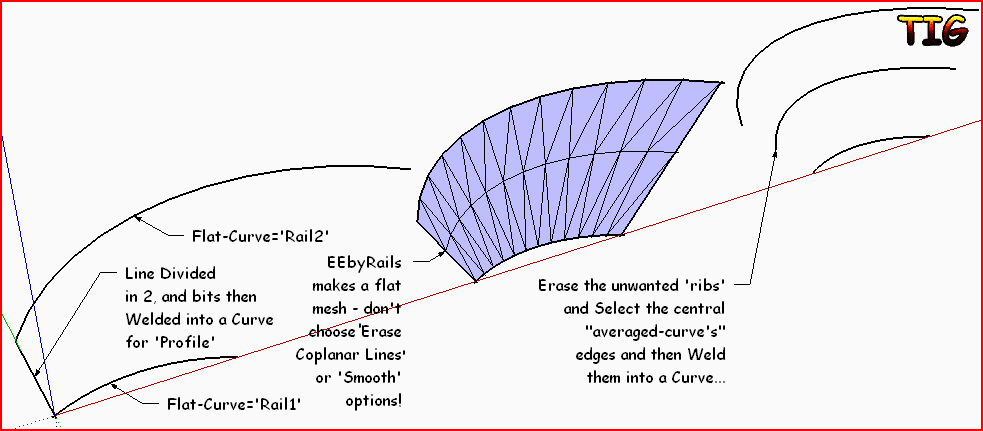
      EEbyRails will make the average-curve between the two rails if the Profiles are a straight-line curve made from two equal length edges [use divide on a line drawn between the curves ends and weld as a curve]. This works in full 3d AND in 2d even if the curves are flat and even coplanar... Just erase the mesh's ribs and use the 'spine' edges to weld into an averaged-curve... Capture.PNGObviously the average is 1/2 but if you wanted to weight the result - let's say a 3rd then divided the profile line in three, erase the ribs and the two mid- spines are at 1/3 from their nearest 'rail'...
      TIG

      1 條回覆 最後回覆 回覆 引用 0
      • jeff hammondJ 離線
        jeff hammond
        最後由 編輯

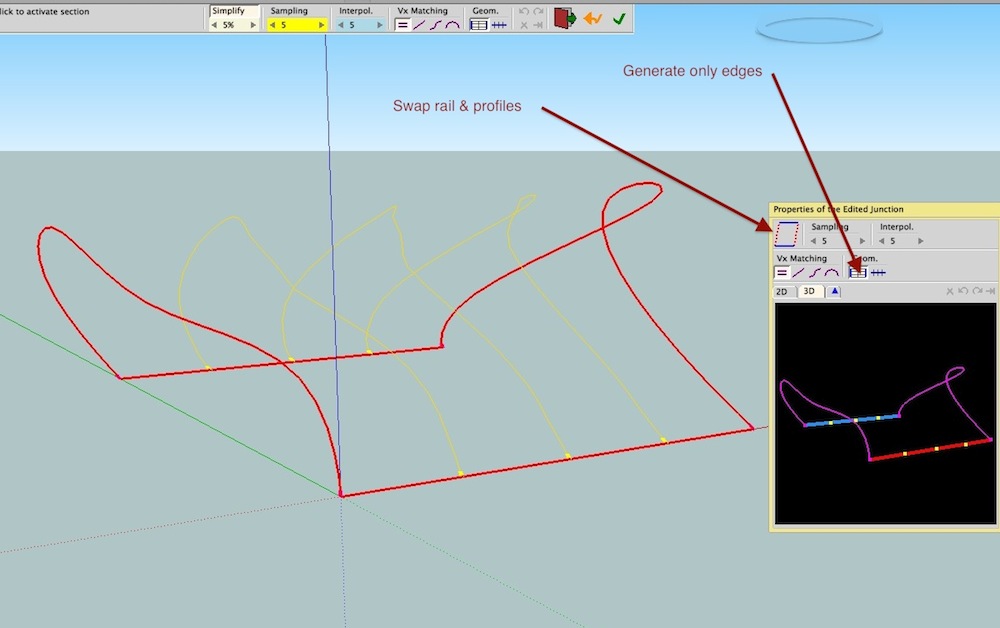
        the thing with curviloft is that you can choose to generate only the edges if you wish so there's no deleting surfaces afterwards etc..
        cloft.jpg

        dotdotdot

        1 條回覆 最後回覆 回覆 引用 0
        • TIGT 離線
          TIG Moderator
          最後由 編輯

          Jeff... doh! moment for me... 😳
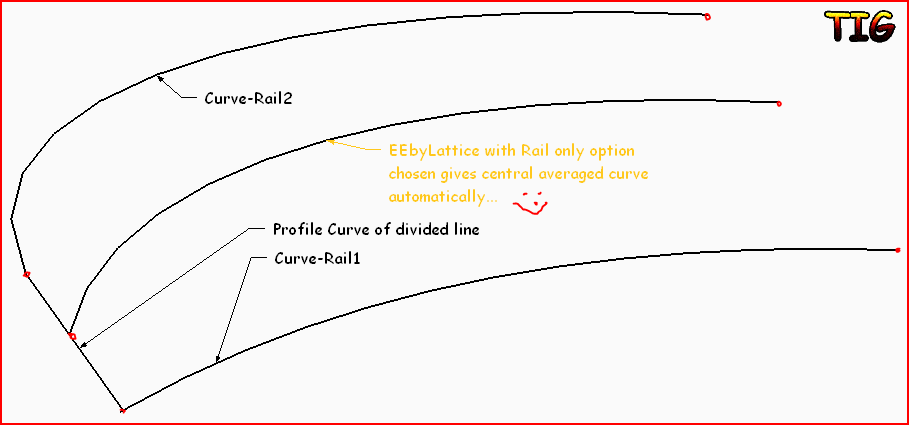
          Use EEbyLattice and chose 'Rail' only option to get a central spine curve [auto-welded and grouped] without the needed to mess on erasing ribs made from EEbyRails 😒Capture.PNG
          TIG

          1 條回覆 最後回覆 回覆 引用 0
          • jeff hammondJ 離線
            jeff hammond
            最後由 編輯

            @tig said:

            Jeff... doh! moment for me... 😳
            Use EEbyLattice and chose 'Rail' only option to get a central spine curve [auto-welded and grouped] without the needed to mess on erasing ribs made from EEbyRails 😒[attachment=0:1z22r8l6]<!-- ia0 -->Capture.PNG<!-- ia0 -->[/attachment:1z22r8l6]

            lol!
            i had forgotten about that option as well

            dotdotdot

            1 條回覆 最後回覆 回覆 引用 0
            • fredo6F 離線
              fredo6
              最後由 編輯

              @unknownuser said:

              (i can't get it to work if both curves are flat and on the same plane)

              Jeff,

              Do you have a particular model where it does not work. In general, that should give the results.
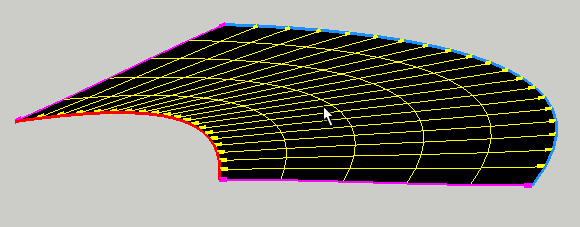
              Curviloft with 2 planar curves.png

              By the way, you can choose the number of internediate curve via the #seg parameter (but not the spacing).

              Fredo

              1 條回覆 最後回覆 回覆 引用 0
              • jeff hammondJ 離線
                jeff hammond
                最後由 編輯

                hi Fredo,

                it's a lot faster for me to just explain it in a video.. i hope it makes sense

                [flash=700,428:2w2q5yyr]http://www.youtube.com/v/bl7TMkBWpZc?version=3&amp;hl=en_US&amp;rel=0[/flash:2w2q5yyr]

                dotdotdot

                1 條回覆 最後回覆 回覆 引用 0
                • fredo6F 離線
                  fredo6
                  最後由 編輯

                  Jeff,

                  Well spotted!

                  1. Options for generating geometry is one feature of Curviloft which is not terminated. I may however add the option to keep either / or the mesh lines in a next release quickly

                  2. in Skinning, I purposedly removed the meshing of surfaces that are planar, precisely to avoid too many polys and faces. Unfortunately, I did not provision an option to inhibit this feature.

                  Thanks again. I'll try to incorporate all this in a next release

                  Just one remark: with your skinning approach, you don't need to divide the segment. Curviloft can do it for you via the Sampling parameter.

                  Fredo

                  1 條回覆 最後回覆 回覆 引用 0
                  • jeff hammondJ 離線
                    jeff hammond
                    最後由 編輯

                    @unknownuser said:

                    Just one remark: with your skinning approach, you don't need to divide the segment. Curviloft can do it for you via the Sampling parameter.

                    Fredo

                    ha.. yeah, i knew that (as it's a great feature of curviloft in general). what i meant to do was use the manual divide as a way to show me trying to force curviloft to make the lines to no avail.
                    for whatever reason, i ended up doing it in a few different parts..
                    i should maybe try following a script next time i make a video 😄

                    dotdotdot

                    1 條回覆 最後回覆 回覆 引用 0
                    • R 離線
                      redsteel
                      最後由 編輯

                      Hi Fredo

                      I just want to say thank you very much!

                      1 條回覆 最後回覆 回覆 引用 0
                      • V 離線
                        vidy
                        最後由 編輯

                        Dear Fredo,

                        First of all i want to thank you for this magnificent plugin.. 👍
                        but i have question, is there a way to slow down the movement of the grip, when we select a grip or a point to edit it?? i usually have this problem when i want to move it on certain axes (after im press ctrl button)

                        Regards,

                        still so much to learn..

                        1 條回覆 最後回覆 回覆 引用 0
                        • C 離線
                          clifdon
                          最後由 編輯

                          Great thank you for this plugin 😄.

                          1 條回覆 最後回覆 回覆 引用 0
                          • H 離線
                            helmholtz
                            最後由 編輯

                            Thank you greatly good sir 😄

                            1 條回覆 最後回覆 回覆 引用 0
                            • M 離線
                              marcel.forum
                              最後由 編輯

                              Dear Fredo
                              Big thanks for this plugin.

                              --
                              Marcel

                              1 條回覆 最後回覆 回覆 引用 0
                              • X 離線
                                xrok1
                                最後由 編輯

                                spotted this in another thread. Worth noting:

                                http://forums.sketchucation.com/download/file.php?id=67872&t=1

                                “There are three classes of people: those who see. Those who see when they are shown. Those who do not see.”

                                http://www.Twilightrender.com try it!

                                1 條回覆 最後回覆 回覆 引用 0
                                • R 離線
                                  rv1974
                                  最後由 編輯

                                  Hi Fredo,
                                  I recently updated your spline tools set and unfortunately it stopped functioning.
                                  I get the toolbar, I can activate the commands, but they simply don't draw.
                                  I'm pretty sure the file's structure is OK, the FredoLib is updated.
                                  What could be the reason?
                                  Thank you in advance.
                                  BTW where could I download the older version?
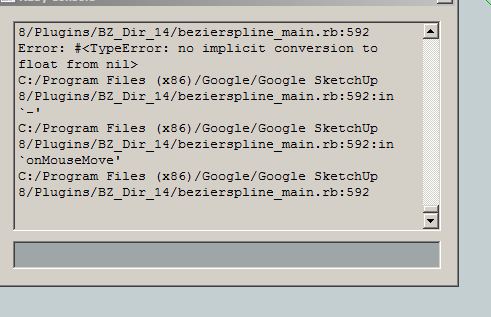

                                  Capture.JPG

                                  1 條回覆 最後回覆 回覆 引用 0
                                  • thomthomT 離線
                                    thomthom
                                    最後由 編輯

                                    Have you tried reinstalling it? Completely removing the existing plugin first and then reinstall to be 100% sure everything is installed correctly.

                                    Thomas Thomassen — SketchUp Monkey & Coding addict
                                    List of my plugins and link to the CookieWare fund

                                    1 條回覆 最後回覆 回覆 引用 0
                                    • R 離線
                                      rv1974
                                      最後由 編輯

                                      @thomthom said:

                                      Have you tried reinstalling it? Completely removing the existing plugin first and then reinstall to be 100% sure everything is installed correctly.

                                      Did it a couple times it didn't help.

                                      1 條回覆 最後回覆 回覆 引用 0
                                      • thomthomT 離線
                                        thomthom
                                        最後由 編輯

                                        What is your system info? Windows and SketchUp version?

                                        Does none of the drawing functions work?

                                        I cannot reproduce it here on my end. Everything appear to work. SU8M1 Pro, Win7.

                                        Thomas Thomassen — SketchUp Monkey & Coding addict
                                        List of my plugins and link to the CookieWare fund

                                        1 條回覆 最後回覆 回覆 引用 0
                                        • R 離線
                                          rv1974
                                          最後由 編輯

                                          @thomthom said:

                                          What is your system info? Windows and SketchUp version?

                                          Does none of the drawing functions work?

                                          I cannot reproduce it here on my end. Everything appear to work. SU8M1 Pro, Win7.

                                          it's win7x64 + su8 (see the printscreen).
                                          none of drawing tools work.

                                          1 條回覆 最後回覆 回覆 引用 0
                                          • R 離線
                                            rv1974
                                            最後由 編輯

                                            I just downgraded to v1.2. It solved 😕 the problem

                                            1 條回覆 最後回覆 回覆 引用 0
                                            • 1
                                            • 2
                                            • 3
                                            • 4
                                            • 5
                                            • 6
                                            • 22
                                            • 23
                                            • 4 / 23
                                            • 第一個貼文
                                              最後的貼文
                                            Buy SketchPlus
                                            Buy SUbD
                                            Buy WrapR
                                            Buy eBook
                                            Buy Modelur
                                            Buy Vertex Tools
                                            Buy SketchCuisine
                                            Buy FormFonts

                                            Advertisement



