sketchucation logo sketchucation
    • Login
    Oops, your profile's looking a bit empty! To help us tailor your experience, please fill in key details like your SketchUp version, skill level, operating system, and more. Update and save your info on your profile page today!
    Mac User? | Join the Rayscaper Beta for Mac Learn More

    [Plugin] Lines to tubes

    Scheduled Pinned Locked Moved Plugins
    131 Posts 61 Posters 312.2k Views 61 Watching
    Loading More Posts
    • Oldest to Newest
    • Newest to Oldest
    • Most Votes
    Reply
    • Reply as topic
    Log in to reply
    This topic has been deleted. Only users with topic management privileges can see it.
    • TIGT
      TIG Moderator
      last edited by

      @Mario

      What have you done exactly ?

      The attached version should work on MAC or PC...
      I have tested it on both platforms, and it works fine for me !

      Compare it to your own effort ??

      Remember that the menu item is under Tools NOT Plugins !
      πŸ˜•


      lines2tubes.rb

      TIG

      1 Reply Last reply
      Reply Quote 0
      • RefkaR
        Refka
        last edited by

        @tig said:

        What have you done exactly ?

        The attached version should work on MAC or PC...
        I have tested it on both platforms, and it works fine for me !

        Compare it to your own effort ??

        Remember that the menu item is under Tools NOT Plugins !
        πŸ˜•

        Thanks a lot TIG very useful.. 😍

        1 Reply Last reply
        Reply Quote 0
        • soloS
          solo
          last edited by

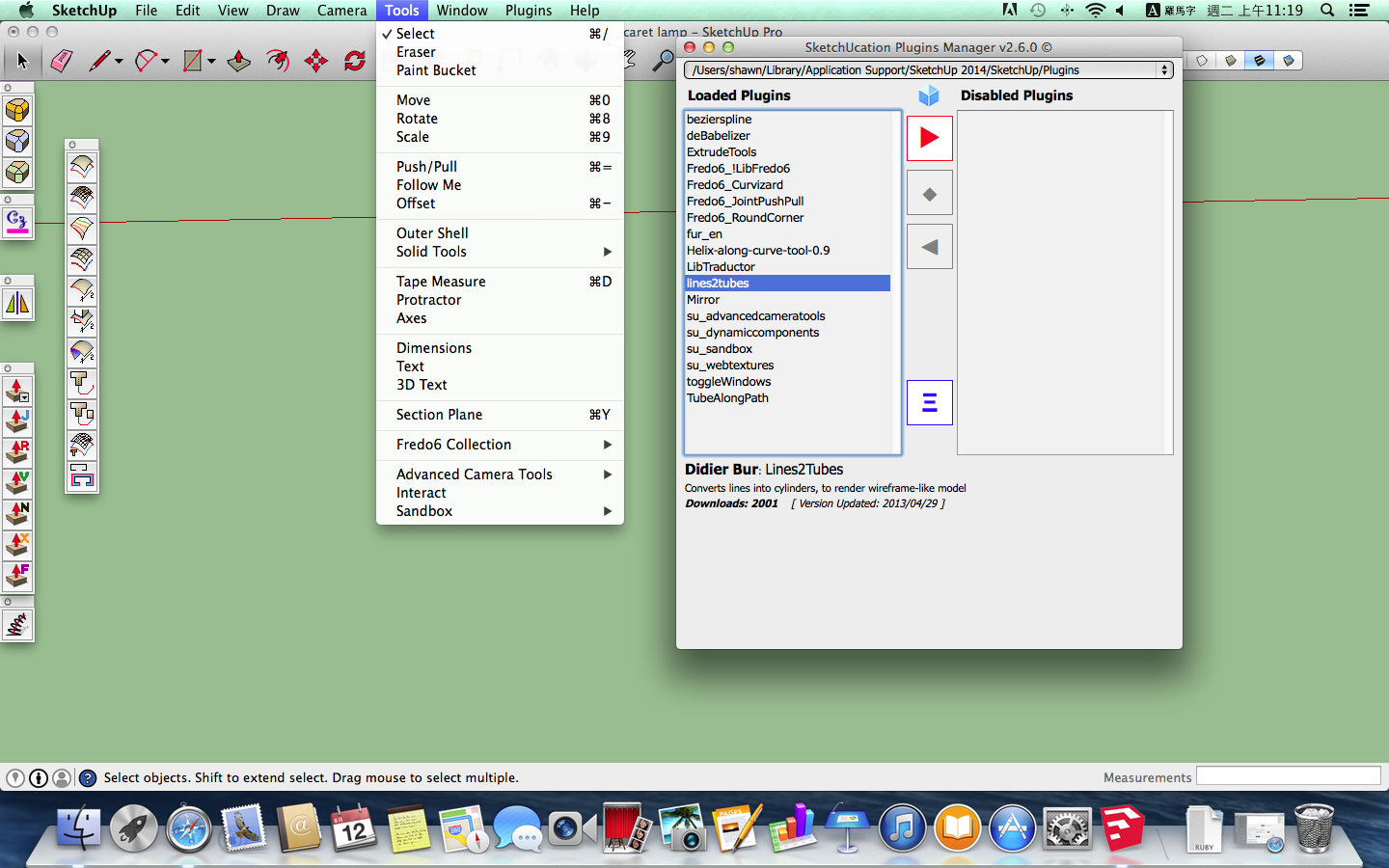
          Where is this tool hiding?, it's not in plugins, not on right click and not in tools.
          lines2tubes.jpg

          http://www.solos-art.com

          If you see a toilet in your dreams do not use it.

          1 Reply Last reply
          Reply Quote 0
          • sdmitchS
            sdmitch
            last edited by

            It should be on the Tools menu as "Convert arcs,circles,curves,lines to cylinders".

            Nothing is worthless, it can always be used as a bad example.

            http://sdmitch.blogspot.com/

            1 Reply Last reply
            Reply Quote 0
            • soloS
              solo
              last edited by

              @sdmitch said:

              It should be on the Tools menu as "Convert arcs,circles,curves,lines to cylinders".

              That's how it is in SU 2013, but not 2014, strange it's in plugin folder and all but not showing up.

              http://www.solos-art.com

              If you see a toilet in your dreams do not use it.

              1 Reply Last reply
              Reply Quote 0
              • Dave RD
                Dave R
                last edited by

                Pete, which file did you download? I downloaded Didier's and it didn't work for me but when I downloaded and installed TIG's version and restarted SketchUp, it did. I converted TIG's version to .rbz (which I am attaching) to make it quick to install. I still had to close and restart SU to get it to show in the Tools menu.


                lines2tubes2.rbz

                Etaoin Shrdlu

                %

                (THERE'S NO PLACE LIKE)

                G28 X0.0 Y0.0 Z0.0

                M30

                %

                1 Reply Last reply
                Reply Quote 0
                • soloS
                  solo
                  last edited by

                  @dave r said:

                  Pete, which file did you download? I downloaded Didier's and it didn't work for me but when I downloaded and installed TIG's version and restarted SketchUp, it did. I converted TIG's version to .rbz (which I am attaching) to make it quick to install. I still had to close and restart SU to get it to show in the Tools menu.

                  That worked, thanks Dave.

                  I have a few plugins just like this that did not install in SU 2014, I now have a trick.

                  http://www.solos-art.com

                  If you see a toilet in your dreams do not use it.

                  1 Reply Last reply
                  Reply Quote 0
                  • S
                    shawnyeh
                    last edited by

                    hello,
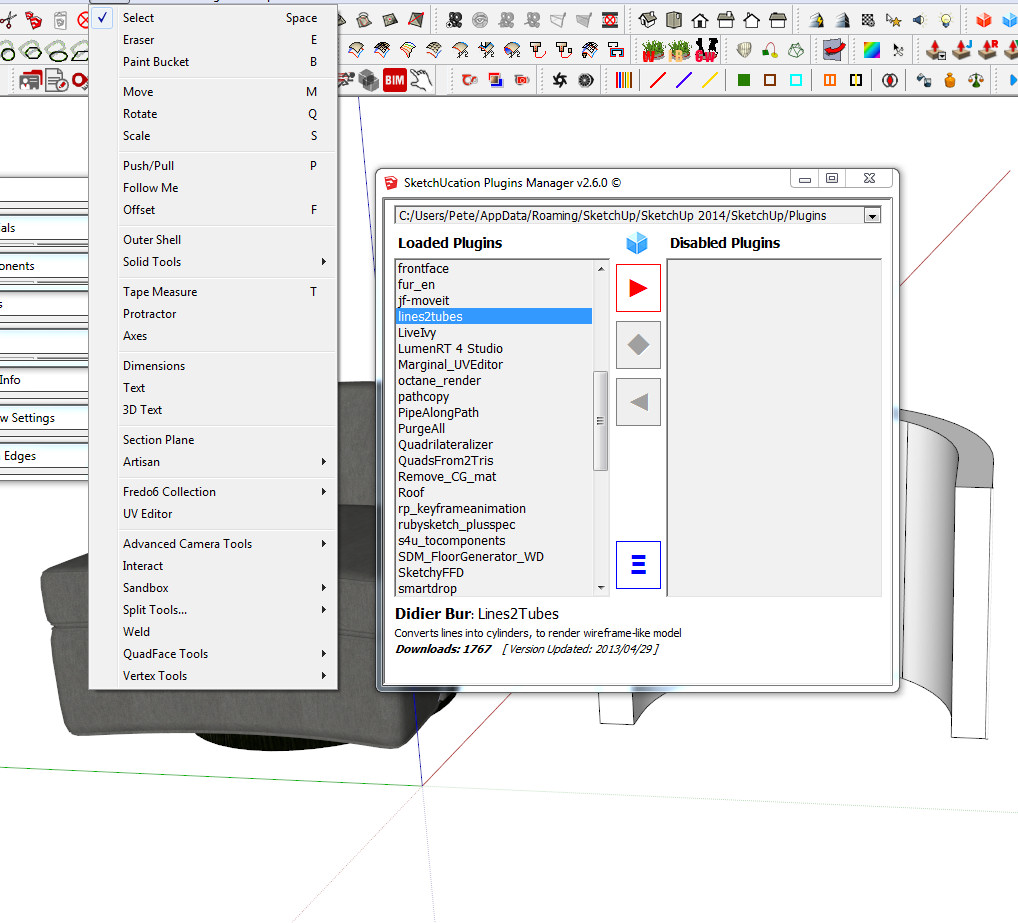
                    I got the same situation that can't find lines2tube in tool menu bar in MAC sketchup2014 .
                    Is there anyone can help me out ?

                    Thanks.


                    θž’εΉ•εΏ«η…§ 2014-08-12 上午11.19.48.png

                    1 Reply Last reply
                    Reply Quote 0
                    • S
                      shawnyeh
                      last edited by

                      Thanks Dave, it works!!

                      1 Reply Last reply
                      Reply Quote 0
                      • H
                        helik
                        last edited by

                        Thank you very much Dave!

                        1 Reply Last reply
                        Reply Quote 0
                        • C
                          chris87
                          last edited by

                          Great plugin !
                          Thank you !

                          1 Reply Last reply
                          Reply Quote 0
                          • TIGT
                            TIG Moderator
                            last edited by

                            Please get the latest v2014/2015 compatible version from the PluginStore http://sketchucation.com/pluginstore?pln=lines2tubes

                            TIG

                            1 Reply Last reply
                            Reply Quote 0
                            • C
                              chauhuyphan
                              last edited by

                              Great plugin! Thanks you !

                              1 Reply Last reply
                              Reply Quote 0
                              • josephkim626J
                                josephkim626
                                last edited by

                                As I am often giving precision 4 to give a rectangular look, im just wondering if there would be a way to rotate the profile 45 degrees. Effectively, having a rectangular tubes.

                                1 Reply Last reply
                                Reply Quote 0
                                • sdmitchS
                                  sdmitch
                                  last edited by

                                  @josephkim626 said:

                                  As I am often giving precision 4 to give a rectangular look, im just wondering if there would be a way to rotate the profile 45 degrees. Effectively, having a rectangular tubes.

                                  Yes, but this particular plugin is scrambled so only the creator can make that change.

                                  In the mean time, maybe this will help. You can copy and paste into the Ruby Console to try it out.

                                  mod = Sketchup.active_model
                                  ent = mod.active_entities
                                  sel = mod.selection
                                  unless sel.empty?
                                    vars=UI.inputbox(["Number of Sides;"," Length of a Side;","Angle of Rotation;"],[4,1,45],"Tube Specifications")
                                    if vars
                                      n,l,d=vars
                                      a=180/n
                                      r=l/Math.sin(a.degrees)/2
                                      edgs=sel.grep(Sketchup;;Edge)
                                      edgs.each{|e|
                                        p,v=e.line
                                        grp=ent.add_group;ge=grp.entities
                                        tube=ge.add_ngon(p,v,r,n)
                                        face=ge.add_face(tube)
                                        ent.transform_entities(Geom;;Transformation.rotation(p,v,d.degrees),face)
                                        face.followme e
                                        grp.explode
                                      }
                                    end
                                  else
                                    UI.messagebox "Select Edges"
                                  end


                                  Nothing is worthless, it can always be used as a bad example.

                                  http://sdmitch.blogspot.com/

                                  1 Reply Last reply
                                  Reply Quote 0
                                  • ntxdaveN
                                    ntxdave
                                    last edited by

                                    While I like the plugin and seem some valuable uses, I am having a problem with it.

                                    Here is a screen capture of the problem I am having:
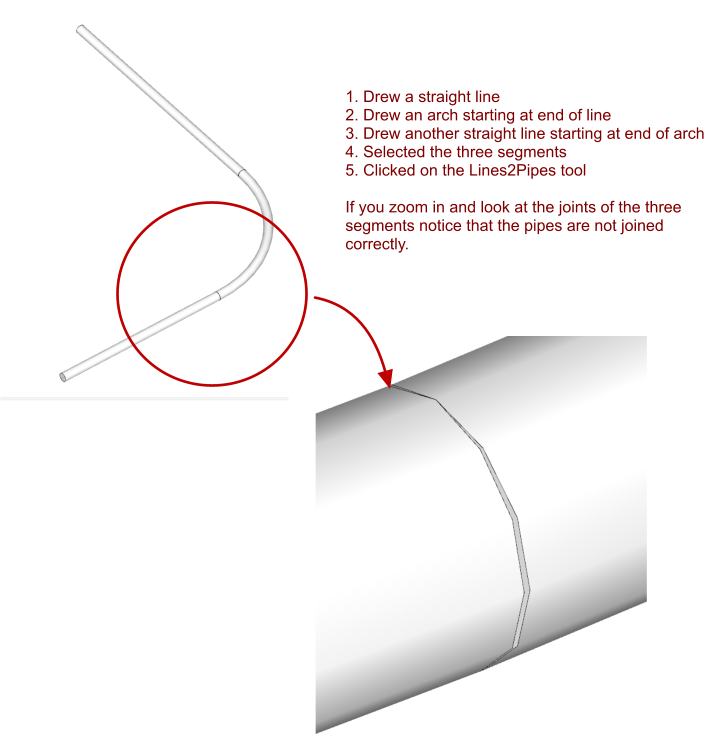
                                    Capture - Pipes 2 Lines problem.png

                                    I tried to be very careful when connecting the three segments (made sure the arch that connected the two straight lines was tangent) but I have many occasions where I will need to draw some pipes with multiple curves.

                                    I will assume I am doing something wrong. I have also attached the skp file (I moved the resulting tube so that the original line can be seen).


                                    Lines2Pipes.skp

                                    Press F1...thank me later

                                    1 Reply Last reply
                                    Reply Quote 0
                                    • D
                                      driven
                                      last edited by

                                      @nxtdave,
                                      download tig_weld and weld your 3 lines first...
                                      john

                                      learn from the mistakes of others, you may not live long enough to make them all yourself...

                                      1 Reply Last reply
                                      Reply Quote 0
                                      • ntxdaveN
                                        ntxdave
                                        last edited by

                                        @driven said:

                                        @nxtdave,
                                        download tig_weld and weld your 3 lines first...
                                        john

                                        Already had weld installed. Just did not use it. When I welded the lines, it worked perfect. Even tried a freehand line and it worked fine as well.
                                        πŸ‘

                                        Thanks..........I should have thought of that 😳

                                        Might be something that should be explored for a future release though. Just out of curiosity, I also have the free version of Profile Builder and it worked fine on the original lines though without using the Weld tool.

                                        Just a thought..........

                                        Press F1...thank me later

                                        1 Reply Last reply
                                        Reply Quote 0
                                        • josephkim626J
                                          josephkim626
                                          last edited by

                                          @sdmitch said:

                                          @josephkim626 said:

                                          As I am often giving precision 4 to give a rectangular look, im just wondering if there would be a way to rotate the profile 45 degrees. Effectively, having a rectangular tubes.

                                          Yes, but this particular plugin is scrambled so only the creator can make that change.

                                          In the mean time, maybe this will help. You can copy and paste into the Ruby Console to try it out.

                                          mod = Sketchup.active_model
                                          > ent = mod.active_entities
                                          > sel = mod.selection
                                          > unless sel.empty?
                                          >   vars=UI.inputbox(["Number of Sides;"," Length of a Side;","Angle of Rotation;"],[4,1,45],"Tube Specifications")
                                          >   if vars
                                          >     n,l,d=vars
                                          >     a=180/n
                                          >     r=l/Math.sin(a.degrees)/2
                                          >     edgs=sel.grep(Sketchup;;Edge)
                                          >     edgs.each{|e|
                                          >       p,v=e.line
                                          >       grp=ent.add_group;ge=grp.entities
                                          >       tube=ge.add_ngon(p,v,r,n)
                                          >       face=ge.add_face(tube)
                                          >       ent.transform_entities(Geom;;Transformation.rotation(p,v,d.degrees),face)
                                          >       face.followme e
                                          >       grp.explode
                                          >     }
                                          >   end
                                          > else
                                          >   UI.messagebox "Select Edges"
                                          > end
                                          > 
                                          

                                          Thank you so much, this helped for me at least this time.
                                          I had to remove "grp.explode" line as I wanted them to be a grouped members.
                                          who is the creator of this plugin? I know it has been tossed around couple times.
                                          (I will still need an option to use "mm" units, follow welded edges as solid)

                                          1 Reply Last reply
                                          Reply Quote 0
                                          • sdmitchS
                                            sdmitch
                                            last edited by

                                            Didier Bur is the creator of the "Lines2Tubes" plugin.

                                            Nothing is worthless, it can always be used as a bad example.

                                            http://sdmitch.blogspot.com/

                                            1 Reply Last reply
                                            Reply Quote 0

                                            Hello! It looks like you're interested in this conversation, but you don't have an account yet.

                                            Getting fed up of having to scroll through the same posts each visit? When you register for an account, you'll always come back to exactly where you were before, and choose to be notified of new replies (either via email, or push notification). You'll also be able to save bookmarks and upvote posts to show your appreciation to other community members.

                                            With your input, this post could be even better πŸ’—

                                            Register Login
                                            • 1
                                            • 2
                                            • 3
                                            • 4
                                            • 5
                                            • 6
                                            • 7
                                            • 1 / 7
                                            • First post
                                              Last post
                                            Buy SketchPlus
                                            Buy SUbD
                                            Buy WrapR
                                            Buy eBook
                                            Buy Modelur
                                            Buy Vertex Tools
                                            Buy SketchCuisine
                                            Buy FormFonts

                                            Advertisement