sketchucation logo sketchucation
    • 登入
    Oops, your profile's looking a bit empty! To help us tailor your experience, please fill in key details like your SketchUp version, skill level, operating system, and more. Update and save your info on your profile page today!
    🔌 Smart Spline | Fluid way to handle splines for furniture design and complex structures. Download

    [Plugin][$] Tools On Surface - v2.6a - 01 Apr 24


    已排程 已置頂 已鎖定 已移動 Plugins
    638 貼文 203 Posters 1.6m 瀏覽 202 Watching
    正在載入更多貼文
    • 從舊到新
    • 從新到舊
    • 最多點贊
    回覆
    • 在新貼文中回覆
    登入後回覆
    此主題已被刪除。只有擁有主題管理權限的使用者可以查看。
    • TIGT 離線
      TIG Moderator
      最後由 編輯

      You should always look in the Plugin Store for the latest versions of almost all toolsets...
      See here...
      https://sketchucation.com/pluginstore?pln=ToolsOnSurface

      Also remember to download and install the latest LibFredo...
      https://sketchucation.com/pluginstore?pln=LibFredo6

      After the installations, restart SketchUp to ensure everything gets synced...

      TIG

      1 條回覆 最後回覆 回覆 引用 0
      • C 離線
        Caleb_Stanley
        最後由 編輯

        I am having issues upon the startup of SketchUp with ToolsOnSurface, I believe it may have something to do with the latest update but I am not sure. Below is the text of the error code upon starting.

        ToolsOn Surface 2.4a: Error starting up plugin (creating menus and icons) invalid byte sequence in UTF-8 [in lib6config.rbe - #'===0: line 319]

        c:/...'sketchup/plugins/fredo6_!libfredo6/lib6core.rbe:1058:in'rescue in block in effective_load_part2'

        Please Help. Thank you.

        1 條回覆 最後回覆 回覆 引用 0
        • TIGT 離線
          TIG Moderator
          最後由 編輯

          I'm sure that Fredo will respond with more details...
          However, the error message you posted is incomplete - in fact it omits the vital parts.
          Can you re-post the FULL message [including your ../users/user_name/ etc]...

          Also please confirm that you have the latest LibFredo RBZ installed...

          TIG

          1 條回覆 最後回覆 回覆 引用 0
          • fredo6F 離線
            fredo6
            最後由 編輯

            Thanks, TIG, for your invaluable help.

            I already answer in the other thread where the problem was also posted.

            1 條回覆 最後回覆 回覆 引用 0
            • R 離線
              rv1974
              最後由 編輯

              Fredo could erroneous Arc behavior be fixed please?
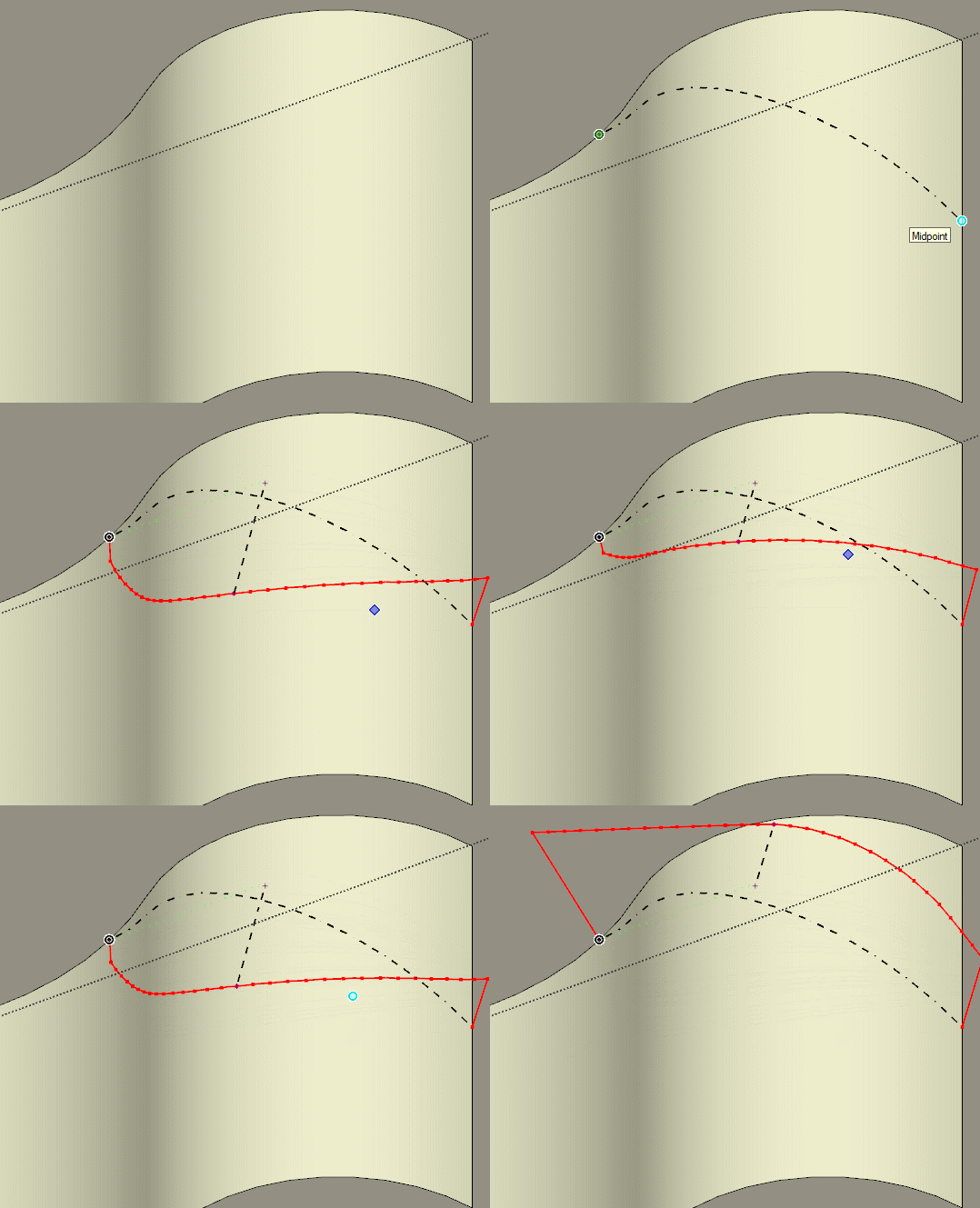

              GIF.gif


              GIF.gif1.gif

              1 條回覆 最後回覆 回覆 引用 0
              • jgbJ 離線
                jgb
                最後由 編輯

                I get that a lot too. Mentioned it numerous times in the past 8+ years and no improvement. Sometimes it works correctly, but I cannot define what works and what doesn't.


                jgb

                1 條回覆 最後回覆 回覆 引用 0
                • R 離線
                  rv1974
                  最後由 編輯

                  Yep it's present from day 1. The 'workaround' is not to start/end from the outer edges. Just a microscopic offset, then manually extend the arc Kinda helps in many (but not 100%) cases

                  1 條回覆 最後回覆 回覆 引用 0
                  • fredo6F 離線
                    fredo6
                    最後由 編輯

                    This is a fundamental flaw in the algorithm when you start from sharp borders.

                    So, not something simple to correct, versus revisiting seriously the algorithm itself.

                    1 條回覆 最後回覆 回覆 引用 0
                    • jgbJ 離線
                      jgb
                      最後由 編輯

                      What do you mean "sharp borders"?


                      jgb

                      1 條回覆 最後回覆 回覆 引用 0
                      • fredo6F 離線
                        fredo6
                        最後由 編輯

                        @jgb said:

                        What do you mean "sharp borders"?

                        Usual cases where you TOS algorithm has problem are those where the surface is a close shape and when you start from an edge which has a sharp angle.

                        1 條回覆 最後回覆 回覆 引用 0
                        • M 離線
                          mrswissmaster
                          最後由 編輯

                          Is it possible to place image on curved surface?

                          1 條回覆 最後回覆 回覆 引用 0
                          • Dave RD 離線
                            Dave R
                            最後由 編輯

                            Native tools can do that or you could look at Fredo's Thru Paint.

                            Etaoin Shrdlu

                            %

                            (THERE'S NO PLACE LIKE)

                            G28 X0.0 Y0.0 Z0.0

                            M30

                            %

                            1 條回覆 最後回覆 回覆 引用 0
                            • K 離線
                              keitheseymour
                              最後由 編輯

                              I'm running Sketchup 2015, and have installed Fredo6: Tools On Surface v2.4a. I can see it installed in my extensions list, but it doesn't show up in the menus to use. Any ideas? Thanks in advance.

                              1 條回覆 最後回覆 回覆 引用 0
                              • BoxB 離線
                                Box
                                最後由 編輯

                                Did you install the Fredo Library that is required.

                                1 條回覆 最後回覆 回覆 引用 0
                                • TIGT 離線
                                  TIG Moderator
                                  最後由 編輯

                                  Fredo's tools appear under the Tools menu, did you look there ?

                                  TIG

                                  1 條回覆 最後回覆 回覆 引用 0
                                  • S 離線
                                    stebbins
                                    最後由 編輯

                                    Hello, how may I avoid these diagonal lines that are produced when offsetting rectangles?

                                    Thanks in advance,
                                    Chris
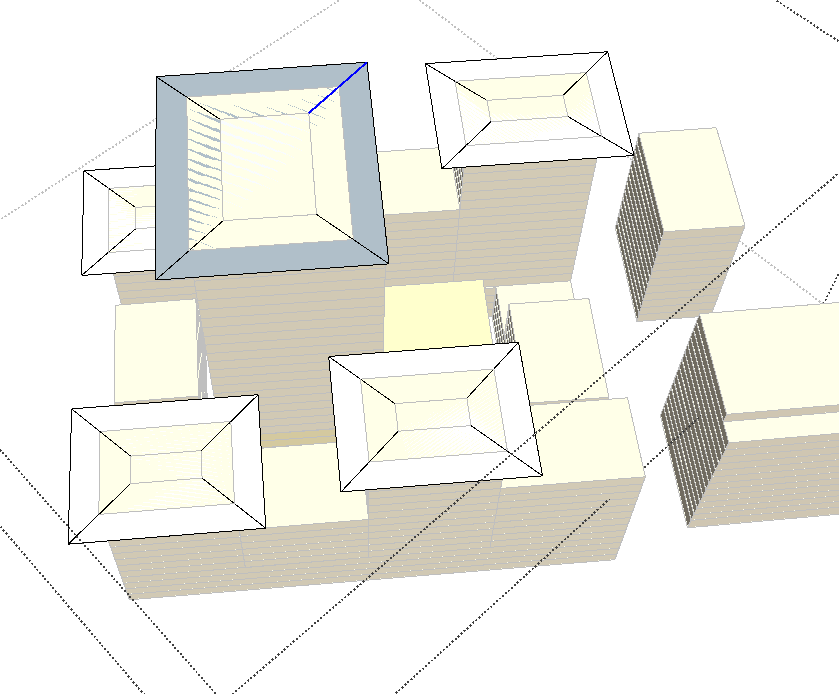

                                    showing diagonal lines.

                                    1 條回覆 最後回覆 回覆 引用 0
                                    • fredo6F 離線
                                      fredo6
                                      最後由 編輯

                                      @stebbins said:

                                      Hello, how may I avoid these diagonal lines that are produced when offsetting rectangles?

                                      I would need to have the model, and also to understand how you used the OffsetOnSurface tool.

                                      1 條回覆 最後回覆 回覆 引用 0
                                      • jgbJ 離線
                                        jgb
                                        最後由 編輯

                                        I take it that those roofs have the center raised a bit. The diagonal lines are the "hip" bends. Quite normal. You need to make then "soft" or hidden.

                                        Three ways, either select the line and change its attribute in Entity Attributes; or

                                        with the erase tool, press and hold "CTRL" and sweep over the line.

                                        The third way is to create a layer and move those lines into it. Make that layer visible or invisible as needed.


                                        jgb

                                        1 條回覆 最後回覆 回覆 引用 0
                                        • J 離線
                                          j40
                                          最後由 編輯

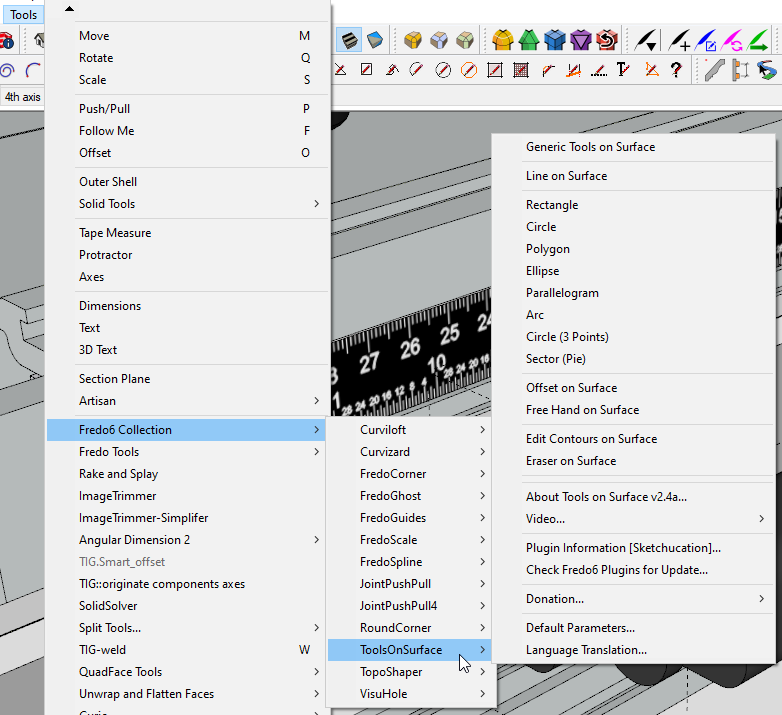
                                          Hi, great plugin! 👍 I have an issue on SketchUp 2020 version (Mac), it's not appearing in none of menus.
                                          on SU 2018 it's working perfectly though.
                                          Any idea why it happens?
                                          best regards
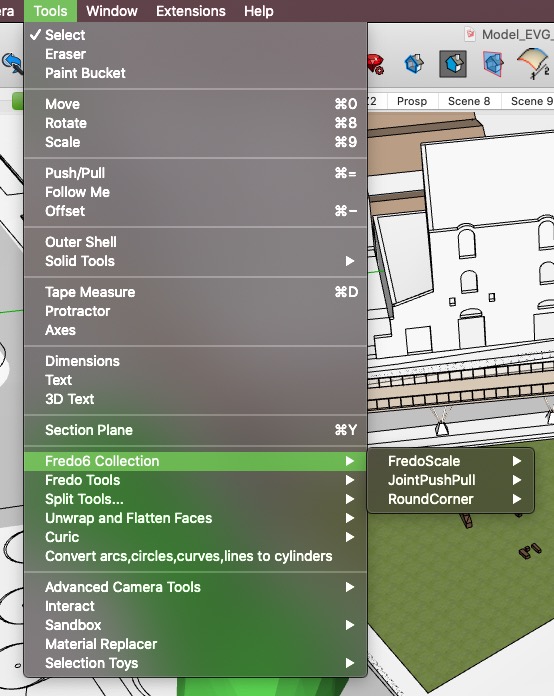

                                          Schermata 2020-05-03 alle 8.35.19 PM.jpg

                                          Top3D Studio

                                          1 條回覆 最後回覆 回覆 引用 0
                                          • Dave RD 離線
                                            Dave R
                                            最後由 編輯

                                            It will show in Tools>Fredo6 Collection in SketchUp 2020. Have you restarted SketchUp after installing it?
                                            Screenshot - 5_3_2020 , 1_52_06 PM.png

                                            Etaoin Shrdlu

                                            %

                                            (THERE'S NO PLACE LIKE)

                                            G28 X0.0 Y0.0 Z0.0

                                            M30

                                            %

                                            1 條回覆 最後回覆 回覆 引用 0
                                            • 1
                                            • 2
                                            • 19
                                            • 20
                                            • 21
                                            • 22
                                            • 23
                                            • 31
                                            • 32
                                            • 21 / 32
                                            • 第一個貼文
                                              最後的貼文
                                            Buy SketchPlus
                                            Buy SUbD
                                            Buy WrapR
                                            Buy eBook
                                            Buy Modelur
                                            Buy Vertex Tools
                                            Buy SketchCuisine
                                            Buy FormFonts

                                            Advertisement