[Plugin][$] Tools On Surface - v2.6a - 01 Apr 24




-
Hi. I am having big problems downloading the latest Library. It keeps on saying it's corrupt and wont progress any further. Is there a known problem with it. Is it possible to get an earlier version as I have had no problems with downloading the TOS files and other stuff from the site?
Regards and many thanks for you excellent work
Jeff
-
Ok, I need to post an update to my problem this morning. Trying to Download the Library having no success. All I got was the 'corrupt file' message coming up. I searched the forum and saw a reference to issues with Google Chrome and so switched to Internet Explorer....hey presto...problem solved and downloaded perfectly? So I was extatic that was going to be able to carry on with my project to model a Chinese Guzheng musical instrument...Well, it didn't finish there. I am using the free version of Sketchup 8 and even though the files all installed ok, nothing would work. The tool bars were there and I could click the buttons, but nothing would actually happen. So I switched to the Sketchup 7 installation and installed the same files there....and Perfect. Everything works and no problems at all. So firstly,,,Why do I have problems with Chrome when the Sketchup software is a Google product! And secondly, how come the Tools on surface and Library won't work on my version 8? I only have a short time left on the Version 7 installation before it does something like locking it, so need to sort this out soon...Any suggestions??
Regards
Jeff
-
@jeffbrad said:
And secondly, how come the Tools on surface and Library won't work on my version 8? I only have a short time left on the Version 7 installation before it does something like locking it, so need to sort this out soon...Any suggestions??
Regards
Jeff
Can you turn the Ruby Console on and check if there is any message when you launch a Tool on Surface tool.
Fredo
-
Hi Fredo. Just cuta % Pasted what happens in the Ruby Window. The same no matter what I click on....
Error: #<NoMethodError: undefined method
+' for nil:NilClass> C:/Program Files/Google/Google SketchUp 8/Plugins/MatchboxPlugin/Population.rb:174:in+'
C:/Program Files/Google/Google SketchUp 8/Plugins/LIBFREDO6_Dir_42/Lib6Config.rb:148:inselected_folders' C:/Program Files/Google/Google SketchUp 8/Plugins/LIBFREDO6_Dir_42/Lib6Plugin.rb:402:inpicture_selected_folders'
C:/Program Files/Google/Google SketchUp 8/Plugins/LIBFREDO6_Dir_42/Lib6Plugin.rb:1020:increate_cursor' C:/Program Files/Google/Google SketchUp 8/Plugins/TOS_Dir_18/ShapeOnSurface.rb:714:inget_id_cursor'
C:/Program Files/Google/Google SketchUp 8/Plugins/TOS_Dir_18/ShapeOnSurface.rb:69:ininitialize' C:/Program Files/Google/Google SketchUp 8/Plugins/TOS_Dir_18/ShapeOnSurface.rb:47:innew'
C:/Program Files/Google/Google SketchUp 8/Plugins/TOS_Dir_18/ShapeOnSurface.rb:47:inlaunch_shape' C:/Program Files/Google/Google SketchUp 8/Plugins/TOS_Dir_18/PaletteOnSurface.rb:100:inaction__mapping'
C:/Program Files/Google/Google SketchUp 8/Plugins/LIBFREDO6_Dir_42/Lib6Plugin.rb:131:incall' C:/Program Files/Google/Google SketchUp 8/Plugins/LIBFREDO6_Dir_42/Lib6Plugin.rb:131:inlaunch_action'
C:/Program Files/Google/Google SketchUp 8/Plugins/TOS_Dir_18/bootstrap_OnSurface.rb:313:inlaunch_action' C:/Program Files/Google/Google SketchUp 8/Plugins/TOS_Dir_18/bootstrap_OnSurface.rb:374:indeclare_command_shapes'
C:/Program Files/Google/Google SketchUp 8/Plugins/LIBFREDO6_Dir_42/Lib6Plugin.rb:919:incall' C:/Program Files/Google/Google SketchUp 8/Plugins/LIBFREDO6_Dir_42/Lib6Plugin.rb:919:incommand_invoke'
C:/Program Files/Google/Google SketchUp 8/Plugins/LIBFREDO6_Dir_42/Lib6Plugin.rb:901:inbuild_config_commands' C:/Program Files/Google/Google SketchUp 8/Plugins/LIBFREDO6_Dir_42/Lib6Traductor.rb:948:incall'
C:/Program Files/Google/Google SketchUp 8/Plugins/LIBFREDO6_Dir_42/Lib6Traductor.rb:948:inadd_command' C:/Program Files/Google/Google SketchUp 8/Plugins/MatchboxPlugin/Population.rb:174:incall'
C:/Program Files/Google/Google SketchUp 8/Plugins/MatchboxPlugin/Population.rb:174Hope this helps to fault find...Many thanks in advance
Jeff
-
Please remove the 'Matchbox' plugin from the folder - it is known to cause several issues, as it ill-advisedly overwrites some standard methods!

Retry and publish any error messages if it recurs...
-
Awesome....That did the trick. Thank you so much for sorting this out. It is very much appreciated. Just got to sort out the menu madness now...funny, sure everyone does the same when they get started...download everything to see what they do and end up with so many menu items that you don't know what's where and what does what. Great fun though!
Regards
Jeff
-
FAIRLY NEW USER, can anyone help. I have installed ([Plugin] Joint Push Pull - v2.0b - 17 Jul 11), and (LibFredo6 4.3c - 31 Jan 12) as instructed to (On Mac the SU plugin directory should be:
Macintosh HD/Library/Application Support/Google SketchUp 8/SketchUp/plugins). I am having difficulty locating the toolbar. It is not under TOOLS>fredo6collection>toolsonsurface.
Any suggestions where else to look for these cool tools.Mac os 10.6.8 goole sketchup pro8
-
Show us a screen shot of the Plugins directory, please. And did you get LibFredo 6 installed, too?
-
Are you activating the Extension?
There are no menu or toolbar items unless it's activated [one time only]...
Are you then looking for the toolbar in the View > Toolbars list [this menu's name is slightly different on a MAC for some arcane reason]... -
THANK YOU VERY MUCH, FREDO6.
-
[off:24nvuvci]
@tig said:[this menu's name is slightly different on a MAC for some arcane reason]...
i think it's because mac apps already have something referred to as 'toolbar' and it's in most apps including sketchup.. there's also a View -> Customize Toolbar & View -> Hide Toolbar in mac sketchup (and again.. most other apps as well) which refer to the toolbar at the top of a mac window.
so the sketchup devs probably changed it to 'Tool Palettes' as a means to try to avoid confusion… (and if they called it 'tool palettes' on windows, that too could lead to confusion on that OS..)
hence the different names?[/off:24nvuvci]
-
just a month i've been playing with tools on surface by freddo. how do i erase the dots left by "arc" tools [included on tools on surface]...
see dots on hood on this model...

-
Just go to edit-->delete guides.
-
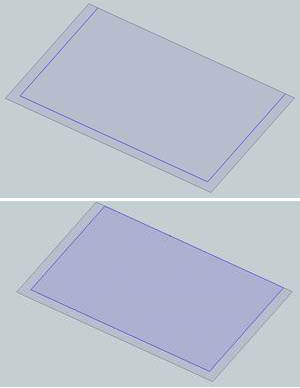
I have problem: I can't offset the preselected curve on the face, the offset tool always select the whole face (with unwanted additional edges). How to disable this mode?
Thanks.
-
Where's the unwanted edge? I get what you show in the second view. The edge that didn't get the offset is divided at the intersection of the neighboring edges but that's normal behavior for the native Offset tool as well.
-
Curious, I don't see any problem : Just no select surface only edges!
If I select the 3 edges, Offset Tools works like it must work!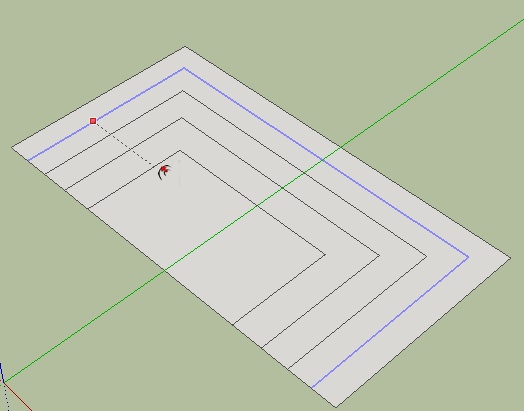
-
@unknownuser said:
Curious, I don't see any problem : Just no select surface only edges!
SketchUp's native Offset tool - or Tools on Surface Offset tool (which is the topic here).
-
Hi,
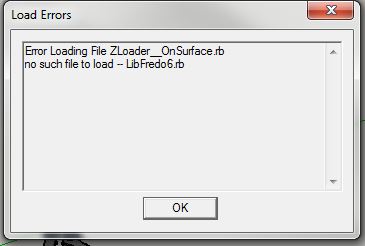
I am really excited to use your tool for Sketchup but this message appears when I start up Sketchup. (see attachment) Let me know what can be done. Thanks!
-
Quell your excitement long enough to go back and thoroughly read the first post in this thread and then install the required LibFredo files as clearly spelled out there.
-
When I put this into Sketchup 8, I get the following Error message:
Error Loading File ZLoader__OnSurface.rb
no such file to load -- LibFredo6.rb









Advertisement