sketchucation logo sketchucation
    • 登入
    Oops, your profile's looking a bit empty! To help us tailor your experience, please fill in key details like your SketchUp version, skill level, operating system, and more. Update and save your info on your profile page today!
    🔌 Smart Spline | Fluid way to handle splines for furniture design and complex structures. Download

    [Plugin][$] Tools On Surface - v2.6a - 01 Apr 24


    已排程 已置頂 已鎖定 已移動 Plugins
    638 貼文 203 Posters 1.6m 瀏覽 202 Watching
    正在載入更多貼文
    • 從舊到新
    • 從新到舊
    • 最多點贊
    回覆
    • 在新貼文中回覆
    登入後回覆
    此主題已被刪除。只有擁有主題管理權限的使用者可以查看。
    • R 離線
      remus
      最後由 編輯

      Yep, that should do it, and I think the extra complication is worth it for fredo's plugins.

      http://remusrendering.wordpress.com/

      1 條回覆 最後回覆 回覆 引用 0
      • W 離線
        watkins
        最後由 編輯

        Dear Fredo6,

        I note that when using your Tools on Surface plugin one has a toolbar which is permanently displayed and then an 'on screen' toolbar that appears when one selects a tool from the permanently displayed toolbar. Is this how it is supposed to work? If so, would it not be better to have a single permanently visible icon, perhaps labelled TOS, which when clicked brought up the 'on screen' toolbar?

        Kind regards,
        Bob

        1 條回覆 最後回覆 回覆 引用 0
        • fredo6F 離線
          fredo6
          最後由 編輯

          @watkins said:

          Dear Fredo6,

          I note that when using your Tools on Surface plugin one has a toolbar which is permanently displayed and then an 'on screen' toolbar that appears when one selects a tool from the permanently displayed toolbar. Is this how it is supposed to work? If so, would it not be better to have a single permanently visible icon, perhaps labelled TOS, which when clicked brought up the 'on screen' toolbar?

          Bob,

          In TOS 1.5, I introduced a Generic Icon (the first one in the toolbar) that keep memory of last TOS tool launched.
          If you go to the Default Setting dialog box of ToolsOnSurface, you can hide all other icons and keep this one.

          Fredo

          PS: you may want to keep one or two other icons for the functions you need frequently.

          1 條回覆 最後回覆 回覆 引用 0
          • W 離線
            watkins
            最後由 編輯

            Dear Fredo6,

            Many thanks for the explanation, and a most excellent plugin.

            Thank you again for your generosity.

            Kind regards,
            Bob

            1 條回覆 最後回覆 回覆 引用 0
            • fredo6F 離線
              fredo6
              最後由 編輯

              Documentation in Frenchnow available, thanks to Jean-Francoand Christophe Plassais.
              See main post at http://forums.sketchucation.com/viewtopic.php?f=180&t=11212#p76625

              1 條回覆 最後回覆 回覆 引用 0
              • plot-parisP 離線
                plot-paris
                最後由 編輯

                hi Fredo,
                in the last couple of releases Daniel S' fancy icons are not implemented anymore. but only the old ones... do you know why that is?

                [Edit] ops.. never mind, just found them in the installation folder 😳
                thanks again for the great plugin []

                1 條回覆 最後回覆 回覆 引用 0
                • K 離線
                  kilgo
                  最後由 編輯

                  Is it possible to use this tool to put text on a surface. Flat text that follows the curvature of a sphere or rolling hills in all directions?

                  1 條回覆 最後回覆 回覆 引用 0
                  • TIGT 離線
                    TIG Moderator
                    最後由 編輯

                    @kilgo said:

                    Is it possible to use this tool to put text on a surface. Flat text that follows the curvature of a sphere or rolling hills in all directions?

                    I think not BUT my 2D Tools - 2D Text will place 2D Text onto any face with the appropriate snapping option - it's not limited to '2D'... You could always place the text on to a high spot on the terrain and use the Sandbox Drape Tool to make the outline of it onto the terrain's surface ? Color it to suit...

                    TIG

                    1 條回覆 最後回覆 回覆 引用 0
                    • K 離線
                      kilgo
                      最後由 編輯

                      Thanks TIG,

                      The drape tool only drapes in a vertical fashion (whats the coordinate? X,Y?) So if for example I wanted to drape a #2 on the side of a slope it becomes distorted, elongated. Love your work by the way.

                      1 條回覆 最後回覆 回覆 引用 0
                      • fredo6F 離線
                        fredo6
                        最後由 編輯

                        The script is now translated to Chinese, thanks to the effort of the CLT Team at SketchupBar.
                        see main post at http://forums.sketchucation.com/viewtopic.php?f=180&t=11212&p=76625#p76625

                        1 條回覆 最後回覆 回覆 引用 0
                        • D 離線
                          Daniel S
                          最後由 編輯

                          Fredo...

                          Changing the axes has no effect in your inference system.. it still uses the standard axes.
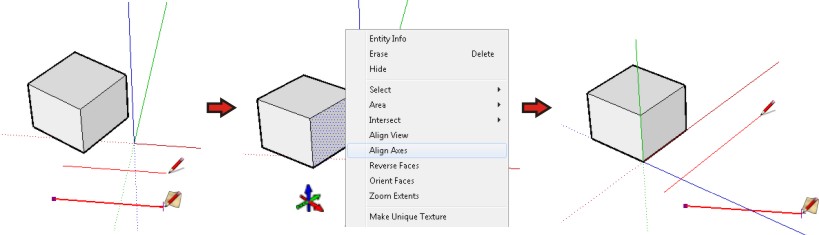
                          Gráfico1.jpg
                          Look that the standard SU tools are not using the original orientation of the axes.
                          Is there a way to choose that Tools on Surface can use the user defined axes instead the standard ones?

                          Daniel S

                          1 條回覆 最後回覆 回覆 引用 0
                          • R 離線
                            red_shift
                            最後由 編輯

                            Can someone please assist me with installing this plugin on Mac OS 10.6.2 (SU 7.1) I have unzipped the folder into SU plugin folder and moved Toolsonsurface.plugin to the Sketchup application package. I see no new menus in Sketchup.

                            1 條回覆 最後回覆 回覆 引用 0
                            • majidM 離線
                              majid
                              最後由 編輯

                              I started to draw an arc on a curved face, and here is the result,....what is wrong with it? I was expecting that result , be somthimg like the black line , but finally I had the red line ,as result.
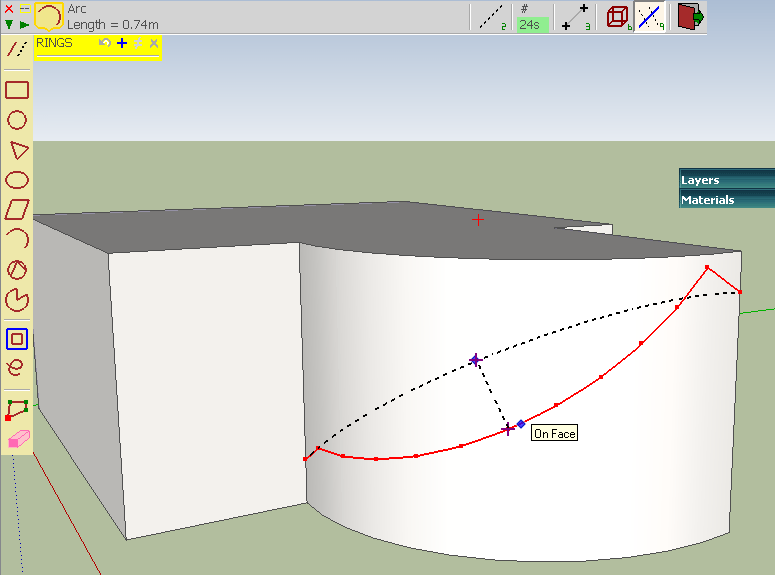

                              zzz.gif

                              My inspiring A, B, Sketches book: https://sketchucation.com/shop/books/intermediate/2612-alphabet-inspired-sketches--inspiring-drills-for-architects--3d-artists-and-designers-

                              1 條回覆 最後回覆 回覆 引用 0
                              • R 離線
                                red_shift
                                最後由 編輯

                                I have still not been able to get the plugin to work on my Mac...can someone please give me some help?

                                1 條回覆 最後回覆 回覆 引用 0
                                • fredo6F 離線
                                  fredo6
                                  最後由 編輯

                                  @red_shift said:

                                  I have still not been able to get the plugin to work on my Mac...can someone please give me some help?

                                  On Mac, the plugin files should be copied to Macintosh HD/Library/Application Support/Google SketchUp 7/SketchUp/plugins
                                  Please make sure that your unzipping operation leads to the same footprint as indicated in page 2 of the PDF documentation, that is:
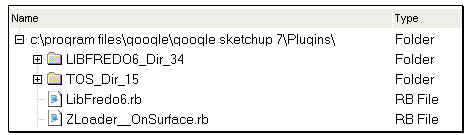
                                  Footprint TOS.jpg

                                  The 2 folders, LIBFREDO6_Dir_34 and TOS_Dir_15 must contains several files (.rb, .lang, ...) and a subfolder IMAGES_STANDARD (make sure that you do not have another LIBFREDO6_Dir_34 or TOS_Dir_15 embedded).

                                  If needed, unzip in a separate place, check the files and directories and then copy them in the Sketchup Plugin folder:

                                  Fred

                                  PS: if it still does not work, then I must call the Mac user community to help.

                                  1 條回覆 最後回覆 回覆 引用 0
                                  • T 離線
                                    tlerak
                                    最後由 編輯

                                    where can i find tools on surface 1.5? thanks

                                    1 條回覆 最後回覆 回覆 引用 0
                                    • thomthomT 離線
                                      thomthom
                                      最後由 編輯

                                      @tlerak said:

                                      where can i find tools on surface 1.5? thanks

                                      First post on the first page of this thread.

                                      Thomas Thomassen — SketchUp Monkey & Coding addict
                                      List of my plugins and link to the CookieWare fund

                                      1 條回覆 最後回覆 回覆 引用 0
                                      • H 離線
                                        haynesc
                                        最後由 編輯

                                        how would i draw a diagonal curved line from plain to plain ... ? top right corner to bottom left corner ?


                                        http://f.imagehost.org/t/0905/Untitled-1_3.jpg

                                        1 條回覆 最後回覆 回覆 引用 0
                                        • D 離線
                                          Daniel S
                                          最後由 編輯

                                          @haynesc said:

                                          how would i draw a diagonal curved line from plain to plain ... ? top right corner to bottom left corner ?


                                          http://f.imagehost.org/t/0905/Untitled-1_3.jpg

                                          Alternative solution:
                                          I see that you have Whaat´s "subdivide and smooth". Use the knife tool (a.k.a. zorro) in parallel projection. Also you can group the faces you don´t want to divide:
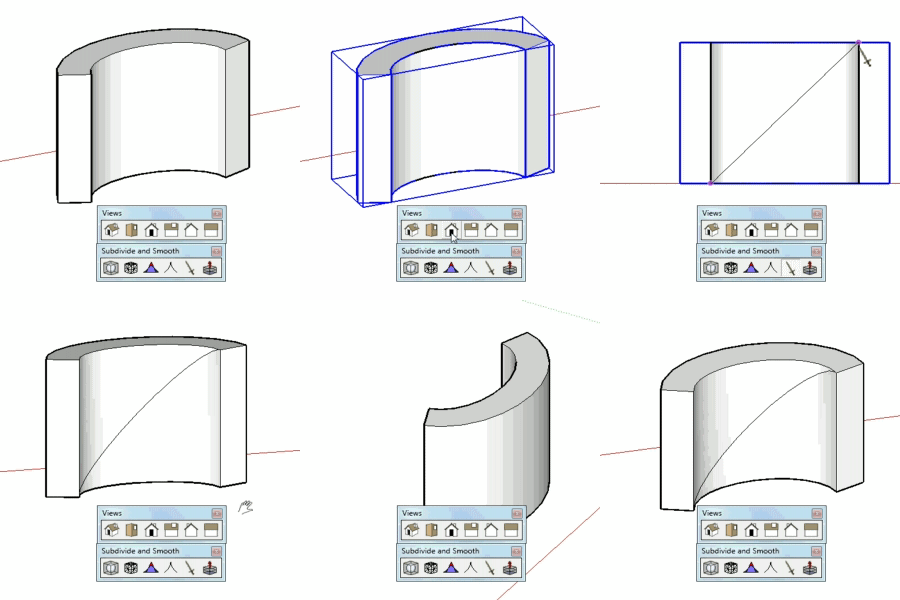
                                          subsmooth.gif
                                          Daniel S

                                          1 條回覆 最後回覆 回覆 引用 0
                                          • T 離線
                                            Toucan
                                            最後由 編輯

                                            Where do I find this script?

                                            1 條回覆 最後回覆 回覆 引用 0
                                            • 1
                                            • 2
                                            • 9
                                            • 10
                                            • 11
                                            • 12
                                            • 13
                                            • 31
                                            • 32
                                            • 11 / 32
                                            • 第一個貼文
                                              最後的貼文
                                            Buy SketchPlus
                                            Buy SUbD
                                            Buy WrapR
                                            Buy eBook
                                            Buy Modelur
                                            Buy Vertex Tools
                                            Buy SketchCuisine
                                            Buy FormFonts

                                            Advertisement