sketchucation logo sketchucation
    • Login
    Oops, your profile's looking a bit empty! To help us tailor your experience, please fill in key details like your SketchUp version, skill level, operating system, and more. Update and save your info on your profile page today!
    Mac User? | Join the Rayscaper Beta for Mac Learn More

    [Plugin] Proper Animation V1.08 Beta(Updated 14/11/10)

    Scheduled Pinned Locked Moved Plugins
    246 Posts 108 Posters 229.6k Views 108 Watching
    Loading More Posts
    • Oldest to Newest
    • Newest to Oldest
    • Most Votes
    Reply
    • Reply as topic
    Log in to reply
    This topic has been deleted. Only users with topic management privileges can see it.
    • thomthomT
      thomthom
      last edited by

      @chris-69 said:

      Most of the time i can solve most of the problems by reading the forums... πŸ˜„ (Thanks for that)
      But i have a problem by using the "scenes transition times". I have more than 27 scenes.
      I can't see more scenes when i want to set the times in this plug-in. Using the "tab", i can "blind" set the times, but i can't see it. Is there a solution?
      ❓ Thanks!

      Use the Scene manager window?

      Thomas Thomassen β€” SketchUp Monkey & Coding addict
      List of my plugins and link to the CookieWare fund

      1 Reply Last reply
      Reply Quote 0
      • pilouP
        pilou
        last edited by

        Yes you right, there is a little problem πŸ˜„
        We must send a PM to Morrisdov!
        Done Wait and see πŸ˜„

        Till that you can move your sketchup window to the bottom screen and call the Scene transition, with that you can see 38 scenes πŸ˜‰

        Frenchy Pilou
        Is beautiful that please without concept!
        My Little site :)

        1 Reply Last reply
        Reply Quote 0
        • M
          morisdov
          last edited by

          quick solution is to use the following line in the ruby console to set the current selected scene -

          Sketchup.active_model.pages.selected_page.transition_time = 4


          1 Reply Last reply
          Reply Quote 0
          • pilouP
            pilou
            last edited by

            One tricky solution indeed πŸ˜‰

            Frenchy Pilou
            Is beautiful that please without concept!
            My Little site :)

            1 Reply Last reply
            Reply Quote 0
            • S
              sambort
              last edited by

              nice work!

              but can someone upload one example with differents Scene Transition Times and/or Scene Delay Times? or can anybody explain what its wrong?

              because mys examples don't seems to work, some times the object arrive to position before the scene to it. it's not clear to me.

              thanks a lot!

              1 Reply Last reply
              Reply Quote 0
              • C
                Chris-69
                last edited by

                Thanks for the quick response!
                It Works! Many, many thanks!

                Dulish new language? :smile:

                1 Reply Last reply
                Reply Quote 0
                • E
                  evgenia
                  last edited by

                  How to fix the animation picture in the body of mail? When i try to send the mail with animation picture attachment, picture link only found in the recipient end. How to fix the picture in the composer body itself?


                  keyword research ~ keyword tool ~ keyword tracking ~ affiliate elite

                  1 Reply Last reply
                  Reply Quote 0
                  • V
                    Vially
                    last edited by

                    Hi guys, and sorry to bother you.

                    I was wondering, has anyone found a way to animate object assembly/disassembly (not just scenes, but moving objects inside) while at the same having a photo realistic effect like the ones you get for static pictures in kerkythea ?

                    I have seen in an older thread at some point on this forum that someone made a very nice animation of a robot with SU2KT and it looked extremely nice. However, I cannot find any tutorial or any kind of advice on how to achieve this. Could anyone please shed some light on the issue ?

                    1 Reply Last reply
                    Reply Quote 0
                    • T
                      tomasz
                      last edited by

                      I am preparing a compilation of few proposed by users modifications to the SU2KT. It includes option to export 'proper_animation' for rendering in the Kerkythea. When finished I will make a post here at SCF, KT and on my website.

                      Tomasz

                      Author of Thea Render for SketchUp

                      1 Reply Last reply
                      Reply Quote 0
                      • M
                        miikka1978
                        last edited by

                        That sounds great Tomasz!

                        By the way, is there any simple way or script that could be used with proper animation Plugin when trying to get vehicles to drive/turn smoothly along curves? Or, is the only way to make it step by step (move the vehicle and then rotate it with rotate tool, move the vehicle and then rotate...)?

                        1 Reply Last reply
                        Reply Quote 0
                        • ashscottA
                          ashscott
                          last edited by

                          This has sort of been covered but the previous conversations don't cover my issue, I'm trying to animate a log on a conveyor going into a sawmill with this plugin, however, every time the log moves it tilts about the green axis by about 15 degrees and its geometry distorts slightly. I obviously have the latest version of the plugin from the googlepages site but the issue persists.

                          Any suggestions are much appreciated.

                          Just some stuff I do with Sketchup.

                          1 Reply Last reply
                          Reply Quote 0
                          • pilouP
                            pilou
                            last edited by

                            Maybe try to see where is the Internal Axis x,y,z of the component?

                            Frenchy Pilou
                            Is beautiful that please without concept!
                            My Little site :)

                            1 Reply Last reply
                            Reply Quote 0
                            • ashscottA
                              ashscott
                              last edited by

                              It seems some setting was mixed up within the group that made up the log, I exploded the group and reset the scenes and the problem was solved.

                              Thanks

                              Just some stuff I do with Sketchup.

                              1 Reply Last reply
                              Reply Quote 0
                              • H
                                hkgiordano
                                last edited by

                                THANKS!!!

                                1 Reply Last reply
                                Reply Quote 0
                                • mariochaM
                                  mariocha
                                  last edited by

                                  @tim danaher said:

                                  Any way to get continuous movement across changing scenes?

                                  Yeah that would be great ! What is the smallest delay time that will still work?

                                  Oh, one more thing. Have you noticed, when in Animation Play mode, how the "shadows on Ground", (set in the Shadows dialog) do not follow well on the "virtual ground", meaning when there is no real surface? But if a surface is added then all is well. πŸ˜„
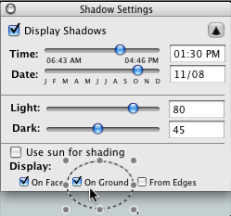

                                  Shadow settings = On ground

                                  %(#008000)[Mario C.
                                  Every rule has exceptions, but some.]

                                  1 Reply Last reply
                                  Reply Quote 0
                                  • T
                                    Tekelwriter
                                    last edited by

                                    @unknownuser said:

                                    I am preparing a compilation of few proposed by users modifications to the SU2KT. It includes option to export 'proper_animation' for rendering in the Kerkythea. When finished I will make a post here at SCF, KT and on my website.

                                    Tomasz

                                    I look forward to it. πŸ˜„

                                    1 Reply Last reply
                                    Reply Quote 0
                                    • FletchF
                                      Fletch
                                      last edited by

                                      @vially said:

                                      ... has anyone found a way to animate object assembly/disassembly (not just scenes, but moving objects inside) while at the same having a photo realistic effect like the ones you get for static pictures in kerkythea ?

                                      Twilight Render will render Proper Animation photorealistically in multiple methods of rendering (biased and unbiased methods)

                                      Check it out on the features page for animation in Twilight Render.
                                      see also this animation rendered.

                                      Now both of those are examples of SketchyPhysics, but it is the same for Proper Animations (I LOVE this Proper Animation plugin)

                                      Fletch
                                      3D Modeling addict. Former owner/developer of Twilight Render. sleepinggiantvisual.com

                                      1 Reply Last reply
                                      Reply Quote 0
                                      • majidM
                                        majid
                                        last edited by

                                        woww ..it is really great development Fletch ,thanx again

                                        My inspiring A, B, Sketches book: https://sketchucation.com/shop/books/intermediate/2612-alphabet-inspired-sketches--inspiring-drills-for-architects--3d-artists-and-designers-

                                        1 Reply Last reply
                                        Reply Quote 0
                                        • FletchF
                                          Fletch
                                          last edited by

                                          Another SketchyPhysics animation, of a TANK driving over a bumpy surface, but turned out great...
                                          http://twilightrender.com/phpBB3/viewtopic.php?p=2363#p2363

                                          again, it will render Proper Animation as well... if I find time, I will do an example... but am swamped at the moment. πŸ˜•

                                          Fletch
                                          3D Modeling addict. Former owner/developer of Twilight Render. sleepinggiantvisual.com

                                          1 Reply Last reply
                                          Reply Quote 0
                                          • B
                                            bulbucila
                                            last edited by

                                            Thank you!, amazing plugin. Can it export the animations into an avi file?

                                            1 Reply Last reply
                                            Reply Quote 0

                                            Hello! It looks like you're interested in this conversation, but you don't have an account yet.

                                            Getting fed up of having to scroll through the same posts each visit? When you register for an account, you'll always come back to exactly where you were before, and choose to be notified of new replies (either via email, or push notification). You'll also be able to save bookmarks and upvote posts to show your appreciation to other community members.

                                            With your input, this post could be even better πŸ’—

                                            Register Login
                                            • 1
                                            • 2
                                            • 3
                                            • 4
                                            • 5
                                            • 12
                                            • 13
                                            • 3 / 13
                                            • First post
                                              Last post
                                            Buy SketchPlus
                                            Buy SUbD
                                            Buy WrapR
                                            Buy eBook
                                            Buy Modelur
                                            Buy Vertex Tools
                                            Buy SketchCuisine
                                            Buy FormFonts

                                            Advertisement