sketchucation logo sketchucation
    • 登入
    Oops, your profile's looking a bit empty! To help us tailor your experience, please fill in key details like your SketchUp version, skill level, operating system, and more. Update and save your info on your profile page today!
    🔌 Smart Spline | Fluid way to handle splines for furniture design and complex structures. Download

    [Plugin] Custom Toolbars Plugin

    已排程 已置頂 已鎖定 已移動 Plugins
    121 貼文 43 Posters 65.1k 瀏覽 43 Watching
    正在載入更多貼文
    • 從舊到新
    • 從新到舊
    • 最多點贊
    回覆
    • 在新貼文中回覆
    登入後回覆
    此主題已被刪除。只有擁有主題管理權限的使用者可以查看。
    • J 離線
      JuanV.Soler
      最後由 編輯

      @unknownuser said:

      any update for this plugin in the near future?
      Thank you very much.

      will love it ¡

      ,))),

      1 條回覆 最後回覆 回覆 引用 0
      • xiombargX 離線
        xiombarg
        最後由 編輯

        I'm surprised that more people don't use this. Having quick access for toggling on/off hidden geometry, work lines, hide rest of model, perspective and a few other of my most often used tools is invaluable to me. It saves me truckloads of time. Thanks Jim.

        1 條回覆 最後回覆 回覆 引用 0
        • xiombargX 離線
          xiombarg
          最後由 編輯

          Sorry... I meant thanks Dan.

          1 條回覆 最後回覆 回覆 引用 0
          • panixiaP 離線
            panixia
            最後由 編輯

            @xiombarg said:

            Having quick access for toggling on/off hidden geometry, work lines, hide rest of model, perspective and a few other of my most often used tools is invaluable to me.
            this is exactly the 50% of the reason why i stay with SU8 for now. 👍

            1 條回覆 最後回覆 回覆 引用 0
            • Dave RD 離線
              Dave R
              最後由 編輯

              @panixia said:

              @xiombarg said:

              Having quick access for toggling on/off hidden geometry, work lines, hide rest of model, perspective and a few other of my most often used tools is invaluable to me.
              this is exactly the 50% of the reason why i stay with SU8 for now. 👍

              Why can't you do it with SU2013 or SU2014? I have keyboard shortcuts for toggling visibility of those things that were set up in SU6 and I've continued to use them for all versions since then.

              Etaoin Shrdlu

              %

              (THERE'S NO PLACE LIKE)

              G28 X0.0 Y0.0 Z0.0

              M30

              %

              1 條回覆 最後回覆 回覆 引用 0
              • BoxB 離線
                Box
                最後由 編輯

                Plus you can customise native and plugin toolbars.

                And this plugin does work in 2014

                1 條回覆 最後回覆 回覆 引用 0
                • panixiaP 離線
                  panixia
                  最後由 編輯

                  @dave r said:

                  Why can't you do it with SU2013 or SU2014? I have keyboard shortcuts for toggling visibility of those things that were set up in SU6 and I've continued to use them for all versions since then.

                  sure, i know you can do this by keyboard shortcuts.. but i like to do this sort of thing with toolbars buttons, having basically any sort ofshortcuts + modifier combo (ctr+alt+...) already assigned to tons of tools/plugins and so on..

                  1 條回覆 最後回覆 回覆 引用 0
                  • panixiaP 離線
                    panixia
                    最後由 編輯

                    @box said:

                    And this plugin does work in 2014

                    😲 are you sure?
                    i didn't try 2014, but i remember when i tried 2013 it didn't work for me..

                    1 條回覆 最後回覆 回覆 引用 0
                    • BoxB 離線
                      Box
                      最後由 編輯

                      @panixia said:

                      @box said:

                      And this plugin does work in 2014

                      😲 are you sure?
                      i didn't try 2014, but i remember when i tried 2013 it didn't work for me..

                      I wouldn't answer a question if I hadn't checked the answer.

                      BTW it also works in 2013. and yes I have installed and checked it.

                      1 條回覆 最後回覆 回覆 引用 0
                      • xiombargX 離線
                        xiombarg
                        最後由 編輯

                        @dave r said:

                        Why can't you do it with SU2013 or SU2014? I have keyboard shortcuts for toggling visibility of those things that were set up in SU6 and I've continued to use them for all versions since then.

                        I like to have buttons for things that I use fairly often but not often enough that I have the shortcuts programmed into my fingertips. Thos being the case, it's faster for me to have the buttons instead of pausing to remember what the shortcut is and having to try a couple of keys before I finally get it.

                        Otherwise you are right. Shortcuts are always faster, as long as you remember what they are.

                        1 條回覆 最後回覆 回覆 引用 0
                        • X 離線
                          xkalvisx
                          最後由 編輯

                          And where is the key "Make component"?

                          1 條回覆 最後回覆 回覆 引用 0
                          • J 離線
                            Jim
                            最後由 編輯

                            Not all SketchUp commands are available from the Ruby API. If the API does not support a command, as it does not with Make Component, then the command will need to be recreated from the beginning. It is possible to recreate the Make Component command in Ruby. I will work on it this coming week, unless someone has already written such and and would be kind enough to share it. 😉

                            Hi

                            1 條回覆 最後回覆 回覆 引用 0
                            • BoxB 離線
                              Box
                              最後由 編輯

                              I'm a bit confused Jim, Make component is available in your toolset.
                              Perhaps the question is what Key stroke is Make Component, the default for that is g.

                              1 條回覆 最後回覆 回覆 引用 0
                              • J 離線
                                Jim
                                最後由 編輯

                                @box said:

                                I'm a bit confused Jim, Make component is available in your toolset.
                                Perhaps the question is what Key stroke is Make Component, the default for that is g.

                                Heh, so it is. it's called "makeComponent" of all things.

                                Unfortunately, it uses a send_action which does not appear to work in SketchUp 2014.

                                Hi

                                1 條回覆 最後回覆 回覆 引用 0
                                • BoxB 離線
                                  Box
                                  最後由 編輯

                                  Works perfectly in my version of 2014.

                                  1 條回覆 最後回覆 回覆 引用 0
                                  • J 離線
                                    Jim
                                    最後由 編輯

                                    Ah, it opens the dialog when loose geometry is selected. I had selected a Group. Thanks.

                                    Hi

                                    1 條回覆 最後回覆 回覆 引用 0
                                    • Bob JamesB 離線
                                      Bob James
                                      最後由 編輯

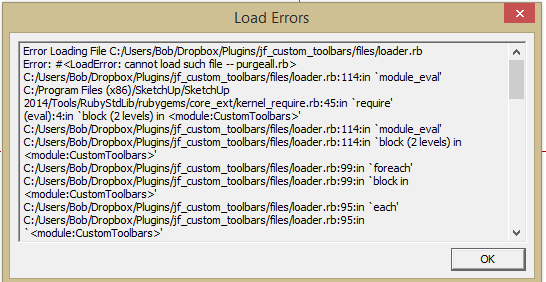
                                      Tried both 'standard' plugin location and additional location.
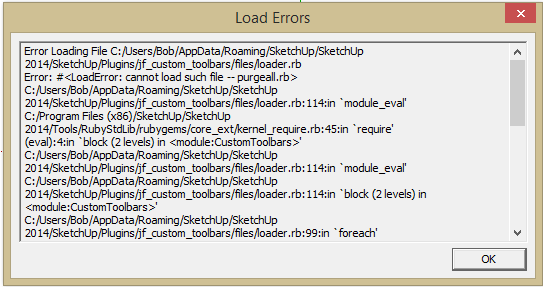
                                      jf2.PNGjf.PNG

                                      i7-4930K 3.4Ghz, 2x GTX780 6GB, 32GB DDR3-1600 ECC, OCZ Vertex 4 500GB, WD Black 3TB, 32TB NAS, 4x 27" Monitors, SpaceMouse Pro, X-keys XK-60

                                      1 條回覆 最後回覆 回覆 引用 0
                                      • J 離線
                                        Jim
                                        最後由 編輯

                                        Hello Bob,

                                        1. You need to install TIG's Purge All plugin.
                                        2. I thought I trapped that error.

                                        Will look into it. Thanks for taking time to report.

                                        Hi

                                        1 條回覆 最後回覆 回覆 引用 0
                                        • J 離線
                                          Jim
                                          最後由 編輯

                                          Bob, I posted a new version this morning in the Plugin Store, but didn't have time to mention it. Did you find and try the update?

                                          You still need to install TIG's purge_all plugin for the custum button to work.

                                          Hi

                                          1 條回覆 最後回覆 回覆 引用 0
                                          • dereiD 離線
                                            derei
                                            最後由 編輯

                                            The "viewRedo" message for Sketchup.send_action, seems unimplemented in API and not present in standard Camera toolbar, but is available in Camera drop-down menu. May be just an omision from Trimble, or it was intended to not be available? Any reasons for that?
                                            I remember a time when it was, and I had it on my Custom Toolbar.

                                            DESIGNER AND ARTIST [DEREI.UK](http://derei.uk/l)

                                            1 條回覆 最後回覆 回覆 引用 0
                                            • 1
                                            • 2
                                            • 3
                                            • 4
                                            • 5
                                            • 6
                                            • 7
                                            • 5 / 7
                                            • 第一個貼文
                                              最後的貼文
                                            Buy SketchPlus
                                            Buy SUbD
                                            Buy WrapR
                                            Buy eBook
                                            Buy Modelur
                                            Buy Vertex Tools
                                            Buy SketchCuisine
                                            Buy FormFonts

                                            Advertisement