sketchucation logo sketchucation
    • 登入
    Oops, your profile's looking a bit empty! To help us tailor your experience, please fill in key details like your SketchUp version, skill level, operating system, and more. Update and save your info on your profile page today!
    🔌 Smart Spline | Fluid way to handle splines for furniture design and complex structures. Download

    [Plugin] Custom Toolbars Plugin

    已排程 已置頂 已鎖定 已移動 Plugins
    121 貼文 43 Posters 65.1k 瀏覽 43 Watching
    正在載入更多貼文
    • 從舊到新
    • 從新到舊
    • 最多點贊
    回覆
    • 在新貼文中回覆
    登入後回覆
    此主題已被刪除。只有擁有主題管理權限的使用者可以查看。
    • J 離線
      Jim
      最後由 編輯

      To create a custom toolbar, you create a plain text file in the jf_custom_toolbars folder.

      The name of the text file becomes the name of the Toolbar.

      The contents of the text file is a list of commands taken from the commands in the image.

      Look for the "Edge Style Example.txt" file in your Plugins/jf_custom_toolbars folder for an example toolbars.
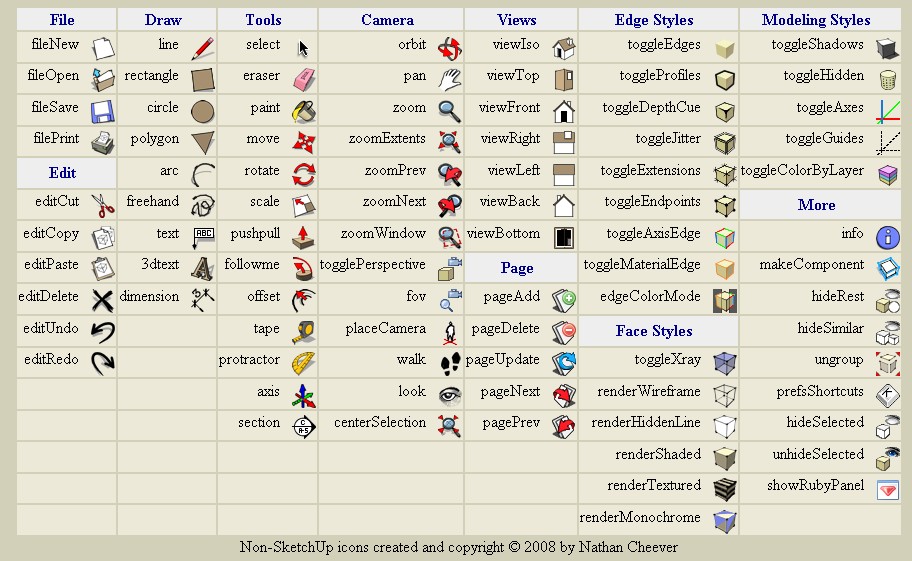
      http://bp1.blogger.com/_ogonR-k5OoM/SFQzmxh8aeI/AAAAAAAAHXQ/pifUCnbkhf8/s1600/toolbar_commands.jpg

      Hi

      1 條回覆 最後回覆 回覆 引用 0
      • ibonI 離線
        ibon
        最後由 編輯

        This is Awesome! keep on with the project, please. Do you need help with the icons? i have changed a little my sketchup, so maybe i could help. Thanks again!


        http://img377.imageshack.us/img377/1050/pantallaum2.th.jpg

        1 條回覆 最後回覆 回覆 引用 0
        • W 離線
          watkins
          最後由 編輯

          Dear Jim,

          I'm sure that it is obvious to everyone else, but how do you go about installing the scripts. A little explanation of what the plugin does and how one might use it effectively. I am loathe to change what I have without an understanding of the benefits. I know that you are very busy, but if you could write a simple 'how to install and use' document, with perhaps a few examples then, that would be most helpful.

          Many thanks,
          Bob

          1 條回覆 最後回覆 回覆 引用 0
          • D 離線
            Daniel S
            最後由 編輯

            @ibon said:

            This is Awesome! keep on with the project, please. Do you need help with the icons? i have changed a little my sketchup, so maybe i could help. Thanks again!


            http://img377.imageshack.us/img377/1050/pantallaum2.th.jpg

            Ibon.. can you share the icons of the bezier tool and the ones for the tools on surfaces (offset and line on surface)? They look really great!!!

            Daniel S

            1 條回覆 最後回覆 回覆 引用 0
            • R 離線
              rsw
              最後由 編輯

              @jim said:

              I've posted a beta release of custom toolbars on my blog (see my sig.)

              thought I would find this quite useful as I tend to use icons rather than shortcuts most of the time, but I can't seem to download it from your blog, I just get to a page which says I don't have permission to view this page - could you post it here on scf instead?

              Thanks

              Richard

              http:img.userbars.pl9819554.png

              http:i158.photobucket.comalbumst106671GUAMDUDEAnimated---User-Green.gif

              1 條回覆 最後回覆 回覆 引用 0
              • J 離線
                Jim
                最後由 編輯

                I had some security settings set wrong, it should work now. Sorry.

                Hi

                1 條回覆 最後回覆 回覆 引用 0
                • Dave RD 離線
                  Dave R
                  最後由 編輯

                  Jim, thank you for this. I was able to download it yesterday and I think I installed it correctly--all into the Plugins folder and otherwise the paths shown in the Zip file were left alone. I haven't figured out how to activate the toolbars though. Any ideas of how to teach an idiot how to work this? 😉

                  Etaoin Shrdlu

                  %

                  (THERE'S NO PLACE LIKE)

                  G28 X0.0 Y0.0 Z0.0

                  M30

                  %

                  1 條回覆 最後回覆 回覆 引用 0
                  • J 離線
                    Jim
                    最後由 編輯

                    They should all be under View > Toolbars menu.

                    A toolbar file is just a text file in the Plugins/Toolbars folder. You can see some example in there already.

                    Hi

                    1 條回覆 最後回覆 回覆 引用 0
                    • Dave RD 離線
                      Dave R
                      最後由 編輯

                      That's kind of what I thought. Maybe I need new glasses.

                      Etaoin Shrdlu

                      %

                      (THERE'S NO PLACE LIKE)

                      G28 X0.0 Y0.0 Z0.0

                      M30

                      %

                      1 條回覆 最後回覆 回覆 引用 0
                      • J 離線
                        Jim
                        最後由 編輯

                        Uh, this is a dumb question, but you did restart SketchUp, right?

                        There should be a toolbars.rb file in Plugins also.

                        Hi

                        1 條回覆 最後回覆 回覆 引用 0
                        • Dave RD 離線
                          Dave R
                          最後由 編輯

                          Not such a dumb question but yes, I did restart SU several times since installing the files. The computer has even been restarted a couple of times since I installed the files.

                          Etaoin Shrdlu

                          %

                          (THERE'S NO PLACE LIKE)

                          G28 X0.0 Y0.0 Z0.0

                          M30

                          %

                          1 條回覆 最後回覆 回覆 引用 0
                          • J 離線
                            Jim
                            最後由 編輯

                            OK, did you check the Extensions tab of the Preferences dialog?

                            I thought I had done away with the extensions interface, which is why I didn't suggest it first. I can't keep track of my own plugins.

                            Hi

                            1 條回覆 最後回覆 回覆 引用 0
                            • Dave RD 離線
                              Dave R
                              最後由 編輯

                              Holy buckets! That did it. I don't think I've had to go in and check a box under Extensions since I first loaded the V6 a long time ago. It didn't occur to me that there'd be a new box to check.

                              Thanks Jim. That was the fix.

                              Etaoin Shrdlu

                              %

                              (THERE'S NO PLACE LIKE)

                              G28 X0.0 Y0.0 Z0.0

                              M30

                              %

                              1 條回覆 最後回覆 回覆 引用 0
                              • R 離線
                                rsw
                                最後由 編輯

                                @jim said:

                                I had some security settings set wrong, it should work now. Sorry.

                                works fine now, thanks

                                Richard

                                http:img.userbars.pl9819554.png

                                http:i158.photobucket.comalbumst106671GUAMDUDEAnimated---User-Green.gif

                                1 條回覆 最後回覆 回覆 引用 0
                                • D 離線
                                  dudekracked
                                  最後由 編輯

                                  hi jim thanks for this useful plugin 👍

                                  im just wondering if it will be something like the one on your site after you finish it?

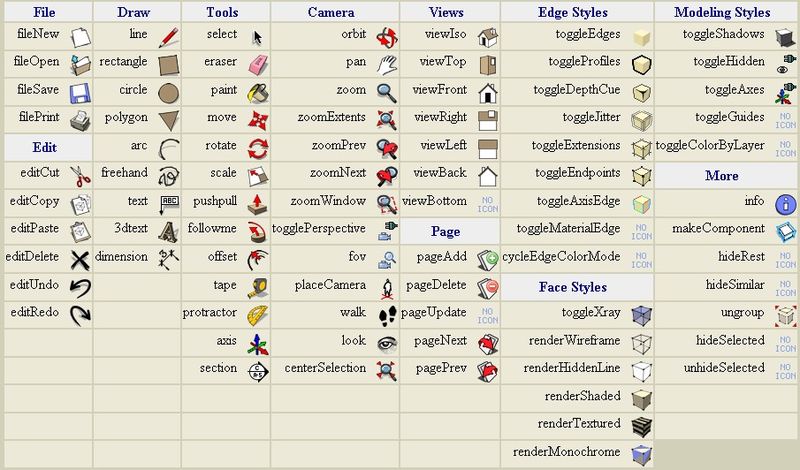
                                  i copied the picture on your site, 😳 will it end up something like this? i kinda like this actually, is it possible to do this? thanks

                                  ct.jpg

                                  1 條回覆 最後回覆 回覆 引用 0
                                  • H 離線
                                    HFM
                                    最後由 編輯

                                    @dudekracked said:

                                    hi jim thanks for this useful plugin 👍

                                    im just wondering if it will be something like the one on your site after you finish it?

                                    i copied the picture on your site, 😳 will it end up something like this? i kinda like this actually, is it possible to do this? thanks

                                    Eh seriously, it is exactly like that! Every button on that page you can use in a custom toolbar... or create new icons
                                    RTFM or in this case RTFRBFILES that are included 😄

                                    and again Jim thanx for this one [it's keeping me up at night creating icons 😲 ]

                                    1 條回覆 最後回覆 回覆 引用 0
                                    • D 離線
                                      dudekracked
                                      最後由 編輯

                                      @HFM

                                      no, no, no, your not reading me clearly, 👎 i absolutely like the idea of a kind of floating toolbar that has all the tools inside it with the name beside it and if all possible can be customized, exactly like the picture that ive attached earlier.

                                      1 條回覆 最後回覆 回覆 引用 0
                                      • I 離線
                                        ilay7k
                                        最後由 編輯

                                        also need shortcut(command) to hide/show all of them...like at most sculpting tool - for clear sketchup desktop(slide away)

                                        1 條回覆 最後回覆 回覆 引用 0
                                        • H 離線
                                          HFM
                                          最後由 編輯

                                          @dudekracked said:

                                          @HFM

                                          no, no, no, your not reading me clearly, 👎 i absolutely like the idea of a kind of floating toolbar that has all the tools inside it with the name beside it and if all possible can be customized, exactly like the picture that ive attached earlier.

                                          Ooooh,...

                                          Why? If you hover over the icons you get the name too. Anyways, sorry for the misunderstanding.

                                          Hugo

                                          1 條回覆 最後回覆 回覆 引用 0
                                          • Dave RD 離線
                                            Dave R
                                            最後由 編輯

                                            Jim, this is pretty slick. I made a replacement for the Camera toolbar that includes centerSelection. So now there's eight tools in that bar instead of 7. I include the TXT file for anyone who might want to do the same thing.



                                            Zoom1.txt

                                            Etaoin Shrdlu

                                            %

                                            (THERE'S NO PLACE LIKE)

                                            G28 X0.0 Y0.0 Z0.0

                                            M30

                                            %

                                            1 條回覆 最後回覆 回覆 引用 0
                                            • 1
                                            • 2
                                            • 3
                                            • 4
                                            • 5
                                            • 6
                                            • 7
                                            • 1 / 7
                                            • 第一個貼文
                                              最後的貼文
                                            Buy SketchPlus
                                            Buy SUbD
                                            Buy WrapR
                                            Buy eBook
                                            Buy Modelur
                                            Buy Vertex Tools
                                            Buy SketchCuisine
                                            Buy FormFonts

                                            Advertisement
