[Plugin] Custom Toolbars Plugin
-
-
@cadfather said:
Hi Jim, i do use the ruby toolbar to load the scripts.. but there are so many! i'm thinking of a way to load a script without browsing for it (click to open/load the tools)
say there is a way to link a specific script to a button, eg. i make it load subdivide and smooth whenever it's clicked.
say to another button i assign fredo's TOS. (ideally you can re-assign your favourite/s for different purposes)
not loading all the plugins at startup would make opening SU a faster and simpler situation - knowing that by clicking an icon i open only the specific set of tools i actually need..
the ruby masters could include their loader button with their plugin...
 or
or  ?
?Isn'it precisely what the Sketchup extension manager does?
-
well not precisely Fredo.. for example not all plugins have the entry in the extensions - what i'd like is a way for me to assign the loading af a script to a button. call it a customised quick loader - the idea can of course evolve further.
-
@cadfather said:
well not precisely Fredo.. for example not all plugins have the entry in the extensions - what i'd like is a way for me to assign the loading af a script to a button. call it a customised quick loader - the idea can of course evolve further.
It's easy to do (I could do it for ToolsOnSurface for instance), but then once loaded, you'll be faced again to the question of toolbar button proliferation (I mean, just TOS would come with 10 buttons!), and the only way to unload the scripts is to restart Sketchup.
Another possibility is that I include a button to hide or show all others. But then, you have the issue with the messy placement of toolbars in Sketchup 6.
Finally, you can also have only one button, which would then pop up a Web dialog which would contain all others (and the parameters of the one currently used), pretty much like the native entity info, Bucket paint windows. Probably better, but, you sacrifice a part of the workspace in most situations.
I agree with the requirement, but I don't see a 'universal' solution (yet).
Fredo
-
@unknownuser said:
It's easy to do (I could do it for ToolsOnSurface for instance), but then once loaded, you'll be faced again to the question of toolbar button proliferation (I mean, just TOS would come with 10 buttons!), and the only way to unload the scripts is to restart Sketchup.Fredo
..yes what i had in mind - only working solution at present. personally would rather have SU start fast and call the ruby when needed that viceversa. however, if the button worked as a toggle mode perhaps it could at least hide the toolbar?
@unknownuser said:
Another possibility is that I include a button to hide or show all others. But then, you have the issue with the messy placement of toolbars in Sketchup 6.Fredo
that is true (though this is not a big issue for me as i use batch files to save, restore toolbar configurations)
@unknownuser said:
Finally, you can also have only one button, which would then pop up a Web dialog which would contain all others (and the parameters of the one currently used), pretty much like the native entity info, Bucket paint windows. Probably better, but, you sacrifice a part of the workspace in most situations.Fredo
..the thing i least like is those palettes roaming about in my project! maybe it will be possible to have a webdialog that opens up under the icon, like web page submenus...
on further thought though, before v7 is out (spring 2013) - one solution could be having a thin vertical toolbar on the right which pops out the other icons on click. in fact now that i'm rolling we could have icons for all those greasy palettes like entity info, paint etc...
@unknownuser said:
I agree with the requirement, but I don't see a 'universal' solution (yet).Fredo
well you said it. the more i think about it the more i like the idea (together with 'floating shortcuts')
...
-
Hi Jim, just trying your plugin, on a mac, on skp 7, and i´m getting a crash when selecting the select tool, after using 3d text. I´m not sure if it´s a sketchup related bug, or if it´s related to your ruby.
Cheers
santiago
-
Hi Jim and thanks again for this life saver!
However I would have a couple of questions - and/or if they can be implemented, rather "feature requests". Below you can see how I solved my always messing up workspace (well, sort of solved - I put the mess elsewhere)
-
There is my custom toolbar now with the buttons/functions I do occasionally use but not often enough to have a shortcut key assigned. This is the coolest part of it.
-
Then there are a couple of tools that cannot be integrated with your plugin;
-
the Sandbox tools
-
the Google tooolbar
-
the Sections > toggle cut / plane function
-
the Layers
Is there any chance they could also be added? I understand that the Sandbox (and probably the Google one, too) are actually plugins in SU but still... -
Then there is my "Plugin area property" - where I keep the toolbars of the actively used plugins (this always varies depending on what I am doing). It would also be cool to be able to put them into a bigger toolbar - or any other solution would be welcome of course (for me, obviously the issue of cluttered toolbars when launched by a single button is not serious so the above solution by Max would also be good).
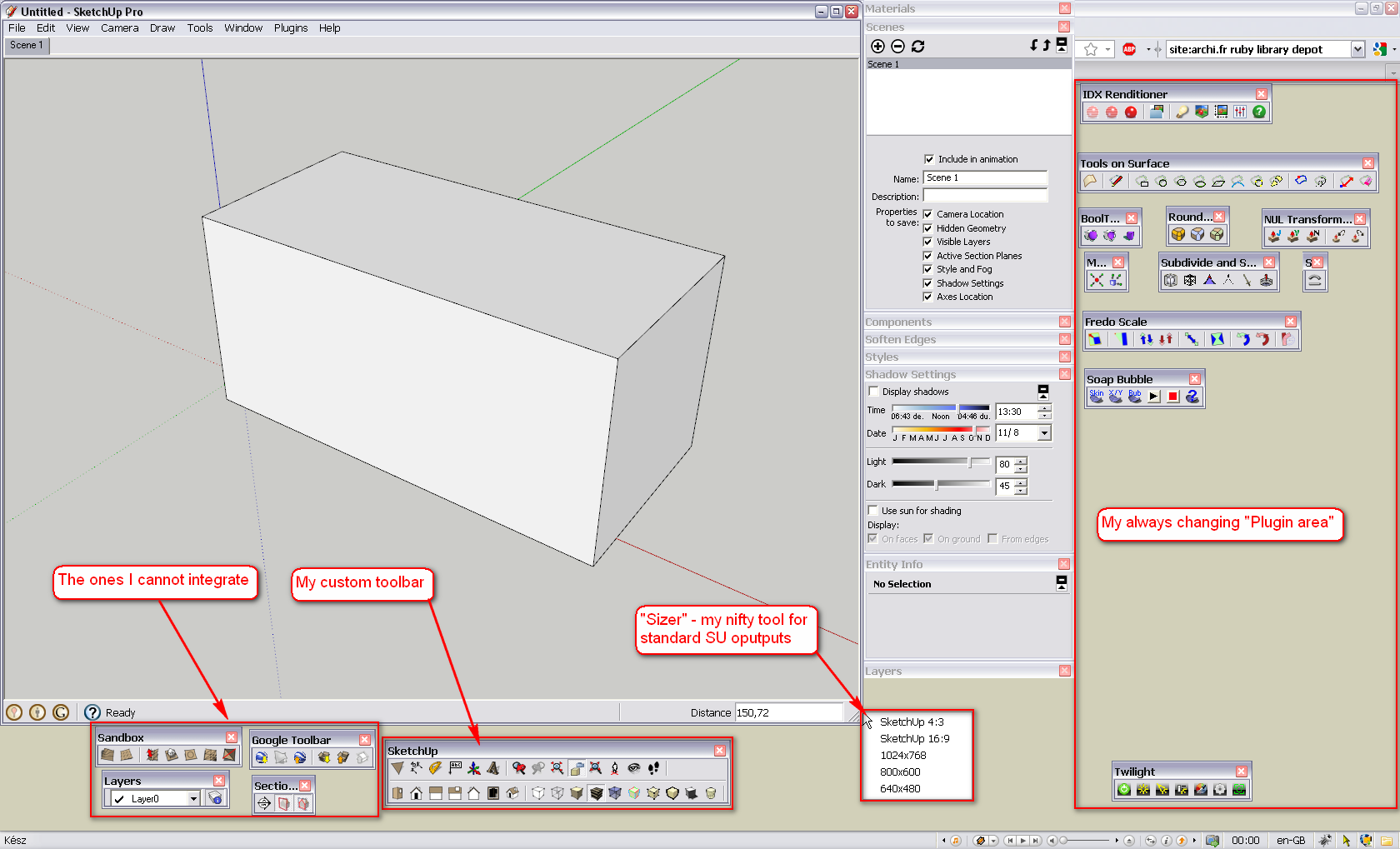
Then it's just a cool, little app that I have; you can set any custom window size and if working similarly as me, you can have output resolution for images/videos pre-set.
BTW I have just realised this is in the Developers' Forum, not in the Plugins forum. Is there a reason (is it intentional)?
I leave it for you guys - it's your playground here... -
-
Thanks for the support Gaieus,
@gaieus said:
Then there are a couple of tools that cannot be integrated with your plugin;
Some of these can be integrated, but others can not. This is a problem because the plug-in can never support 100% of even the built-in functions, which is always a little disappointing to someone. That's why I consider this an "in-between" plug-in. It was a quick and easy way to mitigate some of the frustration with messed-up toolbars, but is not the best long-term strategy. Even so, I do still maintain it, and I am in the middle of updating this plug-in to make it easier to integrate other tools.
I'm also experimenting with the idea of hiding Toolbars, similar to how you can toggle the windows using Window > Hide Dialogs. So you could use a shortcut to toggle the toolbars visible/hidden, and even have several "sets" of toolbars to switch between.
@gaieus said:
It would also be cool to be able to put them into a bigger toolbar
I agree, this is the answer. To be able to drag & drop buttons to build Toolbars, and then drag & drop Toolbars in a window. It can be done, someone just needs to do it.
There is a plugin named SU Tool that is very close to what I think is the best solution; but it is encrypted (or I'd have "borrowed" it already.) But SU Tool is likely close to what the ultimate solution will look like.
-
Thanks Jim for the explanation. As you can see, I am already contented with this solution - my SU life never used to be so comfortable as since I simply undocked everything.
And yes, I guess I know what you mean with those "launch" buttons. The Layers toolbar has this button for instance. Pressing it will open the Layers dialog (or just like activating the Paint bucket tool triggers the Material browser). With less frequently used windows/toolbars this could be an ideal solution.
-
"I agree, this is the answer. To be able to drag & drop buttons to build Toolbars, and then drag & drop Toolbars in a window. It can be done, someone just needs to do it.
There is a plugin named SU Tool that is very close to what I think is the best solution; but it is encrypted (or I'd have "borrowed" it already.) But SU Tool is likely close to what the ultimate solution will look like."
this is the way the plugins PowerSutool organizer works.
to arrange the toolbars.
using a html interface, and a text editor
Maybe this can help find a solution?
http://www.dhtmlgoodies.com/scripts/drag-drop-nodes/drag-drop-nodes.html
other solution
http://www.dhtmlgoodies.com/index.html?page=dragDrop -
What language (and writing) do you use in Argentina? I thought it was Spanish (and even that I understand some of it)

-
si español, se escribe aqui en argentina

-
@gaieus said:
Then there are a couple of tools that cannot be integrated with your plugin;
- the Sandbox tools
Ah yes -- I've been using Flip Division on the Sandbox bar frequently for my triangulated faces. It'd be nice to pop that one action off and put into my main toolbar
-
Is this plugin being updated for SU8 ? Some new functions are missing.
And, I'm thinking if it's possible to add icons from plugins to custom toolbars. I would like to have a larger toolbar with more plugins included, rather than lots of small toolbars, some of them with a one or two icons...Thanks!
-
@unknownuser said:
Is this plugin being updated for SU8 ? Some new functions are missing.
Yes, I'm working on it, as time permits.
I've drawn a bunch of new icon images.@unknownuser said:
And, I'm thinking if it's possible to add icons from plugins to custom toolbars. I would like to have a larger toolbar with more plugins included, rather than lots of small toolbars, some of them with a one or two icons...
This is a common request. But it is difficult to realize. We would have to get all plugin authors to adhere to a certain standard. It is not likely this feature will be included in the ver8 update. (But it's on the future list.)
@urgen said:
... one request (question): have the opportunity to add these buttons? [refering to pageMoveLeft, pageMoveRight commands.]
Urgen, I have drawn these two icons, as well as pageMoveEnd, pageMoveBegin (and I still need to draw the pageMoveChoose icon.)
I plan to have these (Scene) Page commands included in the next release. -
@dan rathbun said:
This is a common request. But it is difficult to realize. We would have to get all plugin authors to adhere to a certain standard. It is not likely this feature will be included in the ver8 update. (But it's on the future list.)
I got a snippet that overloads the UI, Menu, Command and Toolbar class which allows me to traverse the content of the custom UI elements. It is possible, but it needs proper testing and error catching.
-
@dan rathbun said:
This is a common request. But it is difficult to realize. We would have to get all plugin authors to adhere to a certain standard. It is not likely this feature will be included in the ver8 update. (But it's on the future list.)
This "certain standard" is something that might limit the freedom in making the script, or is something easy to achieve and will not affect in any way the scripting manner?
Why I am asking? Because your plugin is maybe the best method to customize SU interface. And maybe if you make a call to arms, there will be some (if not all) plugin masters who will join in this
I must admit that I'd be most pleased if this would happen (I'm a little selfish, ain't I ? )
) -
@diego-rodriguez said:
"I agree, this is the answer. To be able to drag & drop buttons to build Toolbars, and then drag & drop Toolbars in a window. It can be done, someone just needs to do it.
There is a plugin named SU Tool that is very close to what I think is the best solution; but it is encrypted (or I'd have "borrowed" it already.) But SU Tool is likely close to what the ultimate solution will look like."
this is the way the plugins PowerSutool organizer works.
to arrange the toolbars.
using a html interface, and a text editorMaybe this can help find a solution?
http://www.dhtmlgoodies.com/scripts/drag-drop-nodes/drag-drop-nodes.html
other solution
http://www.dhtmlgoodies.com/index.html?page=dragDropDiego, can you give more of an explanation of how this works? You mention an HTML editor and a text editor but there's not enough info for my non-programming brain to work out. Your links don't seem to relate to editing of the toolbars. I'm bugged by the standard UI (and I know I'm far from alone on this) and so want to be able to tweak the toolbars and icons so any info on how to do this would be very much appreciated. Thanks.
-
any update for this plugin in the near future?
Thank you very much. -
Hi Jim, Many thanks for the plugin again!










Advertisement