sketchucation logo sketchucation
    • 登入
    Oops, your profile's looking a bit empty! To help us tailor your experience, please fill in key details like your SketchUp version, skill level, operating system, and more. Update and save your info on your profile page today!
    🔌 Smart Spline | Fluid way to handle splines for furniture design and complex structures. Download

    [Plugin] Polyreducer 0.1

    已排程 已置頂 已鎖定 已移動 Plugins
    61 貼文 45 Posters 133.3k 瀏覽 45 Watching
    正在載入更多貼文
    • 從舊到新
    • 從新到舊
    • 最多點贊
    回覆
    • 在新貼文中回覆
    登入後回覆
    此主題已被刪除。只有擁有主題管理權限的使用者可以查看。
    • S 離線
      sasasoso
      最後由 編輯

      hi all
      thnx for this great plugin
      but i dont know why i cant install it
      i copy past at mu su plugins folder
      but unfortunately it doesnt appeare in the program
      i use su 8 and 6
      can any one help me undestand howto install this plugin ???

      1 條回覆 最後回覆 回覆 引用 0
      • D 離線
        dtrarch
        最後由 編輯

        FYI ALL

        Works with basic triangulated obj in SU 8 PRO OK. 👍

        dtr

        1 條回覆 最後回覆 回覆 引用 0
        • P 離線
          PickledZebra
          最後由 編輯

          Hmmm... I'm fairly noobish when it comes to sketchUp.

          This plugin looks very useful to me, but I can't seem to
          get it to do anything in SU8 Pro.

          I select object, and ask it to reduce polys and it does nothing. Doesn't hang, just doesn't respond.

          Does the object need to be triangulated, and if so, how does one do that? Hopefully not by exporting and reimporting.

          thanks!

          1 條回覆 最後回覆 回覆 引用 0
          • K 離線
            Kvad
            最後由 編輯

            This is awesome!

            Thanks!

            1 條回覆 最後回覆 回覆 引用 0
            • F 離線
              fdd921
              最後由 編輯

              why it doesn't work in SketchUp 8?

              Also there are similar plugins so I can try them?

              1 條回覆 最後回覆 回覆 引用 0
              • Dave RD 離線
                Dave R
                最後由 編輯

                It works on SketchUp 8 for me but the one in Artisan is much better. You should use that.

                Etaoin Shrdlu

                %

                (THERE'S NO PLACE LIKE)

                G28 X0.0 Y0.0 Z0.0

                M30

                %

                1 條回覆 最後回覆 回覆 引用 0
                • B 離線
                  bernzgb
                  最後由 編輯

                  Thanks so much for the plugin! Maybe my frustations in rendering crashes will end now...

                  1 條回覆 最後回覆 回覆 引用 0
                  • I 離線
                    inti11644
                    最後由 編輯

                    how do I use this in sketchup 2016

                    1 條回覆 最後回覆 回覆 引用 0
                    • bazB 離線
                      baz
                      最後由 編輯

                      @inti11644 said:

                      how do I use this in sketchup 2016

                      First post eh?

                      1 條回覆 最後回覆 回覆 引用 0
                      • Dave RD 離線
                        Dave R
                        最後由 編輯

                        @inti11644 said:

                        how do I use this in sketchup 2016

                        From the first post in this thread:

                        @whaat said:

                        Usage:

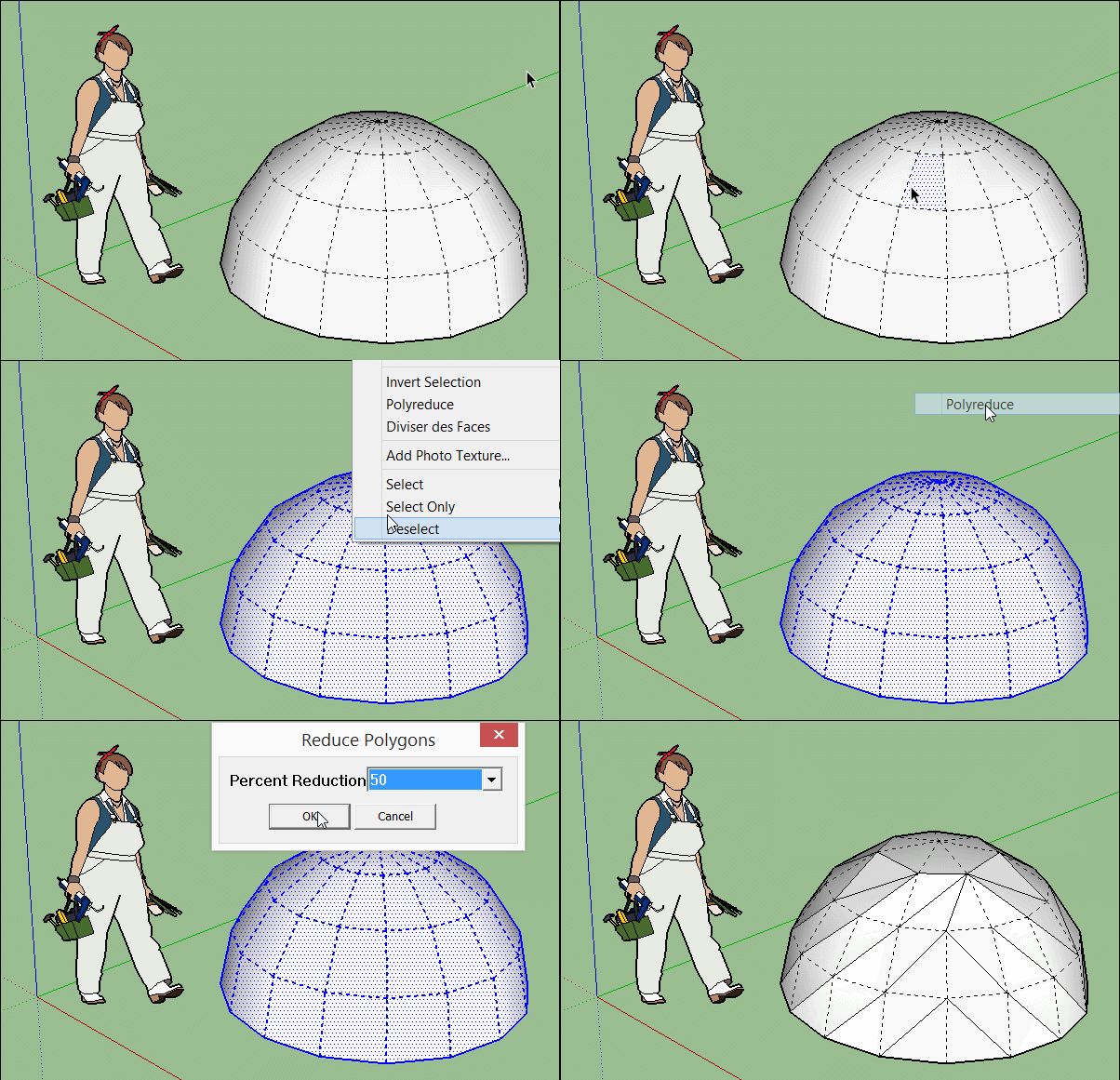
                        1. Select the faces that you want to perform the reduction on.
                        2. Right click and select 'Polyreduce' from the context menu.
                        3. Input the percentage reduction. For example, select 20 to reduce the number of vertices by 20%.
                        4. A recommended workflow is to perform several reductions using a smaller percentage (50% or less). Then, use the 'undo' and 'redo' commands to cycle through the reduction operations to choose the level of detail you are most satisfied with.

                        Etaoin Shrdlu

                        %

                        (THERE'S NO PLACE LIKE)

                        G28 X0.0 Y0.0 Z0.0

                        M30

                        %

                        1 條回覆 最後回覆 回覆 引用 0
                        • A 離線
                          AppleBear
                          最後由 編輯

                          Thank you to share, to give it a try

                          1 條回覆 最後回覆 回覆 引用 0
                          • G 離線
                            gaquandui
                            最後由 編輯

                            how to install Polyreducer in the sketchup 2017?

                            1 條回覆 最後回覆 回覆 引用 0
                            • Dave RD 離線
                              Dave R
                              最後由 編輯

                              @gaquandui said:

                              how to install Polyreducer in the sketchup 2017?

                              Use the Sketchucation Extension Store. Download it, go to Window>Extension Manager and select Install Extension. Find the rbz file, select it, click Open and the affirmative answers to the next message boxes. From there, you can install any extensions from Sketchucation automatically.

                              Etaoin Shrdlu

                              %

                              (THERE'S NO PLACE LIKE)

                              G28 X0.0 Y0.0 Z0.0

                              M30

                              %

                              1 條回覆 最後回覆 回覆 引用 0
                              • ZackJordsZ 離線
                                ZackJords
                                最後由 編輯

                                Thank you so much Dale

                                1 條回覆 最後回覆 回覆 引用 0
                                • G 離線
                                  Gerardus
                                  最後由 編輯

                                  Hi guys,

                                  I installed this extension ( several times ), but can't find it back in SU 2017.
                                  Any tips please?

                                  1 條回覆 最後回覆 回覆 引用 0
                                  • Dave RD 離線
                                    Dave R
                                    最後由 編輯

                                    @gerardus said:

                                    Hi guys,

                                    I installed this extension ( several times ), but can't find it back in SU 2017.
                                    Any tips please?

                                    How did you install it? Where are you looking for it "back in SketchUp"?

                                    Etaoin Shrdlu

                                    %

                                    (THERE'S NO PLACE LIKE)

                                    G28 X0.0 Y0.0 Z0.0

                                    M30

                                    %

                                    1 條回覆 最後回覆 回覆 引用 0
                                    • TIGT 離線
                                      TIG Moderator
                                      最後由 編輯

                                      Assuming that all other installation issues are addressed and it's still compatible with v2017... [ it is almost a decade old ! ], then, as its simple instructions explain, you need to select some faces and right-click > context-menu... to run the tool.

                                      Remember that not every tool has a menu entry or a toolbar.

                                      TIG

                                      1 條回覆 最後回覆 回覆 引用 0
                                      • pilouP 離線
                                        pilou
                                        最後由 編輯

                                        Use of Polyreducer : RighClick on the object! 😉

                                        http://s6.postimg.cc/ci4lzyqz5/GIF_polyreduce.gif

                                        Frenchy Pilou
                                        Is beautiful that please without concept!
                                        My Little site :)

                                        1 條回覆 最後回覆 回覆 引用 0
                                        • I 離線
                                          ISAWHIM
                                          最後由 編輯

                                          Any chance to "fix" this so that it works in 2018+

                                          The drop-down list has the option to select values that don't work, due to a text-issue?

                                          ("10
                                          20
                                          30
                                          40
                                          50
                                          60
                                          70
                                          80
                                          90")

                                          10 and 90 don't work, but they are "doing something", which can be undone. However, if you don't "undo", it can break the model.

                                          Seems like it is just a simple format issue for the list. (Apparently reading the value from the list, instead of reading the values from an INDEX of a LIST. So, the odd text in the first and last values sort-of break the script.)

                                          Personally... I would like to see a slider with 1%, 2% or 5% increments. Maybe also an option to just do a triangulation first, as 0%... Something that would yield some "corrective action", before reducing polygons, if needed. (I don't always agree with the way it triangulates some surfaces, as it doesn't favor neat reductions. Being able to see the way it is going to divide it, before reducing it, allows for some manual triangulation of those potential troubled parts.)

                                          Another option would be to subdivide first... (Creating a smoother potential which to begin a more accurate reduction that may retain those micro-details more, without harming large flat surfaces as much.)

                                          1 條回覆 最後回覆 回覆 引用 0
                                          • S 離線
                                            samodelkin_77
                                            最後由 編輯

                                            [quote="ISAWHIM"]Any chance to "fix" this so that it works in 2018+

                                            The drop-down list has the option to select values that don't work, due to a text-issue?

                                            ("10
                                            20
                                            30
                                            40
                                            50
                                            60
                                            70
                                            80
                                            90")

                                            10 and 90 don't work, but they are "doing something", which can be undone. However, if you don't "undo", it can break the model.
                                            ................

                                            I fix it : in file polyreduce.rb (open wiht notepad)
                                            at line 342 enums=[["10|20|30|40|50|60|70|80|90"]]
                                            need make it like this : enums=[" 10|20|30|40|50|60|70|80|90 "]
                                            and all is work.
                                            after polyreduce need make fix model, is deleting some garbage from.
                                            (sorry for mine english)

                                            1 條回覆 最後回覆 回覆 引用 0
                                            • 1
                                            • 2
                                            • 3
                                            • 4
                                            • 4 / 4
                                            • 第一個貼文
                                              最後的貼文
                                            Buy SketchPlus
                                            Buy SUbD
                                            Buy WrapR
                                            Buy eBook
                                            Buy Modelur
                                            Buy Vertex Tools
                                            Buy SketchCuisine
                                            Buy FormFonts

                                            Advertisement