sketchucation logo sketchucation
    • 登入
    Oops, your profile's looking a bit empty! To help us tailor your experience, please fill in key details like your SketchUp version, skill level, operating system, and more. Update and save your info on your profile page today!
    🔌 Smart Spline | Fluid way to handle splines for furniture design and complex structures. Download

    [Plugin] Polyreducer 0.1

    已排程 已置頂 已鎖定 已移動 Plugins
    61 貼文 45 Posters 133.3k 瀏覽 45 Watching
    正在載入更多貼文
    • 從舊到新
    • 從新到舊
    • 最多點贊
    回覆
    • 在新貼文中回覆
    登入後回覆
    此主題已被刪除。只有擁有主題管理權限的使用者可以查看。
    • W 離線
      Whaat
      最後由 Whaat 編輯

      Update 2019-07-26: Hey there! Polyreducer is a really old and slow plugin! It has a lot of major limitations. If you are looking for a new, fast and incredibly powerful polygon reduction extension for SketchUp, you should check out Skimpat https://skimp4sketchup.com. Skimp can also import and simplify fbx, obj, stl, among other file formats.

      Below is the original post from 2008.


      Hi all,

      I want to release this script so I can get on to other things. It's not perfect but it works pretty well. I don't know if I will work on this script any more. Anyone is free to take over where I left off.

      If anyone is interested, I have also attached the reference material for the algorithm that the plugin is based on. (Thanks to Stan Melax for the article)

      Usage:

      1. Select the faces that you want to perform the reduction on.
      2. Right click and select 'Polyreduce' from the context menu.
      3. Input the percentage reduction. For example, select 20 to reduce the number of vertices by 20%.
      4. A recommended workflow is to perform several reductions using a smaller percentage (50% or less). Then, use the 'undo' and 'redo' commands to cycle through the reduction operations to choose the level of detail you are most satisfied with.

      Issues:

      1. It is highly recommended not to use this plugin on faces that have free edges. It will likely not work as expected.
      2. The plugin must triangulate all faces that are connected to the selected faces prior to performing the reduction.
      3. The plugin is quite slow and may cause SketchUp to hang. It is usuallly successful in completing the reduction if given enough time.
      4. Material assignment is maintained but UVs (texture position) are not.
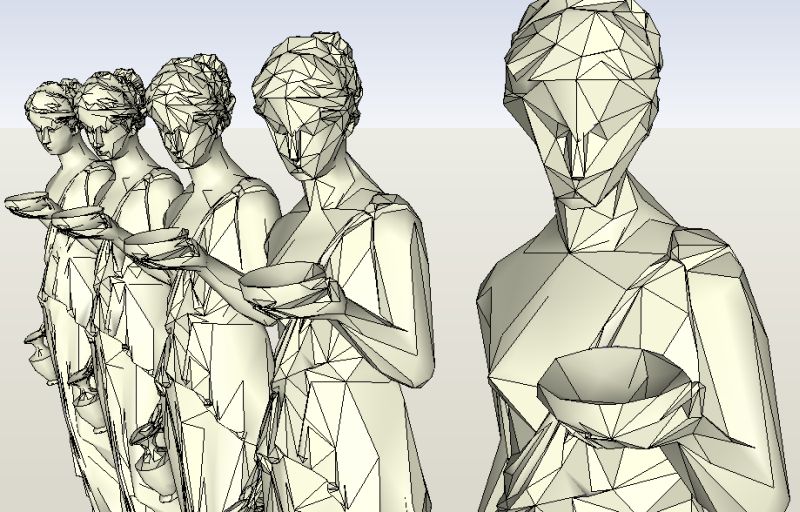
      hebe2.jpg


      Polyreduction Alogrithm.pdf


      polyreduce.rb

      SketchUp Plugins for Professionals

      1 條回覆 最後回覆 回覆 引用 0
      • boofredlayB 離線
        boofredlay
        最後由 編輯

        Thanks Dale. This should prove very useful indeed.
        I just got your Subdivide and Smooth tonight... starting to play.

        http://www.coroflot.com/boofredlay

        1 條回覆 最後回覆 回覆 引用 0
        • L 離線
          lewiswadsworth
          最後由 編輯

          Thank you, Dale.

          I had an interesting conversation with John Bacus and several other Google people about your recent scripts at the AIA convention today (or rather yesterday). I'll summarize sometime tomorrow (its 1:30 AM, and I've been grading assignments for the past few hours) in your subdivide and smooth thread, because that was the item that dominated our talk.

          col sporcar si trova

          1 條回覆 最後回覆 回覆 引用 0
          • R 離線
            remus
            最後由 編輯

            Cheers whaat, another useful plugin to add to the arsenal.

            (perhaps i should setup a shortcut key for saying that ^ , it seems to be a recurring thing 😛 )

            http://remusrendering.wordpress.com/

            1 條回覆 最後回覆 回覆 引用 0
            • W 離線
              watkins
              最後由 編輯

              Dear Dale,

              I too would like to add my thanks for a very useful script.

              I have been playing around with a new bathroom design (for myself), and so I will try your script on some of the high poly models of basins and toilets I have found on the web.

              Kind regards,
              Bob

              1 條回覆 最後回覆 回覆 引用 0
              • P 離線
                pichuneke
                最後由 編輯

                😮

                You could have earned some money! You know it. If you had developed the rb a bit more, you could have done a new plugin like subsmooth rb...

                Thanks a lot. I don't have enough words.

                Forgive my spanglish...

                1 條回覆 最後回覆 回覆 引用 0
                • J 離線
                  Jon
                  最後由 編輯

                  Thanks so much, Dale. Very useful. 😄
                  And thanks again for making it free. 😄 😄


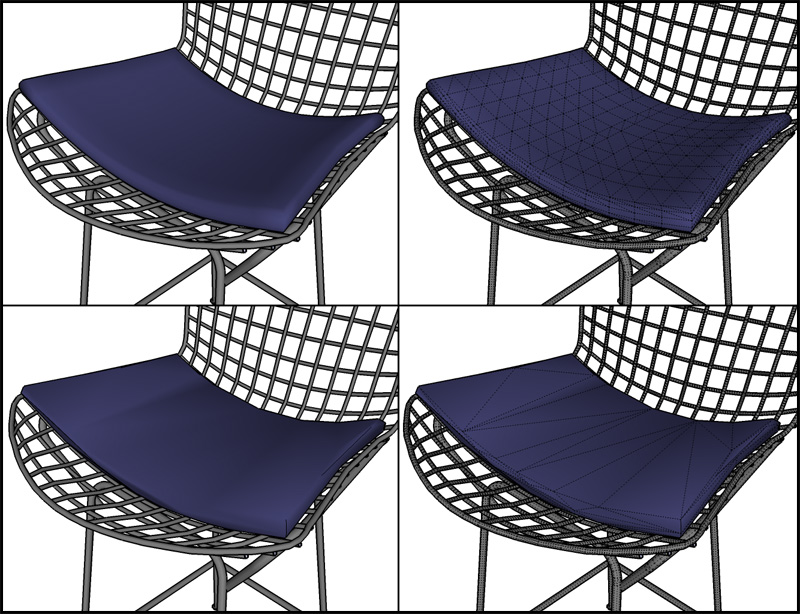
                  chairs.jpg

                  Jon
                  KT Team member

                  1 條回覆 最後回覆 回覆 引用 0
                  • soloS 離線
                    solo
                    最後由 編輯

                    Dang! another excellent addition.


                    http://img296.imageshack.us/img296/3735/blenderlm6.jpg

                    Thanks mate.

                    We gonna have to start naming this software 'Whaats-up' soon.

                    http://www.solos-art.com

                    If you see a toilet in your dreams do not use it.

                    1 條回覆 最後回覆 回覆 引用 0
                    • I 離線
                      ilay7k
                      最後由 編輯

                      Thank you!

                      Pete, you need assembly sketchup - whaat edition 😄... don't forget other talented ruby-writers of our community 😉...

                      1 條回覆 最後回覆 回覆 引用 0
                      • jujuJ 離線
                        juju
                        最後由 編輯

                        Sweet man, thanks!

                        Save the Earth, it's the only planet with chocolate.

                        1 條回覆 最後回覆 回覆 引用 0
                        • K 離線
                          kwistenbiebel
                          最後由 編輯

                          Thank you Whaat.
                          A great contribution again to the SU community!
                          👍 👍 👍

                          1 條回覆 最後回覆 回覆 引用 0
                          • Mike LuceyM 離線
                            Mike Lucey
                            最後由 編輯

                            Thanks Dale,

                            Again a most generous ccontribution that is truly appreciated by the Community.

                            Mike

                            PS: Will you be at 3DBC, I'd like to buy you a drink!

                            Support us so we can support you! Upgrade to Premium Membership!

                            1 條回覆 最後回覆 回覆 引用 0
                            • J 離線
                              johnsenior1973
                              最後由 編輯

                              I've only done some quick tests, but so far I'm struggling to find any reason for this plugin. Following on from Solo, I pulled a model of Bender from the 3DW. I tried a poly reduction of 30% on it, it messed up the model slightly and actually increased the file size from 1500 kb to 1639 kb.

                              1 條回覆 最後回覆 回覆 引用 0
                              • R 離線
                                remus
                                最後由 編輯

                                File size isnt really very important unless your creating absolutely monstorous files. What does matter however is face count. You can have a 100mb file open easily if its got 50,000 faces, but if its got more than 200,000 faces your in for a hard time.

                                So basically face count is more important than file size pretty much all the time.

                                http://remusrendering.wordpress.com/

                                1 條回覆 最後回覆 回覆 引用 0
                                • I 離線
                                  ilay7k
                                  最後由 編輯

                                  ehhh...can you(Whaat) add real-time trigger as at standard smoothing tool?

                                  1 條回覆 最後回覆 回覆 引用 0
                                  • ely862meE 離線
                                    ely862me
                                    最後由 編輯

                                    i don t know how this should woork but for me it doesn t
                                    first i create a shape and when i clicked polyreduce it cuted half of the polys
                                    then i take a hood of a car and i clicked polyreduce and it start counting something and doing nothing it says like that : colapsed (i wait until)2 milion from 98 edges

                                    Elisei (sketchupper)


                                    Before no life was done on Earth it was THE LIFE ITSELF...GOD
                                    Come and See EliseiDesign

                                    1 條回覆 最後回覆 回覆 引用 0
                                    • R 離線
                                      remus
                                      最後由 編輯

                                      No need to boast coen 😛

                                      http://remusrendering.wordpress.com/

                                      1 條回覆 最後回覆 回覆 引用 0
                                      • W 離線
                                        Whaat
                                        最後由 編輯

                                        @solo said:

                                        We gonna have to start naming this software 'Whaats-up' soon.

                                        😆 😆

                                        SketchUp Plugins for Professionals

                                        1 條回覆 最後回覆 回覆 引用 0
                                        • H 離線
                                          human
                                          最後由 編輯

                                          Wow, nice plugin. 👍 compliments Subdivide and Smooth perfectly. Strange thing is...
                                          Say i create a sphere. i right click and choose polyreduce. and it works, but i cant select all the faces with one click. now there are lots of faces that make up the poly-reduced sphere. 😞 Hmmmmmm...

                                          1 條回覆 最後回覆 回覆 引用 0
                                          • W 離線
                                            Whaat
                                            最後由 編輯

                                            @human said:

                                            but i cant select all the faces with one click. now there are lots of faces that make up the poly-reduced sphere. 😞 Hmmmmmm...

                                            What do you mean by 'can't select all the faces with one click' 😕

                                            Maybe you can post a screenshot of the reduced sphere??

                                            SketchUp Plugins for Professionals

                                            1 條回覆 最後回覆 回覆 引用 0
                                            • 1
                                            • 2
                                            • 3
                                            • 4
                                            • 1 / 4
                                            • 第一個貼文
                                              最後的貼文
                                            Buy SketchPlus
                                            Buy SUbD
                                            Buy WrapR
                                            Buy eBook
                                            Buy Modelur
                                            Buy Vertex Tools
                                            Buy SketchCuisine
                                            Buy FormFonts

                                            Advertisement