FFmpeg: Instructions for download and Install
-
Hi I had a similar issue - tried to generate a video, and it didn't work. See the log:
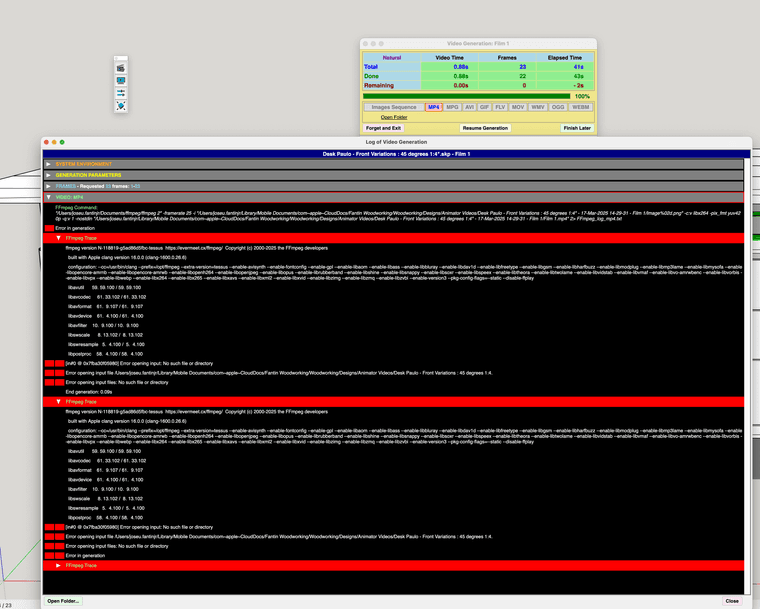
-
Is there a double quote (after 1:4) in the name of the folder where Animator.
Also, if you post a trace, please use the txt file (_EventLog_video_generation.txt). This is easier to read than a screen capture.
-
ffmpeg -framerate 30 -i ~/Desktop/test/image%03d.png -c:v libx264 -r 30 -pix_fmt yuv420p ~/Desktop/output.mp4
where do I have to insert? -
Hello, FFmpeg continues to generate 25 fps videos (mp4) 1920x1080 despite of selecting different framerates. please help
-
@Scit @fredo6 I see the same issue - all MP4 videos seem to be encoded as 25FPS regardless of what is set in the Animator clip creation UI. I am using a Mac Studio with macOS 26.6.2. I am not sure what version of ffmpeg I have; I think it was "inherited" from my previous Mac when I installed this Mac Studio and migrated the contents from my prior Mac.
Edited to add: I just updated ffmpeg to a build from a few days ago (downloaded from https://ffmpeg.martin-riedl.de/) and there is no difference. MP4 clips are still encoded as 25FPS even when, for example, 30FPS is selected in the Animator GUI.
This is causing some grief in my video editor (iMovie), complicating how I time some voice-over with the video content, and also with how I have the editor dissolve from one clip to another when frame-by-frame synchronization is important.
-
Here is an update on the issue of MP4 clips always being encoded by Animator at 25 FPS regardless of what frame rate was requested in the Animator UI dialog box. I found a way on-line to use ffmpeg to create a copy of an MP4 clip file with a different encoded frame rate. In this example, I wanted to create a clip at 30 FPS. I used Animator to create a clip file called Clip.mp4 of an animation that is 10 seconds long (according to the Animator clip editor timeline); I requested 30 FPS in the Animator UI which means 300 frames in the clip. Animator created 300 frames as expected, but tagged the resulting Clip.mp4 MP4 file as 25 FPS. As a result, when the 300 frames in clip.mp4 are played back on the computer the clip lasts 12 seconds (300 frames at 25 FPS yields 12 seconds). This is not wanted; I intended the clip to play in 10 seconds at 30 FPS. Here is an ffmpeg command that will adjust the frame rate of a new copy of the clip (named Clip-30fps.mp4) to be 30 FPS:
ffmpeg -itsscale 0.83333 -i Clip.mp4 -map 0 -c copy Clip-30fps.mp4
This basic command will work to make a new copy of any clip (substituting the clip filenames as desired) to be 30 FPS, when the original clip was encoded at 25 FPS. The key switch in the command is "-itsscale 0.83333"; the number 0.83333 is the approximate ratio between 25 FPS and 30 FPS.

Hello! It looks like you're interested in this conversation, but you don't have an account yet.
Getting fed up of having to scroll through the same posts each visit? When you register for an account, you'll always come back to exactly where you were before, and choose to be notified of new replies (either via email, or push notification). You'll also be able to save bookmarks and upvote posts to show your appreciation to other community members.
With your input, this post could be even better 💗
Register Login


Advertisement