sketchucation logo sketchucation
    • Login
    Oops, your profile's looking a bit empty! To help us tailor your experience, please fill in key details like your SketchUp version, skill level, operating system, and more. Update and save your info on your profile page today!
    ⚠️ Important | Libfredo 15.6b introduces important bugfixes for Fredo's Extensions Update

    FFmpeg: Instructions for download and Install

    Scheduled Pinned Locked Moved Animator Beta
    renderpluginsextensions
    45 Posts 23 Posters 114.6k Views 23 Watching
    Loading More Posts
    • Oldest to Newest
    • Newest to Oldest
    • Most Votes
    Reply
    • Reply as topic
    Log in to reply
    This topic has been deleted. Only users with topic management privileges can see it.
    • B Offline
      borisabdul
      last edited by

      after the generation, I have this dialog only , then save and exit . Nothing appears in the Animators video , just empty folder .


      Screenshot 2023-09-16 at 23.40.36.png

      1 Reply Last reply Reply Quote 0
      • D Offline
        DannyLarsen Newcomers @quillpro
        last edited by

        @quillpro said in FFmpeg: Instructions for download and Install:

        It does not appear in the Control Panel nor does it ask for permission. I was able to fix the issue by using the macOS terminal to make FFmpeg executable.

        shell ~ % ls -lU /Applications/ffmpeg 
        -rw-rw-r--@ 1 username staff  78461292 Aug 31  2020 /Applications/ffmpeg
        
        shell ~ % chmod u=rwx /Applications/ffmpeg 
        
        shell ~ % ls -lU /Applications/ffmpeg      
        -rwxrw-r--@ 1 username  staff  78461292 Aug 31  2020 /Applications/ffmpeg
        

        The Generation of Video interface is still buggy but it does now generate the video files.

        Hi all, New user but have been enjoying the helpful information found here!

        I too have been having a couple struggles getting the great ANIMATOR app from Fredo6 to generate a video file on my MacBook Pro. I did see that in the automatically generated folder "Animator Videos" a sting of individual images but also a .txt file that stated "permission denied". I thought it sounded like I should try the solution from quillpro to let the Mac OS open and run the file. I think quillpro is most likely better at command line instructions than me - but I couldn't get his Command Lines to work for me.

        What I found online and did the trick for me was the following:

        To change permissions in Terminal, do the following:
        Type this command followed by a space: chmod 755.
        Drag the file "ffmpeg" into the Terminal window.
        Press Return.

        Permissions for the file or folder will be changed to read, write, and execute.

        When I did this, the icon for ffmpeg changed from a white piece of paper with the top right corner folded over to a black colored icon with the words "exec" in green written on it.

        I haven't tried all the different available formats but it made a .mov file that played in QuickTime with no problems.

        Hopefully this helps someone!

        1 Reply Last reply Reply Quote 0
        • B Offline
          barlabumbia
          last edited by

          Hello everyone! I have a problem with generating video on Mac OS. I installed the latest version of ffmpeg and placed the downloaded file in the application folder and pointed to it in the video export window. Available video formats immediately appeared in this window, I select the desired one and start exporting, when the indicator reaches 100%, but the video is not created (a folder with .png and .txt files appears. Please help me solve this issue, I really need to make a video animation! Thank you very much!
          Снимок экрана 2025-03-07 в 23.33.31.png
          Снимок экрана 2025-03-07 в 23.33.20.png
          Снимок экрана 2025-03-07 в 23.50.09.png

          1 Reply Last reply Reply Quote 0
          • fredo6F Offline
            fredo6
            last edited by

            It seems that the FFmpeg program is not launching correctly, probably because of security restrictions that you have to configure (since you downloaded it from Internet).

            Can you open the Ruby Console, copy/paste the following command and type Enter.

            Kernel.system ""#{Traductor::FFmpeg.instantiate.program_locate}" -h"

            This invoke FFmpeg help. The return value should be true.

            If you get false, I would have a look at the previous post about giving permissions to FFmpeg.

            1 Reply Last reply Reply Quote 0
            • B Offline
              barlabumbia
              last edited by Rich O Brien

              Thanks for trying) None of the above worked) But I am very grateful that you answered me so quickly, because it is so important to support each other) I will briefly share my story. I tried all possible methods that can only be found on the Internet, but nothing worked, although I managed to install ffmpeg without lipsodium and everything that is downloaded further. Chat GPT helped me, he wrote me the exact command for the terminal and I converted my first video! After that, somehow everything started working in ANIMATOR! Thanks to FREDO for his work and gifts! If anyone needs the command for the terminal, I will leave it here:

              ffmpeg -framerate 30 -i ~/Desktop/test/image%03d.png -c:v libx264 -r 30 -pix_fmt yuv420p ~/Desktop/output.mp4
              
              1 Reply Last reply Reply Quote 1
              • F Offline
                Fantin75 Newcomers
                last edited by

                This post is deleted!
                1 Reply Last reply Reply Quote 0
                • F Offline
                  Fantin75 Newcomers
                  last edited by

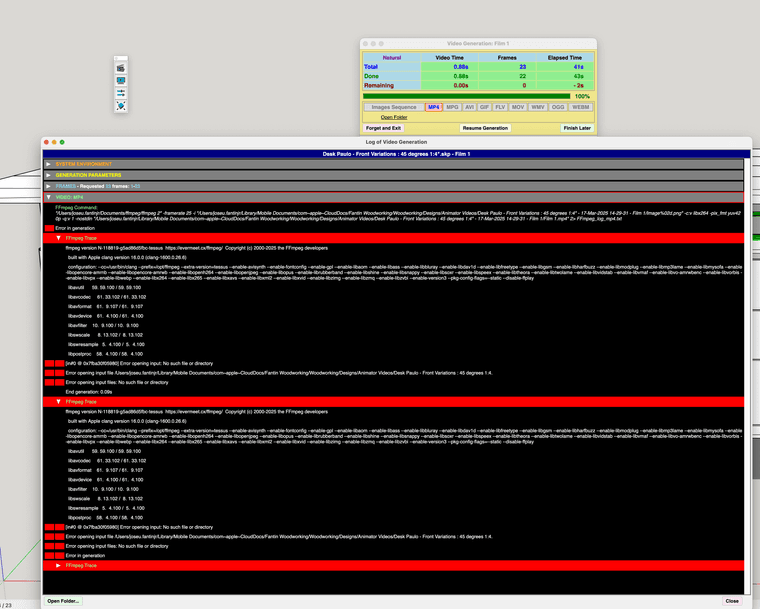
                  Hi I had a similar issue - tried to generate a video, and it didn't work. See the log:
                  Screenshot 2025-03-17 at 2.31.08 PM.png

                  1 Reply Last reply Reply Quote 0
                  • fredo6F Offline
                    fredo6
                    last edited by

                    Is there a double quote (after 1:4) in the name of the folder where Animator.

                    Also, if you post a trace, please use the txt file (_EventLog_video_generation.txt). This is easier to read than a screen capture.

                    1 Reply Last reply Reply Quote 0
                    • D Offline
                      DidiLenz Newcomers
                      last edited by

                      ffmpeg -framerate 30 -i ~/Desktop/test/image%03d.png -c:v libx264 -r 30 -pix_fmt yuv420p ~/Desktop/output.mp4
                      where do I have to insert?

                      1 Reply Last reply Reply Quote 0
                      • S Offline
                        Scit
                        last edited by

                        Hello, FFmpeg continues to generate 25 fps videos (mp4) 1920x1080 despite of selecting different framerates. please help

                        1 Reply Last reply Reply Quote 0
                        • F Offline
                          Fantin75 Newcomers
                          last edited by

                          This post is deleted!
                          1 Reply Last reply Reply Quote 0
                          • 1
                          • 2
                          • 3
                          • 3 / 3
                          • First post
                            Last post
                          Buy SketchPlus
                          Buy SUbD
                          Buy WrapR
                          Buy eBook
                          Buy Modelur
                          Buy Vertex Tools
                          Buy SketchCuisine
                          Buy FormFonts

                          Advertisement
