Scene animation with Animator
-
OK, will have to”mess around”.
I think Animator is a very strong tool but needs some documentation so that people would/could use it even more.
-
@rich-o-brien and @fredo6 I would like to suggest that we set up a new thread category for Animator called Animator Tips and Tricks that hopefully would give Animator some more attention. If you look at the image below, I would then like to suggest that you also set up some subcategories as outlined in the image.
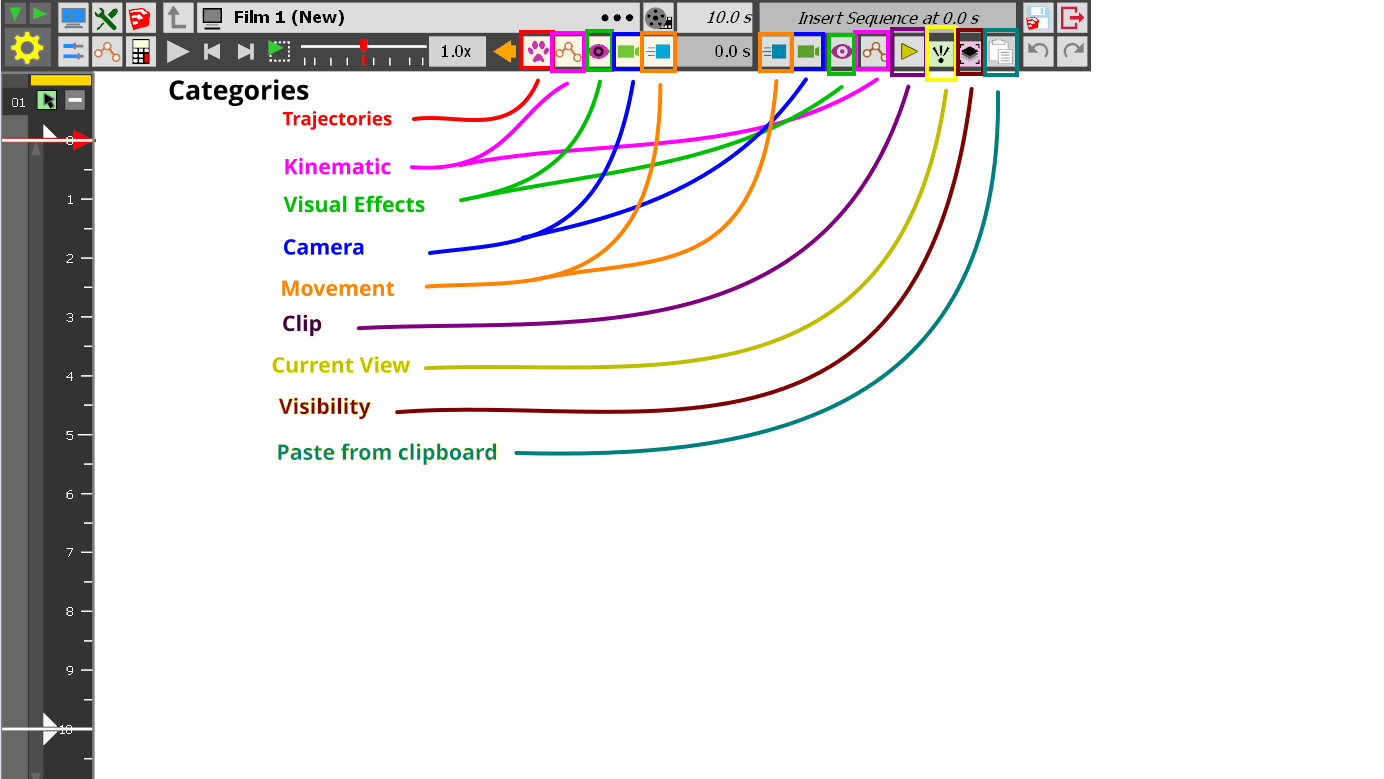
Hope you guys do not think I am crazy. As I learn more, I think that Animator has a lot of power, but people do not know how to take advantage of it .
-
There are videos and there is already a Tip and Trick thread for Animator.
My plan is to rewrite the UI of Animator, but only once the Mac version of Sketchup is migrated to Qt and share the same code as on Windows. I will lkely use HTML dialogs to have a better positioning of the UI elements in the workspace (especially if you have multiple screens) and a more guided interface.
-
@fredo6 said in Scene animation with Animator:
There are videos and there is already a Tip and Trick thread for Animator.
Yes, I know there are videos (and I have watched several) but as you can tell from this thread, there are times when I have problems finding answers about some tools. I did not find the Tip and Trick thread for Animator. Can you give me a link?
My plan is to rewrite the UI of Animator, but only once the Mac version of Sketchup is migrated to Qt and share the same code as on Windows. I will lkely use HTML dialogs to have a better positioning of the UI elements in the workspace (especially if you have multiple screens) and a more guided interface.
Looking forward to this.

-
@ntxdave said in Scene animation with Animator:
Can you give me a link?
It is pinned to this suforum.

Animator Beta
General discussion about Animator for SketchUp
sketchucation (community.sketchucation.com)
-
I am suddenly getting a message that my license expired on 23 Jan 2026 and I do not know how to update/get it working again. Right now I cannot use Animator.
-
Are your extensions up to date?
-
Yes. - according to the SketchUcation manager.

I just sent @fredo6 my email address so he can send me some license information
-
OK guys, I think I have a model here that I think shows you can have something like I talked about before. Although there are some things I need to update (in particular the camera position/distance) on the Animation scene the model has 3 basic scenes. An Introduction scene (which is what I will use at the beginning of some future models), an Animation scene (which is the "main part of the model") where I will do the main features of presenting the model, and a Conclusion scene (which is where I will present some information like - in this case thank the donor of the plaques I modeled).
I hope this might at least get people to think about the wide range that Animator has and how it can be used (IMO) to present models.
Here is the "rough" model" 3 Scene Animator.skp
Once again, I appreciate any comments you might have.
-
OK - this was the wrong version of the file.
-
It's obviously a personal project. Well done persevering.
Now you get to polish and improve while adding to your knowledge.
-
Somehow several updates did not get included in the file I posted before. I am going to try to update the file and post it again with the additional things I have been working on. What I am doing with this (at this point) is not the final version I have in mind but rather an example of where you can go with Animator. Hope to be able to include the updates within the next couple of days. I spent a good amount of time yesterday and do not know what happened to my updates.
I do appreciate your feedback though. I have leaned some "shortcuts" during the process yesterday that really came/come in handy.
-
OK, I think I have fixed the problems I had with the file I uploaded before. But now I have a new problem. I fixed things in the file (as I just said) however when I click on the button to generate a video, nothing happens. I am including a copy of the file that I hope someone can generate a video for me and maybe someone else can tell me what has happened. I have not had a problem generating a video before.
-
I am continuing to have problems. It seems like some files will allow me to generate a movie and some will not.
Hers is a file that "seems" to be OK and in Animator I can see everything, but when I try to generate the video, nothing happens.
3 Scene Animator.skp (This is a version that I updated today)BTW: I tried both with clips for each section and without them and get the same result. Everything plays fine in Animator, but it will not let me generate a video.
I am beginning to wonder if I should just give up.
-
Top Part of Ruby Console:
#<NoMethodError: undefined method
custom_convert_id' for Traductor::ChromiumWdlg:Class> c:/users/doppy/appdata/roaming/sketchup/sketchup 2026/sketchup/plugins/fredo6_!libfredo6/body_lib6weblist.rbe:159:incid'
c:/users/doppy/appdata/roaming/sketchup/sketchup 2026/sketchup/plugins/fredo6_!libfredo6/body_lib6weblist.rbe:44:ininitialize__' c:/users/doppy/appdata/roaming/sketchup/sketchup 2026/sketchup/plugins/fredo6_!libfredo6/lib6weblist.rbe:33:ininitialize'
c:/users/doppy/appdata/roaming/sketchup/sketchup 2026/sketchup/plugins/fredo6_animator/animatorvideomanager.rbe:1666:innew' c:/users/doppy/appdata/roaming/sketchup/sketchup 2026/sketchup/plugins/fredo6_animator/animatorvideomanager.rbe:1666:injob_dialog_select_repair'
c:/users/doppy/appdata/roaming/sketchup/sketchup 2026/sketchup/plugins/fredo6_animator/animatorvideomanager.rbe:1641:injob_detect_repairing' c:/users/doppy/appdata/roaming/sketchup/sketchup 2026/sketchup/plugins/fredo6_animator/animatortool.rbe:2293:inmovie_clip_generation'
c:/users/doppy/appdata/roaming/sketchup/sketchup 2026/sketchup/plugins/fredo6_animator/animatorpalette.rbe:820:inblock in palette_clip_name_duration_video' c:/users/doppy/appdata/roaming/sketchup/sketchup 2026/sketchup/plugins/fredo6_!libfredo6/body_lib6palette.rbe:4100:inexecute_button'
c:/users/doppy/appdata/roaming/sketchup/sketchup 2026/sketchup/plugins/fredo6_!libfredo6/body_lib6palette.rbe:3854:inonLButtonUp' c:/users/doppy/appdata/roaming/sketchup/sketchup 2026/sketchup/plugins/fredo6_!libfredo6/lib6palette.rbe:103:inonLButtonUp'
c:/users/doppy/appdata/roaming/sketchup/sketchup 2026/sketchup/plugins/fredo6_animator/animatortool.rbe:1293:in `onLButtonUp'Nothing in the bottom part of the Ruby Console.
I hope this helps.
-
I found the issue. The error should happen if you open a model and go immediately to generate the video. If you open other dialogs of my plugins., it should work fine
It should go better with LibFredo6 v15.8d, just released
-
@fredo6 said in Scene animation with Animator:
I found the issue. The error should happen if you open a model and go immediately to generate the video. If you open other dialogs of my plugins., it should work fine
It should go better with LibFredo6 v15.8d, just released
Thank you so much.
I was about to give up but after updating to the LibFredo6 v15.8d I was able to generate the video.

In fact, I was also able to create a 2nd version of the model with everything done in clips. Again So, here are some videos I was able to create with the 2 versions of the file (one without clips and the other with clips).
Without clips:
3 Scene Animator.mp4

With Clips
3 Scene Animation With Clips.mp4

I hope this shows that you can have multiple animated scenes in a SU model and use Animator to "show them off".
-
@rich-o-brien Thanks for the upvote Rich.
Updated on 02/03/2026
My whole purpose here was to demonstrate that you can have multiple scenes with animations and information that can be displayed Animator. The one I displayed is not what I want as a final product was just something to show how you can use the features of Animator (like introduction, animation(s), and conclusion) without having to have an external video editor.
Throughout this exercise I think I have learned a lot about Animator like:
-
How to combine items to create a “clip”
-
How to “explode” a clip to edit items within the clip
-
How to create and edit Layer visibility controls. As an example this can be used to I used this in the “Introduction” to control the display of line text one line at a time.
-
How to create/capture and edit (at least to some level) camera settings/positions.
-
I also figured how to take advantage of camera feature, along with the layer visibility controls, to “somewhat” control the transition between scenes.
-
I think I also learned some things about using the movement tools.
Things I need to learn more about (IMO):
-
How to better control the transition from one scene or clip to another one. I think there are options for this but I do not know how/have not figured out. I would like to “fade” between them.
-
I have not experimented with the “translation” tool/feature I would like to be able to use something like section cuts to control the exposure of items or text.
I hope all of this makes sense. The more I learn about Animator the better I like it and would like to help promote it’s use.
-
-
I am having some problems trying to control/set cameras when I have multiple scenes. In the attached file, I have a camera position for the Introduction scene, a second one for the Animation scene, and a third one for the Conclusion scene. I have tried capturing the camera setting for each of the scenes and adding them to the animation clip in the appropriate scene. What I am experiencing is that I set/capture the camera position in one of the scenes it gets carried over/applied to each of the other scenes. I hope someone can look at the file and tell me how to resolve the issue. I want the scene in the clip to match the scene if you click on the scene name. Hope that makes sense to anyone who looks at the file.
OK, file is too large to upload.
-
After thinking about this some more, I think I understand what my problem is and will try to fix it (hopefully today). If the problem turns out to be what I think it might be, it is truly my fault.
-
 N ntxdave referenced this topic on
-
N ntxdave referenced this topic on
-
N ntxdave referenced this topic on



Hello! It looks like you're interested in this conversation, but you don't have an account yet.
Getting fed up of having to scroll through the same posts each visit? When you register for an account, you'll always come back to exactly where you were before, and choose to be notified of new replies (either via email, or push notification). You'll also be able to save bookmarks and upvote posts to show your appreciation to other community members.
With your input, this post could be even better 💗
Register Login


Advertisement