FluidImporter free .obj importer Beta 1.0.5 Updated
-
Hi, I want to uninstall the FluidImporter,
but I use revoUninstaller to do the job,
but revo is make a mistake, it even bold the vray registry to be deleted so i skip the registry deletion and i found this to verify if i can delete these 3 files:
are those fluidimporter files? is it save if I delete them?
coz fluidimporter is crashes with my vray so vray wont render any image from imported object..
-
Do not remove any of the other Importer's .dll files.
If you have you need to reinstall the affected products...To stop the Fluid-OBJimporter loading simply run its Uninstaller and it will be removed...
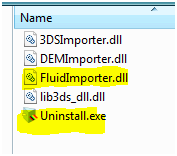
-
I have three .OBJ files I'm trying to import. The largest one imports without crashing, but half of all the facets are not filled in, so I can't really change the material.
The other two files (one without an MTL) crash as soon about 2 seconds after starting to parse file.
Here are the files that crash totally. (One isn't zipped...no MTL).
Thanks.
-
-
Try checking that the units size is correct - very small facets cannot be formed in SketchUp.
Some app's make OBJ files in odd ways...
So if that doesn't work try importing it into another app - like Blender: if it is OK it that app, then re-export from that - the new OBJ format might be made more compatible with this SketchUp's importer ? -
@thomthom said:
I'm getting crashes when I try to import an .obj file I got. (120MB)
I've tried different options - triangulate on/off, material on/off - but it bugsplats every time. Memory usage of Sketchup.exe doesn't exceed 300MB.Any ideas?
I am having this very same issue.
-
guys have you tried installing this in su 2013?
 I tried but I can't see it in file menu, wondering if anyone here installed it successfully inside 2013
 -
You haven't completed your User-Profile... OS, version etc ??
Help us to help you...It is Win 32bit, by default it tries to install into the SketchUp 8 Importers folder, you can redirect it to SketchUp 2013, but when it installs the dll it doesn't load as the OBJ importer in the Import list...
I suspect that the author will need to make a v2013 compatible version...
Perhaps if you PM him he'll respond...
-
thanks Tig for the reply. yah, sorry about my profile, I will complete them now.
Hope the author of this plugin release some update for 2013. I think this is the best importer for obj in sketchup
thanks Tig
-
I've been in touch with the author...
He will look at a v2013 compliant version...
But don't hold your breath... -
I now always get bugsplat when using the obj importer...
I am on Win7Pro64 SU7
Anyone with the same problem? -
hi, there is a problem on the official page of http://www.fluidray.com/ (Internal Server Error)
an its imposible to download the fluidimporter win 32
please can someone share
thanks in advance -
thanks, i have now the fluidimporter from direct download (11,7MB)
I try how it works -
Hi,
We just released FluidImporter 2.0 for SketchUp 2013. We decided to make it available for a small fee to help support the development. You can download the 30-Day trial (full-featured) in the download page: http://www.fluidray.com/downloads -
This is what I was looking for !!! thanks TIG and fluid you are my hero !

-
HELP WANTED - OBJ IMPORT OPTION DOES NOT APPEAR
I am a happy SketchUp user (version 8.0.16846), mostly for hobby purposes. I used the FluidImporter (v 1.0.5 32 bit) to import OBJ files into SketchUp with no problems at all for more than one year. I am running Win XP pro SP3 32 bit.Last week I format my HD and start installing again all programs - no problem so far. After installing the SketchUp (version 8.0.16846) & FluidImporter (v 1.0.5 32 bit) which I used to work for long time without problems, I found that I cannot import OBJ files. Actually, under the "Import" table, the "OBJ files" options is now missing (screenshots follwoing). The FluidImporter seems to be installed normaly, the files "FluidImporter.dll" and "Uninstall.exe" seems to be OK under C:\Program Files\Google\Google SketchUp 8\Importers folder (exactly as before HD format and Win XP new instalation)... but the OBJ importing option is missing!
As said before, I am running a SketchUp 8.0.16846 with FluidImporter 1.0.5 (Win XP 32 bit version downloaded from http://www.fluidray.com/downloads link) on a Win XP SP3. The most weird is that I installed the exact same setup files as before HD format and new Win XP, so it should work but unfortunatelly it does not!
Any ideas or advices please?


-
@mikaelo said:
HELP WANTED - OBJ IMPORT OPTION DOES NOT APPEAR
Any ideas or advices please?
Anybody? Come ooon people. Am I the only one person facing this problem? There MUST be a way! OBJ files importing option is still not available and I have no idea what should be done to make it work......ANY idea, ANY advice could be usefull
-
Have you been in touch with the author ?
It might be an XP issue ??
If all else fails my slower Ruby based OBJimporter will work ? -
@tig said:
Have you been in touch with the author ?
Already did that, few days ago. No answer yet.@tig said:
It might be an XP issue ??
Could be, could be not. I have an old laptop, operating with same XP pro SP3 version, same SketchUp version 8.0.15158 and same FluidImporter version 1.0.5 and the OBJ files can be imported. You might ask me why I do not use this old laptop, to do all the import hard work to translate OBJ into SKP files. Well, its an old laptop as said before, not capable for hard work and able to handle only small (not more than 1-2 Mb) OBJ files without crashing Sketchup.@tig said:
If all else fails my slower Ruby based OBJimporter will work ?
I guess you mean THIS one. Right? Already download it and seems to be the "obj_importer_v2.2.rbz" file (5.2 kb). Placed it into "Plugins" folder, but nothing happened. Should I place it into another folder? On the other hand, I ve alrady tried Jim Foltz's "obj_import.rb" file, which seems to give me an option to inport an OBJ file but it does not work (Sketchup does not respond (even if I tried small files 0.5-1 Mb)...The last few days I have this problem, I formated the hd 5 times, install everything again another 5 times, do everything by the book as I did dozens of times all these years before when need to re-fresh my Windows, tried different versions of Sketchup (v 7.0.08657 / 7.0.10247 / 7.1.04871 / 7.1.06087 / 7.1.06860 / 8.0.03117 / 8.0.04811 / 8.0.11752 / 8.0.14346 / 8.0.15158) tried to install again and again the FluidImporter 1.0.5, but nothing happens...!!! No OBJ file import option appeared into menu.
-
I don't know about the rest of it but the .rbz file is an installation file used to install extension from within sketchup. If you go to Window/Preferences/Extensions tab and click install extension you can navigate to the file and install it that way.
If you don't have a new enough version of SU the install extension button won't be there, either update SU or install the .rb manually. To get the .rb from the .rbz rename it to .zip and you'll find the .rb inside and you can extract it to your plugins folder.


Hello! It looks like you're interested in this conversation, but you don't have an account yet.
Getting fed up of having to scroll through the same posts each visit? When you register for an account, you'll always come back to exactly where you were before, and choose to be notified of new replies (either via email, or push notification). You'll also be able to save bookmarks and upvote posts to show your appreciation to other community members.
With your input, this post could be even better 💗
Register Login


Advertisement