Problem with SU
-
Recently, I've encountered very annoying problems with my SU and can't think what it might be - can't think of any new plugins I've installed which could have affected it.
Anyway, my SU is extremely slow upon loading and whenever I alt+tab it back into the SU, it takes just as long to wake up. All of the dialog boxes flash/blink/dance and SU minimises itself before (usually) settling down and doing it again after the next alt+tab.
Can anyone shed any light on this matter?
Thanks.
-
Is this at work or home?
For someone to help it might be useful if you posted your machine specs, OS and graphics card details for the problem machine.
-
I've had this problem as well. In my case it turned out that the registry settings for my toolbars had been messed up so there was thousands of toolbar registry entries - all invalid. Just junk data.
Are you familiar with the registry?
If you are, can you have a look in the registry and see how many Toolbar related entries you got?
HKEY_CURRENT_USER\Software\Google\SketchUp8\ -
@arcad-uk said:
Is this at work or home?
For someone to help it might be useful if you posted your machine specs, OS and graphics card details for the problem machine.
This is at work, sorry.

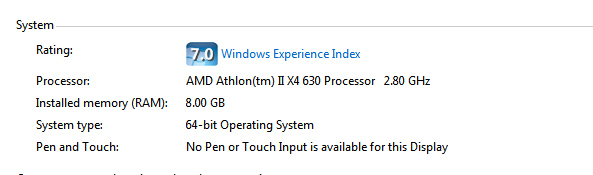
-
@thomthom said:
I've had this problem as well. In my case it turned out that the registry settings for my toolbars had been messed up so there was thousands of toolbar registry entries - all invalid. Just junk data.
Are you familiar with the registry?
If you are, can you have a look in the registry and see how many Toolbar related entries you got?
HKEY_CURRENT_USER\Software\Google\SketchUp8\Not really, no.
 Is it tricky to view?
 -
Here's the thread on my issue: http://forums.sketchucation.com/viewtopic.php?f=180&t=23343
If you're not comfortable with the registry I can't really recommend you mess about with it. You can seriously mess up the system if you don't know exactly where you are.
You don't have anyone who might be more familiar? IT manager?
-
This happens to me also but i aint messing in there. Not unless my hand is held
-
Just had a look at the registry - not touched anything though! ... And as you say, there are hundreds (thousands) of toolbar entries ...
Toolbars-BarXXXX ToolbarsUser-BarXXXX ToolbarsUserCustom-BarXXXXP.s. I trust myself more than the IT manager to be pefectly honest!
-
What's the highest number for ToolbarsUser-BarXXXX that you find?
-
Use at Own Risk!!!
This is a couple of batch commands I use to clear the toolbar registry. It has worked for me - but I put a word of caution anyway; use at own risk.Activate the one corresponding to your SketchUp version.
Bat files to reset SketchUp 7 & 8 toolbar registry items. USE AT OWN RISK!!!
-
-
@thomthom said:
What's the highest number for ToolbarsUser-BarXXXX that you find?
ToolbarsUser-Bar
1852is the highest I can find.Thanks for helping me. I'm going to back up the registry (via CCleaner) and give them batch commands a whirl. Thanks again.
-
Thanks Thom, it appears better than it was. There were 3990 toolbars in registry that the batch command removed!
It still seems to be unstable though. Especially if I have two instances of SU running - still keeps minimising when it's thinking and saying 'not responding'.
-
Hmmm, all those toolbar instances reappeared in the regstry after a re-boot.

-
I think you'll find that a lot of them are under 'Toolbar-' with the same 'BarID'... and the bat file doesn't do anything to those... I suspect these are to do with saving the toolbar settings in v8... I have in the past saved the registry [.reg] - keeping a backup copy - and manually edited the file to remove such duplicate entries [which can run into hundreds]... then erased the whole registry and reinstalled it by running the edited .reg... This combined with thomthom's bat [I have a similar cmd file] will purge the registry of all of this unneeded toolbar dross and it will speed up the launch of a SKP. However, don't try manually editing a reg file unless you are sure you won't screw up - AND keep a backup copy of the original for when you do !!

-
Thomthom, does your BAT file only delete duplicate toolbar registry entries or does it clear them all?
-
It removes all of the user/custom toolbar entries so you have a blank slate to restart from.
However, as I explained there can be a lot of duplicated toolbar- entries too - I manually remove those... -
I can't even find this place. I end up opening my browser

I know if I mess around I'll break it so I'll stock with the flickering

-
Thanks TIG.
-
I've only run into this while debugging plugin development where I experienced plugin errors upon startup that messed up the loading of toolbars and caused lots of stale data.
It's very odd that all your entries comes back...






Hello! It looks like you're interested in this conversation, but you don't have an account yet.
Getting fed up of having to scroll through the same posts each visit? When you register for an account, you'll always come back to exactly where you were before, and choose to be notified of new replies (either via email, or push notification). You'll also be able to save bookmarks and upvote posts to show your appreciation to other community members.
With your input, this post could be even better 💗
Register Login


Advertisement