Installer File says: VRayForSketchUp-1.48.66-windows-installer
Thanks again for the help.
Installer File says: VRayForSketchUp-1.48.66-windows-installer
Thanks again for the help.
Is there a way to get the first error message I mentioned to go away?
I'm also getting a lot of bug splats when I'm trying to preview materials, is that typical?
I'm in Raleigh/Durham and we get all of the same systems but live about 2 hours south of the freezing line in VA. So we've gotten all of the precipitation--but NO SNOW!! Quit hogging it up there and send some down to the Triangle, PLEASE!
So I downloaded the new vray today, and it appeared to recognize my old license. Basically I was able to download successfully and install without putting any info in. I have already encountered a couple of errors though. First, I get this error every time I open sketchup:
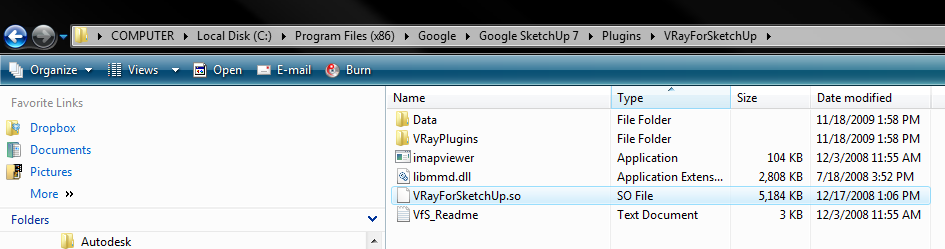
Error Loading File VRayForSketchup.rb
127: The specified procedure could not be found.
There appear to be several small windows that pop up quickly and disappear prior to this error message, and then SU opens and vray appears to have been installed correctly. Any ideas?? I do have a file with that name in that location, so I don't understand the issue.
I'm actually in the middle of a project so I can't really afford any surprises (I should have waited to update, but I couldn't wait!).
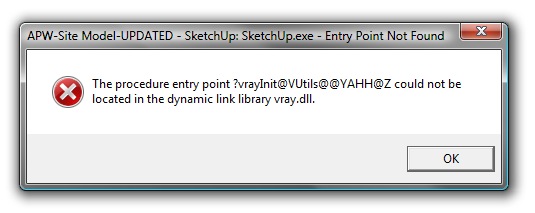
I also got another error message, but I'm not sure what it means. Did something go wrong with the install, or is this something I'm going to have to worry about going forward? I'm a little worried
Thanks for getting back to me Tom. The step I was not aware of is that I have to be facing front when I make the component. Thank you very much.
I think that this plugin is useful, I just need to understand the workflow and the steps that come before it. So I'll ask again, what exactly is the process for correctly setting up images for use as faceme objects in SU?
I'm not sure I follow. So if I have an image of a tree (.png for example) what would the process be to use that image as a faceme object in SU? When I try to do this the component doesn't actually face the camera, it's skewed off at some funny angle, any idea why that is?
possibly post it using humyo?
I'm not sure if this is the best place to pose this question, but I think it may be relevant. If not, sorry.
I'm in the process of doing some renders which may be akin to Earthmover's "couple new pool renders" thread. My question is regarding the actual process of bringing in your own 2D image files in to SU and getting them to face the camera. The cadplants.com examples are great, I would love to understand that workflow to produce my own. But my first couple of tries have led to one random success that I have not been able to repeat, so at this point I would just be happy with a 2d image that faces the camera (even if it's not as easy and nice to use as the cadplants samples that you can switch lowres and hires images in and out and whatnot). What I get right now is a face (a png file that casts the shadow of the entire image file-not just the visible content) that comes in arbitrarily, and when I try to make it a component I have to explode it and then when I make the component and tick the faceme option, it gets whacked out.
Any detailed info would be great, thanks again. I'd love to be able to use a similar workflow to do what is described in this thread!
I just tested that out with Yang, and when I render in any direction he does face the camera.
Not sure if there is a work around, but would certainly be worth looking into. I'd be very interested in finding a solution to this in the near future for something I'm working on, so I'll be checking in.
Another quick question regarding using the RPTrees with VfSU. The components appear to be face me components, but when I render in vray, they appear as 2D images that do NOT face the camera. Is there any fix for this that will allow the trees to face the camera when I render?
shoot, you're totally right. blanked out I guess.
Thanks again, and it seems like you're the go to guy for VfSU, I hope the beta testing is going well. It's rolling out in February right? Looking forward to it and thanks again!
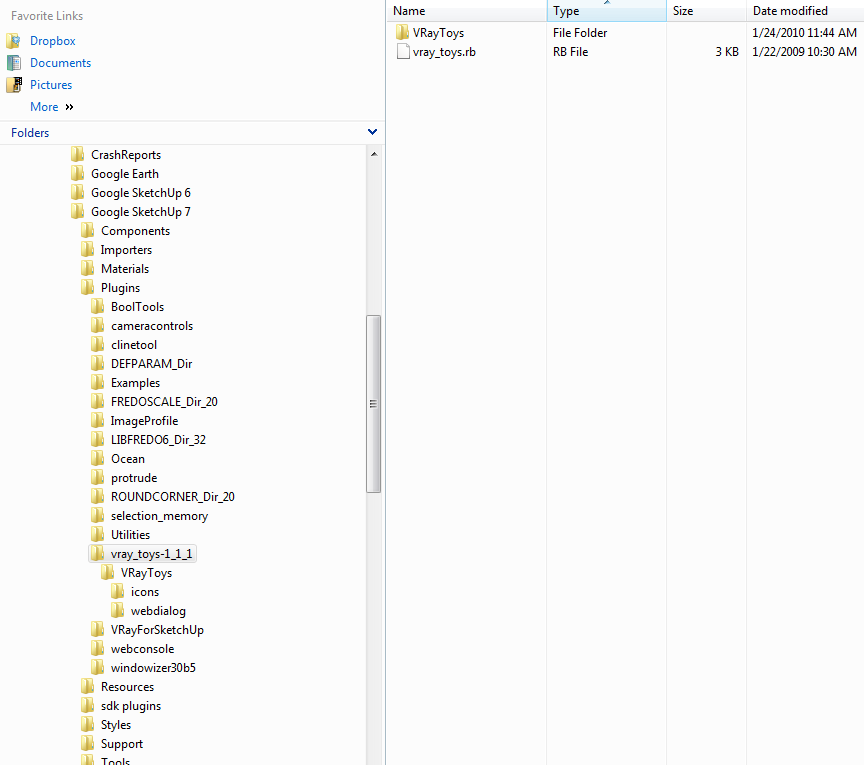
here's my current fie location setup.
Does this look correct? I've checked under tools and plugins and I don't see it in SKUP.
Hey ThomThom,
I'm trying to use the vray toys-specifically the camera sync function, and I'm not having any luck getting the tools to show up anywhere in sketchup. I've dropped the folder into my plugins folder like I've done with my other plugins, but no luck. I'm running Sketchup 7.1.6087 (the latest, I think) and vRay 01.05.30, in case that matters.
Any idea what the problem could be? I think I have it saved in the right place, I restarted sketchup several times and I've restarted my comp just in case.
Thanks
Awesome, well thanks again for all the help Al and others, and I totally agree that this is a very useful tool even just the 2D iteration.
I don't have the beta test for the upcoming release. I think I have the masking stuff figured out now. Thanks alot for you help guys. I do have one last question though, do the trees only render in 3d when using iRender nXT? I think the 2d images (when properly masked) will work well for what I am doing, but 3d would obviously be great.
Thanks again for the help and kudos to renderplus for the useful tools!
Thanks for the fast reply, that is very useful. So applying that to the RPtrees specifically, should there be a bitmap image somewhere on my computer that corresponds to the tree that I'm using?
Could someone please explain the workflow described here: "You have to supply the alpha channel as a separate grayscale image and load that into the transparency slot in the diffuse layer."
I have the latest vRay, but this still doesn't seem to be a one step thing, so I want to understand this second step described above.
Thanks