
sketchucation logo sketchucation
    • Login
    1. Home
    2. thomthom
    3. Posts
    Oops, your profile's looking a bit empty! To help us tailor your experience, please fill in key details like your SketchUp version, skill level, operating system, and more. Update and save your info on your profile page today!
    πŸ”Œ Smart Spline | Fluid way to handle splines for furniture design and complex structures. Download
    Offline
    • Profile
    • Following 0
    • Followers 8
    • Topics 628
    • Posts 16,952
    • Groups 4

    Posts

    Recent Best Controversial
    • RE: [Plugin][$] Vertex Tools

      @optimaforever said:

      However I think I have a problem with the latest VT as it hangs SU at launch.

      SU freeze? Permanently? I see no reason for any change in startup. Minimal code was touched...

      @optimaforever said:

      And second, when I try to Ctrl+move an edge AND type a value in the VCB afterwards, it bugs.

      Is this a new bug?
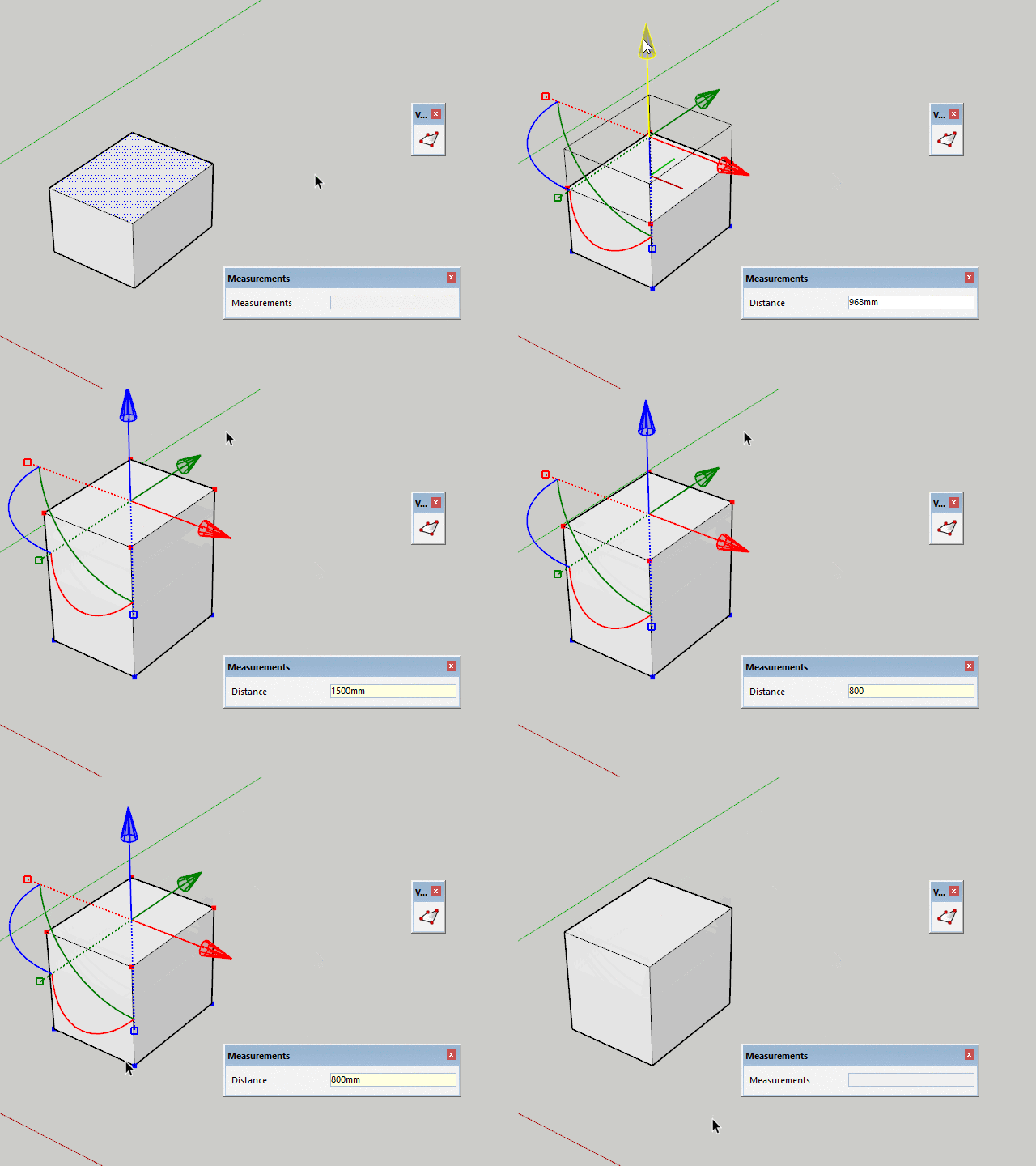
      posted in Plugins
      thomthomT
      thomthom
    • RE: [Plugin][$] Vertex Tools

      @optimaforever said:

      Once you release the LMB, VCB awaits for soft select radius value, so it doesn't work like the move tool of Sketchup, where you can change your mind afterwards and tweak the move value.

      With 1.2.11 you should be able to adjust after releasing LMB.

      2018-02-04_10h42_19.gif

      posted in Plugins
      thomthomT
      thomthom
    • RE: [Plugin][$] Vertex Tools

      Version 1.2.11

      Improvements

      • Added Serbian translations.
      • Added Albanian translations.
      • Updated Spanish translations.

      Fixes

      • Fixed Gizmo VCB adjustments not working.
      posted in Plugins
      thomthomT
      thomthom
    • RE: [Plugin][$] Vertex Tools

      Yea - that sounds familiar. The work on SUbD made me forget some of the details of existing Vertex Tools issues. Seeing how VT2 is taking longer to complete, I may have to do a bug patch to v1.2.

      posted in Plugins
      thomthomT
      thomthom
    • RE: [Plugin][$] Vertex Tools

      You know what, I'm a little unsure to be honest. I might be confusing it with the non-gizmo Move tool...

      posted in Plugins
      thomthomT
      thomthom
    • RE: [Plugin][$] Vertex Tools

      There appear to have been a regression in V1.2. I have it logged. But no fix as of yet.

      posted in Plugins
      thomthomT
      thomthom
    • RE: Literally have no idea !

      Yes, please share your model so we can have a look. Otherwise it's hard to guess what's going on.

      posted in SUbD
      thomthomT
      thomthom
    • RE: Smooth not working

      Hi L i am, did any of the responses solve your issue?
      If not, can you share the model?

      posted in SUbD
      thomthomT
      thomthom
    • RE: Probably a silly question, but...

      Slow to the party here. Thank you Box for helping out.

      VT and SUbD won't prompt you for a license until the trial period is over. I didn't want to nag users with that boring stuff. πŸ˜‰

      posted in SUbD
      thomthomT
      thomthom
    • RE: SubD + Quadface Tools. Live mesh analyses button

      Doing color by layer is a nice idea. Often one keep faces/edges/ on Layer0 - so it would interfere less with normal workflow. Gonna write that up in the issue tracker!

      posted in SUbD
      thomthomT
      thomthom
    • RE: SubD examples and models

      That's a great model! Looks like the owner of the hands is plotting something devious πŸ˜„

      posted in SUbD
      thomthomT
      thomthom
    • RE: [Plugin][$] Vertex Tools

      That's mighty kind of you to say. πŸ˜„

      I've logged both the feature request for the gizmo alignment and the quick-select issue.

      posted in Plugins
      thomthomT
      thomthom
    • RE: [Plugin][$] Vertex Tools

      Thank you for posting these follow ups. Visuals like that helps me greatly to put it into context.

      posted in Plugins
      thomthomT
      thomthom
    • RE: [Plugin][$] Vertex Tools

      Thank you for the detailed explanation. Btw, any change you can provide a couple of screenshot of what type of mesh you work with? And some example of what desired result would be? (Helps me when filing features - as weeks down the line visual reminders helps a lot.)

      As got 2D scale - yes! Absolutely. I have that working in the dev build of V2 already. πŸ˜„

      Regarding your last question. You experience that vertices get selected with you do a quick-move?

      posted in Plugins
      thomthomT
      thomthom
    • RE: [Plugin][$] Vertex Tools

      So you are picking vertices one by one? Not by selection drags?

      posted in Plugins
      thomthomT
      thomthom
    • RE: [Plugin][$] Vertex Tools

      @optimaforever said:

      @thomthom said:

      Yea, it would be doable to create a mode where two vertices define the gizmo orientation. Could infer orientation from the surface normal as well.

      But what would you do with only two vertices selected?

      move the vertices along the axis, scale their relative position, etc.
      I've been doing a lot of terrains recently, and I needed this feature OFTEN, mainly to adjust vertices after creating them.

      But you modify more than two vertices, right?
      I'm just wondering how you determine what two vertices (edge) to orient to when there's more selected.

      posted in Plugins
      thomthomT
      thomthom
    • RE: [Plugin][$] Vertex Tools

      @rv1974 said:

      TT could you add 'lock perimeter' feature please?

      I have a feature request logged named "Lock Vertices". Would this be the same thing?

      posted in Plugins
      thomthomT
      thomthom
    • RE: [Plugin][$] Vertex Tools

      Yea, it would be doable to create a mode where two vertices define the gizmo orientation. Could infer orientation from the surface normal as well.

      But what would you do with only two vertices selected?

      posted in Plugins
      thomthomT
      thomthom
    • RE: [Plugin][$] Vertex Tools

      I see, so if there was an easy way to align the gizmo to an edge that would work?
      (Possibly other methods to align to other things, like face normals etc...)

      posted in Plugins
      thomthomT
      thomthom
    • RE: [Plugin][$] Vertex Tools

      Any chance you can show me a gif or video of how you do this in max?

      posted in Plugins
      thomthomT
      thomthom
    • 1 / 1