sketchucation logo sketchucation
    • Login
    1. Home
    2. tfdesign
    3. Posts
    Oops, your profile's looking a bit empty! To help us tailor your experience, please fill in key details like your SketchUp version, skill level, operating system, and more. Update and save your info on your profile page today!
    ⚠️ Important | Libfredo 15.6b introduces important bugfixes for Fredo's Extensions Update
    T
    Offline
    • Profile
    • Following 0
    • Followers 0
    • Topics 53
    • Posts 1,213
    • Groups 1

    Posts

    Recent Best Controversial
    • AutoCAD for Mac- new beta screenshots!

      This is all getting rather cosy now! πŸ˜„

      Link Preview Image
      First Screenshots of AutoCAD for Mac

      Back in April we reported that AutoCAD was probably coming soon to the Mac, considering all the OS X references that were spotted in the SDK. Today we’ve received the first screenshots of an actual beta, running at 64-bit on Mac OS X. The app is names β€œSledgehammer Beta 1”, doesn’t seem very polished yet...

      favicon

      (www.macstories.net)

      There's a beta, which I did sign up for, but nothing came back. Hopefully something may turn up soon! 😎

      posted in Corner Bar
      T
      tfdesign
    • RE: Terrible time with sketchup

      There are two words you need to know, to learn how to use SketchUp really well and quickly too, and they are;

      "Aidan" and "Chopra"

      Now put these words into YouTube, sit back, with mouse, SketchUp, notepad and pencil, and enjoy! β˜€

      posted in Newbie Forum
      T
      tfdesign
    • RE: Rendered animation in SU - what am I missing here???

      Mac only? πŸ˜• It's Windows too you know!

      I tried SU Animate for Mac, and it just kept crashing! 😑

      Have you tried "LightUp"? I think LightUp is a finer plug in. πŸ˜„

      http://www.light-up.co.uk/

      posted in Extensions & Applications Discussions
      T
      tfdesign
    • RE: Architectural Visualization Poll

      None of the above (because Autodesk don't run on my computer!)

      SketchUp 7 (Free)
      Ribbonsoft's QCad
      Cheetah 3D (mostly for rendering)
      ViaCAD 2D/3D (brilliant when it works. A right pain when it doesn't!)
      McNeel Associates Rhino Mac (beta). Rhino is looking very, very good at the moment.

      I have no need for SketchUp pro right now, but I do plan to buy it sometime soon.
      I will most probably buy Rhino when it finally gets released.

      posted in SketchUp Discussions
      T
      tfdesign
    • RE: OSX - Where is the AA settings?

      Oh yes, I think I see what you mean. I've never needed this option.

      posted in SketchUp Discussions
      T
      tfdesign
    • RE: Folder shortcuts

      Thom, you can do all this stuff using Terminal. You must look for the routine on the internet. You can loose that horrible dock look too. πŸ˜„

      You should also do a permissions repair now and then. Open up Disk Utility, choose the Mac hard Drive, then click 'repair'.

      posted in Hardware
      T
      tfdesign
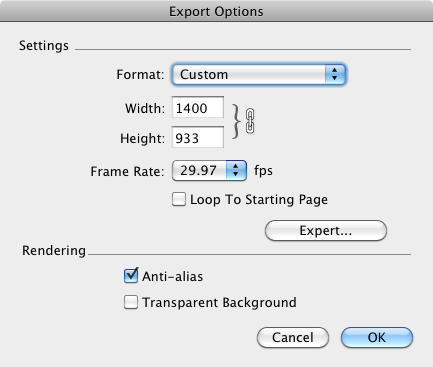
    • RE: OSX - Where is the AA settings?

      @unknownuser said:

      AA only upon 2D exporting.

      Really? Then how come I have it when exporting in 3D? πŸ˜•


      screenshot 01.png

      posted in SketchUp Discussions
      T
      tfdesign
    • RE: SKU Pro 7.16860 works like crap!

      Yes, I agree. 7.1 works really well for me. Far better than 6!

      posted in SketchUp Bug Reporting
      T
      tfdesign
    • RE: OSX - Where is the AA settings?

      Ah Anti Aliasing!

      Yes.

      You can find it when you export to a Quicktime movie, on that page, and you can also find it in Model Info under the Window menu. πŸ˜„

      posted in SketchUp Discussions
      T
      tfdesign
    • RE: OSX - Where is the AA settings?

      Oh yes, I too have just bought a Mac Mini late 2009- just like you. πŸ˜„

      posted in SketchUp Discussions
      T
      tfdesign
    • RE: OSX - Where is the AA settings?

      AA?

      posted in SketchUp Discussions
      T
      tfdesign
    • RE: Driving Dimensions

      This is great news Dimitry. Congratulations, and I really look forward to playing with the new version. πŸ˜„

      You know that McNeel have also released the SDK for Mac Rhino, to allow developers such as yourselves to build plugins for the Mac version. I really, really can't wait for DD for Rhino OSX!! 😍

      posted in Extensions & Applications Discussions
      T
      tfdesign
    • RE: Format my Macbook Pro

      I wouldn't use Time Machine to make whole backups. I've heard that TM can sometimes wipe everything.

      And if you are to use W7, make sure that your computer supports it;

      @unknownuser said:

      You can use a 64-bit version of Windows Vista or Windows 7 with any of these Mac computers:

      1. A Mac Pro or MacBook Pro introduced in early 2008 or later

      2. An iMac or MacBook introduced in late 2009 or later

      If you’re not sure when your Mac computer was introduced, see http://www.apple.com/support/hardware, click your Mac model, and look for an article on identifying your Mac.

      posted in Hardware
      T
      tfdesign
    • RE: Format my Macbook Pro

      No. Don't sweat Jeff! πŸ˜†

      I was just mentioning that. I don't know why, but some folks want to run that abomination on their Macbooks! πŸ˜†

      posted in Hardware
      T
      tfdesign
    • RE: Format my Macbook Pro

      @rickgraham said:

      Anyone do this and live to tell about it? πŸ˜†

      Hi Rick.

      Yes, I've done this one or twice. It's pretty painless (nothing like floating around in a black prompt screen within XP's installer, when trying to load/install Bootcamp!!! 😲 )

      You need to get a separate HD (preferably (well, recommended actually) Firewire), which is the same size, or bigger than your own internal drive. You also need a copy of SuperDuper! (which is payware, but its freeware version will also get the job done nicely). You use SuperDuper! to completely copy your HD, which will take a few hours. Then, if you f**k up (which you won't), you can at least install the whole lot back in again, and you will be back to where you started (fail-safe). Once you are successful, copy all the stuff you need again, from various files on your backed up drive, and hey presto!

      Good luck πŸ˜„

      Tom

      PS Windows 7 doesn't run on anything prior to NVidia unfortunately (but it's sh*t anyway- look elsewhere on this forum πŸ˜† )

      posted in Hardware
      T
      tfdesign
    • RE: AutoDesSys introduces OpenClip plugin for Bonzai and PC8

      @xrok1 said:

      and for windows users? 😒

      Probably still AutoCAD and 3DS Max I'm afraid. (and a reasonable bank manager! 😲 )

      posted in Hardware
      T
      tfdesign
    • RE: Sketchup with Schoolkids

      You guys need to check out the groundbreaking work undertaken by Guzman Tierno (Guzman's here on the forum- just do a search). What's really fascinated me by Guzman, is how he's using SketchUp to teach maths to young kids.

      I'm also going to be working with kids with learning difficulties- using SU to visualise a world that they want to live in. I'm also looking into the idea of getting a RepRap 3D Printer kit, and building it with the kids. Then using SU to create models, that can be printed.

      Tom

      posted in Corner Bar
      T
      tfdesign
    • AutoDesSys introduces OpenClip plugin for Bonzai and PC8

      I found this new plugin from Autodesys really interesting- especially for all those looking for an interface between a mature 2D application (PowerCADD 😎 and a 3D modeller (Bonzai or FormZ);

      http://architosh.com/2010/04/autodessys-announces-openclip-for-bonzai-3d/

      (via Architosh)

      Google, you listening? πŸ˜‰

      posted in Hardware
      T
      tfdesign
    • RE: Sketchup is broken

      Wow.

      Why do you think this is?

      I've just used SketchUp in a big presentation, and it was working beautifully. πŸ˜•

      Are you sure that the problem isn't a recent Windows update? I've had that problem before (on XP)

      posted in SketchUp Discussions
      T
      tfdesign
    • RE: Useful MAC Apps and Hardware [Ongoing Updates]

      I really loathe Adobe Flash. So I've decided to sack it 99% of the time. Now my browser is flying!! No crashes today at all. No fans all on at all pelt, and no Activity Monitor telling me that Flash is sucking 1gB of memory out of my computer! Hooray!

      All because of this little freeware gem;

      favicon

      (clicktoflash.com)

      The installer doesn't ask for a password, which is a bit strange. It can't be a security hole? Can it? Dunno, but clicktoflash is working really well. It seems highly configurable, so it comes highly recommended! 😎

      posted in Hardware
      T
      tfdesign
    • 1 / 1