I have found that converting text to a vector (shx) font before exploding is a practical solution. Exploding vector text results in lower number of lines and is faster to move about than exploding ttf text.
Oops, your profile's looking a bit empty! To help us tailor your experience, please fill in key details like your SketchUp version, skill level, operating system, and more. Update and save your info on your profile page today!
Check out Febhouse | New extensions for Shadow Analysis in SketchUp Download
S
Offline
Posts
-
RE: AutoCAD users! Can you......
-
RE: Stop Line Splitting
@unknownuser said:
enter the following in the ruby console (Window-> Ruby Console)
Sketchup.break_edges= falsechange 'false' to 'true' in order to bring the auto split behavior back.
i think there's a plugin which has an icon for toggling but i can't find it.. someone else probably knows the name..Edit.. found it:
http://forums.sketchucation.com/viewtopic.php?t=16189
it's 4 bucksThanks Jeff. I entered the code you provided into the ruby console and nothing changes. I also purchased a copy of the Break Edges plugin from Smustard and nothing changes. As an example try drawing a rectangle and divide into foure quarters by drawing lines between each of the sides of the rectangle.
So I am thinking that maybe there is another setting that I have to toggle somewhere.
Walter
-
Stop Line Splitting
Is there a way to stop lines and arcs from splitting where they intersect with other lines and arcs?
Walter -
RE: [Plugin][$] Bifold Door Tools
I purchased the plugin. However, where do I find the password?
Walter -
RE: Construction & Working Drawings - Discussion
Thank you Sonder
I am working on a project that is a bit rough around the edges. I think that I used the wrong style.
I will pay more attention to your recommendations on the next project.
Walter -
RE: Construction & Working Drawings - Discussion
I do not know whether there is a answer to this. However, is it much slower to use Layout for construction drawings compared to CAD?
Sorry if I am pushing in here. But my question relates to construction drawings.
Walter -
RE: Sketchup is Inacurrate???
This is what frustrates me when you see comments on the net that Sketchup is inaccurate. Maybe it had a bigger effect in the early days of Sketchup. However, these days a lot of people in the trade know about it.
Oh well I suppose you cannot stop people opening their mouth before their brain is engaged (assuming they have a brain). It really shows that you have to do your own research most of the time.
Walter -
RE: How to Lock A Scene
Thanks TIG. What is the difference between updating a scene by right clicking on a scene tab along the top of the drawing area and updating a scene in the Scene palette.
Walter -
RE: Sketchup is Inacurrate???
That's what I believe. As they say a bad tradesman should not blame his tools.
Walter -
Sketchup is Inacurrate???
I am a long time Sketchup user since V3 and love it. There are posts scattered throughout the net stating that Sketchup is innacurate. Is there substance in this claim or are they talking through their ar**?
Just a sincere question. Bulls****ers need not reply.
Walter -
How to Lock A Scene
Can someone please tell me if it is possible to lock a scene in Sketchup 8 Pro. This is so I do not edit it by mistake and stuff up my layout references.
Walter -
RE: Getting About In Layout 3- Snapping Problem
Thanks Sonder. However, my dilema is that I am trying to stretch a dimension one millimetre at a time but find that it jumps by a larger amount.
Really I am trying to copy items to a known cartesian position from an existing point and was inserting a dimension to facilitate this. I hope that this makes sense.
Walter -
Getting About In Layout 3- Snapping Problem
I am finding that when I draw lines, move objects, move dimension lines that the cursor appears to snap to a grid even though grid snap is off. How can I get the cursor to move about smoothly?
Walter -
RE: Display Question
Hello Guys
I found the solution to my problem. The model was imported into Sketchup too small. Windows were only 1.1 mm high. The model displayed Ok when I enlarged it by a factor of 1000. That is, clipping plane and two tone display are now gone.
Thaks for your help.
Walter -
RE: Display Question
Thanks Gai
Changing the softening angles fixed this problem.
Walter -
RE: Display Question
Thanks so much for your reply. However, not what I wanted to hear. Thanks.
Walter -
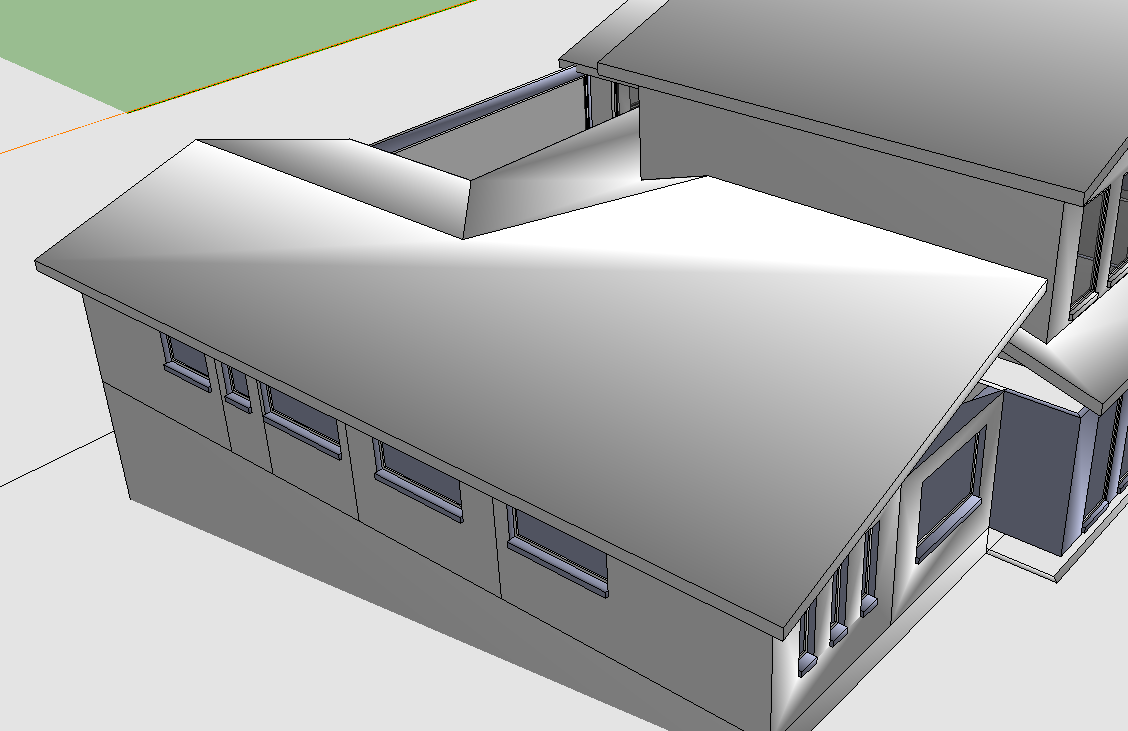
Display Question
I am having a problem with a model saved as a Sketchup model.
In each plane of the model there exists light & dark portions. I cannot figure out how to remove the two tone displays.
Any ideas will be gratefully received.
Walter
-
RE: Doors and windows swing arc
Keep in mind that SU arcs are imported into ACAD / Bricscad as a series of short straight lines & not arcs.
Seasdes