Just in case you don't know how to instal a .rb plugin I made a simple tutorial here... http://sketchucation.com/forums/viewtopic.php?f=18&t=50018
Oops, your profile's looking a bit empty! To help us tailor your experience, please fill in key details like your SketchUp version, skill level, operating system, and more. Update and save your info on your profile page today!
🚨 Skimp | 25% Off until March 30 Buy Now
 Offline
Posts
-
RE: PLUGINS
-
RE: Stop SketchUp from asking to save file before closing?
Thank you so much...This solved my problem!
The one I am using is your second suggestion since the revert method didn't produce what I wanted. The time it takes to save is not much so I am happy.
Again thanks!
-
RE: Make Save and Saveas toolbar
Just in case here was a discussion about this topic I happened to find.
https://groups.google.com/forum/#!msg/sketchupruby/ymKyqD_nxBU/AczVTLjFld4J
-
RE: Stop SketchUp from asking to save file before closing?
Hi, currently working on a platformer type game and want to modify the 'KeyScene' plugin that I previously made to work as the menu interface for the game. Here is link to that plugin just in case; http://sketchucation.com/forums/viewtopic.php?t=49027
Lets say I click start and then select a level I don't want SketchUp to disrupt the flow of the game to open the file that contains that level.
-
Stop SketchUp from asking to save file before closing?
I am trying to open another file with code and don't want SketchUp to ask if I wan't to save before closing. The following code is what I am using;
` file = Sketchup.find_support_file("file.skp" , "Plugins/folder") ;
Sketchup.open_file file ;`
Is there a way to make this happen?
-
Animation Section
Hi,
SketchUp has a lot to offer in the animation side of things so having a thread exclusively dedicated to it will make a lot of people happy I am sure.
Thanks
Note: This post is not a SketchUp wish list its a SketchUcation wishlist for them to make new forum thread about animation.
-
RE: [Animation] SketchUp Origami (Paper Crane)
Hi,
Thanks for teaching me how to use visibility in transformation processor!
Using File_Api through Physic Control to make csv file that will controls the time when the value is 0 or 1 for the Threshold Processor to covert to true or false for visibility transformation is very powerful feature indeed.
I hope I can keep learning new stuff with the help of you guys...Thanks!
-
RE: [Animation] SketchUp Origami (Paper Crane)
I got the idea on using section planes when a generous member of SimFonIA shared a file using it. Maybe in the future one can also animate the section planes from the key frame editor because that will open other possibilities as well.
Thanks!
-
RE: Slicer Intro Animation
Using csv file to control time & velocity is perfectand simple technique for future projects. The Free transform file is very cool indeed I'll be sure to study it so I can find other ways to use it. Again thanks!
-
RE: Slicer Intro Animation
You are right "transformation processor" would of been much better choice but for some reason I liked the strange behavior I got from key-frames so I keep it. I need to find out if you can use Delta time before first play & delta after last play on the transformation setting like you can in key frame editor.
At the moment I have couple things in mind to animate we will see....As always thanks for your input.
If you guys have more --Free Transformation Files I can study I would be very great full. I tent to learn code by reverse engineering stuff

-
RE: Polyhedral Waltz Animation (with music)
You managed to solve the export video issue with resolution...glad to see that it worked! Keep the good work & creative style of teaching!
-
Slicer Intro Animation
Hi, I just made this intro for a friend named Slicer who Streams games on twitch & post YouTube videos. This was modeled in SketchUp & Animated with SimFonIA Animation Tools plugin.
Here are the SketchUp files with animation settings for anyone that would be interested...
http://sketchup.google.com/3dwarehouse/details?mid=cf8cca24ec73214a61d4e2c8fb8a8427
http://sketchup.google.com/3dwarehouse/details?mid=17289f5eaf7eee2f61d4e2c8fb8a8427Here is Slicer links...
http://www.youtube.com/user/TheNameIsSlicer
http://www.twitch.tv/theslicerFor the record the characters are from popular indie games and although they were modeled & animated by me I didn't designed them so since this is Fan Animation I did not charged money to create this.
-
[Tutorial] Installing Plugins
This video will teach you how to find SketchUp to Insatll it and where to get plugins to extend the existing capabilities of it.
-
RE: [Animation] SketchUp Origami (Paper Crane)
Very happy you guys liked this animation!
SimFonIA Team thanks for making such a fun plugin I'll be sure to share the SketchUp file so others can see how it was all done. By the way awesome Rubik's Snake Demo!
Pilou that is so nice of you to say that...I find your artwork very poetic as well.
novena - Thank you very much I really appreciate it and awesome portfolio!
-
RE: The Art of SketchUp - part 2: Sci-Fi
jaw dropping! Best tank in sketchup I have ever seen!
-
RE: [Animation] SketchUp Origami (Paper Crane)
Thank you both for the comments!
@sh00ks said:
How long did it take you for the animation part?
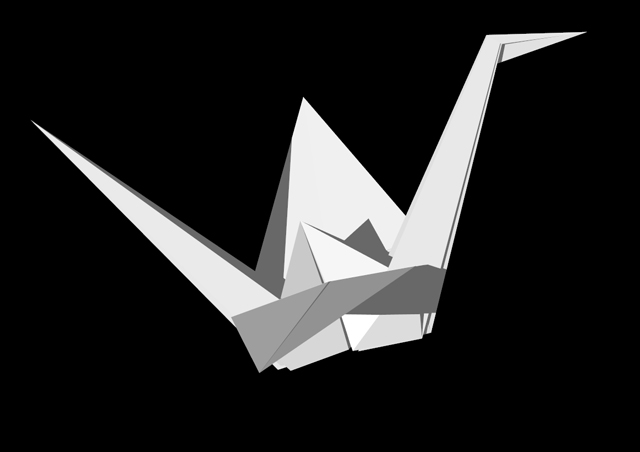
Well this took me about 6 to 8 hours to animate, I struggled a little bit since later on when the folds get more complicated you can get lost in trying to deform multiple vertices at ones.
I uploaded the SketchUp file to Trimble's Warehouse so that people that have the SimFonIA Animation Tools can see how it works. There is some geometry behind a section tool that is called to make switches between models with added vertex points to continue the folds. Kinda hard to explain I hope the SketchUp file explains it better.
Here is the SketchUp Model;
Here is some images;
-
[Animation] SketchUp Origami (Paper Crane)
Hi,
This SketchUp animation of a paper crane origami was made with SimFonIA Animation Tools and its was a lot of fun making it. I am looking to forward my skills so if you want to suggest the topic of my next animation please post a comment below so I can take it into consideration.
The music is an original composition made by me and if anyone is interested in using it in one of your videos I give you permission.
Cheers!
-
RE: Kindergarten project
Something I will have to work on myself is to compose the scene with 3 layers of objects in space. Your 3rd image has a grate foreground vegetation and middle layer (building) but maybe some far object like mountains will complete the 3 layers but if the site doesn't have that its ok. All three images are looking great!