sketchucation logo sketchucation
    • Login
    1. Home
    2. plot-paris
    3. Posts
    Oops, your profile's looking a bit empty! To help us tailor your experience, please fill in key details like your SketchUp version, skill level, operating system, and more. Update and save your info on your profile page today!
    πŸ”Œ Easy Offset | Offset selected faces in SketchUp in positive and negative offsets. Download
    Offline
    • Profile
    • Following 0
    • Followers 0
    • Topics 67
    • Posts 1,477
    • Groups 1

    Posts

    Recent Best Controversial
    • RE: Render #22 (animation test bottom page 8)

      I simply love the ease of use with Indigo...

      • double clicking on a material to access the indigo specific settings
      • change of the materials appearance within SketchUp when importing
      • preview render for materials
      • use of (even textured) materials as lightsource
      • support of face me components

      these are some features that make Indigo such a wonderfully simple, but mighty tool.

      is there any (free?) biased renderer with the same fast workflow that gives you as much control as Indigo does? would be very interesting - from time to time waiting 10 hours or longer for an image to clear up is a bit unnerving πŸ˜‰

      posted in Gallery
      plot-parisP
      plot-paris
    • RE: S&S sculptures

      thanks, remus. now it is working (see above) - indeed easy, when you know how to do it πŸ˜„

      posted in Gallery
      plot-parisP
      plot-paris
    • RE: Marian's W.I.P.s

      I like "Little Nell II" a lot. it looks very close to a real spacecraft. just wait how nasa's next vehicle for a mars mission will look like...
      (I am pretty sure we will find a small "Marian" signature on the back of it then πŸ˜‰ )

      posted in WIP
      plot-parisP
      plot-paris
    • RE: New icons

      but "Scale" would be one of the last tools to add - for having the one "OnSurface" button! πŸ˜„

      we have allready:

      • line
      • circle
      • polygon
      • offset
      • push/pull (joint push pull tool)

      now its only left:

      • rectangle (which already exists with the polygon tool)
      • arc
      • freehand
      • move
      • rotate
      • scale (which is indeed an offset with contoll in two directions)
      • follow me (???)

      then we still can use ibon's buttons (if you press the one, the great, the wonderful OnSurface button, all above tools change their icon). 😍

      sorry, just dreaming. got a bit carried away 😳

      posted in Developers' Forum
      plot-parisP
      plot-paris
    • RE: [Plugin] Polyreducer 0.1

      another great feature would be to adjust poly density throughout the model.

      for example if you use follow me on a rather complicated curve with a varying radius, the resulting shape will have different polygon density. or if you create a difficult model in seperate pieces that are combined later, they might be different in detail.

      now it would be very comfortable to tell the polyreducer to adjust the poly amount to a common level. πŸ˜†

      posted in Plugins
      plot-parisP
      plot-paris
    • RE: New icons

      I agree with you, Daniel S. the wonderful icons look even better with a brown colour (thus blending in to the overal SU icon style).
      good luck for your examns, ibon. πŸ‘ I am looking forward to your new creation...

      "ScaleOnSurface" - what a wonderful idea! I am confident eventually fredo6 will succeed in including inferrences into his marvellous toolset though (so that the rectangle tool will signal, wenn being a square/golden section, and we don't need the scale tool for that anymore).

      fredo6, the wishlist for you gets longer and longer... but every time you check off a point on it, hundrets of SU freaks have tears of joy in their eyes! I haven't had that many birthdays a year in my whole life! πŸ˜„

      posted in Developers' Forum
      plot-parisP
      plot-paris
    • RE: Two programs that help me

      tomislavm, bet ment simply to import the pdf as an image and then drawing the plan in SketchUp like you normally would - you now just have an image to refer to.

      seriously, I don't understand why SketchUp Pro does not import PDFs. if not recognizing the geometry it should at least be able to read it as an ordinary image...

      (it would be really cool to have SU not only understand the line-information of PDFs but also faces and their colour. thus you just pull all the walls up and you have a coloured model 😲 )

      posted in SketchUp Discussions
      plot-parisP
      plot-paris
    • RE: Santo-Volto Church, Turin, Italy

      well, I can understand both sides πŸ˜‰

      Julius, you know how to "component" things - a wonderfully clean model!

      posted in Gallery
      plot-parisP
      plot-paris
    • S&S sculptures

      hi everybody,

      after seeing how kwistenbiebel lives on that other planet, I simply had to buy the wonderful Subdivide & Smooth tool.

      this is my first go with it. its just a quick try (the rendering took quite long though - a lot of transparency, reflection and 16 multisurfaced light sources πŸ˜‰ )

      http://img379.imageshack.us/img379/7075/exhibitionstandem4.jpg

      @Fred: you should really start rendering (indigo is very easy to use) - your sculptures would look marvellous...

      posted in Gallery
      plot-parisP
      plot-paris
    • RE: SketchUpBBS-Interior Design

      the last images have defenitely something of a game environment - very atmospheric and well textured!

      yahoo will be happy πŸ˜‰

      posted in Gallery
      plot-parisP
      plot-paris
    • RE: [Plugin] SUTool 0.38 english version released

      @unknownuser said:

      Might be helpful to explain what this tool does.

      πŸ˜† would like to know that tooo...

      posted in Plugins
      plot-parisP
      plot-paris
    • RE: 2015

      luckily I will drive a solar aircraft by then...

      I would really much like to have such a cool garage for my vehicle though πŸ˜†

      posted in Gallery
      plot-parisP
      plot-paris
    • RE: Sketchy Faces

      maybe you are right.
      so the only way to get it convincingly sketchy is to change the faces (not reaching the borders in some places, overlapping them in others), together with a mask that fades out the frame of the picture smoothly (cp. Dennis technique).

      so I cant be lazy and have to use photoshop... until SU7? πŸ˜‰

      posted in Developers' Forum
      plot-parisP
      plot-paris
    • Sketchy Faces

      I always wondered, why you can choose between loads of different sketchy styles for edges - the coloured faces however are precisely painted to the border, thus destroying the whole impression of handdrawn images.

      sketchy faces would be the sensible next step. I think that would mean a huge programing effort, probably not possible with ruby at the moment.
      a workaround for that would be to employ edge styles that contain this information (white, sketchy patches, that overlap coloured faces).

      I asume that templates for sketchy styles currently only use grayscale information (but not transparency, which would be necessary).

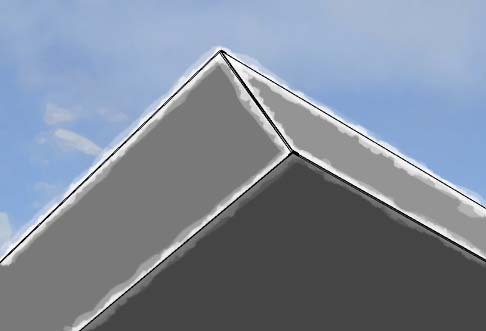
      therefore my question: is it possible to write a script that minds transparency information for edge styles and therefore enables us to export entirely sketchy grafics (except shadows 😞 ) without any post processing?sketchy_phases.jpg
      (a very clumsy attempt to illustrate my words... πŸ˜„ )

      I would very much like to hear what you think of that idea

      posted in Developers' Forum
      plot-parisP
      plot-paris
    • RE: Living with Moore

      I prefer the building with the newly added screens - thus the two shapes seem more united and the building is much more integrated in the sculpture.

      Fred, you should seriously consider going into rendering! I think the building-sculpture would be much more pronounced in it's depth (through indirect lighting, shadowed corners...)
      surely you would produce some stunning results

      posted in Gallery
      plot-parisP
      plot-paris
    • RE: Taking the Mickey

      @lapx said:

      You should seriouly consider writing a book on technique etc...

      oh yes - a book for "pros" to get a step closer to SketchUp Godhood! 😲

      Solo, you are the Architect... and SketchUp is the Matrix! 😍

      posted in Gallery
      plot-parisP
      plot-paris
    • RE: Installer for Plugins

      sounds quite useful.

      are you thinking about a "check for updates" button that automatically downloads the newest rubies? will be deadly tricky to find a way to organize the script database then, I asume.

      but it would be cool! πŸ˜„

      posted in Developers' Forum
      plot-parisP
      plot-paris
    • RE: New project

      what a wonderful trick, Gaieus!

      unfortunately (or hopefully?) it won't be possible in SU7 anymore πŸ˜„

      posted in Gallery
      plot-parisP
      plot-paris
    • RE: Need help with this illustration

      Jorgensen, how bright is your wall colour? I asume it is a pure white (RGB colours at 255, 255, 255).

      such a bright material does not exist in the real world. you should consider setting down the brightness of the colour a bit (for example: a white sheet of paper has RGB 220, 220, 220).

      if you have a perfectly white wall, light rays will not loose any of their strength when reflected - and with the raytracing method the rays will bounce from surface to surface until they have lost all energy (that is how indirect lighting works). if they don't loose any energy, they will bounce forever. πŸ˜•

      I don't know how close Vray sticks to real light behaviour (for it is an biased render enigne). I recently started using Indigo (an unbiased renderer) and if you use a completely white colour it will look unrealistic.

      - please correct me, if it is a different matter with Vray -

      posted in SketchUp Discussions
      plot-parisP
      plot-paris
    • RE: Section cut depth

      that would be cool indeed.

      there was a nice thread some time ago about section volumes instead of mere section faces - a wonderful idea in my opinion because you can create complex cutting geometries... πŸ˜†

      a little workaround for us (until SketchUp 7 πŸ˜„ ) is to place your section plane, group it together with the model and then insert a second section plane at the other end of the model, cutting away what you want to hide in the distance...

      posted in SketchUp Discussions
      plot-parisP
      plot-paris
    • 1
    • 2
    • 66
    • 67
    • 68
    • 69
    • 70
    • 73
    • 74
    • 68 / 74