sketchucation logo sketchucation
    • Login
    1. Home
    2. plot-paris
    3. Posts
    Oops, your profile's looking a bit empty! To help us tailor your experience, please fill in key details like your SketchUp version, skill level, operating system, and more. Update and save your info on your profile page today!
    Urasik Extensions | Lots of new extensions to check out Learn More
    Offline
    • Profile
    • Following 0
    • Followers 0
    • Topics 67
    • Posts 1,478
    • Groups 1

    Posts

    Recent Best Controversial
    • RE: [Plugin][$] RoundCorner - v3.4a - 31 Mar 24

      @unknownuser said:

      Visual dragging was in my plan but is stuck with many other things I need to do on this plugin (non-uniform offset, custom profiles) and other plugins. I should also add a detector of holes and overlaps.

      cool! are we going to get christmas presents? πŸŽ‰ ... πŸ˜„

      posted in Plugins
      plot-parisP
      plot-paris
    • RE: [Plugin] Zorro2 (beta)

      I have got a file, where Zorro crashes constantly.
      I created the geometry in a bigger file and tried to slice it. it crashed. I copied the geometry to a new SU file. it crashed again.

      in the end I had to redraw the whole thing in a new file. and everything worked fine.

      any idea why that is?
      I attached the file for you to experiment...
      crooked.skp

      posted in Plugins
      plot-parisP
      plot-paris
    • RE: The "Duh!" thread (aka the Doh! thread)

      another one, only outside SketchUp...

      did you ever try to explode a folder somewhere to copy it's content to the next higher folder?
      I have a shortcut applied to exploding in SkechUp. and I hit it repeatedly, wondering, why the folder was still there.

      actually, that would be a great thing to implement in an operating system: selecting a folder and exploding it, being left with the files within all selected. or the other way around, grouping things (select several files and hit the 'group shortcut' to put them into a new folder...

      posted in SketchUp Discussions
      plot-parisP
      plot-paris
    • RE: Looking ahead to SU 8.

      @remus said:

      jakob, what would happen with upgrades to the plugin? who would be tasked with going through the code? itd be a monster job and one thats better left to plugin developers themselves, in my opinion.

      fair point there, remus. absolutely true. the big ones, that really add completely new features to the program are probably better kept in the hands of the ruby coders.

      posted in SketchUp Discussions
      plot-parisP
      plot-paris
    • RE: Looking ahead to SU 8.

      ok, what about a compromise then: Google buys these plugins (the ruby masters will be happy). they pollish them up and implement them into SketchUp. and then they disable them by default, like with the sandbox tools. thus a new user wouldn't even know they are there. but more experienced users only had to enable these perfectly integrated tools via preferences>extensions...
      like that both interests will be secured, the simplicity for beginners and the power for pros πŸ˜„

      posted in SketchUp Discussions
      plot-parisP
      plot-paris
    • RE: Looking ahead to SU 8.

      @linea said:

      Above all else I would like to see Google buying shed loads of all the plugins out there, polishing them and incorporating them properly into the core product. No need to reinvent the wheel.

      I agree with you to a certain extend. not all tools make sense to be implemented into the core SketchUp. but there are many tools that are so native to my workflow now (and surely I am not the only one) that it would make perfect sense to incorporate them.

      just take 'select instances' (lets you select all copies of one component just with one click) or Chris' 'arc centerpoint finder'. these are already native tools to me. and when I work on another machine thad doesn't have these scripts, I feel utterly crippled in my workflow.

      I would like to think of it as a great 'open beta area'. all the plugins are being thoroughly tested and developed by the community and the ruby master minds. once it becomes clear, that one script is extremely useful to the majority of SU users, Google could really buy the plugin from it's creator, and properly implement it. it doesn't have to be all the plugins (there are far too many)

      but take as an example fredo's on surface tools, paired with joint push pull (which is sort of a ':pushpull:-on surface'). Google could buy these plugins (and fredo would at last be properly rewarded for his hard work (appart from the gratitude and worship from thousands of members)). and by properly implementing it into the SU user interface, they could create one toggle-button to swich from 'normal mode' to 'on surface mode', making all the native drawing tools work 'on surface'. thus you only had one more button added to the UI, instead o a whole new set of drawing tools...

      so in some cases, the implementation of a plugin would make SketchUp a lot more powerful, while keeping it's simple and easy workflow...

      posted in SketchUp Discussions
      plot-parisP
      plot-paris
    • RE: The "Duh!" thread (aka the Doh! thread)

      wow, cool. didn't know about that eihter. but what I would even more like to see is a push/pull like this:
      strange_pushpull.jpg

      posted in SketchUp Discussions
      plot-parisP
      plot-paris
    • RE: Looking ahead to SU 8.

      @remus said:

      You can already show/hide/delete section planes, all done through the right click menu.

      remus, I think gruff ment 'construction planes' as opposed to 'section planes', similar to construction lines but only as planes πŸ˜„

      although I would find it only mildly useful, for most of it can be achieved already, simply by holding down shift (eg. hover with the circle tool over a plane and then hold down shift. it will keep the orientation of the plane, no matter where you go). but on the other hand, having the option to employ construction planes wouldn't hurt either...

      what I would really like to see is an option to switch the axes' orientation from 'world' to 'object'.
      meaning, that if you enter a group or component that is at an angle to the world axes, all the inferencing, rectangle tool, outline orientation of newly created groups etc. are alligned to the axes of the group/component instead of to the world axes...

      posted in SketchUp Discussions
      plot-parisP
      plot-paris
    • RE: Looking ahead to SU 8.

      about the new cutting capabilities... some sort of 'live booleans' would be fantastic. and, as Gaieus suggested, with the capability of cutting through nested groups. although this might take a lot of processing power and may slow down SU a fair bit. πŸ˜•

      posted in SketchUp Discussions
      plot-parisP
      plot-paris
    • RE: [Plugin] Scale and Rotate Multiple (UPDATED Dec 22, 09)

      just a big THANK YOU!!! again, Chris.
      you saved me about 15 minutes rotating and scaling a whole bunch of trees... 😍

      posted in Plugins
      plot-parisP
      plot-paris
    • RE: Looking ahead to SU 8.

      @earthmover said:

      Better vertex manipulation and control, including soft selection.

      Texture layering and blending

      UVW Mapping

      Better selection tools (Select ring, select loop, freehand selection window, select all in bounds/crossing bounds toggle, etc.)

      Snap/Inference on/off toggle

      all very important features!

      a few additional ones:

      • Referencing of Components instead of including them in the model. meaning, that the component is saved as an external file and only the position and modification (rotation, scaling...) are saved within the model.
        makes a lot of sense if you add cars, trees, furniture and such to a model. cause then you've easily got 20Mb of components in your model that don't need to be there. saving takes a lot longer and your hard disk is filled up unnecessarily...

      • Layer Grouping. you select a couple of layers, click right mouse button and choose the option 'group layers' (or use the same keybord shortcut you use for grouping geometry). now you can still switch on or off the layers within the group separately. but if you switch off the whole layer-group, all the layers within will be turned off at once. when you unhide the group again, only those layers will be made visible again, that were switched on before...
        oh, and you can expand/collapse layer-groups in the layer window to make some space...

      • finally a slightly farfetched one...
        first I have to explain a bit. SketchUp is perfect for basic modelling drawing boxes is quicker than with any other software I know. moving these boxes around and manipulating them is even quicker, thanks to inferencing. but thats where SketchUps capabilities end, or rather, where other programs are way faster (actually beyond comparison).
        a big problem of SketchUp is, that you have to do everything 'by hand'. some rubies try to overcome this lapsus (soapskin, bezier curves, etc.), but as soon as you modify the generated geometry a bit, the information is lost to the plugins and all that remains, is a big mount of polygons. all you can do now is push around polygon by polygon by hand. but the overall idea of the form (like with a tent structure) is lost.

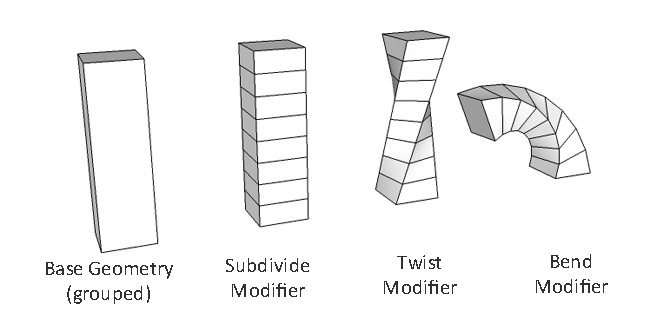
      what I therefore would like to see, are modifiers. what they do is take basic geometry and change it dynamically.
      modifiers.jpg

      in the above imaginary example I created a box and grouped it. to this group I applied a Subdivision-Modifier, then I apllied a Twist-Modifier, and finally a Bend-Modifier.
      I can view all these modifiers in the entity info window of the group. I can even change their order or alter values, like the subdivision leven, the twist- or bend-amount.
      but I can also switch off these modifiers (just like layers) and modify the initial geometry within the group, the basic box. and that is great, because we know that there is no better software to work with basic boxes, than SketchUp!

      once you explode the group, you can choose to either discard the modifiers or apply them permanently to the geometry...

      you've got the same system of modifiers with 3Ds Max at the moment. but seeing it in SketchUp would actually make my eyes water with joy!

      posted in SketchUp Discussions
      plot-parisP
      plot-paris
    • RE: The "Duh!" thread (aka the Doh! thread)

      @gaieus said:

      But at least now I understand why my models "jump" from time to time - I obviously (accidentally) double click with my mouse. 😳

      now it makes sense at last... its me, not a buggy SketchUp 😳

      another one: I am currently working on a fairly complex model. lots of nested groups...
      I was somewhere deep down on the hierarchy, modeling on some walls, when suddenly all newly created geometry turned transparent. when I painted another colour to the faces, they ceased being transparent.
      I checked the default material in the styles editor... you can't even set a transparency value there.
      I closed SketchUp and reopened it. still the same.
      I copied the whole model into a new SketchUp file. yet again: all newly created geometry turned transparent...

      ... and then it hit me... at some point while modelling and texturing, I must have accidentally painted over the parent-group with a glass material. most of the geometry within this group was supposed to be a stone wall, therefore a texture applied directly to the geometry. when I now created some new faces, these were coloured with the default material of course... but the transparent glass material on the group overwrote it...

      how can someone be soooo slow, it took me almost 15 minutes to find out. I had to hit the Homer button twice!!! 😳

      posted in SketchUp Discussions
      plot-parisP
      plot-paris
    • RE: Thank you Google for fast image export

      yes, SketchUp 7.1 on a Windows 7 laptop.
      (although I discovered a few minutes later, that I didn't have textures enabled. when I redid it with textures, it took about 20 seconds... πŸ˜„

      posted in SketchUp Discussions
      plot-parisP
      plot-paris
    • Thank you Google for fast image export

      just a quick thank you to the Google guys.

      I was just exporting a 2D image, 9000 pixels across and shadows turned on. the model is fairly basic, although it has got quite a big terrain. I disabled antialiasing and pressed export. after four seconds it was finished. at first I thought it had crashed. but the image was fine! that is definitely a lot faster than it was before.

      thanks, Google! πŸ‘

      posted in SketchUp Discussions sketchup
      plot-parisP
      plot-paris
    • RE: Product Idea: iSketchUp! don't be hate'n

      I think its a brilliant idea!
      but I think modelling isn't as important as the viewing capabilities. I have two different methods in mind.

      the first is the typical iPhone navigation - one-finger movement is rotation, two-finger movement is panning, and you zoom as you do with images (two fingers increasing or decreasing their relative distance).

      the second navigation option is a lot more exciting - the "geo-tagged motion": you create a model with your computer at home and geo-tag the right location via google earth. then, when you are on site, you load the model. with it's gps sensor the iPhone will not only update the position within the model correctly... using the compass and rotation data it will automatically rotate your view depending on where you point your phone - your iPhone functions as a 'window into the future'!

      I need an iPhone!!! πŸ˜•

      posted in SketchUp Feature Requests
      plot-parisP
      plot-paris
    • RE: [Plugin] BezierSpline - v2.2a - 22 Apr 21

      @unknownuser said:

      My plan would be to introduce stickiness and inferences, a little bit in the spirit of Tools on Surface.

      I am really looking forward to this, Fredo.

      posted in Plugins
      plot-parisP
      plot-paris
    • RE: [Plugin] BezierSpline - v2.2a - 22 Apr 21

      don't know if that behavior is specific to my machinde. but when I have drawn a curve, then go into edit mode, press Ctrl to unlock allow curve points to be moved outside the initial drawing plane and then press the up arrow to lock it to a vertical direction, my cursor doesn't stick to the point anymore. meaning, that when I move up my cursor only by a tiny bit, the curve point shoots up vertically a lot faster, and in very wide increments too.

      if that is the general behavior of the plugin, would it be possible to change it, so that the point still sticks to the position of the curser (only the vertical position of course. to make things easier, a dotted horizontal line could be connecting the curve point and the curser).

      any ideas if thats possible?

      posted in Plugins
      plot-parisP
      plot-paris
    • RE: Nightime renders

      these images are extremely well lit. and what you do with the foreground / background is awesome!

      posted in Gallery
      plot-parisP
      plot-paris
    • RE: Tool Bars Question

      sometimes I find a related, yet even more annoying 'feature' of SketchUp: when I open up the software the toolbars aren't only all over the place, some are disabled and don't show up anymore; others, that I don't want at all, are suddely enabled. fortunately that happens very rarely. but its still annoying

      posted in Developers' Forum
      plot-parisP
      plot-paris
    • RE: The Grass Chopper updated

      thanks for the raw rendered image.
      so you don't know a way to simply asign a 'paint texture' instead of a 'paint colour' to a pen (as opposed to cloning from another image)? cause that would be a very easy way to work, once you have got a tilable texture...

      by the way: I am still impressew with your 'grass soldier'. the perfect camouflage!

      posted in Gallery
      plot-parisP
      plot-paris
    • 1 / 1