Problem solved.
If you get a group or component with an oversized bounding box - it's probably because it contains a 'hidden' raster text object (as opposed to 3d text object) that consists of a space as a character. That is to say, a space as created by pressing the spacebar.
To find it and erase it, open the group / component for editing, delete the visible objects and the hidden txt object's bounding box will appear.
Do a crossing window over said box and erase it.
If you click it and unhide it, you will be able to see the text object waiting for you to type characters into it.
Oops, your profile's looking a bit empty! To help us tailor your experience, please fill in key details like your SketchUp version, skill level, operating system, and more. Update and save your info on your profile page today!
Sketchucation Tools 5.0.7 | Licensing improvements and bug fixes Learn More
P
Offline
Posts
-
RE: OVERSIZED BOUNDING BOX
-
RE: OVERSIZED BOUNDING BOX
when i use a crossing window to select the small empty bounding box that appears after the visible geometry is erased, the entity tray shows the hidden object to be text. strange.....
-
OVERSIZED BOUNDING BOX
Why can't I see the entities that are forcing the bounding box of this group to be so large?
-
Query Tool Fade-Out
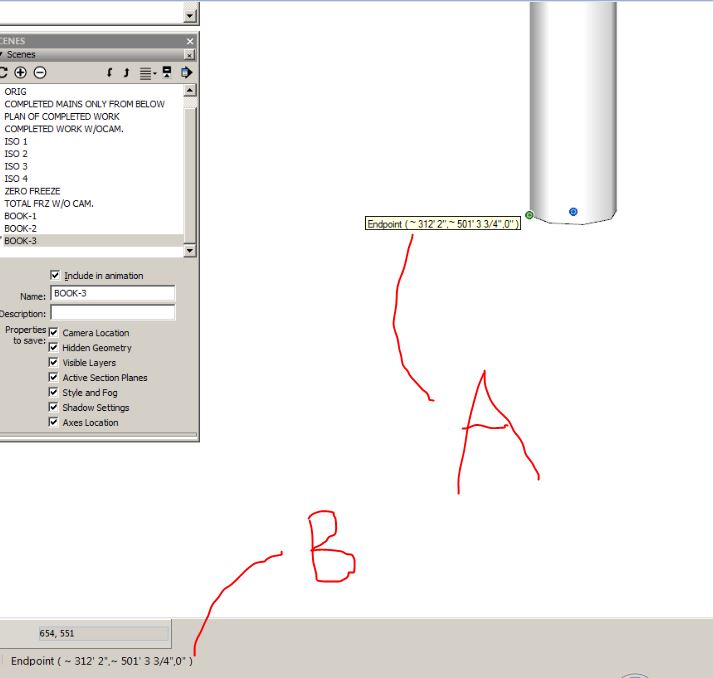
Is there any easy way to have the tag labelled ''A'' remain on the screen until the cursor is moved? By default, it fades out after a few seconds. And yes, I know the info remains in the measurements field at the bottom of the screen. See attached image.
-
RE: Curviloft ''narrowing''
My goal is to connect two offset rectangles with the speed and simplicity of using Curviloft - but without a reduction in aspect ratio. Want to avoid the extra step of manually drawing a path between said rectangles.
-
RE: Curviloft ''narrowing''
Just to complete this subject, hopefully the creator of the extension reads this post so he may attempt to improve the issue. If that's even possible.
-
RE: Curviloft ''narrowing''
pilou - i saved as ver 6 just moments ago.
-
RE: Curviloft ''narrowing''
yes, dave r. - but with the simplicity and speed of the curviloft tool. is that what you used?
-
Curviloft ''narrowing''
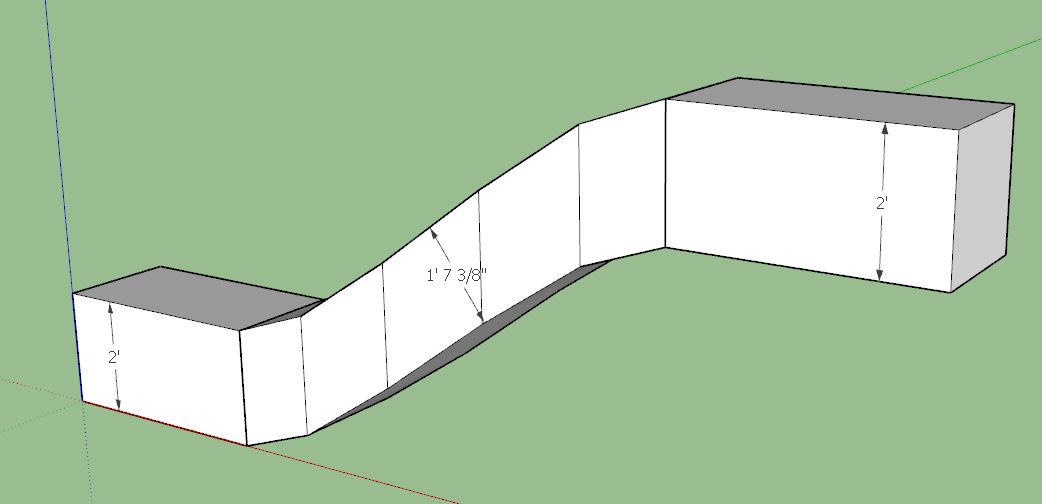
Is there a way to maintain a consistent geometry width? In the attached example, the 1'-7 3/8" dimension illustrates my point.
-
RE: GROUP NAMES APPEAR AT CAD ORIGIN
When exporting a skp model containing named groups, the names (text) will appear at the cad model origin. (will not happen with components). How can this annoying behavior be stopped? Answer - instead of exporting the skp file from SketchUp, import the skp file from AutoCAD using importskp command. However, in the SketchUp program, as of now, you first need to save-as version 8 to avoid an import failure!! The skp file loads into the cad environment as a block. Even if you type 0,0,0 you can only sloppily and inaccurately manually place the block into position. The insertion point of the block mimics the origin on the SketchUp environment. If you want the block's insertion point to land on the cad origin, erase the block and re-insert it (i>enter) and use the insertion part of the dialogue box to specify insertion at 0,0,0. If the block contains groups and/or components, run down the dropdown list in the block insertion window and pick the filename of the imported model. Note – you cannot import a skb file into AutoCAD.
PS – you can ‘temporarily’ save-as version 8 before you let AutoCAD import the file. At the end of you skp session, just save-as your current version. -
GROUP NAMES APPEAR AT CAD ORIGIN
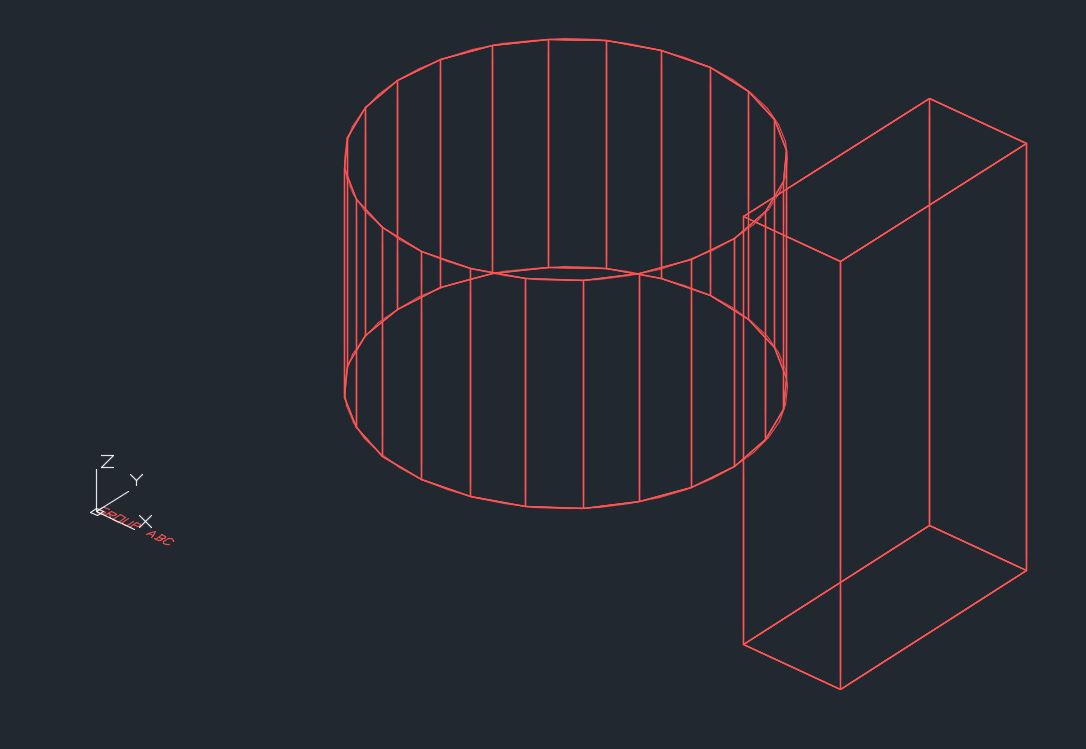
When exporting a skp model containing named groups, the names will appear at the cad model origin. In the attached example, the cylinder is a group, and it's name appears at the cad origin. The rectangle is named component, and the name does not appear at the cad origin. How can i stop this quirky behavior?
-
LO 2017 DAT FILE
With SKP, you can import / export keyboard shortcuts from one installation to another. Not so with LO, right?
-
RE: Paths are invalid............
oops....problem still remains. i need to drill down into this with TIG's administrator suggestion.
-
RE: CFileException 0 in C:\Users....WTH??
but i thought the files get refreshed instantaneously in the c drive, and then the syncing takes place between this and other machines and the cloud as an automatic secondary operation, behind the scenes? anyway, i dumped old versions of skp and am using only 2017. i think that cures the problem. i just do not get a thrill from the trays.
-
RE: Paths are invalid............
Started to re-install 2015 and 2016. but instead, i decided to install 2017 and delete the old programs. i totally dislike the trays, but it's better than the invalid path stuff. (please mr. trimble - give us the option to revert back to the 2015 toolbars, or at the least, enlarge the layer check boxes.)
-
RE: CFileException 0 in C:\Users....WTH??
explain ''latency'' please
-
RE: SketchUp 2017 Wishlist
i'm really not luvin' the 2016 tray system. the 2015 toolbar system was perfect.
-
RE: Paths are invalid............
yes, yes, no. the same paths are listed in skp 2015 on the same computer and i get no red hi-lighting there.