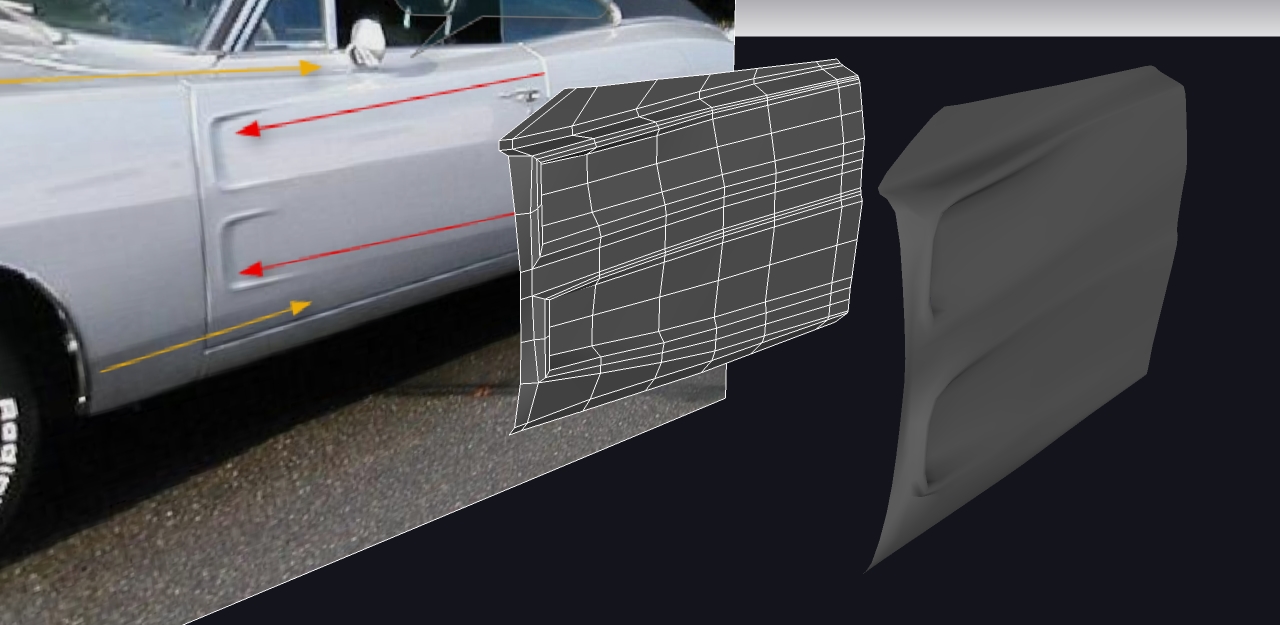
yes i know 
but i said that because in this particular case he specified he need to revert just some components which were eventually painted not on purpose..
Oops, your profile's looking a bit empty! To help us tailor your experience, please fill in key details like your SketchUp version, skill level, operating system, and more. Update and save your info on your profile page today!
🚨 Skimp | 25% Off until March 30 Buy Now
 Offline
Posts
-
RE: Remove the color/fill of a group
-
RE: Remove the color/fill of a group
why do you need plugins for this?
just select the group and open "entity info" dialog, click on the coloured square to open the "choose paint" window and tick "default" -
RE: Vray render time
@valerostudio said:
Its in the debug menu. It basically resets all the materials to default in Vray.
thanks, looks also like very useful when you import some wharehouse components with tons of odd materials.
just i don't know were the debug menu si found
@valerostudio said:
update to 1.49.01 - Although buggy, its still a better product than 1.05.30 by far.
yes buggy.. today 3 materials i just created and applyed are sort of disappeared from the list and replaced with default..
i also saved before notice it.. i don't know why.. just vanished..
-
RE: Vray render time
@valerostudio said:
force a sync of all the materials?
what do you mean by this can you elaborate?
 -
RE: Help with GPU choice
@guyds1 said:
I also have another system with an NVidia Quadro 600 1GB (Core i5-2400 @ 3.1 Ghz, 8GB RAM) and to be honnest I'm rather disappointed about its performance with Sketchup.

-
RE: Help with GPU choice
@thomthom said:
I would pick an nVidia product. I got an ATI card on my office machine a while ago - I experienced many strange glitches
@beginner said:
I agree with ThomThom.
We had some problems with ATI in the past...
nVidia seems to be more consistent.i use sketchup both on a laptop with ati radeon HD5730 and on a desktop with nvidia GTX560 and seems to be way more consistent and smoother on nvidia..
but not sure it'si only a gpu thing, because the overall specs of the desktop pc are better (motherboard, cpu, etc..) -
RE: Problem rendering with v-ray!need help...
@kwistenbiebel said:
Rendering large scenes in Vray For Sketchup is virtually impossible (in my experience).
....My advise, I would wait for VrayforSketchup to mature in next versions if you want to use it professionally.
not sure of this, yes vfs has it's limits, but if you properly manage your scene you can manage quite big scene.
i don't see this scene that big, i've rendered much more large and complex scene.i think what you really need is to have some attention in modeling.
such as: don't overmodel! get rid of all unnecessary geometry, use a proper amount of segments for curvy things, use component if you have some reapeted geometry, properly layer it, so you can hide what is not needed for that scene, try to get rid of those crappy warehouse model (actually not all are that crappy, but HIMO 90% of it does) or at least clean them, in particular look at materials wich often are messy, in addition, if they have some repeated geometryes, make them components because not always they are..the more i come into sketchup + vray, the more i suggest to model your components by yourself, at least when it is possible..
also i found that a good trick is to have low-poly versions of hi-poly components and put it to different layers, so you can quickly show/hide them depending how close the view is..
also don't use hi-res textures, refractions and most of all displacement, if you don't actually need them..
hope this can help
-
RE: [WIP] '69 Dodge Charger
some true masterpieces here, you all guys rule! very intersting and lot to learn from you!
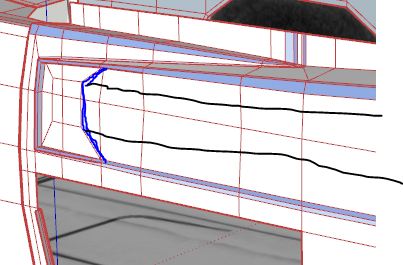
i did'n t fully understand what the blue loop actually controls..
why you didn't go for the more obvious solution of the two black loops?
i'm pretty sure this is another cool trick i miss.. just can't understand..
-
RE: [Plugin] LSS Toolbar 2.0 Beta
this beta looks very good promising.. congrats!
only 2 question:- does this tools support pseudo quads?
- does it actually have a conflict with tru-paint?
thank you
-
RE: [WIP] '69 Dodge Charger
@thomthom said:
I'm finding that I need another tool for building corners.
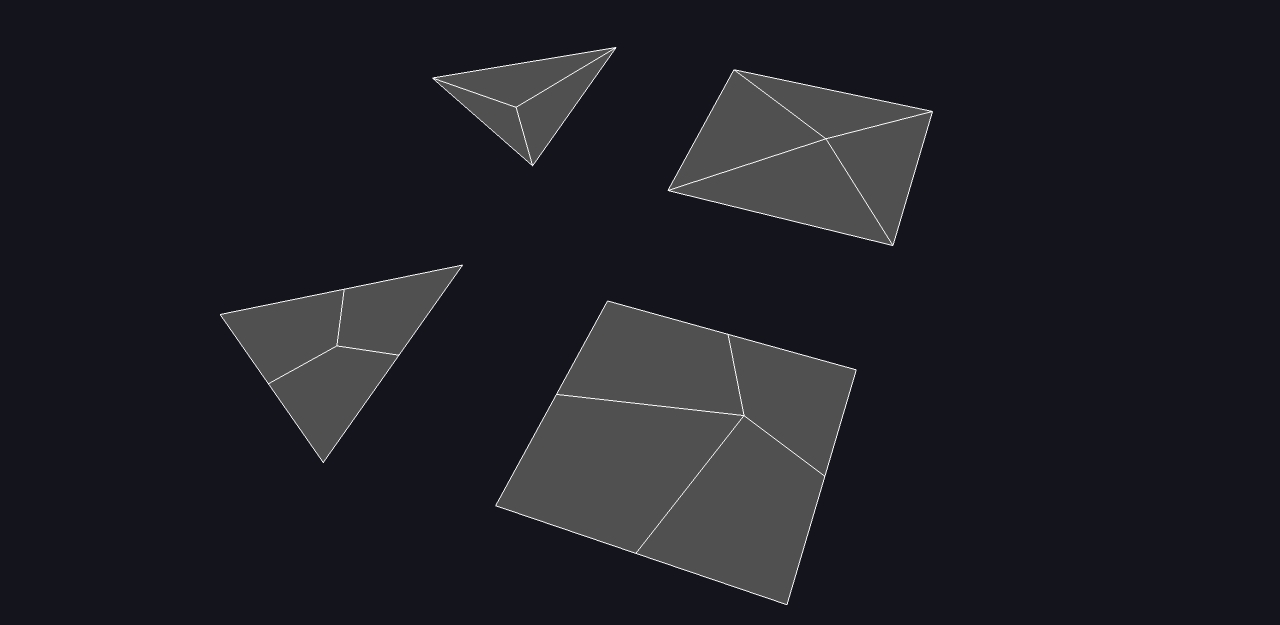
thomthom, while cutting and splitting all those quads i was wondering if would be possible to add an option to the insert vertex tool..
in some cases i think could be helpfuf if one can choose to insert vertex that snap to edges or mid-points of the face instead of existing vertices (see the attachment), so the new small splitted facets are quads (at least with quad or tri parent face..)
what do you think about it? not sure if that can lead to logical/coding problems..
-
RE: [WIP] '69 Dodge Charger
ah ok, i was wondering if you exported to blender or used some modeling trick or cleaned it by hand or something like this.
so.. luck..
-
RE: [WIP] '69 Dodge Charger
maybe you would say "unsmooth quads", ok, but i didn't mind that..
i'm guessing how do you manage to have a so clean quad mesh after subdivision in sketchup .. -
RE: [WIP] '69 Dodge Charger
@rich o brien said:
Bit of clean up to do but an interesting challenge. No creases added all controlled by loops and whatnot.
how did you achieve the middle version (smoothed+quads) in sketchup?
-
RE: [WIP] '69 Dodge Charger
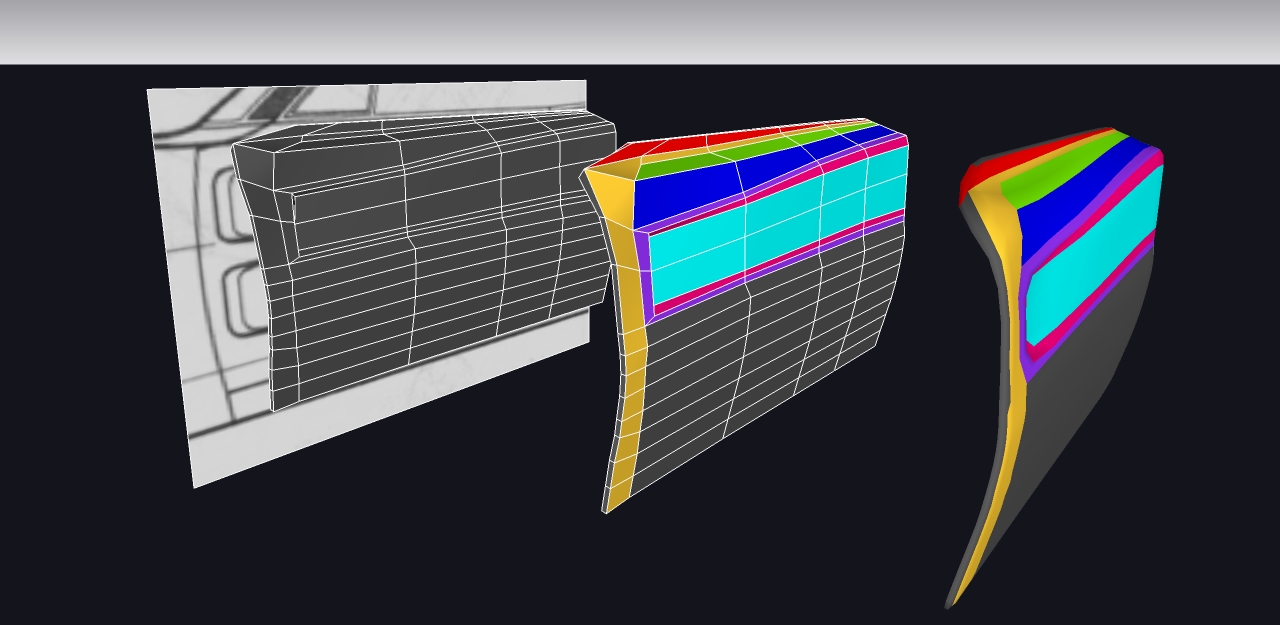
i see only crappiness at the horizon.
if only there was an international crappiness contest i would have been the champ..
because ever attempt i do is crappier than the crappiest one achieved before.
-
RE: [WIP] '69 Dodge Charger
i found this:
http://area.autodesk.com/userdata/forum/6/69charger.jpg
but i'm realizing i'm not good at all.. damn car!
-
RE: [WIP] '69 Dodge Charger
@thomthom said:
these two indented shapes (fake air-scoops?) bordering the intersection.
i noticed from other photos of the car with different color that the two crested things are crome, i did'nt noticed that in your withe car photo. so maybe better to keep them in another component. actually in the first attempt, i did all that loops to crease them from the door shape itself, but this drive to not so uniform quad size. if one keep them apart can actually get rid of all that thiny unneccessary ring, keeping things more low poly.
i don't know if i achieved to explain clearly what i want to say..
sorry for my bad english.. i'm italian after all.. bababadabupi
-
RE: [WIP] '69 Dodge Charger
@thomthom said:
[attachment=1:bn4paodp]<!-- ia1 -->FrontDoor.png<!-- ia1 -->[/attachment:bn4paodp]
I'll bring home some tracing paper today and sketch out where I think the control loops will go.
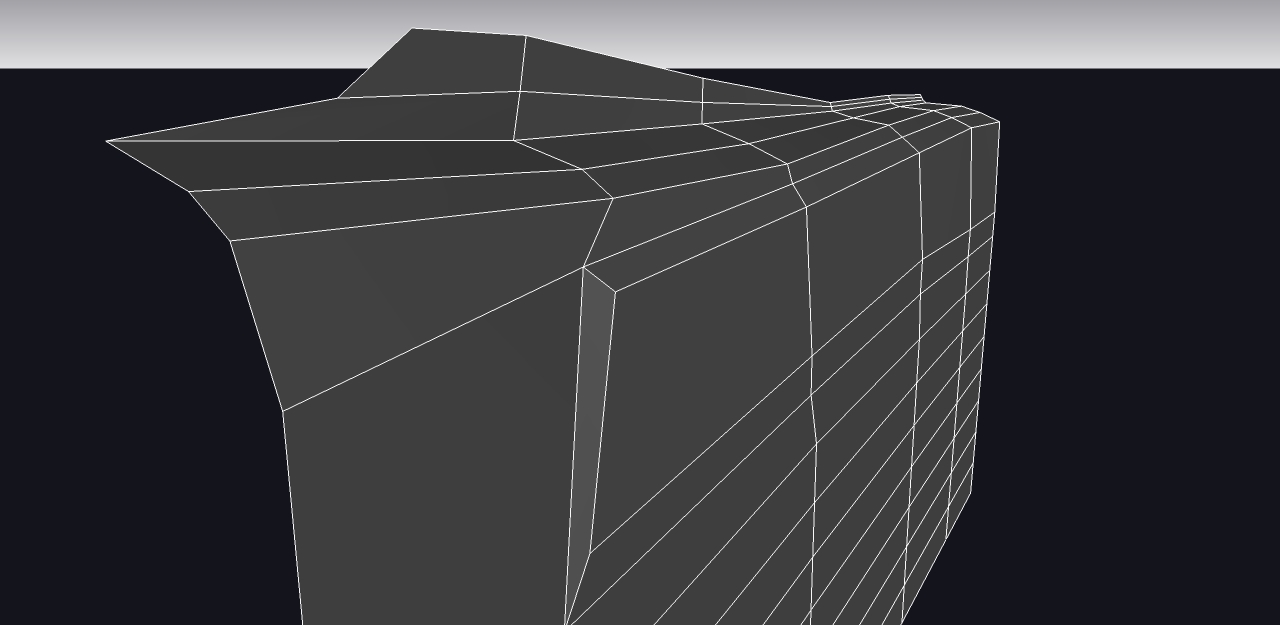
something on this scheme/idea maybe??? this headscrach is driving me completely crazy. not easy at all
-
RE: [WIP] '69 Dodge Charger
@thomthom said:
you're missing the design lines that flows with the yellow edges. Notice how they intersect and blend - especially at the top. I'm thinking I need a loop to run across the door from the top where the front and back fender meets along the crests.
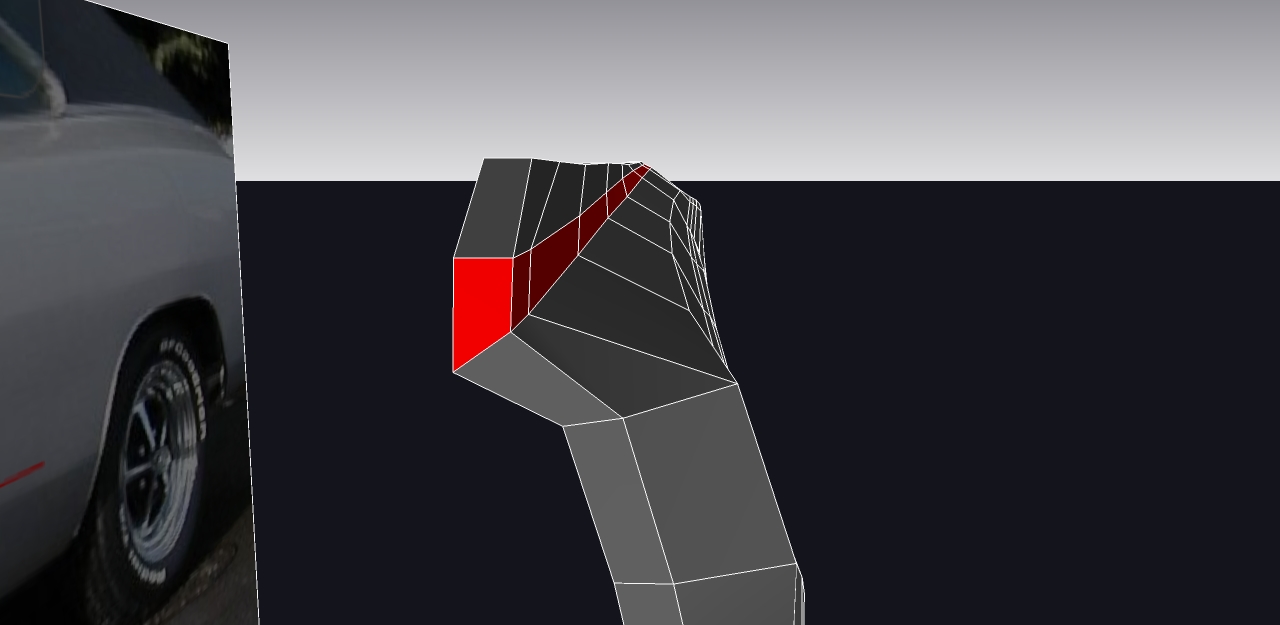
it is absolutely not proportional cause i have no dimension, but i think the job of the upper yellow line may be done by the red faceloop.
by twisting it from near vertical to near flat, should be possible to remove the triangulation on top of your first picture (the one with the orange door)
-
RE: [WIP] '69 Dodge Charger
@pbacot said:
So it looks like you can bring the center edges in line again, by selecting all and scaling to 0 with the scale tool. but there doesn't seem to be control of where this new plane is. You still have to bring it back to the mirror line periodically
yes you have to bring it back.
@pbacot said:
changing the work you've done in that area. Or am I missing the technique?
not 100% sure about this.
in the original comment i said "outer ring" i wanted to say outer loop. in that case not so much would change in the geometry after scaling 0.
i mean place back the component on the other mirrored one require 2 click: pick endpoint -> snap endpoint
i suppose a lock plane tools would need at least 4 click: show menu, enable mirror plane lock, pick first point for the plane, pick second point for the plane.
so.. -
RE: [WIP] '69 Dodge Charger
looks great!
i didn't understand from the vid if it is possible to crease in your beta! great job anyway!
here is my super-crappy effort to the door topology.. never tried to model cars before.. looks very difficoult indeed..