sketchucation logo sketchucation
    • Login
    1. Home
    2. Matt666
    3. Posts
    Oops, your profile's looking a bit empty! To help us tailor your experience, please fill in key details like your SketchUp version, skill level, operating system, and more. Update and save your info on your profile page today!
    Urasik Extensions | Lots of new extensions to check out Learn More
    M
    Offline
    • Profile
    • Following 0
    • Followers 0
    • Topics 75
    • Posts 822
    • Groups 1

    Posts

    Recent Best Controversial
    • RE: [Bug] Add_group inside a component

      It's been a long time I try to convert all components into groups by ruby... See here...

      Yes, thomthom, bug appears when parent of entities to group are not model.
      I have made a set of tools for components and groups. One of these tools can convert one component into a group. It also works with sub components!! It works because you have to select it before conversion, and if you want to select, you have to enter in the first component. So SU parent is the component definition... so 'model.entities.add_group' works. Now tool I want to create could convert ALL components into groups. It works well with components with model parent, but there is a bug with the other components....
      Sorry for my poor english it's quite difficult to explain clearly what I noticed 😳 !

      posted in Developers' Forum
      M
      Matt666
    • RE: [Plugin] Selection manager

      😳

      posted in Plugins
      M
      Matt666
    • [Plugin] Selection manager

      Hi all!

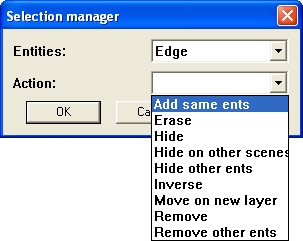
      Here is a beta version of a plugin that manages a selection.
      Please post any bugs or requests in this thread.
      Make a selection, and choose "Selection manager" in right click or in the menu plugins.
      Sans titre 1.jpg

      EDIT : V1.1 Add circles and arcs, and 2 actions for them : Get center point and remove center point
      😉


      V1.1

      posted in Plugins
      M
      Matt666
    • RE: Objects (grouped) Selection to Components

      This kind of thing? It will probably need for a question "Do you want to convert all entities into components in the selection?"
      EDIT : Please see below for the plugin.
      😉

      posted in Developers' Forum
      M
      Matt666
    • RE: Objects (grouped) Selection to Components

      Hi!
      See http://www.sketchucation.com/forums/scf/viewtopic.php?f=180&t=17590 for plugin update.
      Pilou, pourrais-tu supprimer ton New plugin, stoplé ? J'ai créé un post spécial pour lui...
      Merci ! 😉

      posted in Developers' Forum
      M
      Matt666
    • [Plugin] Component/group tools

      Hi all!
      Here is a set of tools to play with components and groups.
      It can :

      • Make a group of just one entity (right click or menu plugins/Make group)
      • Make a component instance of just one entity (right click or menu plugins/Make component)
      • Convert each entity in the selection in a single group (right click or menu plugins/Convert on single groups)
      • Convert each entity in the selection in a single component (right click or menu plugins/Convert on single components)
      • Convert the selected component into a group (right click or menu plugins/Make group)
        SU has a native tool to convert a group into a component.

      That's all!
      😉


      Make_Components.rb

      posted in Plugins
      M
      Matt666
    • [Bug] Add_group inside a component

      Hi all!

      I try to make a group of a component inside another component (so with definition parent).
      But when group is created, it is deplaced to the origin of the component definition. And it generates a bug on close SU.

      But when I try to make a group of a component B inside another component A , and SU has component definition B opened, It works.

      So there is a bug on creation of a group. It cames from the parent of the selection to group. If you are on the model of the drawing, and the group to create is inside a component definition parent, it won't work.

      posted in Developers' Forum
      M
      Matt666
    • RE: Plugins indispensables

      Salut Bert !
      J'utilise moi aussi beaucoup les scènes et les calques... J'ai pour cela créé un petit plugin qui désactive le calque de l'entité sélectionnée dans les autres scènes. Je m'en sers régulièrement, quand je n'utilise pas l'énorme Add_Hidden_Layer de Jim.
      Ce plugin t'intéresse t'il ?

      posted in Français
      M
      Matt666
    • RE: 'Scene manager' plugin

      A little description (with images please) would be cool... I don't have 3Ds... 😄 Thank you!

      posted in Developers' Forum
      M
      Matt666
    • RE: Recent work

      Wow! Great work!
      are Numbers on second image of project 1 made with Sketchup? How did you do them?

      posted in Gallery
      M
      Matt666
    • RE: Transparent watermark

      Ah, Ok! Thank you for theses explanations!

      posted in SketchUp Discussions
      M
      Matt666
    • RE: Transparent watermark

      Wow thank you thomthom! I don't understand how you do that, but it works fine!

      @unknownuser said:

      transparency in images with a palette
      Neither Don't understand this...

      @unknownuser said:

      your image to be full-colour image
      Nor Don't understand that!
      😕 😕 😕 Sorry... I don't like transparency 😄

      posted in SketchUp Discussions
      M
      Matt666
    • RE: Transparent watermark

      Yep! 😉 Thank you for your interest Thomthom!
      EDIT : What is this f*****g black color????


      logo_sketchUP.png

      posted in SketchUp Discussions
      M
      Matt666
    • RE: Transparent watermark

      Thank you for your quick answers!
      Model Background is already white, remus.
      Here is the logo:Sans titre 2.jpgBut model is above him. So you don't see logo all the time.
      Sans titre 3.jpgAnd when I try to put logo above model space, white color of the logo is displayed:
      Sans titre 4.jpgi want logo above model space but without white color... Like this:
      Sans titre 5.jpg
      @unknownuser said:

      Was the logo saved as an Interlaced PNG.?
      I don't know... I don't understand all PNG parameters 😳 😳

      Thank you!

      posted in SketchUp Discussions
      M
      Matt666
    • Transparent watermark

      Hi all !
      I have a style by default that contains a logo and some text. I want this logo to have just white color transparent, because it is above the drawing.

      I tried to make white color of this logo transparent, save as PNG, and inserted in the drawing. I placed it above the model space, but white color is displayed! No transparency... And I can't use blend method, because logo must be clarly readable!

      Can you help me, please?
      Thank you! 😄

      posted in SketchUp Discussions sketchup
      M
      Matt666
    • RE: [Plugin][$] Tools On Surface - v2.6a - 01 Apr 24

      Hi Fredo!
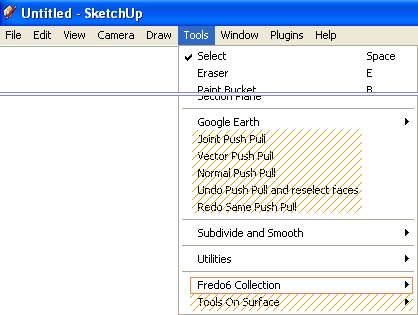
      I suppose you will move your menus in "Fredo collection" in your next TOS update, like freescale plugin ? ❓
      That would be cool, and also your push pull plugin!
      Sans titre 1.jpgExcellent plugin, as always, sir! 😄 Thank you...

      posted in Plugins
      M
      Matt666
    • RE: [Plugin][$] Tools On Surface - v2.6a - 01 Apr 24

      Just construction points? You can try native Su tool! GO to Edit menu / Delete guides.
      You can also copy this code below in the ruby console... It will delete all construction points in the selection.

      Sketchup.active_model.selection.each{|e|e.erase! if e.class==Sketchup;;ConstructionPoint}
      

      😉

      posted in Plugins
      M
      Matt666
    • RE: 'Scene manager' plugin

      Can you explain a little more what you need for, please ??

      posted in Developers' Forum
      M
      Matt666
    • RE: Copie multiple suivant un chemin

      Je crois que ce truc fait ce que tu veux ! Jamais essayé cependant...

      posted in Français
      M
      Matt666
    • RE: SU sur clef USB

      Salut !
      Je ne sais pas, jamais essayé. il n'est inscrit nul part que SU était aussi un logiciel "portable". Par contre cela a déjà été discuté ! En espérant qu'ils aient trouvé une solution... Je n'ai pas lu.
      😉

      posted in Français
      M
      Matt666
    • 1
    • 2
    • 11
    • 12
    • 13
    • 14
    • 15
    • 41
    • 42
    • 13 / 42