sketchucation logo sketchucation
    • Login
    1. Home
    2. MartinRinehart
    3. Posts
    Oops, your profile's looking a bit empty! To help us tailor your experience, please fill in key details like your SketchUp version, skill level, operating system, and more. Update and save your info on your profile page today!
    🚨 Skimp | 25% Off until March 30 Buy Now
    M
    Offline
    • Profile
    • Following 0
    • Followers 0
    • Topics 131
    • Posts 766
    • Groups 1

    Posts

    Recent Best Controversial
    • RE: Matrix Multiplication in C[++]

      @cjthompson said:

      is there any reason (transformation * transformation) won't work?

      The doc says *() is Transformation * Point3d => Transformation. I'm in need of Transformation * Transformation => Transformation.

      My application is animation. I may be turning 180 degrees by, for example, turning 0.5 degrees over each of 360 frames. If you have xform, a "turn 0.5 degrees" transformation, and you call instance.transform!( xform ) the transform!() method multiplies the existing transformation by the new xform matrix.

      It also pushes undo info onto the undo stack, which you don't want. instance.move!( xform ) is supposed to be the same as instance.transform!() minus the undo stack. Unfortunately, it's buggy. It forgets to multiply, and just replaces the old transformation matrix with the new one (losing all existing scales, rotations and location). Bad bug.

      So I'm getting xform via API calls, then multiplying (in Ruby) the existing and new transformations and giving the result to move!(). It works, but using the matrix multiplication code that's there already would be a lot faster. (The matrix multiplication is so fundamental to 3d geometry that it may be hand-tooled assembler.)
      posted in Developers' Forum
      M
      MartinRinehart
    • Matrix Multiplication in C[++]

      To get every possible scale using Move!() I had to write my own matrix multiplier. It wasn't particularly hard, but if I've overlooked something it was particularly stupid.

      Is there any way to use the API to get at the matrix multiplication written in C (or C++)? Any way better than, for example, doing a transform!(), grabbing the matrix and then doing an undo?

      posted in Developers' Forum
      M
      MartinRinehart
    • RE: Changing transformation variables

      @honoluludesktop said:

      Hi Martin, I originally posted an application that did some simple transformations, and became interested in the subject. As you know I am a beginner at all of this and while experimenting, I tried to change some values just to see how my components would behaved, failed to do so, and asked for help

      Fine. I was afraid you overlooked available ways of getting stuff moved / rotated / scaled. I know I did when I started fiddling.

      posted in Developers' Forum
      M
      MartinRinehart
    • RE: A New User Intro

      Before you spend money, post here. You may be pleasantly surprised.

      posted in Newbie Forum
      M
      MartinRinehart
    • RE: Naming 'Untitled'

      @tig said:

      better you can use Sketchup.open_file("myname.skp") to open that newly made file, with the 'Untitled' one being closed without saving

      Thanks, TIG. Any way to fire that extra "N" (don't save Untitled) from Ruby?

      posted in Developers' Forum
      M
      MartinRinehart
    • RE: RDoc question

      @thomthom said:

      Also: my comments that have multiple paragraphs - they all come out merged.

      Wonder what a "<p>" would do?

      posted in Developers' Forum
      M
      MartinRinehart
    • RE: Changing transformation variables

      @chris fullmer said:

      .move! will reset the scale and rotation of a component.

      You are right. I still want to hear from Hawaii, though. Suspect that he might have overlooked a method.

      posted in Developers' Forum
      M
      MartinRinehart
    • RE: Changing transformation variables

      @chris fullmer said:

      Its a quick way to move to a given point ...

      Quicker than move!()?

      posted in Developers' Forum
      M
      MartinRinehart
    • RE: Changing transformation variables

      Why is it that you want to poke values into slots in the transformation matrix? This should almost never be necessary.

      posted in Developers' Forum
      M
      MartinRinehart
    • Naming 'Untitled'

      Your Ruby does a File/New. Create some geometry. model.save "myname.skp".

      Your SU still says it has "Untitled". Any way to tell it that it's got a name?

      posted in Developers' Forum
      M
      MartinRinehart
    • RE: Scaling + move!() == ant feast

      @chris fullmer said:

      You do not need to use the .move! method in a transformation. You can stick with .transform! ... by wrapping your code in start and commit operation ...

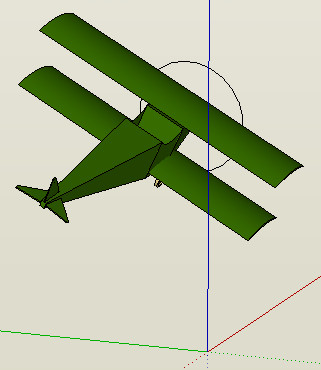
      Wish I'd thought of that. I just want to fly my airplane.

      airplane.jpg

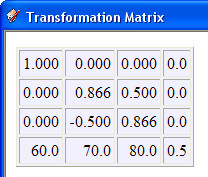
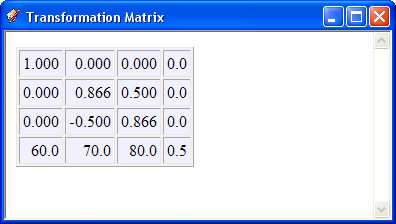
      Anyhow, I've got translation and rotation plus the global scaling cases done. These are xforms after transform (SU) and move (after me poking values into the xform).

      xf1.jpg

      xf2.jpg

      Now if only I could think of a nice, high-level way to describe movements. I've got some Ruby that taxis down the runway adding speed as it goes, lifts off, tilts tail down, gains altitude, levels off, flys away. It's great to watch. Need to turn, return, land...

      But the Ruby is an ugly mess. Not something you'd publish with your name on it. Hmmm.


      My airplane. Just over 50kB.

      posted in Developers' Forum
      M
      MartinRinehart
    • Scaling + move!() == ant feast

      Buggy as hell. I am trying to sort it out. Will let you know. transform!() is one solution. If you want to animate (and I do) ...

      You don't need an animation to study the critters. Just try scaling/transform and then the same scaling/move. Ugh.

      Aside: I now believe the docs are correct re move!(). It's the code that's bad. The guy who wrote this had a very bad day.

      posted in Developers' Forum
      M
      MartinRinehart
    • RE: Geom::Transformation.new( Vector3d ) resolved!

      @chris fullmer said:

      Why refer to it as r,g,b?

      I prefer r, g, b to x,y,z (they're identical, of course) because the ability to orbit, spinning the r and g axes every which way but loose, destroys the traditional meaning of x and y. You can have g horizontal, r vertical, for example. The steady thing about the g axis is that it's green.

      posted in Developers' Forum
      M
      MartinRinehart
    • Geom::Transformation.new( Vector3d ) resolved!

      xform = Geom::Transformation.new( Geom::Vector3d.new(...) )

      If you ComponentInstance.transform!( xform ) a translation is performed moving the component by a vector from its current location.

      If you ComponentInstance.move!( xform ) your component is moved to the absolute location origin+vector.

      The doc is dead wrong when it says of move!(): "This method is the same as the transform! method except that it does not record the move in an undo operation."

      If you wish to translate relative to the current location in an animation, convert the existing transformation to an array; add the translation r, g, b to the existing xform[12], xform[13] and xform[14], respectively; create a new transfomation from the array and move!() to the new transformation.

      These remarks also apply to groups.

      posted in Developers' Forum
      M
      MartinRinehart
    • RE: Geom::Transformation.new( Vector3d )

      TIG, as always, was right. If you transform!() the translation is relative to the current location.

      I was right, too. If you move!() the translation is to the specified point (or to origin + vec, if you specify a vector, which comes out to the same thing).

      The doc, which says the two are the same, is dead wrong. (Or the doc is right and the code is wrong. We'll never know.)

      posted in Developers' Forum
      M
      MartinRinehart
    • RE: Help with Animation

      @thomthom said:

      This could be useful to verify you're getting the desired framerate?

      Frame rate seems correct, within SketchUp's limits. Moves small things nicely at 24 fps. Flying my 50kB biplane smoothly. Corrects the timer problem.

      Will slow down, I assume (never assume!), if trying to move too much geometry.

      posted in Developers' Forum
      M
      MartinRinehart
    • RE: Help with Animation

      @chris fullmer said:

      Here is a quick animation showing your code ...

      Very cool. "Our code" I think is more exact. And thanks!

      Hey, how did you do that? I'm thinking that my HTML tutorial is destined for treeware, but that doesn't rule out links.

      posted in Developers' Forum
      M
      MartinRinehart
    • RE: Help with Animation

      @chris fullmer said:

      I did not use the .move! method, but instead a regular .transform!

      Hooray! It's alive. (It's doing exactly what TIG said: relative moves contrary to everything that I've seen. But that's another issue.)

      You wouldn't be able to slow that down to one or two moves per second, would you? At full throttle on my slow machine that's climbing about 63 inches/second.

      Edit: never mind. I got it.

      
              def nextFrame( view )
                  $gc.transform! $t
                  view.show_frame( 0.5 ) # Really simple!
                  return ( Time.now() - $start ) < 5
              end
      
      
      posted in Developers' Forum
      M
      MartinRinehart
    • RE: Help with Animation

      @jim said:

      view.animation = Jumper.new

      and probably setting it to nil will kill it immediately.

      Making progress. Tick! One tick is better than none.

      @chris fullmer said:

      And try this with a group or component selected and it will raise that G/C up 1 unit per frame.

      Could not duplicate, Chris. Could you repost the entire program? What I've got is missing a move!(). Thanx.

      posted in Developers' Forum
      M
      MartinRinehart
    • RE: Help with Animation

      My first goal, today, was to get this thing to tick off 15 seconds and then take out the trash. Expected to get here before breakfast.

      It's now mid-afternoon and still - no ticking. Can anyone suggest the two or three lines of code (I hope!) needed to get ticking?

      Many thanks. (Factoid: show_frame() returns a reference to the View.)

      
      # anim.rb
      
      require 'sketchup'
      
      class Jumper
      
          def nextFrame( view )
              puts Time.now() - $start
              return ( Time.now() - $start ) < 15
          end
          
          def stop()
              puts 'emptying trash'
          end
      
      end # of class Jumper
      
      $start = Time.now()
      
      view = Sketchup.active_model().active_view()
      puts view
      
      # ??????????  ?????????????  ?????????????  ???????????
      
      view.animation = nil
      
      
      posted in Developers' Forum
      M
      MartinRinehart
    • 1 / 1