sketchucation logo sketchucation
    • Login
    1. Home
    2. ken
    3. Posts
    Oops, your profile's looking a bit empty! To help us tailor your experience, please fill in key details like your SketchUp version, skill level, operating system, and more. Update and save your info on your profile page today!
    ⚠️ Important | Libfredo 15.6b introduces important bugfixes for Fredo's Extensions Update
    Offline
    • Profile
    • Following 0
    • Followers 0
    • Topics 173
    • Posts 1,026
    • Groups 1

    Posts

    Recent Best Controversial
    • RE: Right click menu disabled???

      Welcome to the “I can’t save enough” club. I have had this problem for some time as indicated by the below link. At least on the positive side, I do get to save my model more frequently and the worry about a bug splat wiping out all my improvement has almost disappeared.

      I have tried to load only select plugins groups to find the problem. Still haven’t found the problem. Here’s hoping you have better luck than me in finding this problem.

      http://forums.sketchucation.com/viewtopic.php?f=15&t=21016

      Ken

      posted in SketchUp Bug Reporting
      kenK
      ken
    • RE: Connecting Wood Beams to Steel Pipe Sections

      Fred
      On your previous post you show a connection with 6 sides. However, here you show 7 sides. Have you changed the design?
      Just enjoying your project.

      Ken

      posted in Woodworking
      kenK
      ken
    • RE: [Locked] 2D Toolset - Use Newer Version Link

      TIG

      Thanks. The hatching is a win for me.

      Feedback. I know that when you think of 2d drawing, the Z axis is at a zero elevation. However, at least on my machine, the orbit tool works better when the drawing is done using the Front view. I never can get the orbit tool to behave to my request in the Top View. And why would I need the use of the orbit tool when doing 2d drawing. Well, after using Sketchup for the last couple of years, I try an orbit everything, even Word and Xcel documents. Therefore, it is a learned response. However, I do feel I get more info from the drawing when I orbit.

      Again thanks for the tools.

      Ken

      posted in Plugins
      kenK
      ken
    • RE: Calculate the angle of an ellipse in an ortho view

      John

      Nothing underwater is off topic to me. When we used HDPE, we always buried the pipe. Had to watch the video to understand why they would have the pipe off bottom and in troubled water.

      Thanks for the info.

      Ken

      posted in Developers' Forum
      kenK
      ken
    • RE: Calculate the angle of an ellipse in an ortho view

      I believe if you use this formula you will find the angle

      COS A = R1/R2.

      I have attached a Sketchup file to illustrate.

      I deal with ACAD and ACAD files that have been turned into PDF file each and every day.

      Hope this helps.

      Ken


      Finding Circle Angle from Eplics.skp

      posted in Developers' Forum
      kenK
      ken
    • RE: [Plugin] Blend ver 1.12.

      Mr Krillshot

      Great pluging, however, I am having trouble duplicating all the video you are showing. Would it be possible to also attach the Sketchup file so I can try out the same file as you are using. This way I would know if the problems I am having are with my computer or the plugin.

      Again thanks for the pluging

      Ken

      posted in Plugins
      kenK
      ken
    • RE: [Plugin] Blend ver 1.12.

      Not sure how you are fixing the inside out problem. I can't tell exactly what you are doing. Could you please try again?

      Thanks in advance

      Ken

      posted in Plugins
      kenK
      ken
    • RE: Request "Real-Line-Cross" Center point

      Ok, Chris has indicated that I can export construction points and line to an ACAD file. However, I don’t get the construction line in 2d export, and a total mess in 3d export.

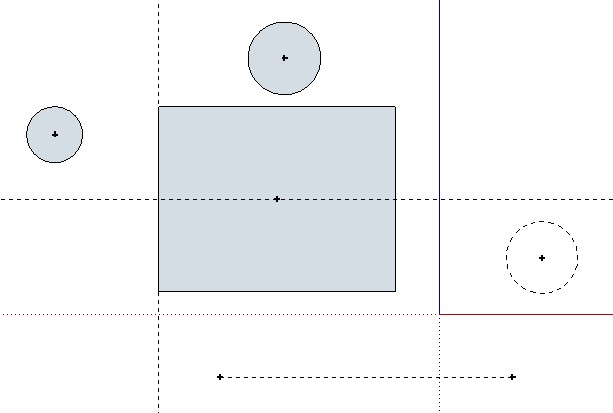
      1. First illustration is the Sketchup file

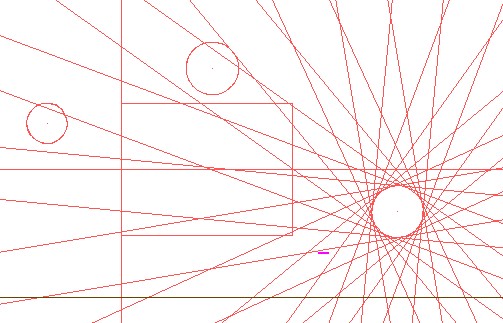
      2. Second, is 3d exporting, with the construction line all over the place, but not real construction lines, as I can’t tell the construction lines from other lines.

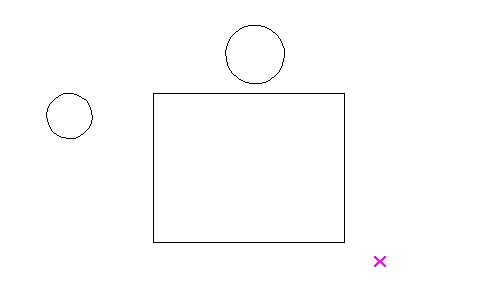
      3. Third is the 2d export. No construction lines.
        So what am I doing wrong.

      Ken


      SKUP File.jpg


      Construction 3d Export.jpg


      Construction 2d Export.jpg

      posted in Developers' Forum
      kenK
      ken
    • RE: Request "Real-Line-Cross" Center point

      Well I found the construction line export in the 3d options. However, no matter what I do, I can't seem to export construction lines or points. Oh, guess I keep working on this problem.

      Thanks

      Ken

      posted in Developers' Forum
      kenK
      ken
    • RE: Request "Real-Line-Cross" Center point

      Chris

      Thanks for the quick reply. But no matter what I do, I can't get construction lines or points to export. I know I must be doing something wrong, but darn if I can find out what it is.

      Thanks again Chris

      Ken

      posted in Developers' Forum
      kenK
      ken
    • Request "Real-Line-Cross" Center point

      Question

      Is it possible to export to ACAD file, points and hidden lines? If there is I haven’t found it so far. So if it is not possible to export points, could a script be made that draws a CROSS from regular lines, “Real-Line-Cross”, about ¼” in size. This way after exporting to an ACAD file, I would have a center point to make all my new circles or arcs. Right now, I have to make a three point construction circle or arc on top of the Sketcup circle or arc. Erase the Sketchup circle or arc and then make a new circle or arc on top of the construction line.

      If I had a “real-line-cross”, all I would have to do is make either a circle or arc without the construction line construction using the cross as the center point. I could make the circle or arc in Sketchup as X-lines and only the “Real-Line-Cross” as the center point and all that would be exported would be the cross.

      Also included,is a photo of my latest work. The QA man is coming back after the final inspection, with a smile. He is the one wearing the green hard hat.
      Thanks in advance

      Ken


      Resized_hab turtleFix.JPG

      posted in Developers' Forum
      kenK
      ken
    • RE: [Plugin] Blend ver 1.12.

      Note sure if it me or note. But I tried V3 and was pleased with the results, however, V4 does not seem to display the same results. Note, I dont' have V3 any more, as I copied over the script, so this is from memory.

      I particular like how if blended a square to a circle, now every time the output has folds or is not a straight blend from the square to the circle.

      Ken

      posted in Plugins
      kenK
      ken
    • RE: [Plugin] Exploded arc lines to arc

      @nobnob said:

      I create a script that converts lines (exploded arc curve) to an arc curve.
      It also can convert offseted arc and followmeed arc.

      Special thanks to Chris Fullmer! You may take, rebuild and release this as yours.

      Don’t want to seem ungrateful, but am I being a jerk?

      Shouldn’t the menu’s item name for a script have some relationship to the script’s function?

      I renamed the menu item’s name to “Unexplode Arc” for this particular script, so at least I would have some hint what the menu selection was suppose to accomplish. And why is there a menu item of “ni” and a submenu item “Lines to Arc”? To me it seems unnecessary to have to make two clicks to accomplish one action.

      One time I had a script that the menu item had no relationship to the script’s name, another two character menu item's name. I had no idea what the script was to do, to what script the menu selection was referring to, and could not find the script by doing a search for the menu’s items name in my list of scripts. Finally, I did come across the script and deleted the darn thing as it was no longer needed.

      All and all a very useful script and thanks for your time and effort and I am very gateful, Nobnob.

      Ken

      posted in Plugins
      kenK
      ken
    • RE: Sandbox tools not working: plugin interference?

      I had this problem some time ago. And found the offending ruby to be Set.rb.

      Below copied from my previous email.

      "Well I have found the offending ruby. After much trial and error, the ruby, Set.rb, if allowed to load will on my machine cause the sandbox tool not to work. If I don't let set.rb load, the sandbox tool works. Note, this is with Ver 6 and Ver 7.

      I have copied part of the first section of this ruby. I don't know what it is controlling, I will do a search to find out where I got this ruby.

      Now, what I don't know as of yet, what is not working now that I have stop Set.rb from loading.

      Hope this helps any others that found the sandbox tool is not working."

      posted in SketchUp Discussions
      kenK
      ken
    • RE: SketchUp > DoubleCAD Workflow for Con Doc Output

      Mike

      I have tried DoulbCad, DC 1 the first version and the update DC 1.1 and found both lacking.

      I originally bought TubroCad14-Deluxe Upgraded to 15,total cost $150 US. However TC 15 had some quirks that made it frustrating to use. Like three key click to start and finish each end of a line if you had any of the snaps turned on.

      So I downloaded DC 1and found that some of the quirks in TC15 were gone and there seem to be an improved interface. So I started trying to use DC 1.

      DC 1 seem to stop for no reason, requiring me to close and start again. And the start up screen would hang up at 99%, preventing the program from starting. All very annoying.

      However, after trying to work with it, I found the documentation weak; some items just didn’t make since on how they were to work. The documentation would show screen shots that did not appear in the program. Just try editing a multiline text element. So I downloaded DC 1.1, the update.

      In DC 1.1 the start up screen always has closed allowing the program to start, documentation did not change; and I can say there were some improvements. A nice program for free. However it still had some quirks that I found time consuming.

      I noticed that TC 15 had a new version, TC 16. So paid the upgrade price. Now TC 16 seems to have taken the best of DC 1.1 and greatly improved from TC 15 in some other areas.

      Improved drawing with snaps on. No more unnecessary mouse clicks jus to draw a line. To me TC 16 is well worth the money. Even if DC 1.1 is free, my time isn’t, so a free product that cost me undo labor is not free to me.

      An on a personal note, I had a person at DC email me and set up a phone time to talk about the program. So I set home waiting. No call.

      So it is almost a good product for free especially if you have no time constraints, however, if you want to truly good program to make construction document out of, try TC 16.

      Ken

      posted in Hardware
      kenK
      ken
    • RE: An annoying recurrence

      thomthom

      No not yet. However, it seemed to slow down yesterday. The day before, I couldn't go 5 minutes without having to shut down.

      Ken

      posted in SketchUp Discussions
      kenK
      ken
    • RE: An annoying recurrence

      Jackson

      Attached is one of the models that the right click problem occurs. Note, this problem is not always repeatable; however, this is model I was having some trouble with today. Note, this is my second try, the first model was to large. This model also had the same right click problem.

      Thanks for you concern and help. Sorry about being late with the model. Had to go to the airport and pick up my youngest daughter.

      Ken


      To Jackson.skp

      posted in SketchUp Discussions
      kenK
      ken
    • RE: An annoying recurrence

      Jackson

      Will this screen shot show what I was selecting. When I realized that everything had grayed out, I made a small square,pulled it up about 6 inch. You can see the part at the left side middle as selected.

      Thanks for you reply. I have been trying to figure out just what I am doing to could cause this. So far I have not found anything that I am doing the will recreat this problem.

      KEn

      posted in SketchUp Discussions
      kenK
      ken
    • An annoying recurrence

      Help maybe.

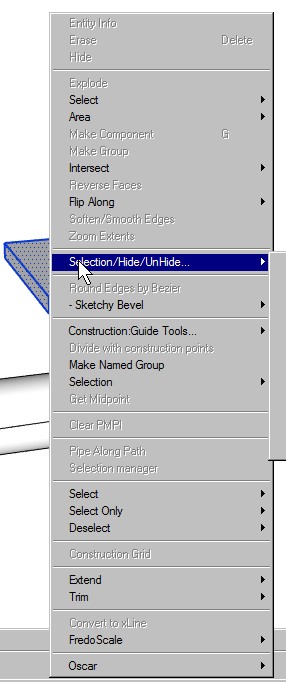
      The JPG is a screen grab after doing a right click to make a group. The group and other commands are grayed out. This is happening more and more often. I have to save the model, close Sketchup and re-open the model to get the grayed out selections available.

      This is making Sketchup almost useless for me any more. I can’t seem to find the trigger. Sometimes it just happens without using any scripts, others, times I can go on for sometime before it occurs. This happen on new and old model.

      I am baffled and peeved, to say the least.

      Note, I am just venting.

      Ken


      ScreenHunter_01 Aug. 05 15.08.jpg

      posted in SketchUp Discussions sketchup
      kenK
      ken
    • RE: Plugin Request - Make Orthrographic Views

      @jim said:

      Scenes or no, if you are talking about copying and moving a group or component then this would be a small plugin. I can take a shot later this week, unless someone wants to do it - let me know.

      Yep, copying the group or component, moving the copy, such that I end up with three differenct orthographic views, that I can export to an ACAD file.

      Thanks Jim

      posted in Developers' Forum
      kenK
      ken
    • 1 / 1