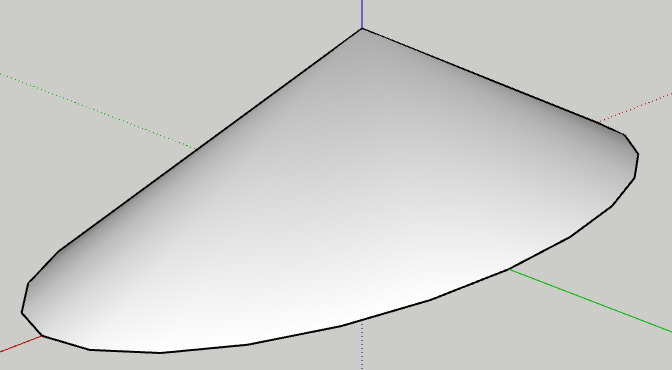
I am unable to get FredoCorner to work properly. It often displays ugly artifacts. I even created a new version of this from scratch — same artifacts when I use FredoCorner!
Am I doing something wrong?
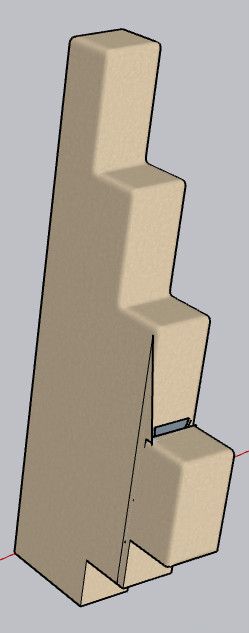
I am unable to get FredoCorner to work properly. It often displays ugly artifacts. I even created a new version of this from scratch — same artifacts when I use FredoCorner!
Am I doing something wrong?
Ah, I see your bug.
I am on a case-sensitive file system — which is totally supported by Apple. The file present has "MAC" in it, and the dialogue has "Mac" in it.
Don't feel bad… it took three years of continuous bug reports before Adobe made their case consistent within their applications!
I suggest you should test on the most constrained case, in this case, on a case-sensitive file system. 
I think the other problem I'm having may be related to this, as well.
But you won't even hear about this until Sketchucation takes this message out of moderation status… 
@fredo6 What do I need to do to get out of Sketchucation jail?
Moderators are holding my postings for FOUR DAYS before putting them up here!
When you pay money for a product, I consider this lousy service! I know developers are busy, and I'd be quite forgiving, but demanding FOUR DAYS before a developer can even see my answer to their question is insane!
@Rich-O-Brien When I start (on MacOS 13.7.8) the available download of either SketchUp 2025 or 2026, it displays the menu bar for SketchUp, but then hangs infinitely† with just the Spinning Beach Ball of Death.
The version of SketchUp 2025 that was in the /Applications folder on my automatic backups (version 25.0.659) works just fine, but displays the "missing Library file" notifier that I showed a few messages ago.
I really need this! I have helpers for the build arriving, and materials being delivered next Friday.
†Thinking it was just busy, I let it run overnight, and still had the SBBoD in the morning. All other applications (Mail, Firefox, etc.) continue working just fine. I have to force-quit SketchUp.
It is not able to run on my SketchUp 2025. (And SketchUp 2026 won't run on my machine for some reason…)
@willeykj
Cool! Looks like something I'd like to play with! It would be nice for training videos.
Does it do threads?
This XML file does not appear to have any style information associated with it. The document tree is shown below.
<Error>
<Code>AccessDenied</Code>
<Message>Access Denied</Message>
<RequestId>XSFMZRMJCV5R3NQD</RequestId>
<HostId>
mM8JG7eWUA89O8+UOiRtpkOMumktFOeAeTObVEvFoWljU2Nt5SMrn3fAmzVOYWPAS9vaHQP1jk0=
</HostId>
</Error>
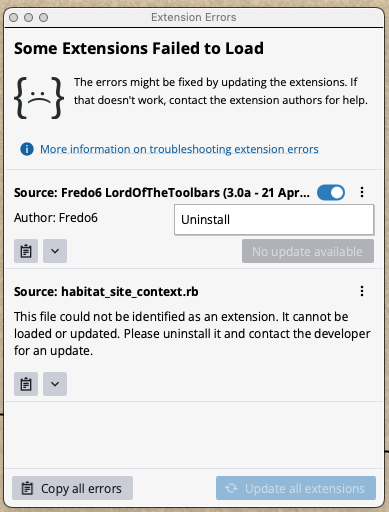
I am unable to license plugins.
Due to the error message, I think this is a general problem, but specifically I was trying to license FredoSpline.
I followed the instructions, and clicked Tools —> Fredo6 Collection —> FredoSpline —> License…
Then I got the following notifier:
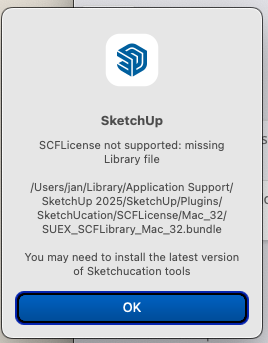
For whatever reason, I cannot run SketchUp 2025 or 2026 as available on the SketchUp website — it simply hangs, even overnight, without displaying anything more than a menu bar. Trimble is currently ignoring my bug report on that.
I followed the instructions and installed the latest version of Sketchucation tools and restarted SketchUp — same problem.
So I am using an older version of SketchUp 2025 (25.0.659)
The file it complains about in the dialogue in fact exists and is read-writeable:
0> ls -l ~/Library/Application\ Support/SketchUp\ 2025/SketchUp/Plugins/SketchUcation/SCFLicense/Mac_32/SUEX_SCFLibrary_MAC_32.bundle
-rw-rw-rw-  1 jan  staff  349136 15 Aug  2025 /Users/jan/Library/Application Support/SketchUp 2025/SketchUp/Plugins/SketchUcation/SCFLicense/Mac_32/SUEX_SCFLibrary_MAC_32.bundle
Any ideas? I would really like to use FredoSpline, and my trial expires soon!
Thanks for any help offered!
@frascati
I came here to find out how to form an elliptical cone, but didn't see a simple way. So I had to figure it out for myself.
Yea, this is an old thread. I'm posting this here in the hope that someone else searching for the solution might find it.
That's how I created the following elliptical cone, with a length-width ratio of 0.5.