@stuartb said:
Jackson, you realise they just released version 53.1.2.3 of that last week. Your old files won't open unless you pay for the 'upgrade'!
Dammit!
@stuartb said:
Jackson, you realise they just released version 53.1.2.3 of that last week. Your old files won't open unless you pay for the 'upgrade'!
Dammit!
@stuartb said:
an app called WinSpy which lets you rename the title bar at the top of the window to whatever you like. So rather than 'model 4 - sketchup' it might say 'model 4 - ZEN CAD' or whatever you like.
Neat- I think I'll rename it SuperDuperHiTechCommandLineTookMe10YearsJustToGetTheBasicsDownAndIHadToRemortgageMyHouseToBuyItCAD (Version 53.1.2.2.)
p.s. a planning department officer told me a couple of days ago that they prefer elevations without shadows- he said they find them confusing! 
haha, morning Jon! Up to anything at the weekend?, etc, etc, office smalltalk, etc, etc, how about that result in Paris huh?
I'd never thought of it as such, but this is a global office! Coffee?
@unknownuser said:
I think the most futile human endeavour I have seen that didn't involve life and death had to be watching token Mac guy trying to do a two point perspective in Illustrator of a store interior complete with hundreds of "rendered" products. It took him about a week to painstakingly apply and tweak gradients, then he gave up. I left shortly after, the firm went bust a year later.
That would be funny if it wasn't so pitiful!
The sad thing about this attitude is that it is not based on either knowledge or experience, purely habit.
Now this may be controversial (especially on this site), but I would gladly welcome the day that someone trumps @last and produces better 3D software than SU- I'd be all over it like a cheap suit! I love SU because it's soooo damn good, not because I'm used to it.
Leave the jerks to ACAD, 3DS, Maya, etc.- they'll all be obselete in under 10 years anyway.
Scott,
Why are you whispering?
Just kidding 
Ah, I see, you meant for plan views, like AutoCAD does. That would be a tricky one to implement as as soon as you orbited out of the plan view the re-aligned selection box would become more of a hindrance than a help.
An effective workaround is to save a scene which is a rotated plan view of the skewed bit of the overall plan which you can switch to and then pan around when you need to make a selection.
I'm not sure I understand. Why would you want to alter the axis of the selection window- the fact that it is aligned with your display is one of the most fundamental features of CAD and graphics programs. It's not hard to select geometry that has been rotated- you just orbit around until the geometry is aligned with your display or am I missing something?
Susan,
I pushpulled the elevation path through the plan path (just the centre line) and intersected them. Then I deleted everything apart from the intersection, did some manual intersecting at the apexes (SU's faceting meant the paths missed by a couple of inches) and just used followme for the profile along the path. Obviously using followme has resulted in the profile twisting a bit- most noticably in the middle. That why I left the path in my skp, so you can clean it up/smooth it out if you need better results. Hope this helped.
Bruce,
Sorry to hear that, but please note the dislaimer below. 

I'm not sure I understand the problem, but here's my interpretation. The result is a bit messy and the path needs manually fixing at the apexes, but it's a start.
Here's the link to the model
http://www.sketchucation.com/forums/scf/sas/Ga ... 2%5dJB.skp
![Waterslide[2] JB 1.jpg](/uploads/imported_attachments/9jsg_Waterslide2JB1.jpg)
@pixero said:
Coen, I like it better with the avatar and personal info to the left.
We read from left to right and I believe its better to see who has posted before reading the post. IMHO.
I second that. Although it's obvious you need to start a new board to prevent further hacks I think the current one is a winning formula . Sadly, I think many folks are still reeling from the demise of the old SU forums and becoming accustomed to SCF. It'd be a real shame to put people through that all over again, especially if the forum format changes dramatically again. It's an unavoidable fact that some regulars on the old forums who posted several times a day and were amongst the most experienced SU users out there barely post more once a day. We know this forum is great  , so the only reason I can think that some members are posting less or not at all is purely because of the big switch-over.
If you're using Vue 5 or previous, it's native units are feet so make sure you export from SU as OBJ, set to feet. Vue 6 uses metres.... go figure! The weirdest thing is that Vue ever had feet as it's native unit since it is made by French developers and France adopted the metric system in 1791!
Do you mean trees you bought from Cornucopia or the ones bundled with the software. Vue's quality control is CRAP- loads of their bundled components (to use the SU term) are not to scale.
Bienvenue!
J'espère que cette image explique, essayez svp de maintenir des attachements petits, de préférence des jpgs moins de 1000 Pixel larges et sous 200kb.
Merci,
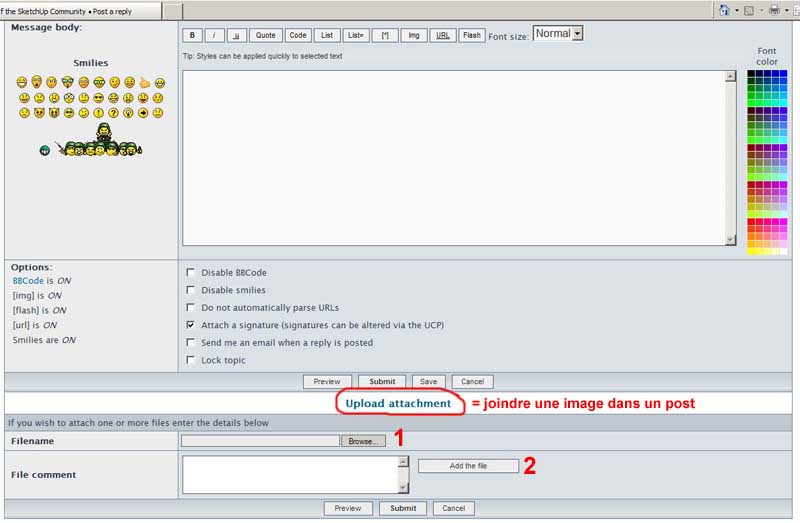
Vous devriez remercier Autodesk de cela qu'ils insistent pour créer de nouveaux types avant de dossier d'Autocad d'autres compagnies peuvent créer des importateurs et des exportateurs pour eux. Ils sont des imbéciles!
Je suis désolé pour mon Français de Babel Fish! 
Cool, I'll have to try this out. Thanks for posting!
Thanks for that James, I'll have to give it a try.
Bill,
I don't know what to say, but lets just say I grinned from ear to ear when I read your post! I kind of hoped another steam engineering enthusiast might like to finish it or add some machinery, but no luck yet.....
however...... your wonderful comments got me fired up (groan) again and I've been doing a bit more work on it. By a stroke of very good luck I've been surveying a derelict Victorian woollen mill this week for my day job and lo and behold- it still had some of the running gear for the old looms in place fixed to the floor beams! There was even a perfectly intact leather belt on one of the pulleys. So I've stripped the mill model down to one floor (the whole thing is copyright) and plonked the steam engine in it with the intention of modelling up some running gear. I will have to draw the line at modelling looms though- I'd like to model some other machinery such as metal or woodworking tools, but it's actually surprisingly difficult to find reference photos or drawings online.
You'll be pleased to know I've added oil pots to the bearings! They were based on grease injected modern bearings, but your excellent bit of observation got me studying photos of steam engines a bit more closely so I've remodelled the bearings to make them look a bit more original complete with oil pots.
Best regards,
Jackson
p.s. your grandson chose an excellent name!
Jackson
Solo,
That model is amazing! I'd probably need to walk away every 5 minutes if I was attempting to crowbar SU into doing this sort of stuff!
I moved it to Tutorials because of your excellent advice at the start, but I've left a shadow topic in place so plenty of folks see this great work.