I've never use Layout. But then I guess I wouldn't, considering the type of models I make.
ℹ️ Licensed Extensions | FredoBatch, ElevationProfile, FredoSketch, LayOps, MatSim and Pic2Shape will require license from Sept 1st More Info
 Offline
Posts
-
RE: Poll: Do you use LayOut?
-
RE: The Art of SketchUp - part 2: Sci-Fi
Very nice work, Ken. I would kill for your imagination.
I'm surprised that nobody has raised a stink because it's not "politically correct" to even think too loud about guns nowadays. Or anything else for that matter.
-
Some of my materials are being renamed
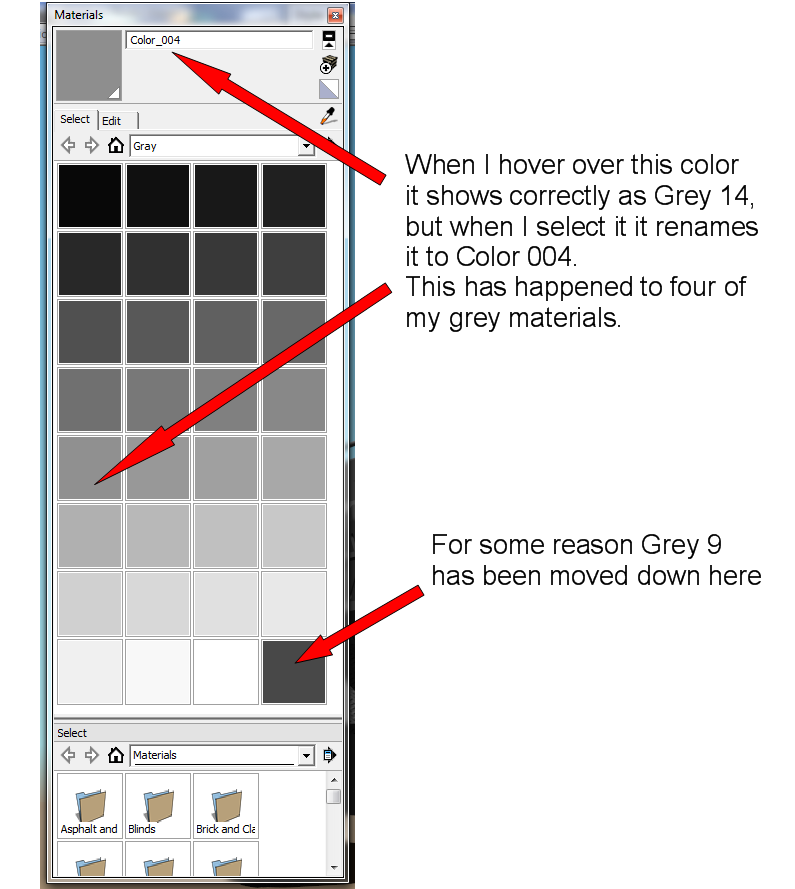
For whatever reason some of my materials have been renamed. The names show up correctly when I hover over them, but when I select them the names have been changed. In my greys this has happened to four of them.
This makes it a real pain if I want to select a slightly lighter or darker shade of grey for something in my model. Normally when I sample the color of an object it would show as Grey 14 (or whatever) so I would know which color I would need to lighten or darken it. But when it's name shows as Color 004, I have to try to visually figure out which color it really is.
I suspect this might have something to do with me at some point using the "match color of object in model" in the material edit mode, although I can't understand why that would change the name of the material.
Anyhow, how do I get the correct names back?
Also, one of the greys has been been moved down to the bottom. How do I get it back where it belongs.
Yes, this is a real life-or-death, end-of-the-world situation. Well, ok, it's annoying.
-
RE: Lighthouse
Nice design, but I'm curious about the various light shapes. I'm assuming they would have to be made specifically for this item, unless they are some light-emitting material that one could bend into the shapes needed. AC or battery powered?
As I said, just curious. -
RE: Copied components automatically tilted to remain flat on sur
Thanks JQL,
I followed your instructions and it seems to be working fine now. Not sure why it stopped working before. Although I suspect your advice about designing the component on a face and not on a group or component may have something to do with it.
I was also pleasantly surprised to see that I no longer need to get the component from the component browser, I can just copy and place as needed. Much easier.
Box,
Compo Spray sounds interesting, I've installed it but have not had a chance to play with it yet. Checked out it's thread, looks like it is going to be fairly complicated and has a real learning curve (for me, at least).
Thanks
Now maybe I can finish these dang models and move on with my life

Steve
-
RE: Copied components automatically tilted to remain flat on sur
@dave r said:
It seems to me someone (probably TIG) wrote a plugin a long time ago that obviates the need to go back to the component browser each time. It would certainly be useful for placing your rivets.
Dave, I have tried to locate the plugin you mentioned, but no luck. I stopped visiting the plugin thread a loooonnnngggg time ago, just got too frustrating with all the plugins that sounded so fantastic but knowing that I probably wouldn't be able to use the dang things right. The thread has changed a lot since then.
I did come across a few that sounded promising, I'll check them out later.
Anyhow, any idea how I might find that plugin?
I ask because I've not had a whole lot of luck with gluing my rivets and I'm working on several models that have approximately a bazillion of them.
Thanks in advance for any help you can provide. -
RE: Kob R4 - Elite/Frontier games inspired ship
hey Marian,
Haven's seen you post here in a while, good to see you back.
Nice ship (needs some high-speed hubcaps tho
 )
) -
RE: "False Maria" robot from 1927 silent film "Metropolis"
Thanks, Richard.
I've done some more work on her since my last post, been meaning to post some photos.
Nice logo

-
RE: AT AT Walker/AT PT Walker
I'll be impressed when you post a fully-detailed Death Star (including interior)

-
RE: Upholstered furniture
It would really help my self-esteem if you would post just one sucky model.
-
RE: Created 8 scenes, none of them work
@slbaumgartner said:
Um, not to insult, but @hellnbak, do you update each scene after you change the camera? If not, none of your changes will be remembered!
Not sure what you mean by "updating each scene". I move the model, and create a new scene. I move it again, and create another scene. Same way I have always done it. It's only with this model that I am having the problem, no others. Not doing anything different.
-
RE: Created 8 scenes, none of them work
I really appreciate all the input, but I just don't have the time to keep messing with this and have moved on. I did come up with something to do what I needed, without using scenes, and it worked out ok.
Again, thanks so much for your efforts to help me. It just shows that these forums are still a great community and an invaluable resource for all things Sketchup.
-
RE: Created 8 scenes, none of them work
@hornoxx said:
... is this box still checked in the scenes window?
Wow, never saw that part of the window before. Took me a while to find it, but, yes, all of the boxes are checked.
-
RE: Created 8 scenes, none of them work
Well, just tried your suggestion. Copied model into a fresh SU file, created a couple of scenes using both methods.
Nothing, nada, zilch, el-crappo.
I give up. Was just trying to finish some of my models before my "Getting Computers the Hell Out of My Life" deadline.
Oh well. Thanks for your help and suggestions.
-
RE: Created 8 scenes, none of them work
@hornoxx said:
copy paste this particular model into a new blank SkUp file and and fix your desired views there. Does this work?
Haven't tried that yet, but I did delete all of the scenes, then created create some new scenes using the "Save as a new style". Still nothing changes between scenes.
-
RE: Created 8 scenes, none of them work
@hornoxx said:
hmm
not sure if I'm doing that right, but I always use the top option "Save as a new style".
If I have a shadow from the left in scene 1, in scene 2, I have a shadow from the right. - Then I always think this probably is meant with "new style". - In any case, it works. Also different layer visibilities are considered then. Did you try that?
Anyway, this option does not affect the "real" styles of SU´s syles window...
Maybe only the wording of your shown option window is somehow clumsy?But like I said, I only use Scenes to change the position of the model. No shadow changes, nothing changed but the position of the model. And it has always worked before, and I just created five scenes in another model, worked fine. I just wanted to know why it wasn't working this time.
-
RE: Created 8 scenes, none of them work
@dave r said:
That's a strange thing to be doing with that message. It pops up when you have an edited but un-updated style selected. I expect all of your scenes are that way, then? In the Scenes settings, what have you got selected to update? Nothing?
I don't know from styles. I have always done it this way, and, up to now, it has always worked. I just created 5 scenes on another model, and it works fine. It changes the position of the models, that's all I use it for.
-
Created 8 scenes, none of them work
I don't often use scenes with my models, but when I do they work fine. Until today.
I created 8 scenes for a model. BUT, no matter which scene I select, nothing changes. The shadows go away for a few seconds, then come back, but the scene does not change.
In the Windows/Scenes panel I can see the little photos of each scene, and they show the model as it should be in each scene.
When I create a scene these are the settings I use
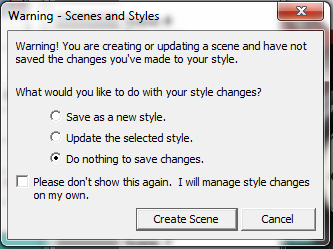
Any suggestions? Or am I going to have to save the model each time instead of trying to create scenes?
-
RE: Mustang Mach 1 1971
Nice, but one thing I always like to know - which parts did you model and which are from the Warehouse or some other source?
-
RE: The Bridge, the Barge and the Croc - Kindle ebook
@tadema said:
Steve, if Stuart doesn't want it I will certainly post it to you
John
Actually, with the work that Stuart is doing he could probably put it to really good use.
I appreciate the thought, tho
(if you ever have any extra cash you want to get rid of, keep me in mind
)