@mistro11 said:
...Companies should really take a look at how 3DSmax hooks their user base giving away free versions to students who later swear by the product. ...
Best way to do it imho
@mistro11 said:
...Companies should really take a look at how 3DSmax hooks their user base giving away free versions to students who later swear by the product. ...
Best way to do it imho
@mike amos said:
Despite the early promise, I believe Trimble have a lack of direction for the program with the predicted integration into the Trimble software group not happening as far as I can see. While open source has its attraction, Trimble are a hard nosed, profit driven company and it is this that I see as the hurdle and bar for development.
Agreed! Trimble was around long before SU and this is NOT their money maker by any means. SU sales are probably a drop in the larger Trimble bucket. IIRC we were lead to believe that SU would be the base for Trimble's new BIM solution, correct? Time will tell and we'll see what happens.
@freebs said:
Before you even contemplate that one, you should take a look at FormZ ...
Agreed. The built-in tools that don't come with SU are impressive. The stair tool is a good one. Not perfect but easy too use. The built-in Subdivision and Subdivision Edit tools are also great. Some of the editing and controls are a bit different as compared to SU. The real plus is the option of 3 levels of product. They have the Pro with ALL the bells and whistles, Jr which has a slimmed down tool set and then a free offering. All 3 are available for ANY use what-so-ever! So yes, you can use Free for commercial work if you want to (shock!). The Pro also has a Layout tools as well. All 3 will import DWG files but only the paid versions can export DWG.
Juju's advice is sound but I will add on to the HDD. Get a NVMe PCIe based hard drive. It is just about the fastest out there. 1 tb drives can be had for under $200 USD.
@kathryng said:
@glenn at home said:
What font is that, do you know? Might be able to find an open font that is close enough for your needs.
No idea. I did a search last night, but as I had mentioned to someone else, it was sent to me as ai file, so it could be a font that was edited in Illustrator, and I need to use exactly what was sent.
Wait, you have the .ai file? Open in Illustrator and then save as a .dxf or .dwg and then open in SketchUp. Extrude till the cows come home!
What font is that, do you know? Might be able to find an open font that is close enough for your needs.
Apple to an Orange. One should not compare the 2 as they are 2 different types of programs. CA is a BIM program geared for houses, SU is NOT a BIM program at all. Sure there are LOTS of 3rd party add-ons that get SU really close but it is not BIM. Last time I tried CA is was no where as easy to use as SU either. imho
Next he can work on that squeaky floor  Yes, cool door.
@ibrubeer said:
@glenn at home said:
@ibrubeer said:
....I had no idea that it would be so difficult to convert a metric dxf file to inches!
LOL, it's not. I just wanted to make sure that I had it correct. So 8" center to center. Done.
If my guy can open this, you will be my AutoCad hero! Thank you very much for the assist!
He should be and glad to help
@ibrubeer said:
....I had no idea that it would be so difficult to convert a metric dxf file to inches!
LOL, it's not. I just wanted to make sure that I had it correct. So 8" center to center. Done.
What distance does it need to be from center to center?
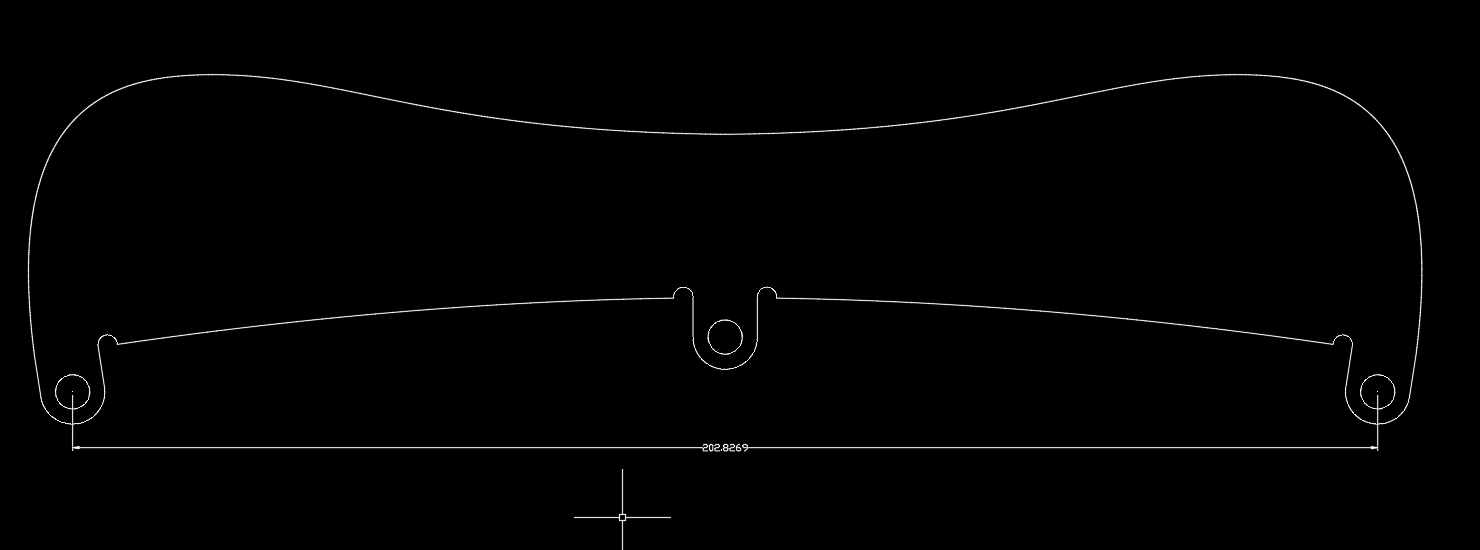
Have you tried any of the free 2D CAD programs out there...draftsight being one of them? If not shoot it to me and I'll do it for you with AutoCAD.
Oh BOY!!!!!! Thank you for this!
@rv1974 said:
Sorry but my impression is that this stage architecturalmodelling in Blender is a refined torture. The more Blender promos I see , the more I appreciate SU existance (with all its bottle necks).
I really have to agree with this statement in regards to architectural modeling. The archimesh tool set video seemed very cumbersome and laborious. Now for general 3d modeling Blender is a GREAT option. Still loving these videos.
Great info Chipp. Thanks for sharing 
@pilou said:
The more fun and free (1920 *1080) : Simlab Composer Lite
Even the Pro version is dirt cheap at $149 USD (currently).
LOL at 1st few seconds of the archimesh video above "change select to left-mouse" 1st thing I did when playing with Blender. Why make select with right-mouse? :crazy: