sketchucation logo sketchucation
    • Login
    1. Home
    2. Garry K
    3. Posts
    Oops, your profile's looking a bit empty! To help us tailor your experience, please fill in key details like your SketchUp version, skill level, operating system, and more. Update and save your info on your profile page today!
    Urasik Extensions | Lots of new extensions to check out Learn More
    G
    Offline
    • Profile
    • Following 0
    • Followers 0
    • Topics 33
    • Posts 976
    • Groups 2

    Posts

    Recent Best Controversial
    • RE: [Plugin] GKWare Cabinet Maker

      Porting CutMaster and DxfConfig to a more current compiler took longer than I had hoped. However, I also changed the database driver. We are still using SQLite database but no longer need to install a 3rd part ODBC driver. The Data Grids now work better than ever before.

      I recommend that you either use metric or decimal inches for the DXF features. Fractional inches is not close enough for European hardware. It is best if you work with metric but decimal inches should be ok.

      Version 2.0.1.26 of CutMaster and DxfConfig are now available on my web site. CabMaker Gold version 1.0.57 is intended to work with CutMaster Gold.

      Anyone who has expired trials for CutMaster and DxfConfig and who wishes to try out the new programs please email me from my web site and I'll reset your accounts.

      Cutmaster still requires some work - but it is close enough to get a good feel for it.

      To Do:

      1. Update documentation
      2. Complete tall cabinet sides
      3. Enable multiple Dxf Configuration files
      posted in Plugins
      G
      Garry K
    • RE: [Plugin] GKWare Cabinet Maker

      I am working on porting CutMaster and DxfConfig to a more current C++ compiler. CutMaster reports will now be available in 6 formats

      1. Screen
      2. Printer
      3. PDF
      4. HTML
      5. CSV
      6. RTF
      posted in Plugins
      G
      Garry K
    • RE: [Plugin] GKWare Door Maker

      New version 1.0.49 now available for download

      • Version number now shows up on title bar of web dialog
      • Now uses same License strategy as cabmaker
      • Check license now first deletes old license and then updates license
      • Has preferred setting for users who have license issues
      posted in Plugins
      G
      Garry K
    • RE: [Plugin] GKWare Stair Maker

      New version 1.0.32 now available for download

      • Version number now shows up on title bar of web dialog
      • Now uses same License strategy as cabmaker
      • Check license now first deletes old license and then updates license
      • Has preferred setting for users who have license issues
      posted in Plugins
      G
      Garry K
    • RE: Splitting Groups of Walls in SU

      There is one definite advantage of having the corners mitered. It simplifies outside wall textures. A number of plugins do miter for this reason.

      posted in SketchUp Discussions
      G
      Garry K
    • RE: [Plugin] GKWare Cabinet Maker

      I'm now working on documentation for DxfConfig and then updating CutMaster. After that I will make some utube videos.

      I am concentrating on these 2 programs over the next month or two. I want to make sure that everything goes smoothly.

      posted in Plugins
      G
      Garry K
    • RE: Fast Fun & Free : Rocket 3F

      I spend 180.00 USD for Vipre for 2 years for 5 computers which works out to 18.00 per computer per year. I have never seen problems like you are talking about.

      I've seen Avast and it runs very slowly as it checks things.

      Perhaps you should re evaluate which virus protection software you use.

      posted in Freeware
      G
      Garry K
    • RE: [Plugin] GKWare Cabinet Maker

      Cabmaker 1.0.54 now available
      Fixed bug with respect to libraries

      CutMaster 2.0.1.25 now available

      DxfConfig 2.0.1.25 now available
      This program helps to configure the rules for all the drilling and grooving required for CNC machines

      posted in Plugins
      G
      Garry K
    • RE: Fast Fun & Free : Rocket 3F

      Then it is essentially "Cripple Ware"

      I prefer fully functional software stating things like 30 day Free Trial
      No nagging - just a caption stating how many days left in the trial

      posted in Freeware
      G
      Garry K
    • RE: Plugin Software designer required

      I sent you my contact info in a PM

      posted in Corner Bar
      G
      Garry K
    • RE: Plugin Software designer required

      I have sent you a PM

      posted in Corner Bar
      G
      Garry K
    • RE: [Plugin] GKWare Cabinet Maker

      Version 1.0.53 is now ready for download.

      I've also added a report configuration where you can choose the reports that you want and with the parts_list you can turn off a few sections if you want. For example if you purchase your doors and build cabinets then you can produce a door report and omit the door parts from the part listing report.

      posted in Plugins
      G
      Garry K
    • RE: [Plugin] GKWare Cabinet Maker

      The next version is close. Just need to finish of the documentation and translation files.

      1. Fixed positioning problem with drawer box for the right side of side by side drawers.
      2. Add my own DXF import for dxftext and cutmaster. This dxf import is not extensive but will import my own dxf files much faster than the built in dxf import. It also places construction points at the center of all holes making it much easier to test accuracy. I've also created groups for geometry and placed those groups in proper layers.
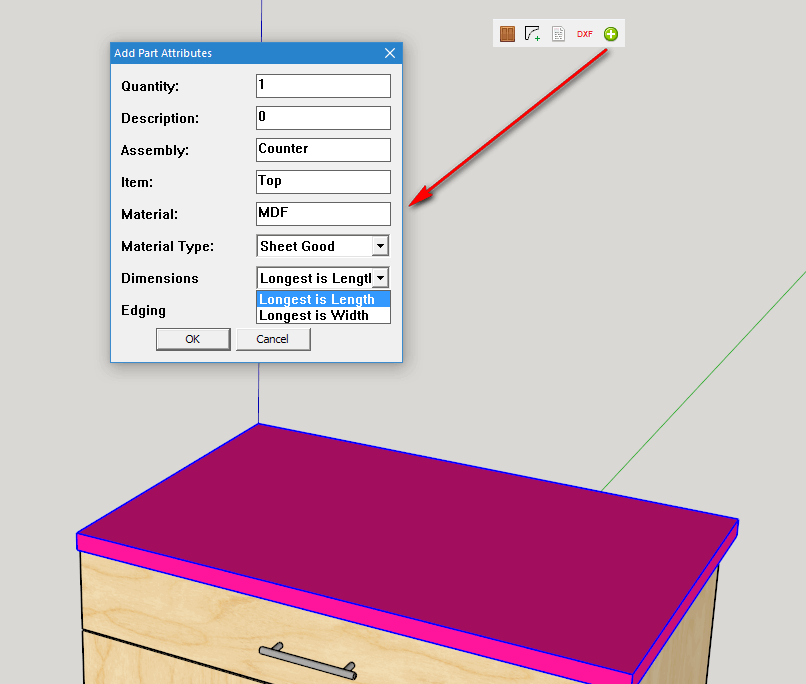
      3. Add a routine so you can add your own parts to the parts list. (CabMaker Gold). Thickness is always the smallest of the 3 dimensions but you can choose whether the longest measurement is Length or Width.

      add attributes.png

      posted in Plugins
      G
      Garry K
    • RE: [Plugin] GKWare Stair Maker

      Here are a few more videos:

      Flattening stringers for machining - CNC or by hand.
      Adding finished bottom to stair.
      Second method for adding a finished bottom.

      posted in Plugins
      G
      Garry K
    • RE: Startup Lag

      Sketchup 10 on my desktop with internet 5 seconds and without internet 4 seconds.

      posted in SketchUp Discussions
      G
      Garry K
    • RE: [Plugin] GKWare Cabinet Maker

      Getting closer. The testing that I've done has different edge thickness for all edges on side panels.

      I also wrote a DXF import that reads the DXF files that I generate and places construction points at the center of circles. I've added the script to my CabMaker so that I can check the accuracy of my DXF files. The DXF files have true circles and radius so I've adjusted the number of segments based on radius of circle. I've also placed each object inside a group but you can select all of the groups and explode them.

      For drilling and grooving you have total control of placement, depth, width, length and or hole diameter.

      Currently there are a few assumptions such as stretcher thickness and top and bottom thickness is assumed to be the same as the side panel thickness. With nested CNC most parts are the same thickness however if this doesn't work for everyone I am open to make changes.

      posted in Plugins
      G
      Garry K
    • RE: How to make perfect smooth arc or circle?

      I'm not impressed with Sketchup's DXF import and export and that is why I wrote my own import (my ruby code has very simple requirements) and I wrote my own DXF outside of Sketchup in C++.

      Sketchup's DXF import

      1. Creates circles with something like 92 segments. This is way too many segments for tiny circles and way too few for very large circles. I've adjusted the number of segments based on radius.
      2. Puts geometry on layers without groups.
      3. Very slow import

      My CabMaker plugin exports information in a csv file about each part. The C++ program uses rules and then creates DXF file with real circles complete with radius and extrusion (pushpull).

      Cabinet side panels can have hundreds of holes for shelf supports, dowels, minifix or rafix connectors and they have to be absolutely accurate. I saw no real way of having Sketchup do this kind of work.

      posted in Newbie Forum
      G
      Garry K
    • RE: Sketchup for Windows 10

      As a plugin developer I have been running many versions of Sketchup with Windows 10.

      All versions since 7
      7, 8, 2013, 2014, 2015 and 2016

      No problems

      posted in Newbie Forum
      G
      Garry K
    • RE: [Plugin] GKWare Cabinet Maker

      The DXFTest program I wrote helps to understand many aspects of the drilling for parts. I've added an samples.ini file where users can add their own panels. Lots of comments in the ini file.

      I am now working on edging adjustments. If you don't care about the thickness of the edging then set it to 0. However if you are working with 3 mm solid wood or pvc edging then it does matter.

      For example your side panel may have up to 4 different edging and various thicknesses. Cutmaster automatically adjusts the panel sizing and also adjusts the actual spacing for the drilling.

      posted in Plugins
      G
      Garry K
    • RE: [Plugin] GKWare Cabinet Maker

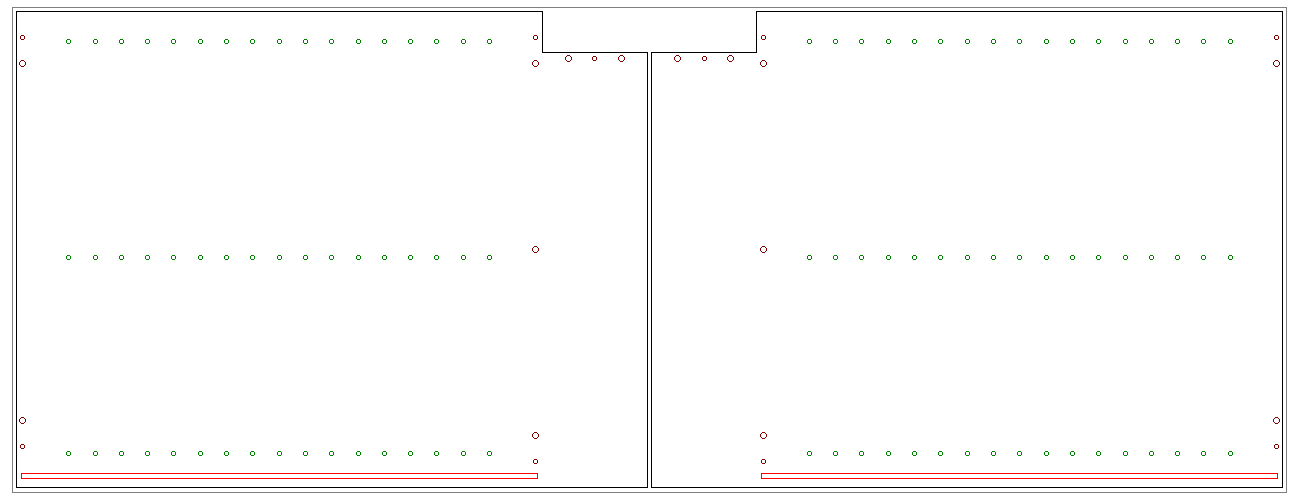
      I have gone with lists for upper, base, split top and tall spacing details. These lists are for Shelf supports, Construction holes, Dowel holes, Minifix and Rafix connectors.

      For example for these 2 sides for Base cabinets the list for shelf supports contains:
      37,300-48
      This tells Cutmaster to place the first line of holes at 37 mm on center from the front edge. The second line of holes is placed on center 300 mm from front edge. The negative sign tells Cutmaster to place the holes 48 mm from the back edge.

      2 sides and drilling.png

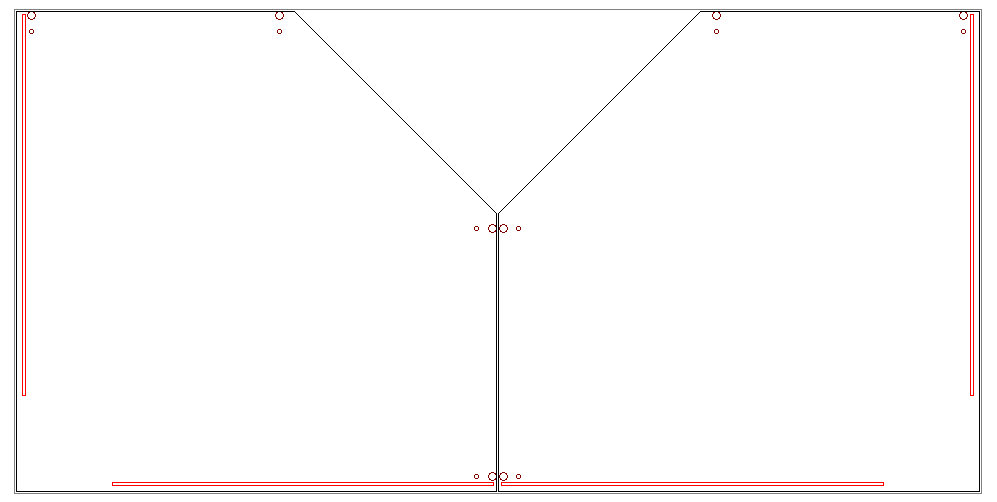
      Here is the layout for Angled Top and Bottoms using Rafix connectors with Optional 10 mm dowel hole. In this case there is a mitered back support and the grooves stop where the back support ends.

      angled top and bottom with rafix.png

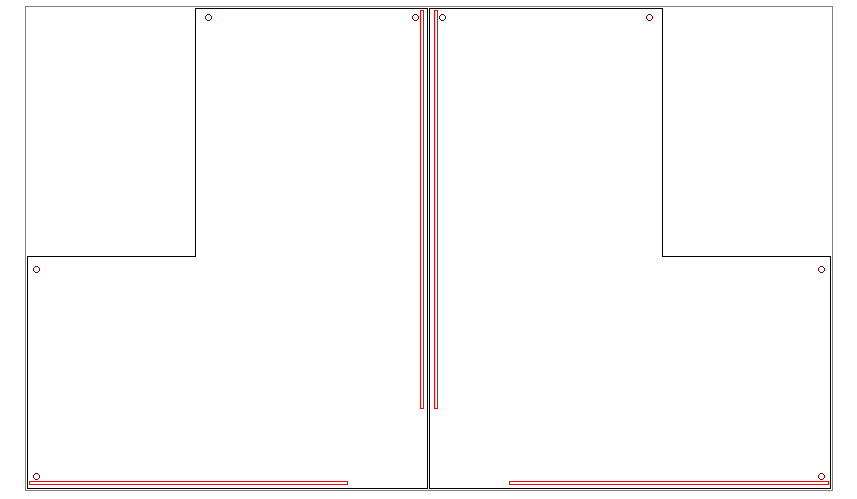
      And here is the layout for Return Top and Bottoms using Minifix connectors.

      return top and bottom with minifix.png

      posted in Plugins
      G
      Garry K
    • 1
    • 2
    • 13
    • 14
    • 15
    • 16
    • 17
    • 48
    • 49
    • 15 / 49