sketchucation logo sketchucation
    • Login
    1. Home
    2. fredo6
    3. Posts
    Oops, your profile's looking a bit empty! To help us tailor your experience, please fill in key details like your SketchUp version, skill level, operating system, and more. Update and save your info on your profile page today!
    Check out Febhouse | New extensions for Shadow Analysis in SketchUp Download
    fredo6F Offline
    • Profile
    • Following 0
    • Followers 70
    • Topics 175
    • Posts 5,452
    • Groups 3

    Posts

    Recent Best Controversial
    • RE: [Plugin] Plugins help script

      TIG,

      There is an error, due to a missing closing brace '}' on line 22.

      Otherwise, it seems to work, though I may prefer to have the menu / submenu version (one suggestion would be to build the submenus at first call, rather that systematically at load time).

      Thanks a lot

      posted in Plugins
      fredo6F
      fredo6
    • RE: Accessing the PDFs with Plugins

      Adam,

      You are right, we can do much cooler things, but there is still the problem of compatibility with v5.
      But I still don't understand the logic of the basic Sketchup Windows-based dialogs for dimensioning combo boxes!

      posted in Developers' Forum
      fredo6F
      fredo6
    • Bezierspline Update 20 Jan 08

      Just to inform you that there is an small update to Bezierspline scripts, available at Crai Ruby Depot http://www.crai.archi.fr/rubylibrarydepot/ruby/fr_Newest_scripts.html

      Nothing big, but some bug fixing in the area of inference, as well as the support of Portuguese translation, with a Quick reference card as well (many thanks to Edson).

      Fredo

      PS: I am still expecting some gentle souls more accomplished in the art of geometry than me to publish new curve extensions

      posted in Developers' Forum
      fredo6F
      fredo6
    • RE: Accessing the PDFs with Plugins

      Didier,

      Very nice idea.
      It seems to have problems with the subfolders of the Plugins directory however. For instance with the PDF of Bezierspline which are in subfolder BZ_DIR. I think it is because the file name contains a '.' (on top of the extension).

      Also, do you understand why the combo boxes in Sketchup Dialogs are never properly sized? I came across this problem too.

      posted in Developers' Forum
      fredo6F
      fredo6
    • RE: Shear object?

      Daniel,

      You are an artist. Adopted, and will go in the final published version, if OK with you

      Thanks again

      posted in Plugins
      fredo6F
      fredo6
    • RE: [Obsolete] Joint Push Pull

      @cadfather said:

      not sure what's happening but on my pc JPP seems to have clashed with beziers, either some icons disappear altogether, or the curves cannot be drawn. - i have noticed this before a couple of times while working on the rubymenus thus think the weakness might have more to do with beziers than jpp

      EDIT: or it may be me of course!

      I am not sure it is an interference with JPP, but there were a few bugs in Bezierspline regarding inference, and in some situation it could create the impossibility to position the starting point at the origin.

      I made some fixes, and also incorporate the Portuguese translation (many thanks to Edson). Didier just published the new version of Bezierspline on his site today.

      posted in Plugins
      fredo6F
      fredo6
    • RE: Shear object?

      @cphillips said:

      @gata said:

      CPhillips was playing around with somethng similar http://www.sketchucation.com/forums/scf/viewtopic.php?f=57&t=2570&start=0&st=0&sk=t&sd=a but SketchyPhysics is a bit distracting. It's good to see this sort of tool revived.

      I semi-finished that thing I was working on. Problem was that it was really slow a reasonable size model could take minutes to update. Maybe someday I'll go back an optimize it.

      Shear looks like a handy tool to have!

      I think your Free Form Deformation ballon is really one big step forward, because I guess it implies to handle the individual deformation of faces and edges, and then to re-arrange the topology of the model to keep meaningful geometrical continuity. In comparison, PlaneShear is just a linear offset of vertices that keep faces as faces and edges as edges, without any individual complexification.

      Bon courage! I am quite admirative and impressed by what you can achieve with SketchyPhysics!

      posted in Plugins
      fredo6F
      fredo6
    • RE: Shear object?

      @pixero said:

      I think it would be a good idea to let the plane shear also have a "deformation box" so that you could use it more like a tweak tool and try different amount of shear (something like the scale tool).
      The current version is more suited for use with a known amount. In my humble opinion.
      Anyway, thanks again!

      It would be very difficult to consider an interactive deformation of the model. Keep in mind that the transformation reconstructs the selected portion of the model, face by face, edge by edge, etc...., as there is no native transformation in Sketchup doing a shear (i.e. a non uniform offset).
      However, what I have done is to show interactively the deformation of the selected model in wireframe mode. This is much lighter and performance seems acceptable.

      You need to download the 2 attached files nult.rband LibProtractorTool.rb.


      version with interactive wireframe deformation


      version with interactive wireframe deformation

      posted in Plugins
      fredo6F
      fredo6
    • RE: [Obsolete] Joint Push Pull

      @urgen said:

      ...Unfortunately I have former problems... 😕

      Could you turn on the Ruby Console and see what it says (or does not say)

      Thanks

      posted in Plugins
      fredo6F
      fredo6
    • RE: [Obsolete] Joint Push Pull

      @greyhead said:

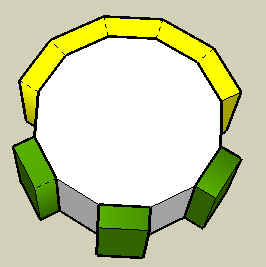
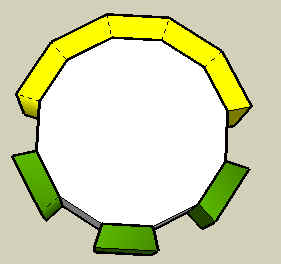
      Fredo, I do think that there is something here that is not consistent with "as if you would also extrude the neighbouring face." See this diagram (plan view of an extruded dodecagon). Notice that the two end extrusions of the five contiguous faces are different. (I did these both on the same dodecagon for simplicity but I get the same result if I do them on separate objects so I don't think there is interference between them.)

      Scratching my head here but I don't see an obvious pattern.

      Bob

      [attachment=2:2u7nlb8r]<!-- ia2 -->push-pull.png<!-- ia2 -->[/attachment:2u7nlb8r]

      This abnormal behavior is actually almost 'normal'.
      Because the polygon has 12 segments, the angle between the normals of 2 contiguous edges is exactly 30 degree, which is the default value of the Angle of Influence. So depending on the rounding up, some outside faces do influence, some others do not.

      You should change the value of the Angle of influence to either 29 Degree (to have strict perpendicular borders) or to 31 degrees, to have them all radial.


      Angle of influence = 29 degree


      Angle of Influence = 31 degree

      posted in Plugins
      fredo6F
      fredo6
    • RE: [Obsolete] Joint Push Pull

      @urgen said:

      Very good script 👍 , but in SU5 unfortunately does not work ... 😢

      Can you try this version. It may be slower however!


      Supposed to work in Sketchup 5 too

      posted in Plugins
      fredo6F
      fredo6
    • RE: Push Pull Jointif

      Serieux. Je suis a la recherche de cas ou il y a des problemes, pour savoir si on peut y faire quelque chose (de mon cote j'en ai quelques uns!). La methode que j'utilise est plutot empirique et en plus Sketchup est assez capricieux question creation et orientation de faces.
      Si ca se passe pas trop mal, direction Ruby Depot, avec ta permission.

      posted in Français
      fredo6F
      fredo6
    • Push Pull Jointif

      Juste pour ne pas oublier mes chers compatriotes, j'ai publie a l'essai un script de push pull jointif dans la section Ruby. La doc est pour l'instant en anglais.
      http://www.sketchucation.com/forums/scf/viewtopic.php?f=57&t=4840&st=0&sk=t&sd=a
      Une petite image pour illustrer l'intention:


      Push-pull methods.jpg

      posted in Français
      fredo6F
      fredo6
    • RE: [Obsolete] Joint Push Pull

      @greyhead said:

      Fantastic, enjoyed playing with it. Now I need to find a place to use it.

      Thanks, Bob

      PS Confirming bellwells image earlier, if you use Joint push-pull on non-contiguous faces of an polygon block then the side of the extrusions have a mix of angles, some are rectilinear (as from the Vector extrusion) some are aligned to the center of the block.

      GreyHead

      Thanks for appreciation.
      Regarding the non contiguous faces, what you get is normal, because it depends on what you want to achieve. If you wish the borders to be perfectly normal, you must select NO in the option "Extent influence to non-selected neighbors", as explained in the Tutorial, in section 1.7, p.12. Otherwise, the macro compute the direction as if you would also extrude the neighbouring face. Unless I missed something....

      Fredo

      posted in Plugins
      fredo6F
      fredo6
    • RE: [Obsolete] Joint Push Pull

      @daniel s said:

      Edit:PS. Yes.. like bellwells says... there are hidden edges.. in a lot of cases don´t looks good... would be better to use "soften edges"

      Actually, I did not know what was the most appropriate, hidden or soft, because there are advantages for both in any situation.
      This is easy to fix (see attached file modified).
      The question is whether I leave this as an option


      version with soft / smooth edges instead of hidden

      posted in Plugins
      fredo6F
      fredo6
    • [Obsolete] Joint Push Pull

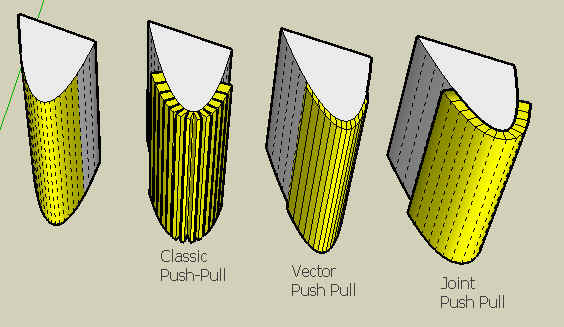
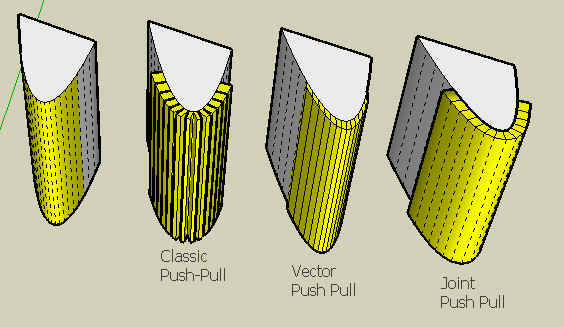
      Here is a very first version of what I call Joint Push Pull, which is a compromise between the classic Sketchup push pull along individual face normals and the Vector Push pull whihc keeps faces contiguous. In other terms, how to extrude faces along their normal, but generate a contiguous shape.

      I guess the pictures attached are self-explanatory on what the script tries to achieve.

      The ZIP archive should be unzipped in the Plugins folder and create in the Plugins folder:

      • jointpushpull.rb, the main macro
      • LibPlaneSelectorTool.rb, to select a custom plane
      • LibVectorSelectorTool.rb, to select a custom vector
      • LibTraductor.rb, for language translation and dialog boxes. This is a new version (you must use this one, but it is compatible with the previous version published with Bezierspline)
      • LibTraductor.def, an optional configuration file allowing override of language
      • A folder JPP_Dir, which contains the 2 icons for the toolbar
        The script creates 2 menu entries in the Tools menu
        The script also implements Classic Push Pull and Vector Push pull

      There is a full doc in PDF, but it is too large to upload on this site. So I put it on the Google forum at http://groups.google.com/group/Ruby-API/browse_thread/thread/6ae80c5c688083fb.


      Comparing Classic vs. Vector vs. Joint Push Pull methods


      Works also for insets


      to unzip in the Plugins folder - Update with smooth / soft edges

      posted in Plugins
      fredo6F
      fredo6
    • RE: Shear object?

      Coincidentally, I am currently working of this type of transformation which I call Non Uniform Linear Transformations (NULT), that are not native in Sketchup and end up recreating the drawing element.

      I had completed the Plane Shear a while ago and need to finish the box shear.

      Plane Shear is actually a transformation that would deform a rectangle into a parallelogram (in 3D space). Box shear, is a variant that allows non uniform scaling, typically transform a sphere into an egg. The question here is more how you specify what you want to do (my current idea is to do it via a transformation box)

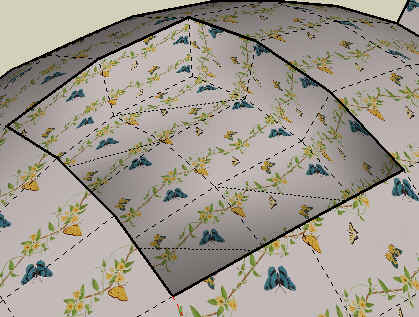
      Attached in the Plane Shear. You specify the plane, the reference direction and the angle. This is why the tool behaves pretty much as a Protractor tool. The tool applies to the Selection, but you can include what you want in it (groups, components, images, etc...) at any nested level. It preserves and deforms textures, as well as layers, attributes and properties. The only restrictions are:

      • Components are transformed into Groups, because there is no way to preserve the component definition for all instances, as they may be rotated and scaled
      • Images are transformed in planar face, with the image texture sheared (Sketchup does not support images in parallelogram as far as I know!)
      • Dimensions are not transformed because Sketchup does not provide a Ruby API for these objects
      • Interestingly, the transformation preserves Bezier and other Spline curves

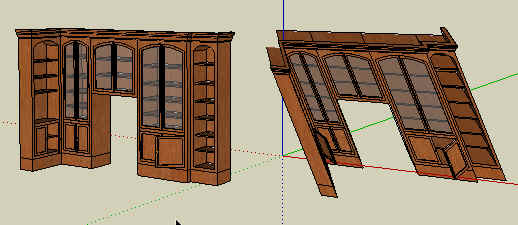
      Here is a basic example with a simple parallelepiped, but you can find a more complex situation at http://escargot-archi.eu/forum/viewtopic.php?t=2299 (a French site, but the image is self explanatory). For this kind of objects with 1,400 faces, it takes longer (the macro has a progress bar anyway).

      There is no documentation at the moment, and this is why I do not publish it yet.

      The Zip archive attached contains 5 files, all to go to the Plugins Directory:

      • Nult.rb, the main macro
      • LibProtractorTool.rb, a utility to emulate the Protractor tool (if anyone interested, it can be used as an independent tool for other purposes).
      • LibTraductor.rb, a utility to language translation. You may already have it with the Bezierspline macro, but this one is more recent and anyway compatible.
      • LibTraductor.def, an optional configuration file to force language.
      • **iconshear.png**which is for the toolbar button
      • **cursorshear.png**for the cursor shape

      Feedback welcome. Thanks

      Fredo
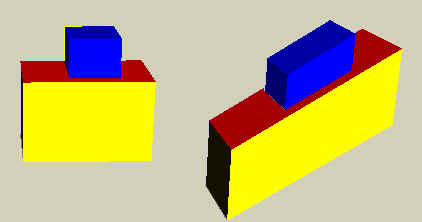

      Shear box.jpg


      Bibli.jpg


      to unzip in Plugins folder

      posted in Plugins
      fredo6F
      fredo6
    • RE: Shear object?

      @daniel s said:

      The only problem is that every time i make a shear... the new object appears with hidden lines..

      My mistake, as the macro is not fully tested. I reloaded the Zip file with correct behavior (I hope).

      @daniel s said:

      This plugin can be converted into a Lattice tool?

      Yes. That's what I call the NULT Box, which is a downgraded version of lattice tools you can find in many 3D design tools (such as Blender), as the deformed box must keep its 6 faces planar. What I am working on is the GUI to specify the deformation. The transformation algorithm is exactly the same as for Plane shear (i.e. based on vertex non uniform translation).

      posted in Plugins
      fredo6F
      fredo6
    • RE: Ruby console intruder

      Can someone check if Sketchup changed the version of the Ruby Interpreter (normally 1.8), because these messages maybe a sign of an evolution on the Ruby side.

      posted in Developers' Forum
      fredo6F
      fredo6
    • RE: Group color setting in ruby

      Just use e.material, where e is an instance of a Group, as a Group is a Drawing Element.
      This set the material for the group, used as a default by its elements if they do not have a material by themselves.

      posted in Developers' Forum
      fredo6F
      fredo6
    • 1
    • 2
    • 269
    • 270
    • 271
    • 272
    • 273
    • 271 / 273