v1.1.260101
- license free version
Download from Plugin Store
This is the previous version, but now free and does not require a license.
 E
Offline
E
Offline
v1.1.260101
This is the previous version, but now free and does not require a license.
@Bratthaus said in [Plugin] MultiTags for Sketchup:
I know this may be redundant, but is there still a way to buy this plugin even tho you no longer support it?
Sorry, no way, all used infrastructure was deconstructed.
The source code is preserved and maybe someday a free version will be made, but now not have enough time to this.
P.S./ On the Trimble forum says that this feature is not needed in Sketchup and it is enough to use Outliner and put the object in several nested groups.
You can try use this free workaround way.
@Dan-Rathbun
The reason is: low demand for the solution (statistics of trial installations and downloads for 2 years), and as a result, low sales.
Now it is time to pay for renew license for Sketchup, hosting, certificates, and a domain name for the licensing services, but no any interest for continue, also have difficulties with payments for this services (EU/US sanstions + banned from Trimble).
Low demand for the solution >> no interest to find ways to solve problems with payments.
SUPPORT AND DEVELOPMENT OF THE PLUGIN HAS BEEN DISCONTINUED.
release 1.1.230903:
added command to menu for reload visibility state,
which can be broken in some cases (for sample: component reloaded from file)
automatic updating of the visibility on all scenes when their visibility changes
fix updating of the visibility on the Scenes: the status of object hiding changed to set via Hidden.
Also stop use technical tag “Multitag Hidden” which was used to hide objects in earlier releases.
[anchor= goto=https://zzlab-xs.com/downloads/MultiTag-1.1.230903.rbz:3m0vt35m]Download MultiTag-1.1.230903.rbz[/anchor:3m0vt35m]
@joshtays said:
Hi,
I've been trying to purchase a license
Hi joshtays,
I'm answered to your question into PM
In what cases can it be useful to use negation in formulas:
1.1.221216
@greatoe said:
I was trying this plugin with SketchUp 2022 on macOS 12.5.1 with Apple M1 max chipset.
When I click the toolbar button of MultiTags, a window pops up.
However, the pop up window is tiny, very tiny that doesn't show even a word.
And I can not adjust the size of the window.[attachment=0:10c1m068]<!-- ia0 -->截屏2022-09-10 12.41.42.png<!-- ia0 -->[/attachment:10c1m068]
Thanks for issue, i'm investivating a problem
MULTITAG EXTENSION FOR SKETCHUP
SUPPORT AND DEVELOPMENT OF THE PLUGIN HAS BEEN DISCONTINUED.
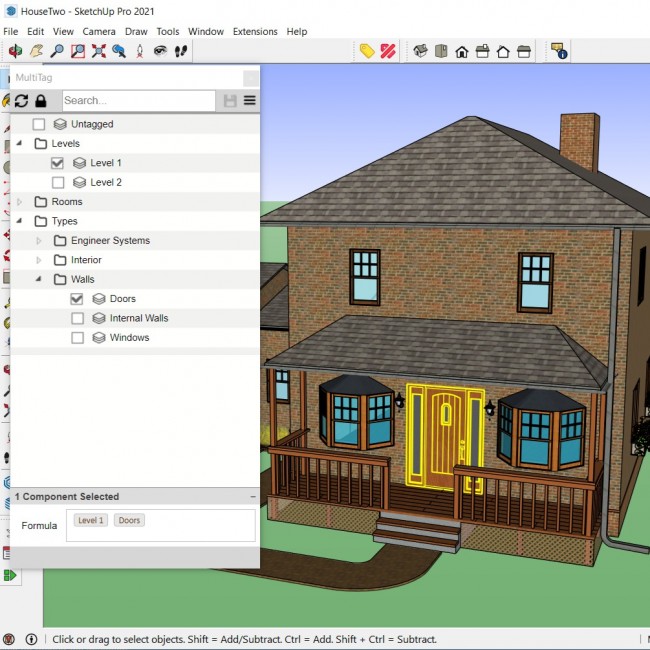
The extension allow assign several tags/layers to group/component. And get flexible control to object visibility on complex models, such as houses, apartments with large engineering networks (water supply, electricity, etc.)
By default all selected tags use AND condition: so object will displayed only if all tags are enabled;
Extension also allow use OR condition between layers, grouping and combination AND and OR conditions
For sample: Each wall in house can be assigned at least to two layers "room1" and "room2" and be visible when one of "room" tags enabled or Furniture can belong to both tags "room" and "type", for example "Chair" or "Table" and are displayed only when both layers are active
@rich o brien said:
To mimic an emboss across identical objects as per your setup could be done if the identical objects were components. Then a change in one is propagated to others.
But to emboss multiple objects based on selection I cannot see possible with Vishole if I understand your description correctly.
It’s a pity that it’s impossible, it seems like a typical operation (because the plugin can punch holes through components). But I need to cut a hole of a given depth through several components
I found another plugin (BoolTool) that does this, less convenient than this plugin. But it works
Hello,
Is it possible to create holes with specific depth in multilayer objects
For sample, I was unable to find correct results
using drill and carve commands