Above is a little enhancement: select the material before typing matTexture in the console.
Regards
Oops, your profile's looking a bit empty! To help us tailor your experience, please fill in key details like your SketchUp version, skill level, operating system, and more. Update and save your info on your profile page today!
Sketchucation Tools 5.0.7 | Licensing improvements and bug fixes Learn More
 Offline
Posts
-
RE: How to Obtain Length and Width Values from the Material Panel via SketchUp Ruby API?
-
RE: How to Obtain Length and Width Values from the Material Panel via SketchUp Ruby API?
Here is a little snipet
Open the console, load the RB and type: matTexturedef matTexture() model = Sketchup.active_model materials = model.materials mat = Sketchup.active_model.materials.current mat_name = mat.display_name texture = mat.texture if texture t_height = texture.height t_width = texture.width UI.messagebox( "Material " + mat_name + "\n\nCurrent size:\n" + "Height: " + t_height.to_s + " inches\n" + "Width: " + t_width.to_s + " inches") else UI.messagebox("No texture applied to this material",MB_OK) end endPlease select a material first
Retrieved values are in INCHES
Hope this helps -
RE: [Plugin] SectionByCamera (V0.2) - UPDATED 4 June 2012
Hi,
I made it work with SU2023, there were 2 syntax errors with the Ruby version used at that time (2023). Try it with 2024/2025. -
RE: Flatten surface / vertices to selected face
Hi,
Maybe one of my projection tools will do what you are asking for:[https://extensions.sketchup.com/extension/8f66e284-c0e3-45a9-be6e-e86911a3cf5e/projections-tools](link url)
(an old version is on the plugin store but the latest in on the extensions warehouse)Click on the second icon (starting from left) to project a face perpendicularly on another face plane.
Hope this helps, -
RE: [Plugin] Door-Lintel Update + Window-Sill
Me again,
Same goes for door_lintel.rb -
RE: [Plugin] Door-Lintel Update + Window-Sill
Hi all,
My baby is quite old now
Here is the non-encrypted version. Please unpack in your Plugins dir.
No update because I haven't SU2024.
Regards,DBUR_Lines2Tubes.zip -
RE: BZ_toolbar Bézier curve tool
SketchUp Extension Warehouse
Your library of custom third-party extensions created to optimize your SketchUp workflow.
(extensions.sketchup.com)
-
RE: 'break_edges' behavior wrong when in a group context
Yesssss ! Deleting all faces before using find_faces WORKS.
Thanks a lot TIG -
RE: 'break_edges' behavior wrong when in a group context
Oh and iterating through the inner edges array and use edge.find_faces doesn't help...
-
RE: 'break_edges' behavior wrong when in a group context
Thanks TIG.
Unfortunately intersect_with_instance doesn't work. I tried to insert short edges at intersections that are an issue, but this doesn't solve the problem either.
So next step is to compute everything 'virtually' (storing the inner edges (not as Sketchup::Edge)) in an array and drawing all edges at the end of the process.
I wonder why the API works OK at the top level of the model but doesn't do the same job in a group or component context...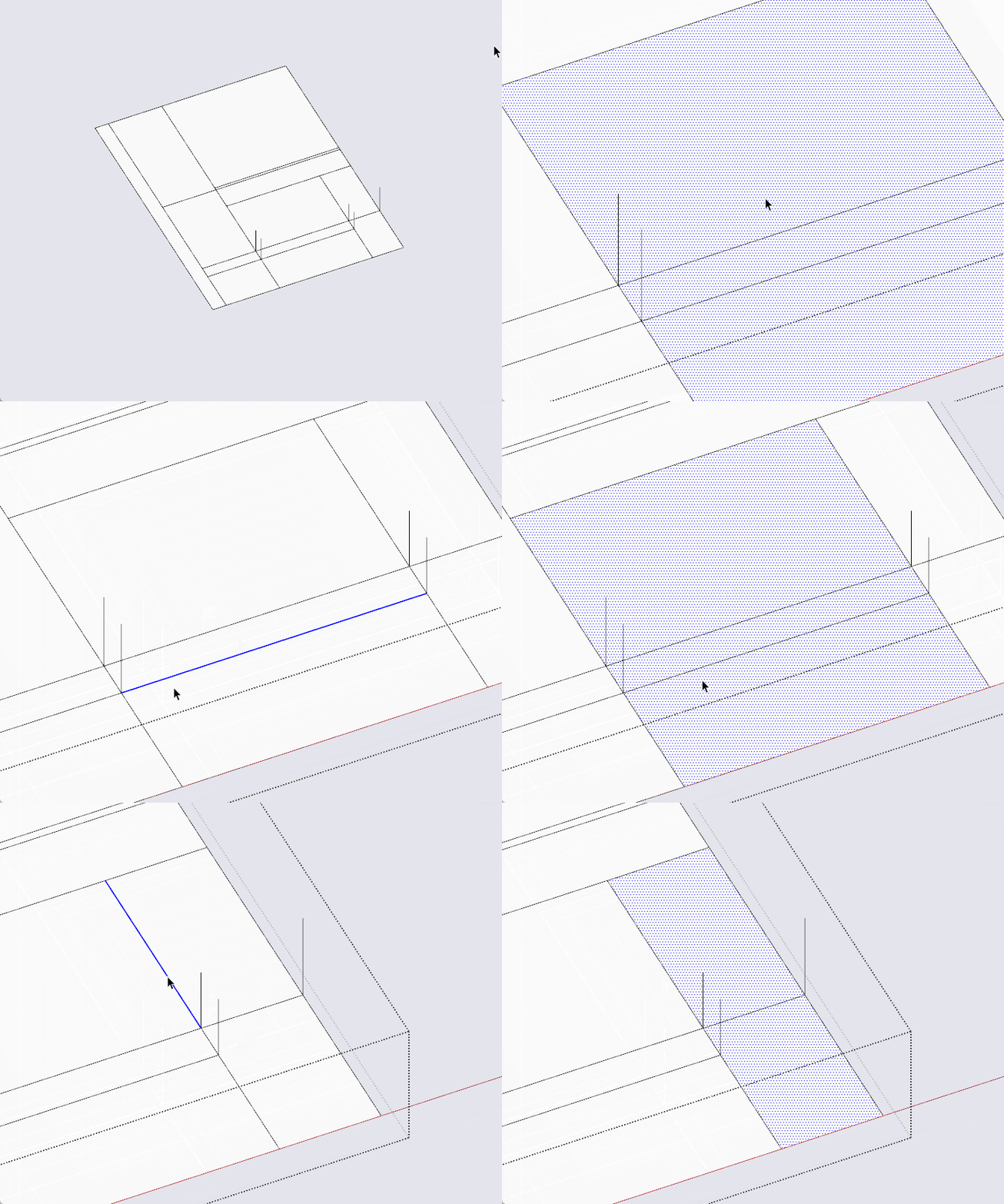
-
'break_edges' behavior wrong when in a group context
Hi,
As you know, Sketchup.break_edges is always set to true by defaut.
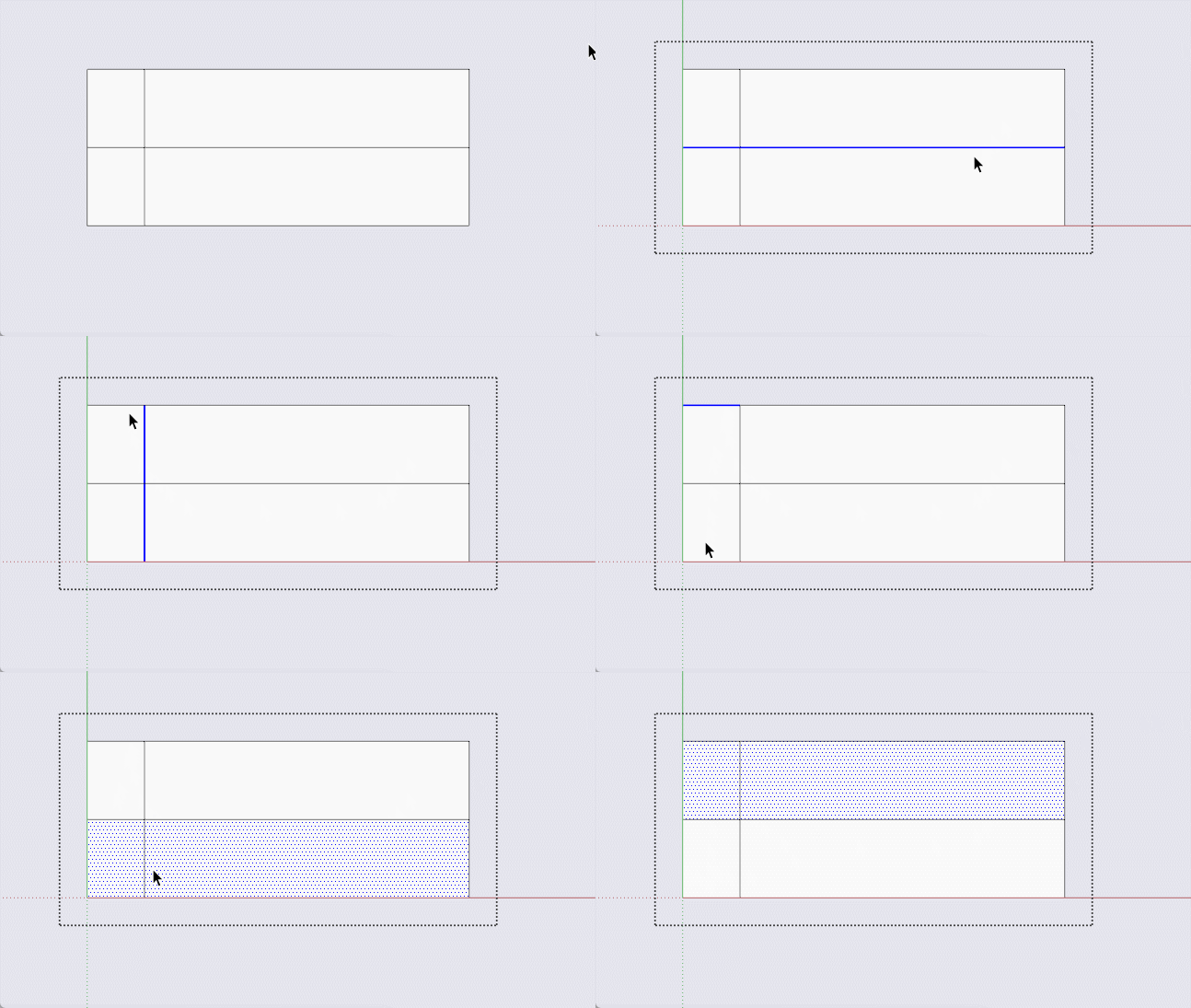
My script generates several lines in a group context. As you will see in the animation, 2 lines crossing the face have been drawn but they are not break when the second one is drawn.
The resulting number of faces within the group is 2 instead of 4.
The resulting number of edges within the group is 10 instead of 12.
Running the script in a component context does the same.
Why that ?
I didn't find a workaround. Any idea ?
-
RE: [Plugin] Door-Lintel Update + Window-Sill
@ SU2024 and Door-Lintel users:
Hi,
I don't have SU2024 installed on my PC.
Maybe some developer (TIG ?) will update the plugin ?
So here it is.Regards,
# Name : door_lintel # Description : Draws a lintel above door between wall sides, and window as well # Author : D. Bur # Usage : select face and "Door by reveal" in context menu # Date : May 2008 # Type : Tool # History: 1.0 (May 2008) - first version # 1.1 (May 2008) - window added require 'sketchup.rb' # f=Sketchup.active_model.selection[0] def trad(word) # tStrings = [["Door" "Porte"],["Window" "Fenetre"]] tStrings={ "Door" => "Porte", "Window" => "Fenêtre"} return word if Sketchup.get_locale != "fr" return tStrings[word] end def dbe_by_embrasure(type) model=Sketchup.active_model entities=Sketchup.active_model.active_entities @dbe_door_height=2.m if not @dbe_door_height @dbe_window_height=135.cm if not @dbe_window_height @dbe_sill_height=1.m if not @dbe_sill_height org_face=model.selection[0] model.start_operation "Door-window by reveal" if model.selection.empty? UI.messagebox("Empty selection: please select a vertical face.") return end if (model.selection.length !=1) UI.messagebox("Please select only ONE vertical face.") return end if (model.selection[0].class != Sketchup::Face) UI.messagebox("Please select a vertical face.") return end if org_face.normal.z>1e-012 or org_face.normal.z<-1e-012 UI.messagebox("Please select a VERTICAL face.") return end if org_face.outer_loop.edges.length != 4 UI.messagebox("Please select a RECTANGULAR vertical face.") return end # Parse edges edges=org_face.edges @verticals={} @horizontals={} edges.each do |e| if e.start.position.z==e.end.position.z @horizontals[e]=e.start.position.z else @verticals[e]=e.start.position.distance e.end.position end end # Dialog #puts "type " + type.inspect if type=="door" return if !dbe_door_height() else return if !dbe_window_height() end # heights control if type=="door" height_ok=false until height_ok if @dbe_door_height<@verticals.values.max #or (@dbe_sill_height+@dbe_window_height)<@verticals.values.max height_ok =true else UI.messagebox("Incorrect height for this door.\nPlease set it to a lower value than " +@verticals.values.max.to_s) return if !dbe_door_height() end end end if type=="window" heights_ok=false until heights_ok if (@dbe_sill_height+@dbe_window_height)<@verticals.values.max heights_ok =true else UI.messagebox("Incorrect heights for this windows.\nSum of sill and window heights should'nt exceed " + @verticals.values.max.to_s) return if !dbe_window_height() end end end # Highest edge & lintel height high_edge=@horizontals.index(@horizontals.values.max) bottom_edge=@horizontals.index(@horizontals.values.min) lintel_height=@verticals.values.max-@dbe_door_height if type=="door" lintel_height=@verticals.values.max-(@dbe_window_height+@dbe_sill_height) if type=="window" # New face of lintel p1=high_edge.start.position p2=high_edge.end.position p3=Geom::Point3d.new(p1.x,p1.y,(p1.z-lintel_height)) p4=Geom::Point3d.new(p2.x,p2.y,(p2.z-lintel_height)) # Mid point of lintel v=p2.vector_to p3 v.length=v.length/2.0 mid=p2.offset(v) # Opening width v_norm=org_face.normal touch=model.raytest([mid,v_norm]) if touch same_object=true hitpoint=touch[0] hit_obj=touch[1] if hit_obj.length>1 hit_face=hit_obj.last hit_parent=hit_obj[0] if not hit_parent.entities.include? org_face same_object=false end else hit_parent=hit_obj.last hit_face=hit_obj.last end width=mid.distance hitpoint if width > 200 go=UI.messagebox("Suspicious door width found: " + width.to_s + "\nProceed ?",MB_OKCANCEL) return nil if go==2 end case hit_parent.typename when "Face" if org_face.normal!=hit_face.normal.reverse UI.messagebox("Opposite reveal not parallel to selected face. Aborting...") return nil end else if same_object==false UI.messagebox("Cannot find opposite wall,\nobstructive "+hit_parent.typename+" found on layer "+hit_parent.layer.name+ ".\nPlease hide it and retry.") return end end else UI.messagebox("No opposite wall to connect lintel.") return nil end new_face=entities.add_face p1,p2,p4,p3 if touch and same_object==true v2=new_face.normal v2.length=width new_face.pushpull width else UI.messagebox("Cannot pushpull lintel.") end #Redraw these fucking remaining edges to better kill them e1=entities.add_line(p1.offset(v2),p2.offset(v2)) e2=entities.add_line(p1.offset(v2),p3.offset(v2)) e3=entities.add_line(p2.offset(v2),p4.offset(v2)) e1.erase! e2.erase! e3.erase! if type=="window" # New face of sill p1=bottom_edge.start.position p2=bottom_edge.end.position p3=Geom::Point3d.new(p1.x,p1.y,(p1.z+@dbe_sill_height)) p4=Geom::Point3d.new(p2.x,p2.y,(p2.z+@dbe_sill_height)) # Mid point of sill v=p2.vector_to p3 v.length=v.length/2.0 mid=p2.offset(v) # Opening width touch=model.raytest([mid,v_norm]) if touch same_object=true hitpoint=touch[0] hit_obj=touch[1] if hit_obj.length>1 hit_face=hit_obj.last hit_parent=hit_obj[0] #if not hit_parent.entities.include? org_face #same_object=false #end else hit_parent=hit_obj.last hit_face=hit_obj.last end width=mid.distance hitpoint if width > 200 go=UI.messagebox("Suspicious window width found: " + width.to_s + "\nProceed ?",MB_OKCANCEL) return nil if go==2 end case hit_parent.typename when "Face" if v_norm!=hit_face.normal.reverse UI.messagebox("Opposite reveal not parallel to selected face. Aborting...") return nil end else if same_object==false UI.messagebox("Cannot find opposite wall,\nobstructive "+hit_parent.typename+" found on layer "+hit_parent.layer.name+ ".\nPlease hide it and retry.") return end end else UI.messagebox("No opposite wall to connect linter.") return nil end new_face=entities.add_face p1,p2,p4,p3 if touch and same_object==true v2=new_face.normal v2.length=width new_face.pushpull width else UI.messagebox("Cannot pushpull sill.") end #Redraw these fucking remaining edges to better kill them e1=entities.add_line(p1.offset(v2),p2.offset(v2)) e2=entities.add_line(p1.offset(v2),p3.offset(v2)) e3=entities.add_line(p2.offset(v2),p4.offset(v2)) e1.erase! e2.erase! e3.erase! end # if window model.commit_operation end def dbe_door_height @dbe_door_height=2.m if not @dbe_door_height prompt=["Door height: "] value=[@dbe_door_height] results=inputbox prompt,value,"Door height" puts results.inspect return false if !results @dbe_door_height=results[0] end def dbe_window_height @dbe_window_height=135.cm if not @dbe_window_height @dbe_sill_height=1.m if not @dbe_sill_height prompts=["Sill height: ","Window height: "] values=[@dbe_sill_height,@dbe_window_height] results=inputbox prompts,values,"Window heights" return false if !results @dbe_sill_height=results[0] @dbe_window_height=results[1] end def valid_door_selection s=Sketchup.active_model.selection return false if s.length!=1 return false if s[0].typename!="Face" return false if s[0].normal.z>1e-012 or s[0].normal.z<-1e-012 return false if s[0].outer_loop.edges.length != 4 return true end #---------------------------------------------------------------------------- # add menu items if !file_loaded?(__FILE__ ) dbe_menu=UI.menu("Tools").add_submenu("Door/Window by reveal") dbe_menu.add_item("Door") { dbe_by_embrasure "door"} dbe_menu.add_item("Window") { dbe_by_embrasure "window" } dbe_menu.add_separator # Context menu UI.add_context_menu_handler do |menu| if( valid_door_selection ) menu.add_separator menu.add_item("Door by reveal") { dbe_by_embrasure "door" } menu.add_item("Window by reveal") { dbe_by_embrasure "window" } menu.add_separator end end end file_loaded(__FILE__ ) -
RE: [REQ] Export selected groups/comps to separate skp files
This one will perhaps be useful to you:
[https://sketchucation.com/plugin/2667-componentsplus]
Regards, -
RE: [Plugin] Extended Views v1.2 UPDATE May 23, 2013
@pipinek and freeagent:
Hi,
Take a look at this: https://sketchucation.com/plugin/1284-dbur_ucsmanager_v1_0_0
Basically it's an 'axes manager' but besides that the 6 views can be changed absolute to the main axes or relatively to your custom set of axes.
Regards, -
RE: [Plugin] Groups to Components
Hi,
You can also take a look at this post: https://sketchucation.com/plugin/2667-componentsplus
There is a command in this plugin to export all groups as components in one go.
Regards, -
RE: [Plugin] Draw Boundingbox
Hi AISMebel,
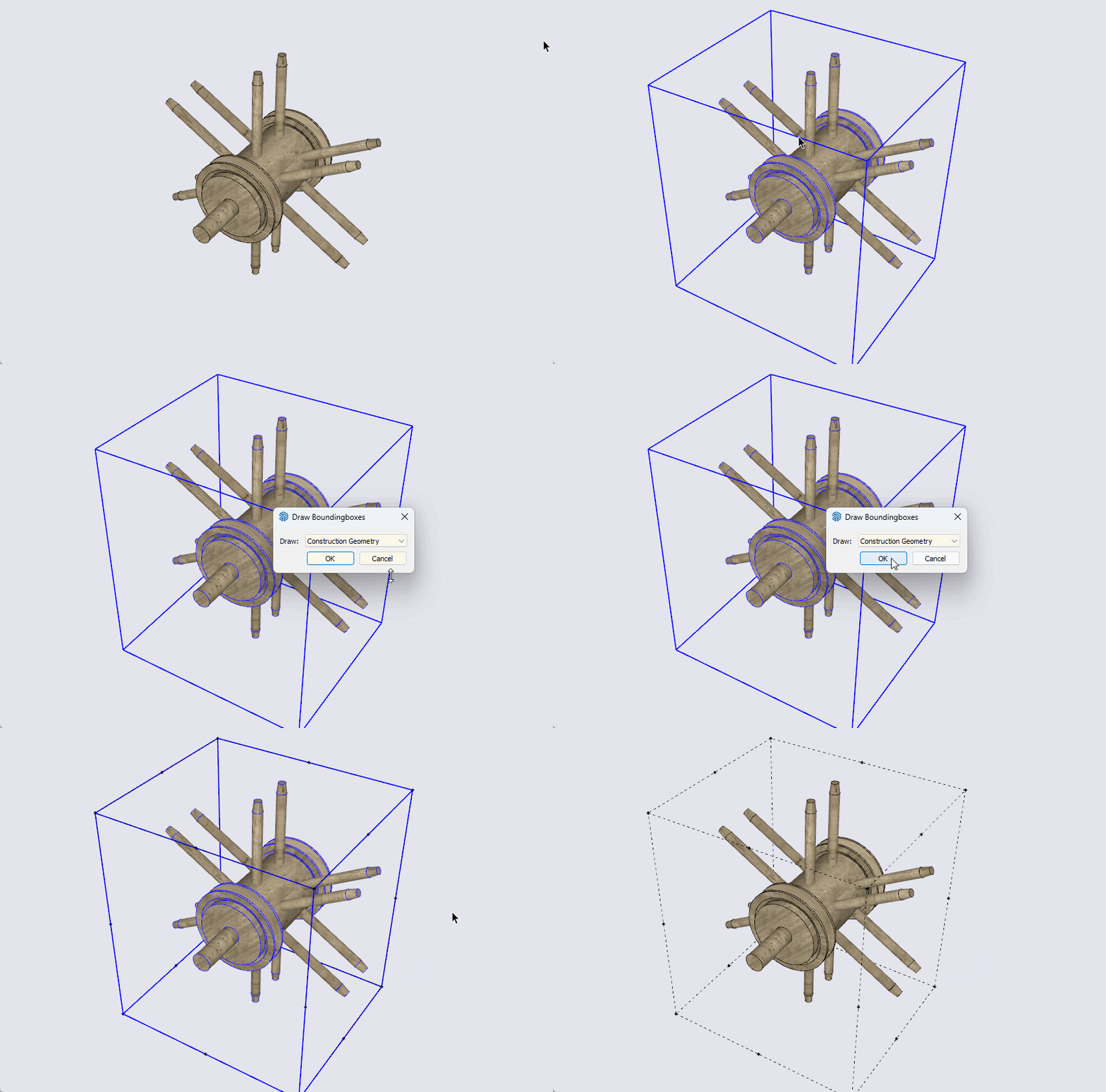
Below is what you can do:
Browse your disk to your Plugins folder to find a sub-folder named 'tt_draw_bb'- open the file 'core.rb' in that folder (using a'pure' text editor)
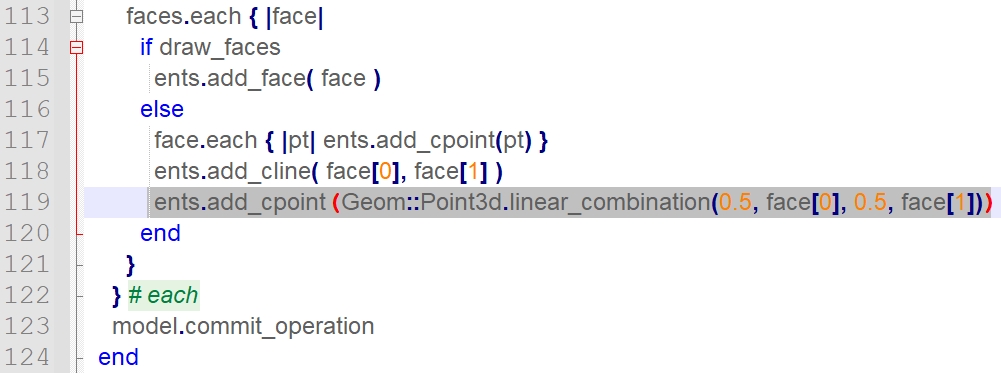
- find line #118
- add the following line:
ents.add_cpoint( Geom;;Point3d.linear_combination(0.5, face[0], 0.5, face[1]))- save the core.rb file and restart SketchUp.
-
RE: [Plugin] Door-Lintel Update + Window-Sill
Hi syahirXIII,
The message shown on your image pops up when the reveal's face loop is made of more than 4 edges.
Please check if this is the case on the face that doesn't work.
Regards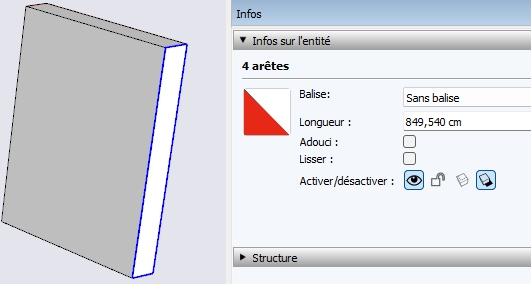
-
[Plugin] ComponentPlus
Hi all,
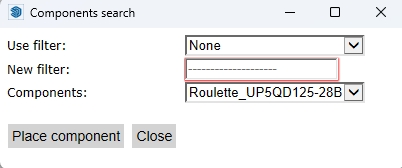
I've gathered 6 utilities together in this plugin to add tools to the groups and components functionalities, especially a 'search component' dialog that is handy when you are dealing with hundreds of components definitions.
PluginStore page here: https://sketchucation.com/plugin/2667-componentsplus
Enjoy
-
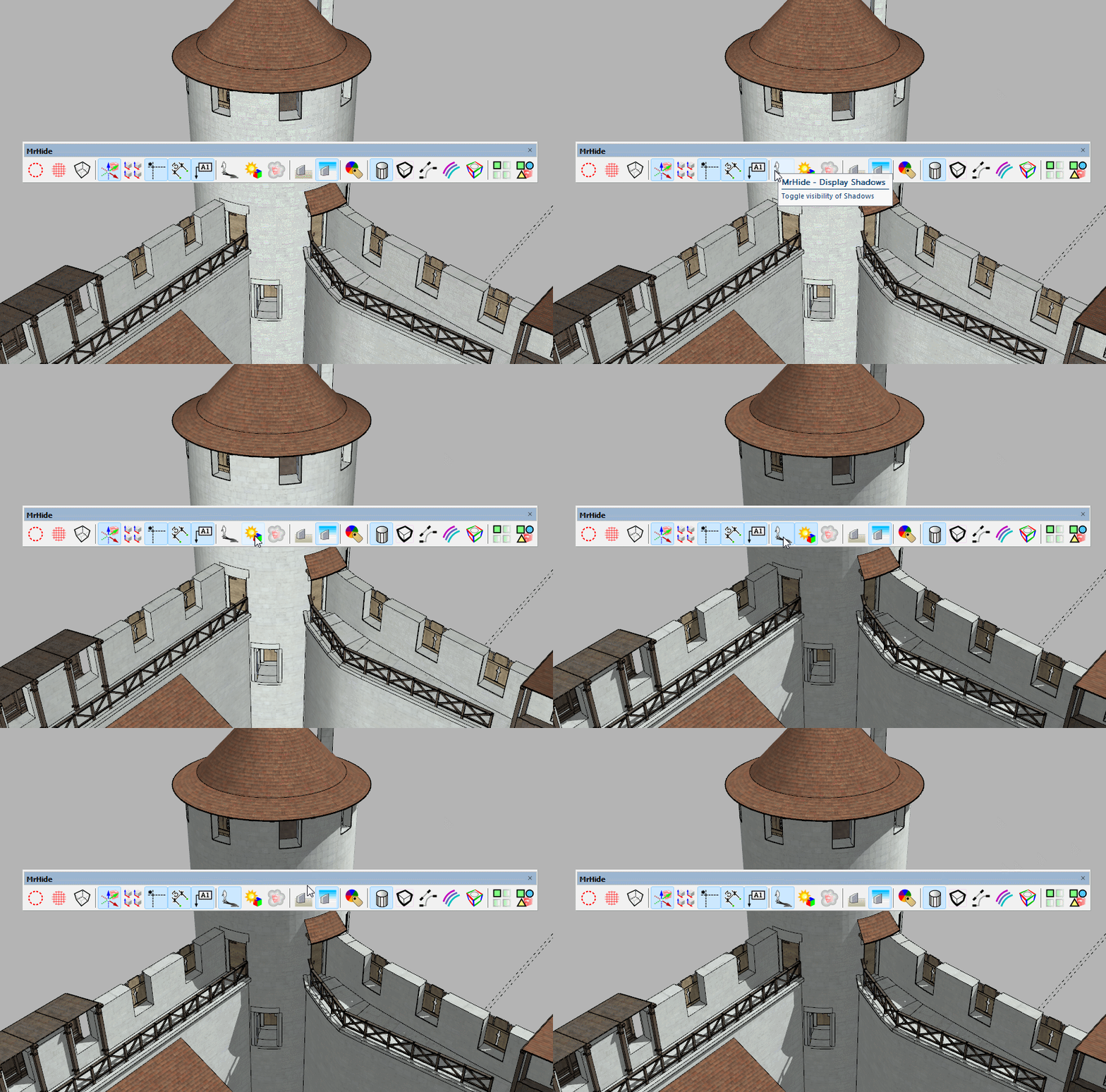
RE: [Plugin or command code Inquiry] Switch Shadow On Off
Hi,
Mr Hide by Fredo6 is all what you need (and more, I guess)
Regards