sketchucation logo sketchucation
    • Login
    1. Home
    2. CAUL
    3. Posts
    Oops, your profile's looking a bit empty! To help us tailor your experience, please fill in key details like your SketchUp version, skill level, operating system, and more. Update and save your info on your profile page today!
    πŸ”Œ Smart Spline | Fluid way to handle splines for furniture design and complex structures. Download
    C
    Offline
    • Profile
    • Following 0
    • Followers 0
    • Topics 8
    • Posts 61
    • Groups 2

    Posts

    Recent Best Controversial
    • RE: [PLUGIN] Flowify v1.1.0 (updated 150327)

      @tt_su said:

      It's been a while since I used Rhino - is the operation of setting up the meshes the same as FlowAlongSrf?

      It is very similar, in Rhino there are no explicit connection edges though.

      @pilou said:

      You have also a "Flow" function inside Moi3D πŸ€“

      That was a nice summary, the projective version of Flow is actually coded and may end up in a later version of Flowify.

      @duanekemp said:

      Is v1.2 addressing texture mapping? πŸ˜„

      I will look into this, it would certainly be a nice feature.

      posted in Plugins
      C
      CAUL
    • RE: [PLUGIN] Flowify v1.1.0 (updated 150327)

      @rv1974 said:

      Edit: I found 'flowify without cut' mode that solves this issue β˜€

      I was just going to suggest this πŸ˜„

      @rv1974 said:

      BTW What exactly 'Aux' tools do?

      The first Aux tool "Edge -> CLine" converts an edge to a construction line. If two connection edges intersect each other (if you pair your corners crosswise), then they split into four edges and that is not handled by the extension. The extension let you convert an edge to a construction line to handle this.

      The purpose of the second Aux tool cannot really be explained in less than 2500 words. There will eventually be a tutorial with this tool playing a small part.

      posted in Plugins
      C
      CAUL
    • [PLUGIN] Flowify v1.1.0 (updated 150327)

      Flowify is a Sketchup equivalent to Rhino's command FlowAlongSrf. The extension bends geometry along quad surfaces.

      Inputs to the extension are groups or components of source geometry and a group called the support group which has the following layout:

      Support group

      - Group with projection plane
      - Group with target surface
      - Group with connection edges
      • The projection plane is either an empty rectangular face or a flat custom made quad grid with the same topology as the target surface.

      • The target surface is a rectangular quad grid - rectangular means that the grid needs to have four distinct corners.

      • Connection edges (or construction lines in case the lines intersect each other) connect two adjacent corners on the projection plane with two adjacent corners on the target surface.

      Flowify maps raw faces within groups or components of source geometry, thus, groups further down the hierarchy will be ignored. Front and Back materials are transferred to the target geometry.

      Compatibility: Tested on Sketchup 2015 only.

      Introduction:

      Tutorials

      Versions
      v1.1.0 Formats edges in the target geometry according to:
      A) Edges in the source geometry have their formatting transferred to the target
      B) Edges introduced in intersect becomes unsoftened in the target
      C) Triangulation diagonals in the target are formatted according to the conventional quad definition

      Thus, "Flowify without cut" will preserve quad formatting.


      CAUL_Flowify(1.1.0).rbz


      Some examples.

      posted in Plugins
      C
      CAUL
    • RE: Distance between two points / optimization

      @jolran said:

      That looks nice! Did you get that from the Geometric Tools library ?

      Well, no, it's a very primitive (just a plain 3D-array) standard space hash. It's surprisingly effective on average; memory intense though. I use variations of this quite often, here's another example.

      @sdmitch said:

      Here are my results with the two code options [Pascal's averaged 8.4 versus 45.9 for Caul's]

      That's very strange, I've tested on two computers and my results are more like ~0.2s (vs 4.7s for Pascal's code). I wonder where the huge time penalty comes from in your tests, maybe it's the memory allocation in init()..?

      posted in Developers' Forum
      C
      CAUL
    • RE: Distance between two points / optimization

      You could try to use a space hash. The code below generate the points well within 1s.

      ` module PointCloud

      def self.init(box_side, min_dist)
      @min_dist = min_dist
      @divs = (box_side / min_dist) - 1.0
      @dInv = 1.0 / (box_side / @divs)
      @hash = []
      (0..@divs - 1).each { |i| @hash << []
      (0..@divs - 1).each { |j| @hash[i] << []
      (0..@divs - 1).each { |k| @hash[i][j] << []
      }}}

      @nBox = []
      [0, -1, 1].each { |i|
        [0, -1, 1].each { |j|
          [0, -1, 1].each { |k|
            @nBox << [i, j, k]
      }}}    
      

      end

      def self.validBox?(xi, yi, zi)
      return xi >= 0 && yi >= 0 && zi >= 0 && xi < @divs && yi < @divs && zi < @divs
      end

      def self.getBox(p)
      x = (p.x * @dInv).floor
      y = (p.y * @dInv).floor
      z = (p.z * @dInv).floor
      return nil unless validBox?(x, y, z)
      return [x, y, z]
      end

      def self.validPoint?(p, ind)
      xi = yi = zi = 0
      @nBox.each { |offset|
      xi = ind[0] + offset[0]; yi = ind[1] + offset[1]; zi = ind[2] + offset[2]
      next unless validBox?(xi, yi, zi)
      box = @hash[xi][yi][zi]
      box.each { |p2| return false if p.distance(p2) < @min_dist }
      }
      return true
      end

      def self.add(p)
      ind = getBox(p)
      return false if ind == nil
      return false unless validPoint?(p, ind)
      @hash[ind[0]][ind[1]][ind[2]] << p
      return true
      end

      def self.main
      mod = Sketchup.active_model
      ent = mod.entities
      res_g = ent.add_group

      box_side = 1000
      min_dist = 50
      no_of_points = 5000
      
      t0 = Time.now
      init(box_side, min_dist)
      (1..no_of_points).each { |i|
        pt = Geom::Point3d.new(rand * box_side, rand * box_side, rand * box_side)
        res_g.entities.add_cpoint(pt) if add(pt)
      }
      t1 = Time.now
      puts (t1 - t0).to_s
      

      end

      main

      end`

      posted in Developers' Forum
      C
      CAUL
    • RE: SketchUp RUBY API Wishlist [way of coding wishes, please]

      It would be nice if you could retrieve a face from Geom::PolygonMesh. For example:

      ` ent = Sketchup.active_model.entities

      ps = [[0, 0, 0], [0, 10, 0], [10, 10, 0]]
      mesh = Geom::PolygonMesh.new
      ps.each { |p| mesh.add_point p }
      ind = mesh.add_polygon ps
      ent.add_group.entities.fill_from_mesh mesh

      WISH

      f = mesh.get_face ind
      ############`

      If you want to make a lot of manipulations on a complex piece of geometry, it is often an order of magnitude faster to recreate the manipulated geometry from scratch using fill_from_mesh rather than operating on the existing geometry using add/remove face. However, you often want to associate faces in the old geometry with corresponding faces in the new mesh geometry in order to copy over materials and so on, and this is where mesh.get_face would save a lot of time.

      posted in Developers' Forum
      C
      CAUL
    • RE: Find Intersection of 2 curves

      From a time complexity perspective I think the problem is inherently O(n^2) (which means that your code can't be any simpler), also, if the curves have few segments and you already know enough to throw away half of them, then I would say your code is probably close to optimal. In general, the simplest way to gain speed is to use bounding boxes in various ways like reducing the input to segments in the bounding box intersection between the curves and so on, however, there are constant costs associated with this so it may not be a gain on small inputs.

      posted in Developers' Forum
      C
      CAUL
    • RE: Find Intersection of 2 curves

      You can use a simple space hash. I attached a piece of code in this thread solving the similar problem of finding intersecting faces. The principle is the same.

      posted in Developers' Forum
      C
      CAUL
    • RE: [solved] &quot;movin&quot; group into another group (in ruby)

      I think this works:

      ` def self.add(g0, g1)
      g0.entities.add_instance(g1.entities.parent, g1.transformation * g0.transformation.inverse)
      g1.erase!
      end

      def self.insert(ng, g0, g1)
      ng.entities.add_instance(g0.entities.parent, g0.transformation)
      ng.entities.add_instance(g1.entities.parent, g1.transformation)
      g0.erase!
      g1.erase!
      end`

      posted in Developers' Forum
      C
      CAUL
    • RE: How do you intersect two faces?

      Thanks for the replies!

      slbaumgartner, splendid advice. It worked much smoother than I thought it would. The code is attached below. Here are some results from intersecting the two columns in the example file:

      • Intersect from UI: 983s

      • Outer shell (*****): 161s

      • g0.intersect_with g1 (******): 104s

      • Intersect face pairs: 4s

      () Outer shell is probably dominated by the intersect
      (
      *) In order to produce all edges for coplanar cuts two calls to intersect_with has to be made with the groups reversed. The result above is for a single call.


      cuttest.zip


      CAUL_CutTest0.3.rb

      posted in Developers' Forum
      C
      CAUL
    • How do you intersect two faces?

      I want to intersect two groups ( g0, g1) and put the intersection edges in a third group. Since intersect_with is very slow on complex geometry it should pay to find pairs of faces from g0 and g1 that might intersect and then intersect those pairs separately. An example, I have two groups with roughly 11000 faces each. This requires 121 million face/face comparisons, however, with some space hashing this number drops to ~400.000 from which ~4000 pairs of potential face intersections are extracted (ie. face pairs whose bounding boxes intersect). The whole procedure takes about a second. (To intersect the groups from the UI takes 16 minutes..)

      Now, is there a way in sketchup to intersect just two faces? I'm at loss on how to use intersect_with for this and the Geom class contains only plane/plane intersection.

      posted in Developers' Forum
      C
      CAUL
    • RE: Followfy 0.2 (2014-05-15)

      @dave r said:

      May I ask for a modification/addition? Would it be possible to have it also Smooth/Soften curves like the native Follow Me tool does?

      That's on the TODO-list.

      @unknownuser said:

      ps Maybe an info Message "Followfy is calculating" will be fine for complex path/profile !

      As it happens, almost all time is spent trying to build the geometry with the api method add_face. In this release the geometry is built with triangles. The next release will use rectangles when appropriate (which is almost always) and that will roughly double the speed.

      posted in Plugins
      C
      CAUL
    • RE: Followfy 0.2 (2014-05-15)

      @sdmitch said:

      Having written a similar plugin almost three years ago, I was very curious as to how you did yours. About the only similarity was the projecting of points on bisecting planes at the corners.

      Interesting, how did you approach the problem?

      @sdmitch said:

      It is impossible to test for all possible things that could go wrong so when I seemed to find a situation that causes a failure in the mergeCoPlanarFaces method, I thought you might like to know.

      Thanks for the feedback! The mergeCoplanar-method was/is a disaster waiting to happen. I will release an updated version soon.

      posted in Plugins
      C
      CAUL
    • Followfy 0.2 (2014-05-15)

      Followfy is a script intended to solve some special cases where the native FollowMe fails to produce solids. Followfy works like FollowMe and can be used for any path (except loops), however, the solidsolving behaviour only works for planar paths.

      Usage: Select path and profile. Run Followfy from the Plugins menu. The selection may include edges from the profile surface; if the profile and path are stuck together triple click may be used. For predictable results the profile should be at either end of the path.

      Installation: Drop the file in the Plugins folder.

      The example .skp below shows some instances where Followfy produces solids while FollowMe doesn't.


      Followfy.png


      examples.skp


      CAUL_Followfy_0.2.rb

      posted in Plugins
      C
      CAUL
    • RE: Intersection - Problem with coplanar cuts

      Thanks for the replies. I think my original post was a bit unclear, the problem is quite subtle and it isn't a problem with intersect generally but rather:

      1. Explode doesn't always merge geometry properly. In the image below an explosion will fail to cut the top face in the left model. The grouped edges in the right model is a subset, and in this case an explosion will split the top face into four faces as we expect. So, for explosion to be robust the geometry needs to be as simple as possible.

      2. Intersect_with doesn't provide all edges for coplanar cuts.

      The original problem was a combination of 1 and 2.

      If the two groups are cut from the UI, the resulting edges represents all coplanar cuts. So, what's the difference between the UI intersect and the API intersect? It turns out that the resultant edges from UI intersect is (conceptually):

      intersect_with g0, g1 + intersect_with g1, g0

      Thus, the solution is to make two calls to intersect_with in the API. The script below properly cuts the two pipes.

      ` def mergeGroups(ent, g0, g1)
      ng = ent.add_group
      ng.entities.add_instance(g0.entities.parent, g0.transformation)
      ng.entities.add_instance(g1.entities.parent, g1.transformation)
      g0.erase!
      g1.erase!
      nt1 = ng.entities[0]
      nt2 = ng.entities[1]
      nt1.explode
      nt2.explode
      return ng
      end

      def intersect(ent, g0, g1)
      eg = ent.add_group
      g0.entities.intersect_with false, g0.transformation, eg , g1.transformation , true, g1
      return eg
      end

      def cutGroupPair(ent, g0, g1)

      ge0 = intersect(ent, g0, g1)
      ge0.transform! g1.transformation

      ge1 = intersect(ent, g1, g0)
      ge1.transform! g0.transformation

      g00 = mergeGroups(ent, ge0, g0)
      g11 = mergeGroups(ent, ge1, g1)

      ng = mergeGroups(ent, g11, g00)

      return ng

      end

      mod = Sketchup.active_model
      ent = mod.entities
      sel = mod.selection

      cutGroupPair(ent, sel[0], sel[1])`
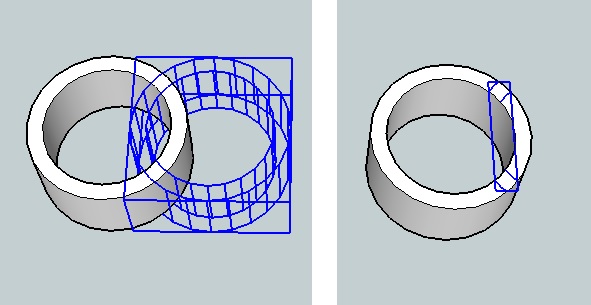

      Cuts.jpg

      posted in Developers' Forum
      C
      CAUL
    • Intersection - Problem with coplanar cuts

      I'm trying to put together a robust cut script but it turns out to be quite difficult. The attached .skp shows a problem with coplanar cuts that my script is unable to handle.

      As seen in the .skp, it is possible to accomplish a proper cut manually with the following steps:

      1. Intersect the groups
      2. Make a group of the intersection edges (2 copies)
      3. Explode the intersection edges into both groups separately
      4. Merge the groups

      However, I can't manage to perform these steps in a script (see Script Cut scene in the .skp). The problem is in step 3. The UI intersect method produces the face/face cuts as well as coplanar cuts. The API intersect_with gives only edges for face/face cuts. The script tries to get around this by adding all edges from group 1 to group 2, it then merges the geometry and finally deletes the stray edges. This doesn't work though, the problem is that the geometry just doesn't merge (it's probably too complex or something..)

      So, is there a (non-O(n^2)) way to get the same set of edges through the API as you get with the UI version of intersect, ie, a group of edges that includes coplanar cuts?


      How do you properly intersect these groups in a script?


      IntersectFail.skp

      posted in Developers' Forum
      C
      CAUL
    • RE: [Plugin] Shellify v1.5 20131217

      Bump

      posted in Plugins
      C
      CAUL
    • RE: [Plugin] Shellify v1.5 20131217

      @guanjin said:

      Original components, to achieve selective whether to keep?

      Ok, I'll add when I got time. In the meantime, 1.3 is altered to replace the original group. If you download this version and want the old behaviour back you can search for

      replace_original = true

      in the code, and then change true to false.

      posted in Plugins
      C
      CAUL
    • RE: [Plugin] Shellify v1.5 20131217

      @krisidious said:

      I've wanted something like this for an entire house model... I model entire interiors, wall thicknesses etc for a house, then I'll want to render it from the outside or I'll want to make lots of copies of the house in a development but the model gets heavy with all the interiors. think it will work? I'm gonna try it...

      I don't think the script does what you want. Shellify is basically a cleaning tool to be used after intersections etc. It purges geometry on the inside and flaps on the outside. If you've modeled a house where the wall structure itself is a near solid, then shellify will remove geometry within the wall, but not in the house so to speak.

      posted in Plugins
      C
      CAUL
    • RE: [Plugin] Shellify v1.5 20131217

      @rv1974 said:

      1. it won't work with the complex geometry (see attached pic)

      Thanks for trying out the plugin. If you by complex geometry mean multiple disconnected objects within a group, then no, the script is not made to handle that. If you mean that your geometry is not cleaned in the way you anticipated, then it might be due to the non solid proporties of your object. The plugin tries to maintain a coherent sense of inside/outside and that is only possible if the object is a near solid.

      @rv1974 said:

      1. placing the output beside (instead of replacing the preselected)

      I'm not quite sure what the best way to present the result is, the plugin is by no means unbreakable so I think there is a point to preserve the original as a comparison.

      posted in Plugins
      C
      CAUL
    • 1 / 1