Thank you Mr brain!  just Perfect!
Oops, your profile's looking a bit empty! To help us tailor your experience, please fill in key details like your SketchUp version, skill level, operating system, and more. Update and save your info on your profile page today!
🚨 Skimp | 25% Off until March 30 Buy Now
 Offline
Posts
-
RE: [Req] Toggle Units
@remus said:
I think the idea is to be able to assign a shortcut key to it so you dont have to go through the whole window->model info thing each time you want to change them.
that's it...sometimes i have to design everything in feet - which is fine as long as i look at my own!
instead one can just draw a dim line, push pull in centimeters and check it in feet - or viceversa..
in fact, do all sorts things for those US projects...that is of course, until the planet 'unites'..
is there ruby hope?
.
-
[Req] Toggle Units
i'm thinking (hoping) of a script that would help me toggle between feet and centimeters.
that way i can assign a shortcut and toggle-view the dimension lines in the model in real time
- scroll down for Matt's Toggle Units plugin -
-
RE: Where does the time go?
guess that's a deep one Adam! ..if i get your question, i think a lot of time goes in gathering and setting up the source material prior to modelling - pictures, cad files, elevations, aligning, hunting down those intersections.. etc. what's in your mind?
-
RE: [Plugin][$] Tools On Surface - v2.6a - 01 Apr 24
@unknownuser said:
CadFather,
For easier access to your set of icons and cursors, I edited the first message of this thread and attached the archive file.
http://www.sketchucation.com/forums/scf/viewtopic.php?f=180&t=11212&st=0&sk=t&sd=a#p76625Fred
oh..i'm honoured to have my name next to it!

-
RE: Context menu Submenu
one remaining bug - the menu always shows up at the bottom. i tried changing the loading order of the scripts but it doesn't work. it is not even sorted alphabetically..

-
Context menu Submenu
Hi, i'm trying to organise my right click menu (mine started to go under the table) - i'm now dealing with multiple submenus
- anyone with a quick snippet on multiple submenus code?
this is what i'm trying to achieve
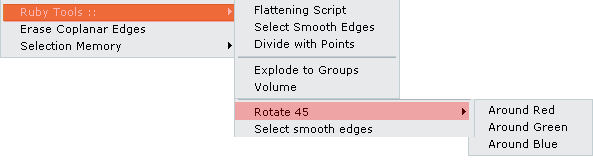
oh, and another question please - is there a way to 'specify' the position of the menu? (eg not at bottom)
-
RE: [Plugin][$] Tools On Surface - v2.6a - 01 Apr 24
..it would be great to have _16, _24 naming convention like TOS - but all in your own time of course

-
RE: [Plugin][$] Tools On Surface - v2.6a - 01 Apr 24
Hi Fredo, i don't think this same 16/24 system applies to bezier as well - had a look at the scripts but cannot locate/attempt how to make the switch automatic..any pointers would be great..
-
RE: [Plugin][$] Tools On Surface - v2.6a - 01 Apr 24
Master Fredo... Thanks and hats off -

works just like sketchup 8 - if only i was half as lazy as you!
-
RE: [Plugin][$] Tools On Surface - v2.6a - 01 Apr 24
large toolbars use 24 pixel icons, small 16 pixels.
but TOS does not load them automatically, so if you want small toolbars put the 16 in the folder - if large the 24
a quick way is to zip both set of icons in the TOS folder - when you want to change them just "unzip here" and overwrite all files (i use winrar).
-
RE: [Plugin][$] Tools On Surface - v2.6a - 01 Apr 24
are you sure you installed the 24 pixels ones? (TOS_IconsCursors_24)
-
RE: [Plugin][$] Tools On Surface - v2.6a - 01 Apr 24
thanks Stan, your comment makes glad two weeks of work to achieve it!
-
RE: [Plugin][$] Tools On Surface - v2.6a - 01 Apr 24
thanks Stanmarsh, files updated.
@ Fredo.. to make the toolbars easier to manage.. (you may already know)
i know Didier has a way of changing the icons from small to large (projections/layer manager) according to the toolbars setting in SU. unfortunately the script is scrambled so i can't see the relevant code. would be good to have all big and small icons in the TOS folder (and not worry about it anymore).
-
RE: [Plugin][$] Tools On Surface - v2.6a - 01 Apr 24
Hi, i think this is going to be the final release (for now)
TOS Cursors updated (smaller pencil).
TOS Icons updated:-


.
-
RE: [Plugin][$] Tools On Surface - v2.6a - 01 Apr 24
i upated my icons for TOS - not the best but thought i shared them - basically just place them inside the TOS icons folder overwriting the existing one (you have the originals anyway)

i hope to work more on the cursors and on the small ones as they are not too clear
EDIT: MORE ICONS IN THE POSTS BELOW..
-
RE: Tool Bars Question
the difficulty is that i probably have different plugins than you and unfortunately this tweak is an exact science - one more or less script in the folder and bingo! - it's all over the place again!

the way i managed is to change places - for example there was a toolbar who completely refused to be positioned in a specific area - eventually i got it to behave somewhere else
also as others have noticed you always drop the toolbar from either higher or lower then the horizontal line. in fact, i noticed some toolbars just don't want to be next to each other!

in any case, i attach my 4 files - remember to back up your current key before....good lucky!
work time!
-
RE: Tool Bars Question
i know what you mean
 ! 'eventually' i also got all rows to fit (can't remember the stubborn one) - then...once i got those in place i ran to the registry and there i stayed!