They are all great, but that last with just that little bit of color is outstanding!
Congrats on the new business.(customer)
 B
Offline
B
Offline
They are all great, but that last with just that little bit of color is outstanding!
Congrats on the new business.(customer)
Thanks!
The background was his from the "Components" Forum.
http://www.sketchucation.com/forums/scf/viewtopic.php?f=40&t=5879
The other elements (including the hanging flowers) are straight from SketchUp or 3DW.
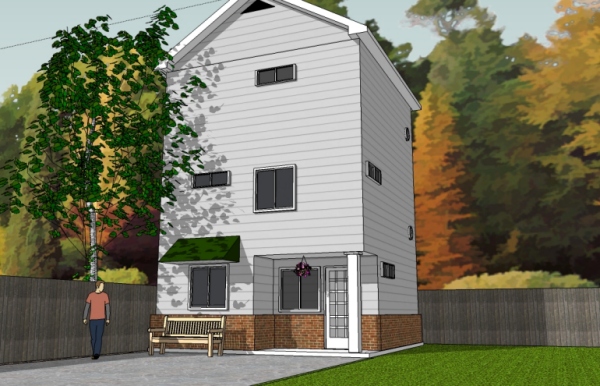
The round windows on the side are mine as is the door, the main building, awning and fence. All materials for the building are from SketchUp.
Thanks for the information about FormFonts. 
@unknownuser said:
No, that's not a very efficient way of doing things at all. Get process explorer, it's a replacement for task manager with Way more functionality. The easiest way to spot spikes in cpu usage is to turn on the cpu history column in process explorer.
Nice!
I forgot to mention that the model is missing the back and opposite side windows and has no interior structure.
It also has some flaws. 
(For those of you who have downloaded it already.)
This was one of the first threads I browsed when I first arrived and I'll be honest... I was intimidated.
The style and design are superb!
It was also one of several creations here that has motivated me to learn SketchUp.
Well, here is my first full model. It was done just as my computer reached its limit of being able to handle the model. I can't complain. I think it turned out O.K. Took me roughly a total of 24 hours.
It's a budget garage apartment remodel. It stands on a 20'x20' slab and is 3 floors.
The 1st floor is kitchen, laundry, breakfast bar and under stair storage. The 2nd floor is the living room and "powder room." (small bath with sink and toilet only) The 3rd floor is the bedroom with full bath and walk-in closet. The stairwell is stacked in the back right corner and has landings and 90 degree turns.
I hope to finish the interior one of these day. I have the first floor almost complete. It is making for a good introduction to SketchUp.
Thanks to Alan Fraser for the wonderful background.
(click on pic for larger image)
@didier bur said:
Can't believe this is known as a french door ?
America is bad enough at giving strange names to things, but Texas is even worse.
@remus said:
Might be worth having a read through this jim: http://www.pcstats.com/articleview.cfm?articleID=1139
I havent had time to read through the whole thing, but i tink its about data recovery without having to send your disk off to be opened up.
Sorry for your loss, i've given up on keeping bookmarks personally, i lost them too often.
Wow! What a coincidence. This is just what I've been looking for! Thanks!
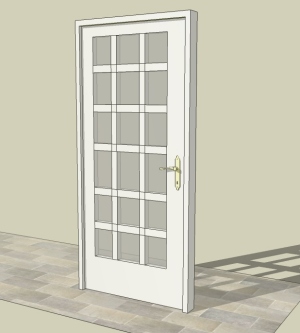
This is my first model. Pretty basic. I used a door handle I found in 3DW. I had a hard time getting it rotated. I'm still getting the hang of the rotation tool.
I was unable to bevel the inside edges. This is probably because of incorrect workflow. The same goes for the cross pieces.
I made this as I was unable to find (at least a suitable) one in 3DW. Another poster (sorry, forgot who) seems to be right about there being a lot of junk on 3DW.
Advice welcome!
(I'm not sure how to place the .skp file in this post)
Thanks Boofredlay.
I have turned off "Enable length snapping" and set "Precision" to 0". Same results.
I'm working on a small house model.
I'm beginning to suspect I don't have a powerful enough computer. 
I'm using an optical mouse with about 3-400dpi, a 128mg video card, slightly less than 1gig RAM and a 7200rpm HDD on a 100mhz bus. AMD 1.7ghz P4. There is no room for more RAM (poor mobo design). Nor can I upgrade the cpu for the same reasons. I might be able to upgrade the vid card. I'm thinking about going with something that uses DDR. I had good results with a customer's computer after installing one for them. The HDD is brand new. (Seagate Barracuda) I have a 19" LCD monitor.
In other words, it's an old computer.
Sorta. I know about entering exact measurements, but I don't really know what those measurements are. I'm more about "eyeballing" when putting parts together and then getting measurements.
But it seems I can't even get to block to fit together, whether face on or at right angles. The move tool is like using a sledgehammer. Most of the tools seem to jump around, no matter how slow I move my mouse. Perhaps I need to change my mouse settings?
I have found and turned off the "snap to" function, but I still cannot get smooth, precise movement and placement.
What am I doing wrong, if anything? This is driving me crazy and proving to be very frustrating.
@gaieus said:
Spence, be careful with gif images though - they can only handle 256 colours so your (most probably nice) render might get screwed up big time! It's quite a big "downgrade" from a jpg quality to gif quality.
This is true.
Some graphics apps have a setting that allows you to "dither" the gif image, which basically smooths the image. I'm not familiar with ImageReady (know of it, used it once) but I believe it should be able to "dither" the final gif.
The best way I can think of doing this is to first export a JPEG of your model.
Use this file as your static background and template.
Use a graphics program of your choice and one that will allow you to make GIF animations. ImageReady should be able to the following:
Make or capture or import your animation as a separate file. Resize to exactly fit the area/space where it will be placed. Stretch as necessary.
A good way to find the exact size is to convert the JPEG of your model to use "pixel" measurements. Create a solid box that exactly fits the space/area where the animation will be placed. (black is preferred) Look at the measurements and shape of that box
Then use your graphics program to export or save as or convert to "animated gif" file.
Go back to your JPEG. Create a new layer. Import your gif animation and place on the new layer in the space/area where you want the animation. Tweak/trim as necessary.
Can be viewed on the Internet or in any browser.
If this does not work for you or is not the solution you are looking for, please let me know and send more details about the intended end use. There are a couple of ways to do this, but it all depends on the final use.
