These are amazing! Such clean work. thx!
Do you have some more photos pre-smoothing? I'm trying to get a handle on how to divide geometry, especially for tufting and piping, before I hit the smooth button.
Oops, your profile's looking a bit empty! To help us tailor your experience, please fill in key details like your SketchUp version, skill level, operating system, and more. Update and save your info on your profile page today!
Urasik Extensions | Lots of new extensions to check out Learn More
 Offline
Posts
-
RE: My furniture
-
RE: Poll: Do you use LayOut?
I'm a former woodworker trying to make the transition to millwork/furniture draftsman. I've been using SU for 8 yrs. Right now I've got about 4-5 small furniture makers as clients on a freelance basis and use LAYOUT exclusively. But they don't much care about formatting and standards. When I try to find work more permanent or steady, my lack of experience with AutoCAD seems to be a huge disadvantage. Ive taken an AC class and quickly got frustrated with it. ("This would take me half the time in Sketchup")
It's nice to be able to have changes made to a model referenced quickly in the paper space with LAYOUT, but I find it kinda clunky with line weights, annotations, etc.
While it seems architects are slowly opening up to the possibilities of using SU and LAYOUT exclusively, in the world of millwork shops and professional woodworkers, AutoCAD seems standard.
I'm thinking I need to learn AC enough so I can be quick and comfortable in it's paper space, and keep my modeling in SU.
Any thoughts from the pro's out there would be appreciated.
-
RE: Curviloft troubleshoot
Thanks TIG,
I had learned somewhere along the way to avoid small geometry...didn't know that it was an issue the other way around too. guess I overcompensated.But I scaled down and it doesn't seem to change the problems I'm having
-
Curviloft troubleshoot
Hi,
I'm running into some issues when using the Loft by Path tool.
On previous tries I was able to select multiple faces along a curved path and got good results.
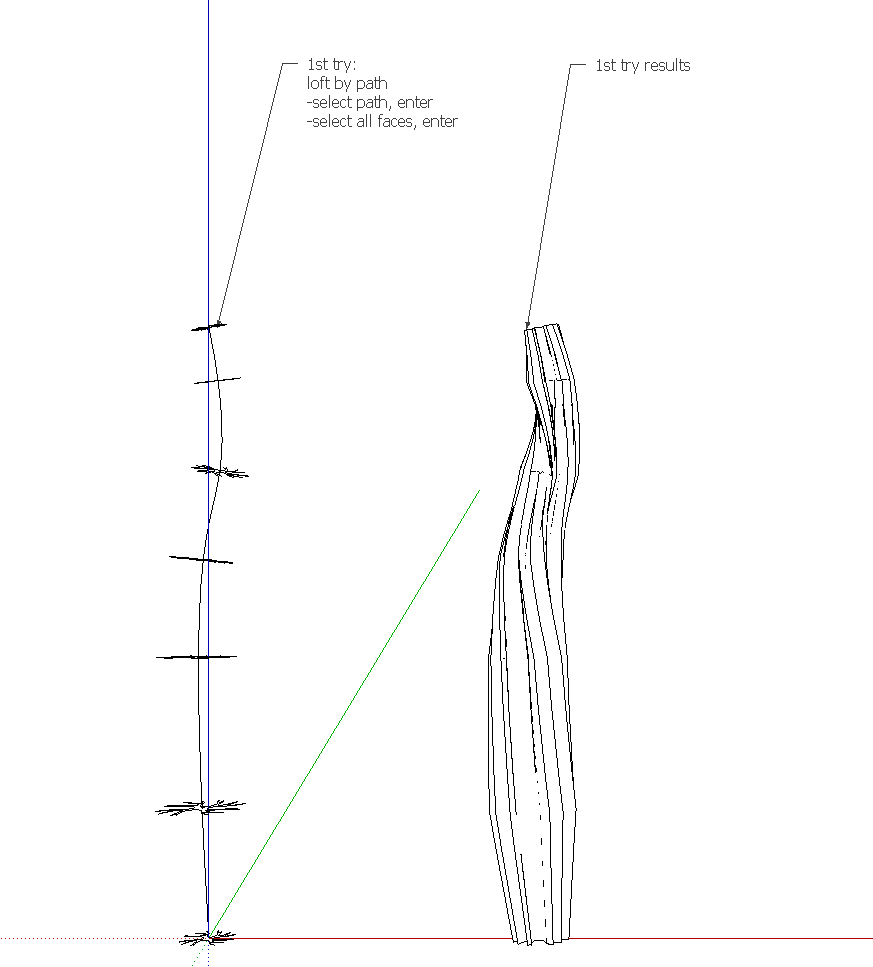
Today, using the same faces on a straight path, I can't seem to make it work. After selecting the path and faces I get no response.
I tried breaking the process down by lofting along only two faces at a time, but after getting half way I ran into the same, no response issue.
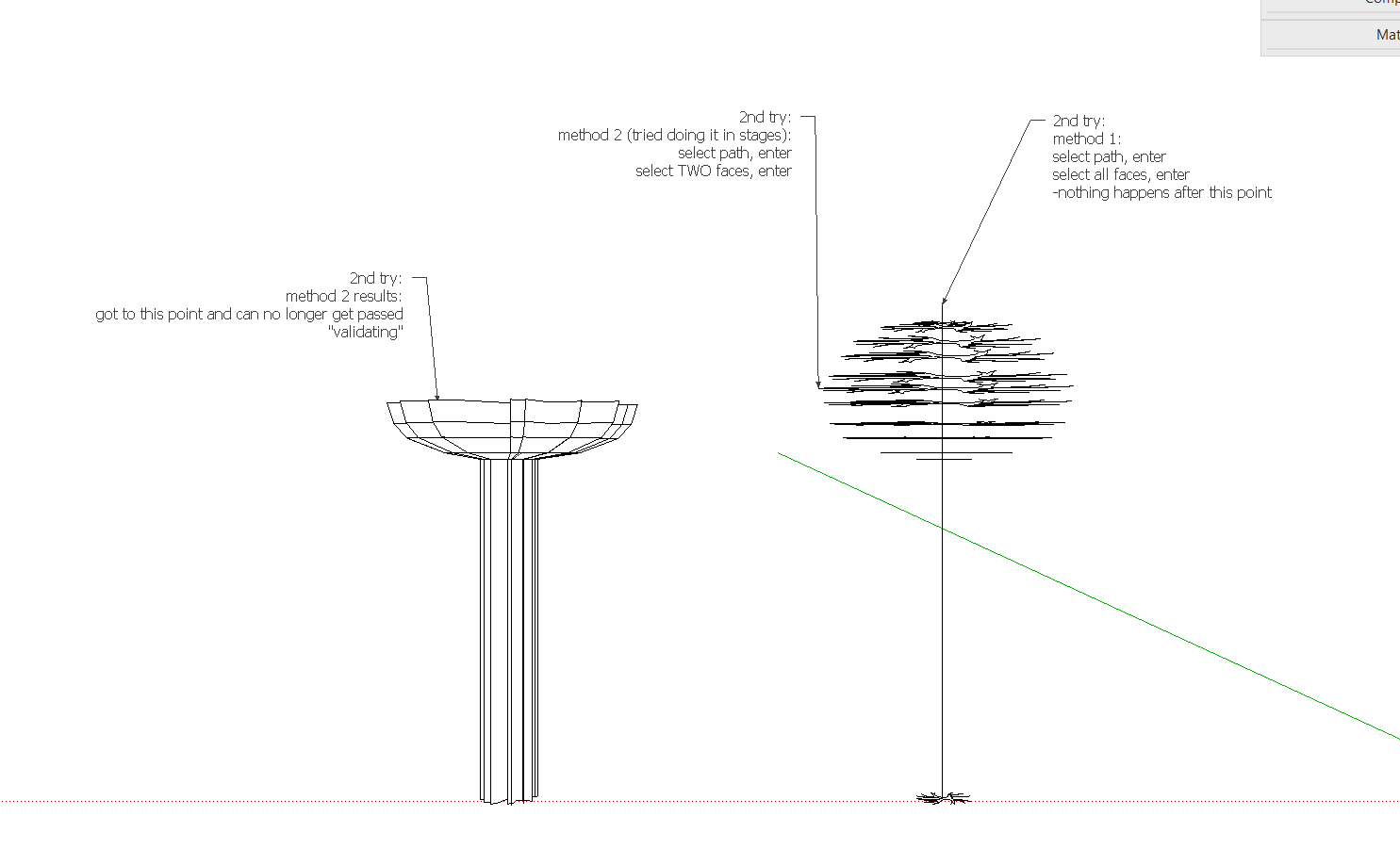
I figure I'm doing something wrong, but not sure what.
Any help is appreciated
Tom
-
Best tool for furniture upholstery
Hi,
I need some advice on the most efficient tools/plugins for modeling furniture upholstery...seat/couch cushions etc.
I'm relatively new to working with these types of poly-face meshes (i think that's what they are called) and the sandbox doesn't seem right to my mind. I've downloaded Curviloft and been playing with it, but cant seem to get the billowing effect right.
I've seen the soap shin and bubble plugin and it's inflate ability, but not sure what's best.
Any thoughts from experienced furniture designers on how to get nice, natural looking geometry for eventual rendering?
Thanks in advance,
Tom -
RE: Dynamic components help
Thanks Dave,
I'd definitely be interested in learning an efficient and quick way to resize. Where's your blog?
-
RE: Dynamic components help
Thanks for the reply.
i'm not really familiar with using the outer shell command, so i think hiding the sizes i don't need is a better bet for me right now.
I need to produce shop drawings for a bed in three different sizes. i thought it made sense to build one model with dynamic components, link it to a layout, then have the layout file automatically reflect the size changes i made to the model file.
It's starting to feel like i'm going down a rabbit hole with all the nesting components and dynamic parameters.
For just three different sizes, i'm thinking it might just make sense to just build separate models.
-
Dynamic components help
Hi,
I'm just learning how to use dynamic components and ran into a question.
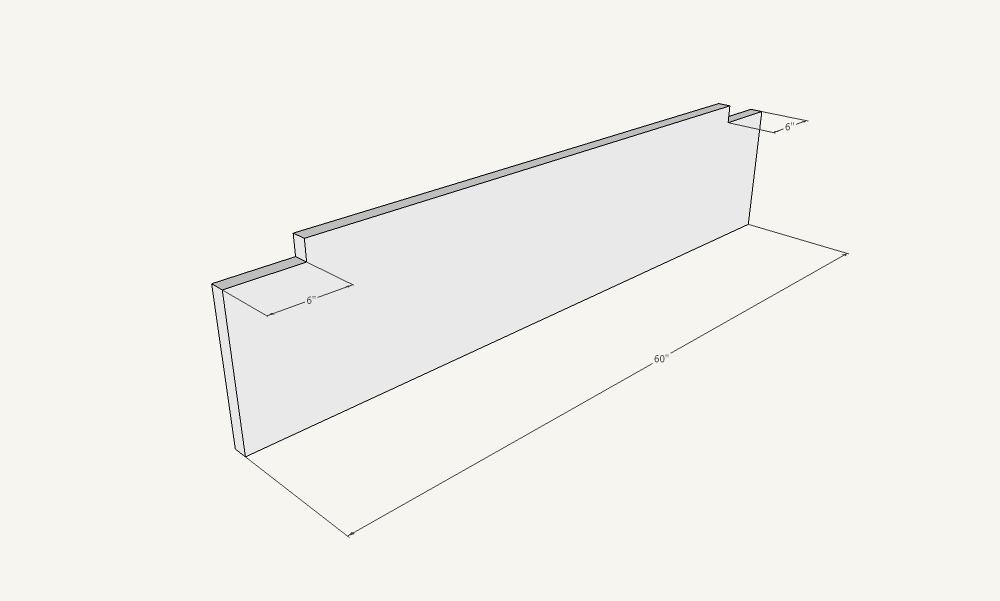
The attached pic shows a footboard. I want to be able to choose between overall lengths (full, queen, and king sizes) but maintain the 6" notch. Right now the notch is scaling up or down when the overall size is changed.
Thanks for any help
tom