
sketchucation logo sketchucation
    • Login
    1. Home
    2. brookefox
    3. Posts
    Oops, your profile's looking a bit empty! To help us tailor your experience, please fill in key details like your SketchUp version, skill level, operating system, and more. Update and save your info on your profile page today!
    ⚠️ Important | Libfredo 15.8b introduces important bugfixes for Fredo's Extensions Update
    Offline
    • Profile
    • Following 0
    • Followers 0
    • Topics 75
    • Posts 796
    • Groups 1

    Posts

    Recent Best Controversial
    • RE: [Plugin] follow me rotate

      Thanks, Chris.

      @unknownuser said:

      You already have a inputbox.rb? This plugin appears to have a file called that, as well as another plugin then?

      Yes; yes. The three being: FollowAndRotate_cn.rbs, FollowAndRotate_en.rbs and inputbox.rb.

      @unknownuser said:

      Do you know what other plugin supplied the other inputbox.rb?

      Both inputbox.rb open as below, but are different implementations:

      @unknownuser said:

      Inputbox.rb Copyright 2008 jim.foltz@gmail.com

      The Inputbox class makes it easy to create user input
      dialogs by providing a consistent interface to UI.inputbox for
      text fields and drop-down selection fields.

      Checking the date stamps and my downloads leads to 2 DLs on 4.4.: inputbox and model_location.rb, which may or may not require input box (it has been snipped from some search result locations).

      Certainly I can try renaming the existing to something else in order to see if that will enable FAR.
      posted in Plugins
      brookefoxB
      brookefox
    • RE: [Plugin] follow me rotate

      OK, thanks, though they did not work that way ---> It dawned on me belatedly that I needed to provide for the re-naming or not of inbox.rb: if I rename it then I guess I need to go through the code and replace the old name with the new name wherever it occurs.

      posted in Plugins
      brookefoxB
      brookefox
    • RE: [Plugin] follow me rotate

      I unzip to plugins; get FollowAndRotate_cn.rbs, FollowAndRotate_en.rbs and inputbox.rb, which I must rename as I have a larger file of that name already (I put far.skp elsewhere). No plugins result in my pull down. I rename them *.rb and still nothing. Any tips?

      posted in Plugins
      brookefoxB
      brookefox
    • RE: 'ghost' entity boxes indicate layer mash?

      I'll keep that in mind, too, but I'm thinking ten to one the ghosts occur around groups / components with bits on displayed layers but with shared faces / edges on other layers not displayed, not '0', and not right. I'll venture that tt's routine isn't aggressive enough to clean up that kind of problem.

      posted in Newbie Forum
      brookefoxB
      brookefox
    • RE: [Plugin] Component Stringer UPDATED May 23, 2013

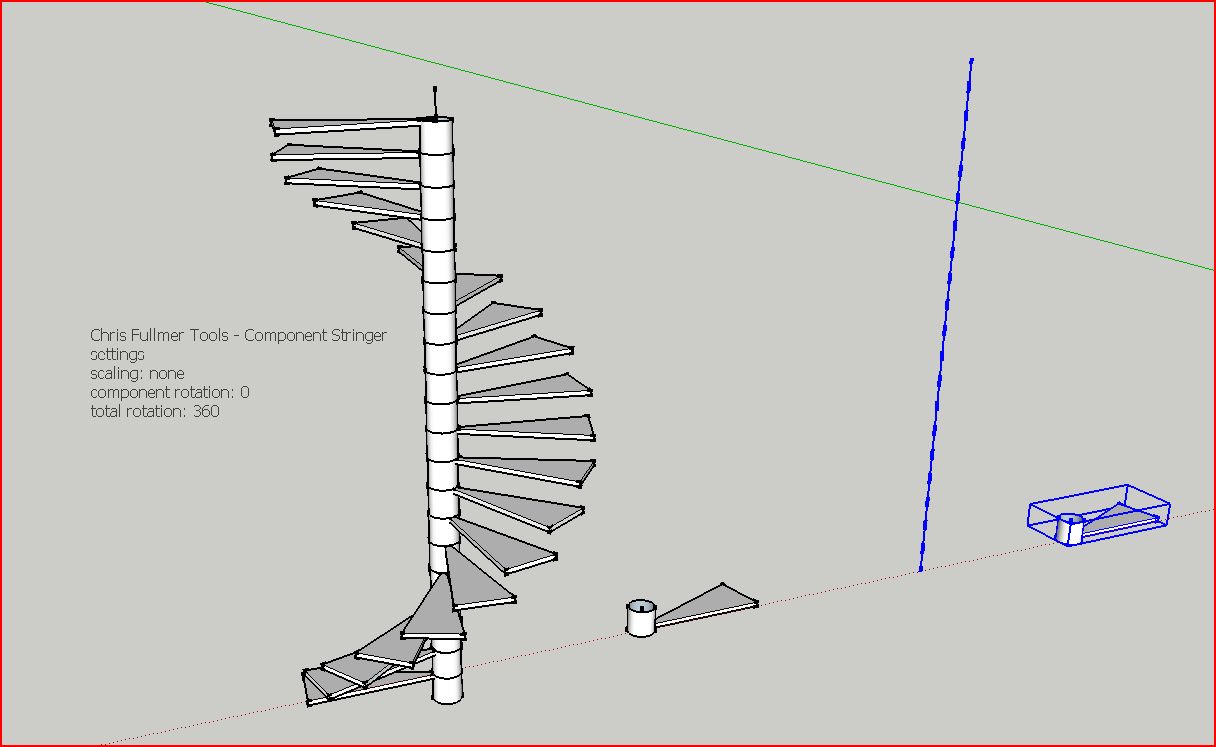
      Well, I'm happy to post this homely little picture: my first entry into the well-worn spiral stair saga. Contents: the usual suspects: one set of edges, one component (soon to be tuned and embellished with stringers, railings etc.). Why bother this thread? I just thought maybe a point or two needed clarification: In this case the length of each edge determines the displacement of the component, and the component cannot touch the edges or the routine will not work (for me).

      Thanks, Chris!!

      (For me, it would be nice if the settings were sticky across uses.)


      Capture3.JPG

      posted in Plugins
      brookefoxB
      brookefox
    • RE: Is this possible or already exists

      @hfm said:

      You could use Layout for this. Simply load the Sketchup-file; open it twice at a different scale and draw the circles yourself.

      So, it apparently already exists, if you have SUPro, which you may or may not. Back in the days of graphic cards with CAD drivers on steroids ($$), such a thing existed. Now we have SUP ($$).

      posted in Plugins
      brookefoxB
      brookefox
    • RE: 'ghost' entity boxes indicate layer mash?

      @xrok1 said:

      look through the outliner this is sometimes the only place you can see hidden stuff if it was hidden while in edit group mode.

      Very nice idea.... I'll try to keep that in mind. Unfortunately (or not, given the limited resource of time), I have hundreds of unnamed groups in this model as I didn't clue in to the value of outliner until too late in the production of this one.

      Thank you.

      posted in Newbie Forum
      brookefoxB
      brookefox
    • RE: 'ghost' entity boxes indicate layer mash?

      Yes, display hidden is on. I understand that they are a bounding box kind of entity, but in time there is nothing there,'hidden' or otherwise, unless maybe it is a jumbled entity, entangled in the netherworld of mixedly displayed and defined layerdoom.

      And yes, I think displaying all layers might reveal the beast, but how would I find it as I can't pick the disappearing phantom? (it's a too big model, full of stuff I can't seem to get rid of, even with fifty iterations of the file which I could go back to to pluck whatever I might mistakenly purge.)

      Thanks for the tips. This is one I can live with and will get back when I find something out.

      posted in Newbie Forum
      brookefoxB
      brookefox
    • 'ghost' entity boxes indicate layer mash?

      Does the presence of 'ghost' boxes, apparently empty, which flash briefly when moving around in a large drawing, and usually indicating the presence of geometry to be more fully rendered in time but not in this case, indicate some poorly constructed entities with geometry on mixed layers, some of which are not currently displayed?

      posted in Newbie Forum sketchup
      brookefoxB
      brookefox
    • RE: DC StairCaseBuilder

      From a distance, certainly looks nice, but codes in my vicinity, and throughout most of the US, require more horizontals: 4" inch max clear is common. Tough luck for the yanks.

      posted in Dynamic Components
      brookefoxB
      brookefox
    • RE: Unable to scale

      Irrelevant, but you might consider adding a little post-modern detail to that otherwise pretty interesting model.

      "Just ideas." (No poke.)

      Forget it; I hate post-modern.

      posted in SketchUp Discussions
      brookefoxB
      brookefox
    • RE: Hardware recommendations

      I wasn't being sarcastic: I just tried the second, thread, link, which was useful to me.

      posted in SketchUp Discussions
      brookefoxB
      brookefox
    • RE: Hardware recommendations

      Uh..., that's a seriously useful re-direct.

      Thanks.

      posted in SketchUp Discussions
      brookefoxB
      brookefox
    • RE: Urgent help pls

      "I went to shoe school..."

      posted in Plugins
      brookefoxB
      brookefox
    • RE: [Plugin][$] RoundCorner - v3.4a - 31 Mar 24

      Well, obviously, I mean, well, er....

      I thought I had checked that but obviously my methodology was seriously flawed.

      Thanks, t.

      posted in Plugins
      brookefoxB
      brookefox
    • RE: How to disable sounds

      Thank you, Rich. I guess I'll go that route since tim says he 'fixed' some other issues.
      Solo, I'll assume you as well are taken care of.

      posted in Newbie Forum
      brookefoxB
      brookefox
    • RE: How to disable sounds

      Of the three .rb's, HouseBuilder, HouseBuilder_extension and HouseBuilderTool, only the latter had either of the culprits (UI.beep).
      When I get verification of the results I'll post it for you, Solo, if you still lay claim to that status. Seems to me this is naughty and probably unintentional behavior by the routine, to make ripples extending beyond when it is explicily invoked(?).

      posted in Newbie Forum
      brookefoxB
      brookefox
    • RE: How to disable sounds

      Yes, yes !!!

      Will do.

      Thank you very much.

      posted in Newbie Forum
      brookefoxB
      brookefox
    • RE: [Plugin][$] RoundCorner - v3.4a - 31 Mar 24

      @unknownuser said:

      @brookefox said:

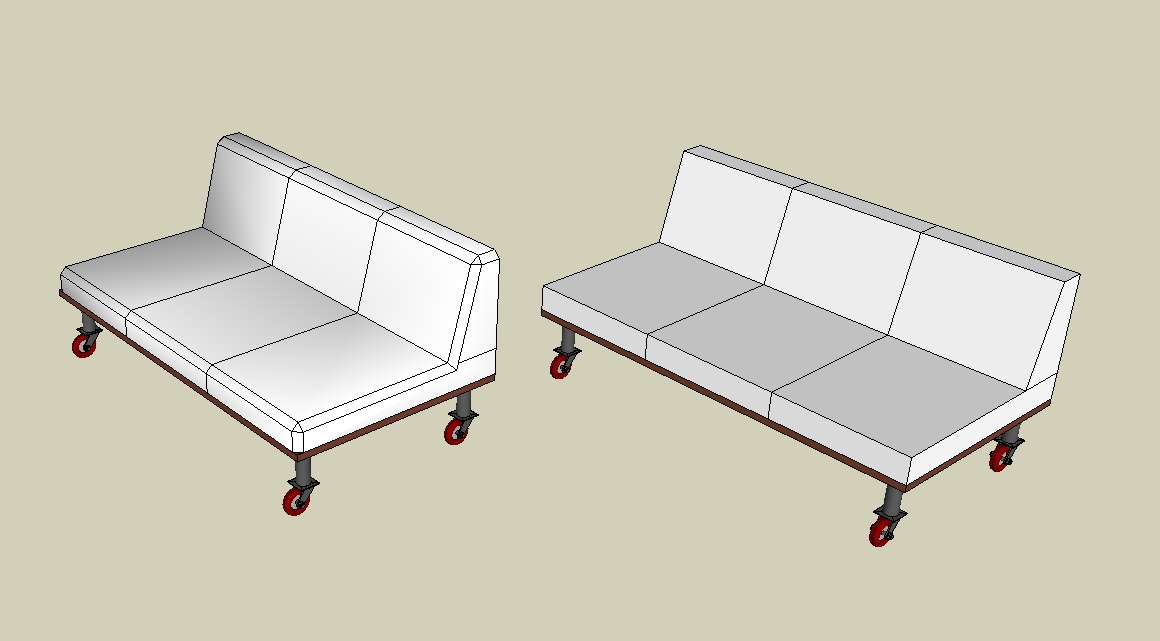
      S: It would be nice to have persistent settings for each of the three round types independently as, for instance, I generally want beveled edges unsmoothed but the others likely not.

      Normally the persistence is done for each individual tool, including the custom saving by the icons A, B, C, D
      Fredo

      Sorry, I missed that and will investigate further. Thank you.

      @unknownuser said:

      @brookefox said:

      Q: With a surface whose edges have been beveled and unsmoothed and which appears flat and untextured, what causes the slightly modeled appearance (slight shading effects not visible elsewhere)?

      I am not clear of what is the bad visual effect. Coul you post a picture or the model.

      Fredo

      Its only very slightly 'bad'. My understanding is worse, though, and that is what I was wanting to improve.


      couches-caster.jpg

      posted in Plugins
      brookefoxB
      brookefox
    • RE: MysticThumbs - Thumbnails for 64bit Windows

      OK, I'm sorry, I thought I had seen them. Must have been in xplorer2 lite (free), which has a preview pane which does display them.

      posted in SketchUp Discussions
      brookefoxB
      brookefox
    • 1 / 1