sketchucation logo sketchucation
    • 登入
    Oops, your profile's looking a bit empty! To help us tailor your experience, please fill in key details like your SketchUp version, skill level, operating system, and more. Update and save your info on your profile page today!
    🔌 Smart Spline | Fluid way to handle splines for furniture design and complex structures. Download

    [Tutorial > Modeling] How a Pro Builds a House in SU pt 1

    已排程 已置頂 已鎖定 已移動 SketchUp Tutorials
    sketchup
    88 貼文 30 Posters 80.9k 瀏覽 30 Watching
    正在載入更多貼文
    • 從舊到新
    • 從新到舊
    • 最多點贊
    回覆
    • 在新貼文中回覆
    登入後回覆
    此主題已被刪除。只有擁有主題管理權限的使用者可以查看。
    • N 離線
      Nick W
      最後由 編輯

      It's not there as far as I can see... (see attached)

      maybe it's an issue with an older version? Version 6.0.515 is what I have installed here.

      however, I know that I've seen the "location" options before. I'm assuming it was while working on my work computer, which led me to the conclusion that it's a Pro vs not-Pro difference.
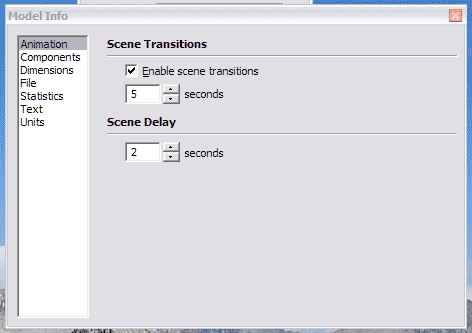

      model_info.gif

      http://www.nrwiesneski.com

      1 條回覆 最後回覆 回覆 引用 0
      • N 離線
        Nick W
        最後由 編輯

        Here is the help text regarding setting location. This seems to confirm the lack of "Location" settings in the non-Pro version:

        @unknownuser said:

        Specifying a Model's Location in the World
        You can set the location of your model in all versions of SketchUp. However, the mechanism for setting location is different between SketchUp Pro and Google SketchUp (free).

        Setting Location in SketchUp Pro
        Use the Location panel in the Model Info dialog box (Window > Model Info > Location) to set the location for your model.

        Caution - Do not use the Location panel in the Model Info dialog box to change the location of a model after importing the current view from Google Earth (using the Google Plugin). Using the Location panel to position models in Google Earth will likely result in an incorrectly located model.

        Setting Location in Google SketchUp (free)
        Load Google Earth and navigate to the location where you model will exist (the town is sufficient). Use SketchUp's Get Current View button to import the current view, as well as the location, from Google Earth. You can hide or delete the Google Earth snapshots if you want to work without them (such as when doing a shadow study).

        http://www.nrwiesneski.com

        1 條回覆 最後回覆 回覆 引用 0
        • N 離線
          Nick W
          最後由 編輯

          I'll change the setting when I get to work on Monday.

          I noticed that the north line only shows up in the ISO view tab, not in the elevation or plan views. I'm guessing it's because Kris had set the views up with that feature enabled or disabled and SU still recognizes the setting, but doesn't give me the interface to change it.

          Thanks again for this template, Kris! 😄

          http://www.nrwiesneski.com

          1 條回覆 最後回覆 回覆 引用 0
          • KrisidiousK 離線
            Krisidious
            最後由 編輯

            no problem Nick... and thanks for finding this little glitch... I'll remove it from the template and replace the file... again nice catch.

            By: Kristoff Rand
            Home DesignerUnique House Plans

            1 條回覆 最後回覆 回覆 引用 0
            • N 離線
              Nick W
              最後由 編輯

              [light bulb over head] After thinking through what I wrote in the last post, I realized that since the setting is attached to the view I could simply regenerate the ISO view by resetting the camera position from a scene with the North line disabled.

              http://www.nrwiesneski.com

              1 條回覆 最後回覆 回覆 引用 0
              • R 離線
                rhankc
                最後由 編輯

                hello Kris,
                back to the template again, I have been using your template on most new starts, mostly because I think it works different than the stock start file; probably the most noticeable difference is the higher number of degree divisions (minutes?) on the protractor from the vs. 6 stock protractor. Is that protractor an entity from previous versions or is there a settings for fine tuning your system?
                Thanks for your time.
                Hank

                Hank

                1 條回覆 最後回覆 回覆 引用 0
                • KrisidiousK 離線
                  Krisidious
                  最後由 編輯

                  I bleive that's in the modelinfo dialog box...

                  goto Window>Model Info>Units

                  then angle units and Precision and snapping

                  that should do it...

                  By: Kristoff Rand
                  Home DesignerUnique House Plans

                  1 條回覆 最後回覆 回覆 引用 0
                  • R 離線
                    rhankc
                    最後由 編輯

                    you are right, and I go there daily, have not ever seen it... thanks

                    Hank

                    1 條回覆 最後回覆 回覆 引用 0
                    • syburnS 離線
                      syburn
                      最後由 編輯

                      hi all,

                      im having probs with step 6. after making the rectangle i then cant see the jpg plan as its under neath. so no matter how much i right click i cant see the "Use image blah blah" option.

                      Any ideas what im doing wrong?

                      Report this post

                      (syburn)

                      1 條回覆 最後回覆 回覆 引用 0
                      • KrisidiousK 離線
                        Krisidious
                        最後由 編輯

                        at this point it is best to right click on your image, and select use image as texture, then apply the texture to the rectangle... now continue tracing...

                        By: Kristoff Rand
                        Home DesignerUnique House Plans

                        1 條回覆 最後回覆 回覆 引用 0
                        • syburnS 離線
                          syburn
                          最後由 編輯

                          oh i have placed the rectangle to one side this time. I have managed to get the jgp in the matrial library by the right click methof - but when i paint bucket the material to the recangle nothing happens - i cant see the image. can see other materials if i try those though.....

                          hmm i have now done it but not sure how - restarted it. maybe it was groups problem.

                          had to flip the image as it was mirrored but looks ok now.

                          thanks for you help!

                          (syburn)

                          1 條回覆 最後回覆 回覆 引用 0
                          • KrisidiousK 離線
                            Krisidious
                            最後由 編輯

                            you may have problems like this, after applying the texture to the rectangle, then right click on the rectangle and select "texture>Position> then flip, rotate, move until it fits correctly.

                            this help?

                            By: Kristoff Rand
                            Home DesignerUnique House Plans

                            1 條回覆 最後回覆 回覆 引用 0
                            • T 離線
                              titmas
                              最後由 編輯

                              @krisidious said:

                              step 11
                              repeat this process for your foundation, your first level and your second level and third...

                              by 'repeat' are you referring to steps 1-10 for each page of the plans by importing an image of each page than scale, trace, copy, layer?

                              1 條回覆 最後回覆 回覆 引用 0
                              • KrisidiousK 離線
                                Krisidious
                                最後由 編輯

                                yes that's what I meant...

                                By: Kristoff Rand
                                Home DesignerUnique House Plans

                                1 條回覆 最後回覆 回覆 引用 0
                                • N 離線
                                  not registered yet
                                  最後由 編輯

                                  Hi Kristoff,
                                  I only just found this thread and I'm finding it very useful indeed as I'm modelling my house in order to plan various improvements and alterations to services etc. I've got about six versions so far in various stages of completion which I realise is going to cause me major problem. Your tip about layers will be invaluable. Going right back to the beginning, would I be right in assuming that you could treat an imported 2D .DWG file in exactly the same way as you've used a .jpg image ?
                                  Thanks again for all your great input.

                                  Bigyin

                                  1 條回覆 最後回覆 回覆 引用 0
                                  • KrisidiousK 離線
                                    Krisidious
                                    最後由 編輯

                                    yes you could use the dwg file, although you would explode it and make the actual lines of the dwg into SU lines.

                                    By: Kristoff Rand
                                    Home DesignerUnique House Plans

                                    1 條回覆 最後回覆 回覆 引用 0
                                    • N 離線
                                      not registered yet
                                      最後由 編輯

                                      Thanks for that Kristoff. I think I'm gonna restart my model as I have a .DWG that friend produced and following your approach will help me keep the versions much better organised.
                                      Cheers,

                                      Bigyin

                                      1 條回覆 最後回覆 回覆 引用 0
                                      • KrisidiousK 離線
                                        Krisidious
                                        最後由 編輯

                                        Bigyin...

                                        start a thread in the gallery and post your work as you go, people will stop by and drop encouraging notes and advice that you can't find by asking, the kind that pops into their head while they see your progress.

                                        good luck.

                                        By: Kristoff Rand
                                        Home DesignerUnique House Plans

                                        1 條回覆 最後回覆 回覆 引用 0
                                        • N 離線
                                          not registered yet
                                          最後由 編輯

                                          I am having problems with step 4.

                                          What do you mean when you say open the group?

                                          If you mean edit, I am editing the group and measuring with the tape measure, but it is not asking me to resize the group?

                                          BTW- I am using the free version of SketchUp.

                                          Thanks from an aspiring SU user!

                                          (Online)

                                          1 條回覆 最後回覆 回覆 引用 0
                                          • KrisidiousK 離線
                                            Krisidious
                                            最後由 編輯

                                            online...

                                            after measuring a lined that you have drawn, you type in the box on the lower right hand of your screen, the measurment that you wish the line to become.

                                            does that help?

                                            By: Kristoff Rand
                                            Home DesignerUnique House Plans

                                            1 條回覆 最後回覆 回覆 引用 0
                                            • 1
                                            • 2
                                            • 3
                                            • 4
                                            • 5
                                            • 2 / 5
                                            • 第一個貼文
                                              最後的貼文
                                            Buy SketchPlus
                                            Buy SUbD
                                            Buy WrapR
                                            Buy eBook
                                            Buy Modelur
                                            Buy Vertex Tools
                                            Buy SketchCuisine
                                            Buy FormFonts

                                            Advertisement
