sketchucation logo sketchucation
    • Login
    Oops, your profile's looking a bit empty! To help us tailor your experience, please fill in key details like your SketchUp version, skill level, operating system, and more. Update and save your info on your profile page today!
    Mac User? | Join the Rayscaper Beta for Mac Learn More

    Is SketchUp Now Open-Source? Trimble Won't Like This

    Scheduled Pinned Locked Moved Corner Bar
    81 Posts 16 Posters 8.7k Views 16 Watching
    Loading More Posts
    • Oldest to Newest
    • Newest to Oldest
    • Most Votes
    Reply
    • Reply as topic
    Log in to reply
    This topic has been deleted. Only users with topic management privileges can see it.
    • TIGT
      TIG Moderator
      last edited by TIG

      "The Free alternative to SketchUp", "The Free answer to SketchUp", "The Free application inspired by SketchUp" or "The Free SketchUp-like application" [and the same for "Layout-like", or '...-style' etc] - would be a safer phrasing, without any suggestion of 'passing-off'. Avoiding words like 'clone', 'replica', 'copy' etc - stress the 'familiar', 'compatible' and 'independent' aspects. But you could say, for example, that tool AAA 'replicates' the XXX tool within SketchUp. But I think that e.g. 'Our Extrude [Follow] tool' works very much like SketchUp's PushPull [FollowMe]', would be a safer [legally] and more accurate way to describe their tools... Also this avoids using a tool's name that SketchUp might think it 'owns' - unlike 'Line' or 'Arc' which were of course around before @Last, and completely generic...
      The developers just need some advice on good idioms in English - after all they are predominantly Spanish speakers...

      TIG

      D 1 Reply Last reply
      Reply Quote 1
      • ninomaydaN
        ninomayda @numerobis
        last edited by

        @numerobis : PLUG-INS:

        Been looking and cannot find some kind of a Forum for IngeTrazo.

        How about transporting DYNAMIC-COMPONENTS into Python PlugIns? Perhaps thorough AI?

        Nino

        G D N 3 Replies Last reply
        Reply Quote 0
        • G
          Glenn at home @ninomayda
          last edited by

          @ninomayda Try here...

          Link Preview Image
          ingelibre/ingetrazo · Discussions

          Explore the GitHub Discussions forum for ingelibre ingetrazo. Discuss code, ask questions & collaborate with the developer community.

          favicon

          GitHub (github.com)

          SketchUp Pro 2025/2026 Dell XPS 8950 i9-12900K 64GB Ram RTX 3080

          1 Reply Last reply
          Reply Quote 0
          • D
            diredjo @Mike Amos
            last edited by diredjo

            @Mike-Amos said:

            Calling a product "Open source Sketchup" is using a the title of a product not owned by the makers of that software

            who say i'm agree with this statement? please dont judge someone without any reason. As i said before small description and i mean about the software in similarity with SketchUp and just another opensource ones, the folk you mention is not appropriates and i totally disagree, just for gain massive audiences or viewer he does i think.

            Mike AmosM 1 Reply Last reply
            Reply Quote 0
            • D
              diredjo @ninomayda
              last edited by diredjo

              @ninomayda said:

              How about transporting DYNAMIC-COMPONENTS into Python PlugIns? Perhaps thorough AI?

              i doubt in capability about this since IngeTrazo have no feature of dynamics component currently. However, a small to medium complexity of plugin creates by detecting object and properties seems to be possible. I personally succeed to port my plugin in exporting.

              *updates
              this you may looking for. ( link )

              2026-10-02 22_59_34-IngeTrazo Tutorials - YouTube and 5 more pages - Profile 1 - Microsoft​ Edge.png

              1 Reply Last reply
              Reply Quote 1
              • KrassK
                Krass
                last edited by

                If all the features SketchUp lacks become available natively—without extensions—it will be incredible; the bevel option alone is a huge deal. Impressive.

                Krass

                1 Reply Last reply
                Reply Quote 0
                • Mike AmosM
                  Mike Amos @diredjo
                  last edited by

                  @diredjo
                  Who is saying you have to agree?
                  Look, wanting the product to succeed AND see the realities of the market AND how litigation is a massive part of life these days. The real world has a way of smacking folk down. Language use has been suggested as needing a bit of help.
                  Do not be surprised if Trimble litigate.

                  Absentia mortis praesentiam vitae probat, vita autem est argumentum constantiae.

                  1 Reply Last reply
                  Reply Quote 0
                  • N
                    numerobis @ninomayda
                    last edited by

                    @ninomayda said:

                    How about transporting DYNAMIC-COMPONENTS into Python PlugIns? Perhaps thorough AI?

                    That should be possible if you have the unencrypted source code. But I doubt Trimble would hand it over. And decrypting it would probably lead to copyright issues...
                    But of course, you can write your own plugin 😉
                    I think it’s still a little too early to invest any time in that. But if it turns out well, it will surely be a very interesting plugin platform, and then maybe even a plugin converter could be developed.

                    1 Reply Last reply
                    Reply Quote 0
                    • pixelcruncherP
                      pixelcruncher Extension Creator
                      last edited by pixelcruncher

                      I agree with @mike-amos - There's clearly strong demand for a 3D tool as easy as SketchUp, but using the SketchUp name / marketing angle might get you in hot water with Trimble. But I could be wrong here, a lot of motivated people are chomping at the bit to dethrone established software and it's hard to keep them at bay. I know of a company in the real estate SaaS here in Belgium that's trying to cease and desist challengers but there are a lot of motivated people that want to take their share of that juicy real estate SaaS market here in Belgium.

                      I'm the developer of Rayscaper: https://rayscaper.com/ - Fast and easy rendering for SketchUp.

                      1 Reply Last reply
                      Reply Quote 0
                      • D
                        diredjo @TIG
                        last edited by TIG

                        @TIG said:

                        PushPull [FollowMe]'

                        i seen this may problematic, a general names is extrude and sweep

                        @Mike-Amos said:

                        Look, wanting the product to succeed AND see the realities of the market AND how litigation is a massive part of life these days.

                        for this, a case similar with Intellicad with Autocad and it seems not a problem.

                        apologizes when i answered with doubting since i'm not a lawyer.

                        1 Reply Last reply
                        Reply Quote 0
                        • TIGT
                          TIG Moderator
                          last edited by TIG

                          @diredjo
                          You misunderstood my point.
                          SketchUp might think they 'own' some tool-names like PushPull and FollowMe - but then calling 'equivalent-tools' say Extrude [or perhaps Pull or Push] and Follow [or perhaps Sweep or Follow or FollowPath or ExtrudeAlong] would be cleaner and safer naming ways. There are easy ways to avoid 'passing-off' accusations...

                          TIG

                          1 Reply Last reply
                          Reply Quote 0
                          • Mike AmosM
                            Mike Amos
                            last edited by

                            Fact is, "Sketchup" is a trade mark and has property rights to it, downright calling a program that acts like Sketchup in many ways "open source Sketchup" is misleading and false advertising. Trimble could already be talking to lawyers and arranging to completely ruin someone's LIFE.

                            Trade mark, copyright etc do not come cheap and when they pull the trigger with lawyers it will already cost them money so they will want THAT back for starters. Take a good look at the folk who made fan films in the Star Trek genre to see just how it can blow up in your face.

                            I hope this works out, I really do as competition is GOOD.

                            Absentia mortis praesentiam vitae probat, vita autem est argumentum constantiae.

                            1 Reply Last reply
                            Reply Quote 0
                            • jujuJ
                              juju
                              last edited by

                              Save the Earth, it's the only planet with chocolate.

                              1 Reply Last reply
                              Reply Quote 2
                              • Mistro11M
                                Mistro11
                                last edited by Mistro11

                                The developer did not put "Sketchup" in the name. That's the YouTube influencers doing. It's simply Ingetrazo. So I don't see a problem with Trimble coming after the developer because of using the word "Sketchup".

                                I been watching this very closely and been testing it myself. I'm not happy with the way Trimble abandoned older loyal users like myself. Years ago I worked and saved money to buy a Pro license for around $700. Recently built a new PC and found out my Pro version of Sketchup can no longer be authorized. I do have 2017 free version but it's not Pro like I'm used to. So my main 3D pipeline been completely upended by both Trimble and the new overlords of Thea Render who both decided to abandon the very users who enthusiastically supported them in the past. Thea Render also discontinued support for the perpetual licenses we paid real money for. So I give a warm welcome to Ingetrazo and wish it all the best. If this new program gets proper texturing tools which Sketchup always lacked, it would be incredible. So far the plugins have started pouring in and I'm excited.

                                Structural Integrity is Not Just Physical...It's in the Design and Purpose

                                1 Reply Last reply
                                Reply Quote 1
                                • ntxdaveN
                                  ntxdave
                                  last edited by

                                  Can someone tell me how to use the follow me tool in Ingetrazo. When I have tried, I could not get it to work like it does in SketchUp.

                                  Press F1...thank me later

                                  Mistro11M 1 Reply Last reply
                                  Reply Quote 0
                                  • Mistro11M
                                    Mistro11 @ntxdave
                                    last edited by

                                    @ntxdave I got it to work fine. Just select the edge/s you want to follow, click on the follow me tool, then click on the face of the shape you want to follow the edge. I had a simple rectangle right at the corner.
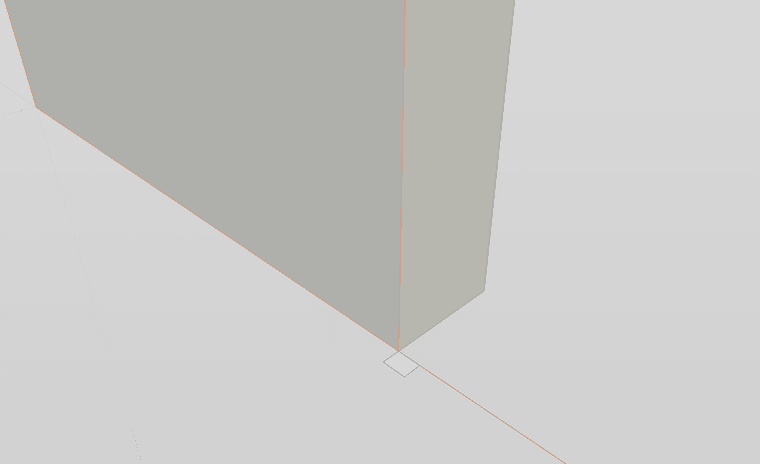
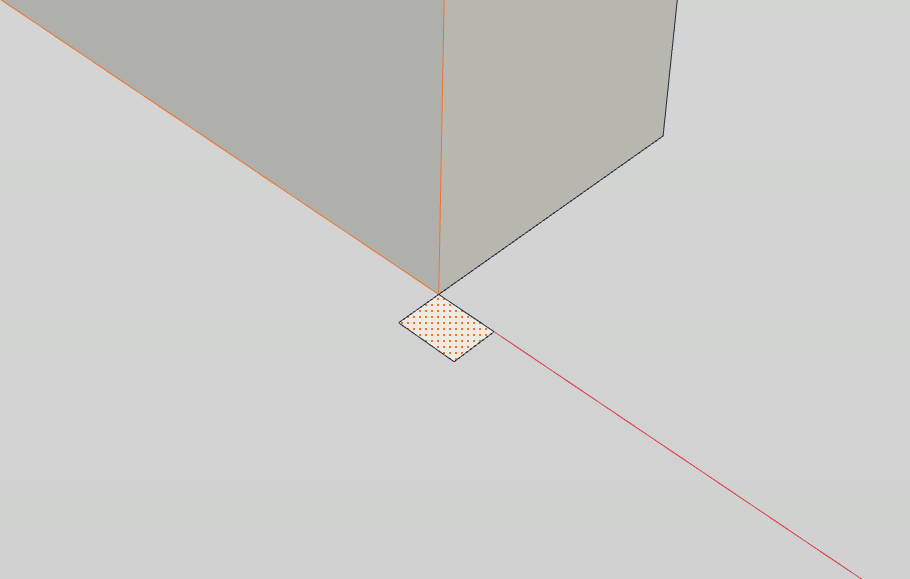
                                    Follow1.png

                                    Follow2.png

                                    Follow3.png

                                    Structural Integrity is Not Just Physical...It's in the Design and Purpose

                                    1 Reply Last reply
                                    Reply Quote 1
                                    • KrassK
                                      Krass
                                      last edited by

                                      helleo, it works for me on simple extrusion
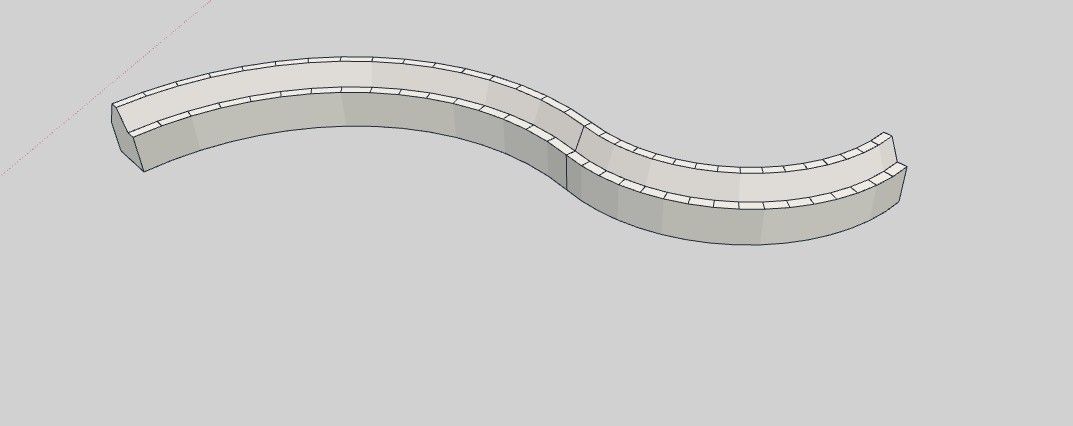
                                      image.jpeg

                                      Krass

                                      1 Reply Last reply
                                      Reply Quote 0
                                      • ntxdaveN
                                        ntxdave
                                        last edited by

                                        Thanks guys. I do not know what I was doing wrong before but I now have it working. Still a lot to learn about using this tool. Things like learning how to select multiple items (like multiple lines and how to set the axis for something I am drawing) but at least I am moving forward.

                                        Press F1...thank me later

                                        G 1 Reply Last reply
                                        Reply Quote 2
                                        • G
                                          Glenn at home @ntxdave
                                          last edited by

                                          @ntxdave It's also way early in its development.

                                          SketchUp Pro 2025/2026 Dell XPS 8950 i9-12900K 64GB Ram RTX 3080

                                          pixelcruncherP 1 Reply Last reply
                                          Reply Quote 2
                                          • pixelcruncherP
                                            pixelcruncher Extension Creator @Glenn at home
                                            last edited by

                                            @Glenn-at-home said:

                                            @ntxdave It's also way early in its development.

                                            This @ntxdave - We are in uncharted territory here, figuring things out as we go. It's exciting times.

                                            I'm the developer of Rayscaper: https://rayscaper.com/ - Fast and easy rendering for SketchUp.

                                            1 Reply Last reply
                                            Reply Quote 0

                                            Hello! It looks like you're interested in this conversation, but you don't have an account yet.

                                            Getting fed up of having to scroll through the same posts each visit? When you register for an account, you'll always come back to exactly where you were before, and choose to be notified of new replies (either via email, or push notification). You'll also be able to save bookmarks and upvote posts to show your appreciation to other community members.

                                            With your input, this post could be even better 💗

                                            Register Login
                                            • 1
                                            • 2
                                            • 3
                                            • 4
                                            • 5
                                            • 5 / 5
                                            • First post
                                              Last post
                                            Buy SketchPlus
                                            Buy SUbD
                                            Buy WrapR
                                            Buy eBook
                                            Buy Modelur
                                            Buy Vertex Tools
                                            Buy SketchCuisine
                                            Buy FormFonts

                                            Advertisement