shortcuts not retained in 2026 when Sketchup restarts
-
Forever, I have used ctrl+Q as a shortcut for hide/ show rest of model when editing blocks or components. I recently updated to 2026 and it appears ctrl+q is now the default shortcut for file>exit. I tried to change the shortcut in preferences, but it will not let me assign ctrl+Q as the shortcut for show/hide rest of model when going through the preferences window.
So I exported my preferences from 2025 and then imported them to 2026. When i imported, It asked if I wanted to reassign the ctrl+Q shortcut, i said yes and got my desired ctrl+Q function back. Problem is when i close out of sketchup and reopen it, it does not remember the ctrl+Q and reverts back to the file>exit. How do I get sketchup to remember the shortcut? (Hoping i don't need to pick a different shortcut since I have used ctrl+Q forever and it's ingrained in my workflow brain!)
Thanks.
-
Some OSs protect/reserve certain Ctrl+Key combos, so your system might revert Ctrl+Q to Quit after changes. Try something else like Shift+Q and see what happens...
Alternatively, if you haven't installed SketchUp properly SketchUp might not be able to remember user's changes to shortcuts in their preferences file.
This will be obvious if changing a shortcut to something potentially innocuous isn't remembered across sessions.To fix a faulty installation is simple.
Exit SketchUp and find its Installer exe file, usually in your Downloads folder.
Select its icon and right-click > context-menu > Run as administrator
When the dialog opens it should offer a 'Repair' option.
Choose 'Repair' and let it run,
this will fix the permissions of various files and folders,
so that your normal user-accounts changes to things like Shortcuts are remembered between sessions.
Choosing to 'Run' the installer's exe file, or double-clicking it is not the same as 'Run as administrator', even if your user has some admin-powers.
There's no need to Uninstall and Reinstall to fix things.
The Repair will not affect any customized changes or extension installations etc... -
@TIG
Thanks for the response and suggestions.Sketchup will retain Shift+Q when I restart it.
I ran repair and it did not change anything.
The fact that I when I type Ctrl+Q in the preferences the "+" is unresponsive so it will not add it to the assigned box is strange. But I can add Shift+Q to the assigned box and sketchup will then retain it when restarted.
So I guess this is an annoying bug and I need to train myself to use a new shortcut.
-
This post is deleted! -
Thanks for clarifying. It didn't used to be. previous versions did not have a shortcut for Exit. I've been using it for hide rest model since the early days of sketchup. It's frustrating they made it hard coded with this release (I'm not even sure why they need a shortcut to Exit).
-
This post is deleted! -
@joshvt said in shortcuts not retained in 2026 when Sketchup restarts:
I'm not even sure why they need a shortcut to Exit
Agreed. Moreover it's redundant with Ctrl + F4 which is standard for Windows.
-
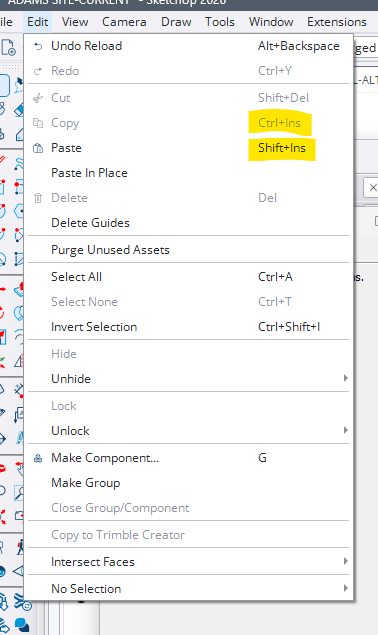
My second day of using 2026 and I've been having issues with copy and paste working inconsistently (I use Ctrl+C, Ctrl+V- just like every other windows program) Just noticed that sketchup 2026 edit menu shows the shortcuts for these as Ctrl+Ins, Shift+Ins. Presumably this is related to the insconsistent behavior I am experiencing when using the old/ standard shortcuts. Makes total sense to use a shortcut with keys on the opposite side of the keyboard... thanks Sketchup.... unreal.
-
CTRL+C and V works for me even though menu shortcut shows INS
I'd say 2026.1 or 2 will address the issues.
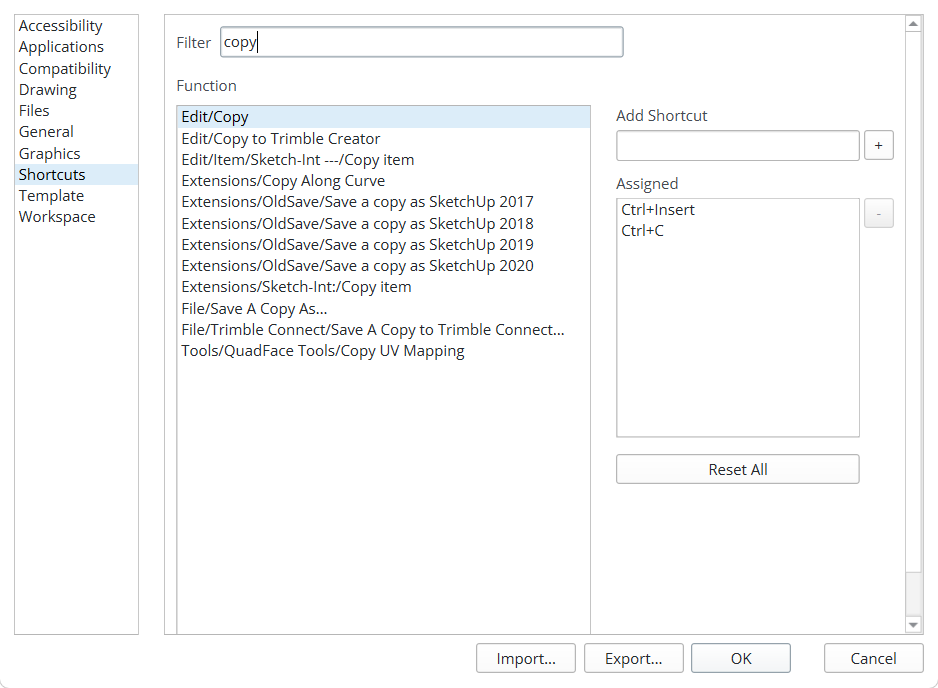
If you check the shortcuts you'll see 2 entries
-
Thanks. Ctrl+C and Ctrl+V work about 75% of the time. I'm trying to recreate/ observe the situation where they don't work, but haven't figured it out yet. Ctrl+C works less frequently than Ctrl+V, which is odd.
-
On PCs in v2026.1 some nitwit swapped the order in the Preferences >Shortcuts listed for the Edit commands for Copy Ctrl+C and Ctrl+Insert, and also the Cut [+X/+Insert] and Paste [+V/+Insert] etc, so the Edit menu now gives you an illogical listing because the long established ones now come second and so they aren't listed in that menu.
They still work, Unfortunately they are hardwired and not editable in Preferences>Shortcuts.
Hopefully common sense will revert this weirdness in the next update.




Hello! It looks like you're interested in this conversation, but you don't have an account yet.
Getting fed up of having to scroll through the same posts each visit? When you register for an account, you'll always come back to exactly where you were before, and choose to be notified of new replies (either via email, or push notification). You'll also be able to save bookmarks and upvote posts to show your appreciation to other community members.
With your input, this post could be even better 💗
Register Login


Advertisement