Scene animation with Animator
-
@ntxdave said in Scene animation with Animator:
there is a transition that takes place early (about 1:40)
The object is moved through the plane to fake the appearance of a Spiral getting revealed.
You can set playback on YouTube to be 0.25x speed if following along in real-time is difficult.
Download the free D'oh Book for SketchUp 📖
-
@Rich-O-Brien said in Scene animation with Animator:
You can set playback on YouTube to be 0.25x speed if following along in real-time is difficulty
I have never done that before. How do you do that?
-
OK, I looked it up and found out how to adjust the playback speed. I was able to set the speed to .25 on both my iPad and laptop.

-
@rich-o-brien @fredo6
OK guys, I am making some progress. I have a version being developed with Animator. I have to get ff-mpeg installed so I can generate some to share with you. Just want you to know that I am making some progress. Lots of trial and error so far and I can tell you I am going to have a bunch of questions later but I am headed in the direction I want to go.
-
OK, still more progress but when I click on the Generate Video link, nothing is happening.
-
Go to Tools > Fredo Collection > Animator > Video... menu for guides
-
Yes, I went there but I cannot generate a video. Again, when I click on the Generate Video button in Animator, nothing happens. It does not launch the screen for me to select the options and generate a video.
-
Can you open the Ruby console.
-
@fredo6 said in Scene animation with Animator:
Can you open the Ruby console.
Here is what I see:

BTW: Here is what I am clicking to generate the video.

-
Now I am seeing more problems. When I open the model and try to replay the animation in Animator, all of the objects are misplaced.
Here is a copy of the SketchUp model. If you load it you will see it play the correct movements, but all of the objects are now in the wrong place. How do I keep this from happening?
Jesus - Animator Animation.skp
Now to tell you where I want to take this:
-
I want to add some "introductory" text and an image. Part of this will include also animating parts of the text and possibly the image.
-
I want to add some "exit text" that again, might include some animation.
I have had several thoughts about this and with scenes and tags(layers) this is pretty easy but with Animator, it seems like I have more options for the animation sequences.
All of this is really an exercise for me to learn more about controlling things in/with Animator. I have another project if mind that would use a lot of these same things. As I have said before, I have used Animator many times in the past. If you go to YouTube and look under my previous account (ntxdave) you can see several videos. Some of them use some additional features that I am not currently using.
-
-
OK, I was able to go back and save the model with everything in the right position to make the animation work correctly.
Here is an updated copy of the modelJesus - Animator Animation.skp
Now I need for someone to give me advice on how to save/create a camera position so that future developments will allow everything to show up in the right position(s).
I know, this is not a complicated model and all of this should be very easy to accomplish. As I said before, this seems very much different than things I have done in the past because of the collective movement of objects.
Once I have all of this worked out, I want to be able to assign a nice environment and try using Rayscaper to produce a rendered version of the final product.
-
@ntxdave said in Scene animation with Animator:
try using Rayscaper to produce a rendered version of the final product.
Rayscaper does not support Animator.
Download the free D'oh Book for SketchUp 📖
-
@Rich-O-Brien ok, I thought I saw something recently that said they were working on that.
-
Can you copy/paste the error message as text from the Ruby Console. The screenshot does not show the head of the error message.
Also, always use the positioner (4th toolbar icon) to record the initial position of objects, precisely in case there are issues.
-
@fredo6 said in Scene animation with Animator:
Can you copy/paste the error message as text from the Ruby Console. The screenshot does not show the head of the error message.
There was no error message. I now have it working and ffmpeg is installed.

Also, always use the positioner (4th toolbar icon) to record the initial position of objects, precisely in case there are issues.
This is useful for me also. I am going to have several things located in the model so I will capture the camera position for each of the units.
-
Is there a way to adjust the camera position during an animation? As an example, I am going to move an object and I would like to move/change the camera as the movement occurs.
I know I used to have the camera follow a car as it went through a car was but it has been too long ago and I do not remember how I achieved it. DUH!
-
Just create as many camera view as you like and place them along the timeline. Animator will interpolate the camera between them.
-
OK guys I keep going backwards. In the screen short below, I cannot seem to click on the right link to get the timeline back to the left side (like normal).
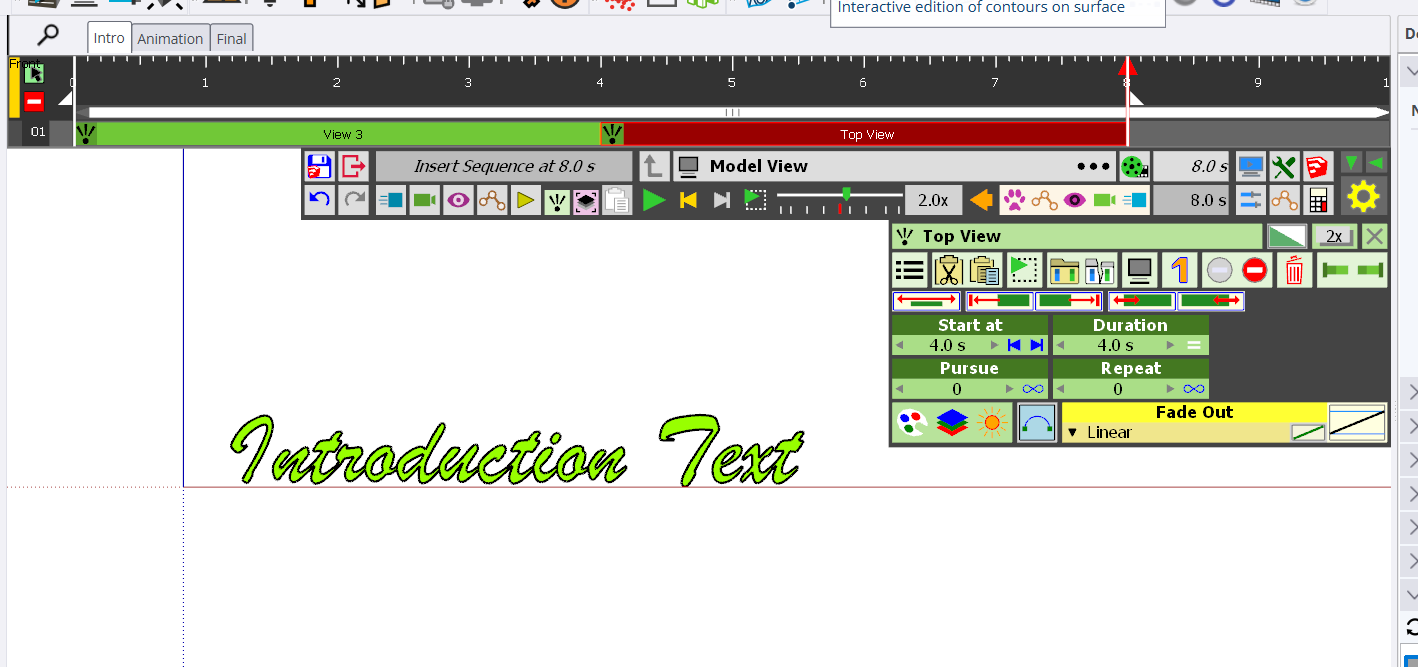
I am also having a problem trying combine things to make a Clip. I thought you could hit the shift key and click on multiple items to create a Clip.
-
 N ntxdave referenced this topic on
-
What are Kinematic objects and how are they used in SketchUp and Animator?

What are Trajections and how are they used in Animator?

What are Visual Effects and how are they used in Animator?

-
@ntxdave said in Scene animation with Animator:
What are Kinematic objects and how are they used in SketchUp and Animator?
@ntxdave said in Scene animation with Animator:
What are Trajections and how are they used in Animator?
The buttons you are pointing at are the include/exclude in animation toggles.
Download the free D'oh Book for SketchUp 📖


Hello! It looks like you're interested in this conversation, but you don't have an account yet.
Getting fed up of having to scroll through the same posts each visit? When you register for an account, you'll always come back to exactly where you were before, and choose to be notified of new replies (either via email, or push notification). You'll also be able to save bookmarks and upvote posts to show your appreciation to other community members.
With your input, this post could be even better 💗
Register Login


Advertisement