Scene animation with Animator
-
It has been a while since I used Animator to create an animation. In particular, I want to build an animation with the following features:
-
A “start screen” that includes some text that I may/may not want to scroll or fade in or out
-
I would like to show/hide some items in the model that are/can be controlled by tags
-
I have several scenes in the model that I would like to use to control the visibility of the model (camera and visibility of some objects)
As I said, it has been a while since I last used Animator. I watched a couple videos lately but they did not address the items I listed above. At this point, I just want to try to learn how to do some things other than rotate items. My objective is to control visibility. I also wondered if the was a way to control text.
-
-
I looked at some more videos today but still have another question.
Has anyone used SketchUp scenes in an Animator animation? If so, can you give me some feedback. I have several scenes in my model that I would like to take advantage of. In essence, I already have set all of the scenes to be included in an animation but I was hoping Animator would give me more control over them.
-
OK, I have a VERY simple model that I would like to use for creating animations with Animator.
As you will see in the model, there are 2 scenes and two objects.
-
Scene 1 {Side View) has two objects. A wood object that is laying down and a square to the right of the week object. This scene was crated using the "front" camera position.
-
Scen2 (Top View) has only one object viewable. The wood object is being viewed using the "Top" camera view. The second object does not show because the tag associated with it is turned off.
Now here is what I want to achieve: I want an animation (created with Animator) that achieves the same results as though you had clicked on one of the scenes. In other words, you will see the transition from Side View to Top View and the second object that is hidden in the Top View no longer shows.
I have a far more complicated model that uses some of the same features. I can create the animation pretty easily with SketchUp but I want to do it with Animator because there are other things that I want to achieve based on these same principles.
Here is the SketchUp file for you to look at and give me some advice on how to achieve my goals.Animator Learning.skp
-
-
I just watched a tutorial from Tutorials Up that does a lot of what I would like to do with Animator. The name of the animation was Simple Animation with Fredo6 Animator
The video showed a lot of things I would like to do in my animation. However, there was no narration of what was being done so I could not really follow what was being done for most of the video.
I also watched a video for another plugin called Keyframe Animation. It also showed a lot of things I wish we could do in Animator (primarily using SketchUp scenes as "key frames").
I which I could get some feedback on this thread.
-
 N ntxdave marked this topic as a question on
-
Animator requires the user to put in the hours playing around with it. Its also pretty advanced and requires a user to be proficient in SketchUp to begin with.
Anyone adept using Animator has put in the time to discover its features.
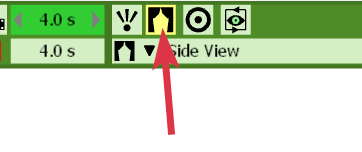
You need to set your Camera to use a scene.
-
Thanks @rich-o-brien. I will look at that the next time I start up SketchUp.
Yes, it is hard to find out how things in Animator work. I saw A neat Animator tutorial here. In particular as the 1:49 point in the video there is a really neat feature. The problem with the video is that it is fast and there is no narrative.
I had wanted this thread moved to a more generic category so that I would get more feedback. I also would like to be able to PM @fredo6-animator so that I could discuss some issues with him.
I have also looked at another plugin called Keyframe Animation that has some neat feature but not as many options as Animator. One of the primary things it can do is use SketchUp Scenes. Since you pointed out the camera link, I will look at it and see if it gives me some ways to take advantage of scenes.
OK @rich-o-brien, I just launched SU and then started Animator. How did you get to the option in your post?
-
@ntxdave said in Scene animation with Animator:
How did you get to the option in your post?
Double clip a strip in your timeline to edit that strip's properties.
Download the free D'oh Book for SketchUp 📖
-
Scenes can be used in Animator for their camera. The interest versus setting the camera in Animator is that Animator will use the camera of the scene , which is controlled outside of Animator.
However, for tags (layers) and visibility of objects, you need to use Visual Effects.
-
@Rich-O-Brien said in Scene animation with Animator:
@ntxdave said in Scene animation with Animator:
How did you get to the option in your post?
Double clip a strip in your timeline to edit that strip's properties.
Thanks @rich-o-brien , I will look at that.
-
@fredo6 said in Scene animation with Animator:
Scenes can be used in Animator for their camera. The interest versus setting the camera in Animator is that Animator will use the camera of the scene , which is controlled outside of Animator.
However, for tags (layers) and visibility of objects, you need to use Visual Effects.
If you look at the tutorial I referenced above at about 1:49, you will see a very interesting way the poster handled an object (trvealing in it I circular pattern).. I want to do something similar with some intro text (probably reveal it in a left to right pattern - like writing or printing the text.
I have some other things in the back of my mind but I need to takes one step at a time. Bottom line is that I think Animator is a great tool but learning how to take advantage of its features is somewhat difficult.
-
@fredo6 said in Scene animation with Animator:
Scenes can be used in Animator for their camera. The interest versus setting the camera in Animator is that Animator will use the camera of the scene , which is controlled outside of Animator.
However, for tags (layers) and visibility of objects, you need to use Visual Effects.
Thanks for this feedback. Now I need to figure out how to use a lot of the features of Animator. BTW, I have used Animator many times in the past for things like looking at car washes, a figure walking along a path and even one of a drone moving around. You can see them if you go to YouTube and look for ntxdave animations (I now have a new account on YouTube so that will change in the future).
Now I want to do something really different. The movie below was created using native SketchUp animation features. I want to make a more sophisticated version using Animator and some of its features (some like the Tutorials Up video I referenced before and adding text intro and conclusion.
Here is the current video Jesus Animation.mp4
IHere is the SketchUp model for you to look at and give me advice. Jesus-Animator.skp
In this video there is a transition that takes place early (about 1:40) that I would like to understand better.
-
@ntxdave said in Scene animation with Animator:
there is a transition that takes place early (about 1:40)
The object is moved through the plane to fake the appearance of a Spiral getting revealed.
You can set playback on YouTube to be 0.25x speed if following along in real-time is difficult.
Download the free D'oh Book for SketchUp 📖
-
@Rich-O-Brien said in Scene animation with Animator:
You can set playback on YouTube to be 0.25x speed if following along in real-time is difficulty
I have never done that before. How do you do that?
-
OK, I looked it up and found out how to adjust the playback speed. I was able to set the speed to .25 on both my iPad and laptop.

-
@rich-o-brien @fredo6
OK guys, I am making some progress. I have a version being developed with Animator. I have to get ff-mpeg installed so I can generate some to share with you. Just want you to know that I am making some progress. Lots of trial and error so far and I can tell you I am going to have a bunch of questions later but I am headed in the direction I want to go.
-
OK, still more progress but when I click on the Generate Video link, nothing is happening.
-
Go to Tools > Fredo Collection > Animator > Video... menu for guides
-
Yes, I went there but I cannot generate a video. Again, when I click on the Generate Video button in Animator, nothing happens. It does not launch the screen for me to select the options and generate a video.
-
Can you open the Ruby console.
-
@fredo6 said in Scene animation with Animator:
Can you open the Ruby console.
Here is what I see:

BTW: Here is what I am clicking to generate the video.



Hello! It looks like you're interested in this conversation, but you don't have an account yet.
Getting fed up of having to scroll through the same posts each visit? When you register for an account, you'll always come back to exactly where you were before, and choose to be notified of new replies (either via email, or push notification). You'll also be able to save bookmarks and upvote posts to show your appreciation to other community members.
With your input, this post could be even better 💗
Register Login


Advertisement