Is there a way to "define the scale" of a group of objects in SketchUp?
-
I'm not AI.
BUT I'll outline the steps for you...Run these snippets in the Ruby Console.
-
Find all 'containers' [i.e. groups and component-instances].
-
Decide if you want to process all of them in your model. OR those in a selection. Here are the two ways a and b.
3a. #code
model = Sketchup,active_model
containers = model.definitions.to_a #an array of ALL groups and component definitions, including any nested ones.
OR
3b. #codemodel = Sketchup.active_model selection = model.selection containers = [] #an empty array selection.each{|e| next if ! e.is_a?(Sketchup::Group) || ! e.is_a?(Sketchup::ComponentInstance) containers << e.definition } containers.uniq! #ignore duplicates #containers is now an array of selected groups and component-instances' definitions, BUT not any that are nested.- #use puts to see the results, e.g.
puts containersProcess [scale ?] the array of the 'containers' as you desire... one at a time e.g.
containers.each{|e| # whatever... } -
-
 R Rich O Brien marked this topic as a question on
-
@TIG I've tried but it doesn't work. I'm attaching an image as an example where I've modified the scale of each cube and also the scale of a group that contains three cubes. In practice, I would like that once all objects are selected, I can define the scale for all of them, even those nested inside the group.
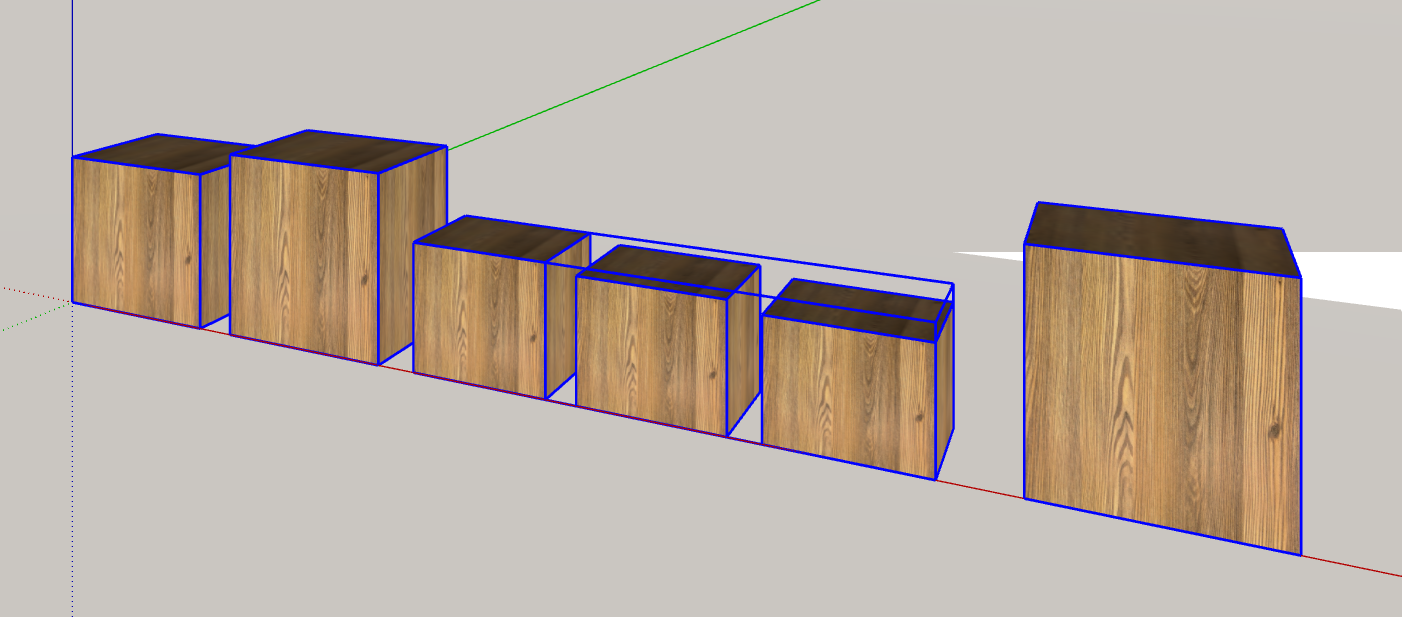
-
Once you have a collection of selected 'containers' [groups and component-instances] you need to go though that array and do the same again to each 'container's' entities, selecting any new 'containers', repeat this until all nested 'containers' are got.
Here's an outline of an example...def miner(entities=Sketchup.active_model.to_a) containers = [] #an empty array entities.each{|e| next if ! e.is_a?(Sketchup::Group) || ! e.is_a?(Sketchup::ComponentInstance) containers << e.definition } containers.uniq! #ignore duplicates #process the containers containers.each{|e| #do scaling code on 'e'... } #containers is an array of selected groups and component-instances' definitions, #BUT not any that are nested. #Next go through the container.entities - #this repeats until there are no containers left to process. return nil unless containers[0] containers.each{|e| miner(e.entities) #repeats itself ! } end#def #run with miner(Sketchup.active_model.selection.to_a) after first making your selection...TIG
-
@TIG
Is it necessary to repeat this operation for every single object? I need a single command to set the scale for all selected elements (including nested components and groups) with just one click. Otherwise, it would be faster to do it manually -
@TIG I think I found it. Gemini gave me this solution and it works logically. The components will become unique, but it does exactly what I wanted. Since you're the expert, could you check if it works well?
require 'sketchup.rb'
module Visual_Scale_Applier
def self.apply_scale_to_selection
model = Sketchup.active_model
selection = model.selectionif selection.empty? UI.messagebox("Seleziona gli oggetti a cui vuoi 'fissare' la scala.") return end model.start_operation('Fissa Scala Corrente', true) selection.each do |entity| self.process_entity(entity) end model.commit_operation puts "Scala 'fissata' a 1.0 per la selezione e tutti i contenuti nidificati."end
def self.process_entity(entity)
return unless entity.is_a?(Sketchup::ComponentInstance) || entity.is_a?(Sketchup::Group)# 1. Se è un componente con più copie, lo rendiamo unico per non rovinare il resto del modello entity.make_unique if entity.is_a?(Sketchup::ComponentInstance) t = entity.transformation # Estrarre i fattori di scala correnti scale_x = Math.sqrt(t.to_a[0]**2 + t.to_a[1]**2 + t.to_a[2]**2) scale_y = Math.sqrt(t.to_a[4]**2 + t.to_a[5]**2 + t.to_a[6]**2) scale_z = Math.sqrt(t.to_a[8]**2 + t.to_a[9]**2 + t.to_a[10]**2) # Se la scala è già 1.0, non facciamo nulla su questo livello unless (scale_x - 1.0).abs < 0.001 && (scale_y - 1.0).abs < 0.001 && (scale_z - 1.0).abs < 0.001 # 2. Creiamo una trasformazione di scala per la geometria interna internal_scaling = Geom::Transformation.scaling(scale_x, scale_y, scale_z) # 3. Trasformiamo la geometria interna (bordi, facce, etc.) entity.definition.entities.transform_entities(internal_scaling, entity.definition.entities.to_a) # 4. Resettiamo la scala del contenitore esterno a 1.0 mantenendo posizione e rotazione new_transformation = Geom::Transformation.axes( t.origin, t.xaxis.normalize, t.yaxis.normalize, t.zaxis.normalize ) entity.transformation = new_transformation end # 5. Entra ricorsivamente nei gruppi/componenti nidificati entity.definition.entities.each do |child| self.process_entity(child) endend
endEsegui
Visual_Scale_Applier.apply_scale_to_selection
-
@tig
I have included a final status message and a count for the modified objects.require 'sketchup.rb' module Visual_Scale_Applier def self.apply_scale_to_selection model = Sketchup.active_model selection = model.selection if selection.empty? UI.messagebox("Seleziona gli oggetti a cui vuoi 'definire' la scala.") return end @count = 0 model.start_operation('Definisci Scala Corrente', true) selection.each do |entity| self.process_entity(entity) end model.commit_operation # Messaggio di successo richiesto UI.messagebox("Scale definition of all objects/components successfully completed.\nElementi elaborati: #{@count}") end def self.process_entity(entity) return unless entity.is_a?(Sketchup::ComponentInstance) || entity.is_a?(Sketchup::Group) # Rende unico il componente se necessario per non influenzare copie non selezionate entity.make_unique if entity.is_a?(Sketchup::ComponentInstance) t = entity.transformation # Calcolo dei fattori di scala correnti scale_x = Math.sqrt(t.to_a[0]**2 + t.to_a[1]**2 + t.to_a[2]**2) scale_y = Math.sqrt(t.to_a[4]**2 + t.to_a[5]**2 + t.to_a[6]**2) scale_z = Math.sqrt(t.to_a[8]**2 + t.to_a[9]**2 + t.to_a[10]**2) # Applica la trasformazione interna se la scala non è già 1.0 unless (scale_x - 1.0).abs < 0.001 && (scale_y - 1.0).abs < 0.001 && (scale_z - 1.0).abs < 0.001 internal_scaling = Geom::Transformation.scaling(scale_x, scale_y, scale_z) entity.definition.entities.transform_entities(internal_scaling, entity.definition.entities.to_a) # Resetta il contenitore esterno a scala 1.0 new_transformation = Geom::Transformation.axes( t.origin, t.xaxis.normalize, t.yaxis.normalize, t.zaxis.normalize ) entity.transformation = new_transformation @count += 1 end # Processo ricorsivo per elementi nidificati entity.definition.entities.each do |child| self.process_entity(child) end end end # Esecuzione Visual_Scale_Applier.apply_scale_to_selection -
You have misunderstood.
It works on your selection of 'containers' AND any 'containers' inside those etc, iterating...
As your later example shows too.
You just needed you to add in some of your scaling code... -
-
I think that there's a pretty obvious logical problem with this.
If you have a component with X instances of another component nested into it and each one of them has a different scale factor, only one of them can be used to set the "definition".
And which one the algorithm should choose?
Based on which criteria?That's why Gemini is trying to make each instance unique.
It's not a code problem. It's definitely a logical problem.
-
@panixia In certain situations, I am willing to lose the instances. This is particularly true when I am building external component libraries: every component within is stripped of all scale and instance definitions. I accept this compromise.
Buon anno, Marcello.
-
Yeah, I think you'll definitely need to live with the compromise, because there's not some "universal" solution to this problem (and it can get even more complex with multiple nesting levels and/or multiple instances of the "father" component with different scale factor.
You will indeed loose the "instancing" benefit, otherwise it will be a mess.. No matter the code.
Buon anno a te! -
 A alexpacio2013 has marked this topic as solved on



Hello! It looks like you're interested in this conversation, but you don't have an account yet.
Getting fed up of having to scroll through the same posts each visit? When you register for an account, you'll always come back to exactly where you were before, and choose to be notified of new replies (either via email, or push notification). You'll also be able to save bookmarks and upvote posts to show your appreciation to other community members.
With your input, this post could be even better 💗
Register Login


Advertisement