Rayscaper New Releases
-
-
Hey, Rayscaper users!
Rayscaper 1.0.4 is available. You can get it via:
- The SketchUcation store.
- Direct download: Rayscaper_Win_1.0.4.rbz.
Rayscaper Has Its Own Licenses Now
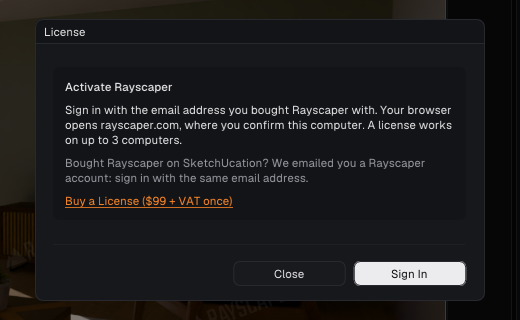
From 1.0.4 on, you activate Rayscaper with a Rayscaper account instead of a SketchUcation license. In the Rayscaper window, open License... and click Sign In: your browser opens rayscaper.com, you sign in with your email address (no password, we email you a link) and confirm the computer. A license works on up to 3 computers, which you manage on your account page, and Rayscaper keeps working offline.
Bought Rayscaper on SketchUcation? Your license has already moved: you have a Rayscaper account with the email address you bought it with, and we emailed you today. There's nothing to buy, and as a thank-you your license includes every Rayscaper 1.x update and support by email until November 21, 2027. Rayscaper 1.0.3 and older keep working with your SketchUcation license until you update.
Buying through SketchUcation? You get a license in the new system too: we add it to a Rayscaper account with the email address you bought it with, and email you how to sign in.
New licenses are also sold on rayscaper.com. See the Licensing FAQ.
Any issues with your license or signing in? Contact us at hello@rayscaper.com or reply here, and we'll sort it out.
What Changed?
- Move Rayscaper to its own licensing system: you activate it with a Rayscaper account through Sign In in the License dialog (Extensions > Rayscaper > License…), instead of with SketchUcation. Licenses bought on SketchUcation move to a Rayscaper account, and older versions keep working with them.
Full release notes: rayscaper.com/manual/release-notes
Help Me Build the Community

If you like Rayscaper, please share your renders (final or work-in-progress, it doesn't matter)! This is motivating
and helps me showcase its capabilities to new users.Follow me on X.
Happy Rendering!
Thomas -
Great news @pixelcruncher
Thanks for sharing the whole development of Rayscaper here. It’s been great to see it become a very solid engine.
For one person it’s also an amazing feat. Well done and I hope it continues to grow into the future.
Download the free D'oh Book for SketchUp 📖
-
A wild ride and great experience. Glad to have been along for some of it. Rich, we owe you too.
My thanks to both of you. -
Hi all,
Some of you who moved over from SketchUcation to the new Rayscaper accounts got mixed messages about whether Rayscaper is now a subscription. It isn't, and that's my fault for showing a date that looked like an expiry. To clear it up:
- You pay once, and the license is yours. Nothing renews, and you'll never be charged again.
- Every Rayscaper 1.x update is included, also the ones that come out later.
- Rayscaper 2.0 will be a paid upgrade whenever it arrives, and only if you want it. Your 1.x license keeps working either way.
- Email support: a license officially includes a year of it. In practice, I've always helped people well beyond that and will keep doing so. The limit is only there so I'm not answering 1.x questions for the rest of my days once newer versions are out.
The date I showed was only the end of that support year. I've removed it from the account page so it doesn't cause more confusion.
If anything about your license or account is unclear, reply here or email me.
-
Hey, Rayscaper users!
If you don't use AI agents (Claude Code, Codex, Claude Desktop, Cursor...), you can skip this one.
If you do: Rayscaper has an experimental feature that lets an agent work in Rayscaper. It can look at your scene and the render, and change the sky, lights, materials, scatters, camera and post processing. You ask in your own words, for example "light this room for the evening", and it works through it while checking the render.
It's early, and I'd like to hear how it works for you before I put more into it. What did you ask, what went well, what went wrong, and what would you want it to do?
Two recordings, so you can see what it does:
Trying it: you need the latest Rayscaper, 1.0.4. The AI Agents page has a prompt that sets up your agent, and the settings to do it by hand (also under Tools > Connect AI Agent... in the render window). Open the render window before you start the agent session. The connection stays on your computer, but the agent sees your renders, so they go to the AI service behind your agent app.
Thanks!
Thomas -
Hello Thomas, I think it's a good evolution for your program. I use codex to generate 3d models in sketchup, it is sometime very impressive. I work for landscape architects who handle the exterior areas of buildings; they provide me with the architectural plans, which I then have ChatGPT process. It’s an impressive time-saver in this context, where minor inaccuracies aren't a major issue. I’m now looking into other scenarios where AI might be useful in my work with Rayscaper.
For instance, how could ChatGPT take control of or interact with Rayscaper? I’m currently using the MCP server for SketchUp.
I’ll check your manual to see if you’ve included a guide for this. In any case, great work! -
@krass, let me know how it goes. This is only the first step for now. I've only tested so far with
claude-codeandcodex-cli(ChatGPT). But I can definitely see how AI provides the best of both worlds here: you keep 100% control over the output images because they aren't AI-generated, but you can still iterate quickly on scenes by letting the AI agent configure scenes.I am looking into adding AI features for users who want them, without enforcing them for those who don't. So let me know what kind of features would be useful for you. The idea would be to still have the pay-once, own-forever license model, but you can buy credit packs for your AI workflows.
-
I am currently working on an elaborate animation using Animator; the subject matter is a rather silly cartoon, but it’s helping me get a solid grasp of how Animator works. I actually asked GPT to create a modified version of a component already present in the model. The result was excellent—it even generated the normal maps for the materials it applied, which I was then able to import into Rayscaper. It’s a minor detail, perhaps, but it’s not entirely unrelated to the potential future integration of AI into Rayscaper.
I need to finish this animation first, and then I’ll look into how I might test ChatGPT and Rayscaper together. -
With respect, cartoons take as much planning as any graphical media interaction, film. music video etc.
As a definite 'old git' I still love cartoons. Looking forwards to getting a look at yours mate.






Hello! It looks like you're interested in this conversation, but you don't have an account yet.
Getting fed up of having to scroll through the same posts each visit? When you register for an account, you'll always come back to exactly where you were before, and choose to be notified of new replies (either via email, or push notification). You'll also be able to save bookmarks and upvote posts to show your appreciation to other community members.
With your input, this post could be even better 💗
Register Login


Advertisement