sketchucation logo sketchucation
    • Login
    Oops, your profile's looking a bit empty! To help us tailor your experience, please fill in key details like your SketchUp version, skill level, operating system, and more. Update and save your info on your profile page today!
    Mac User? | Join the Rayscaper Beta for Mac Learn More

    Rayscaper New Releases

    Scheduled Pinned Locked Moved Extensions & Applications Discussions
    rayscaperrender
    813 Posts 14 Posters 382.0k Views 15 Watching
    Loading More Posts
    • Oldest to Newest
    • Newest to Oldest
    • Most Votes
    Reply
    • Reply as topic
    Log in to reply
    This topic has been deleted. Only users with topic management privileges can see it.
    • A
      Alattab @Krass
      last edited by

      @Krass Okay, I’m sorry; I didn’t mean that. All I meant was to clarify the automatic material recognition feature.

      1 Reply Last reply
      Reply Quote 2
      • pixelcruncherP
        pixelcruncher Extension Creator
        last edited by

        No worries, folks, I appreciate suggestions and the love for Rayscaper! I've been working on a feature like this for a while, but I never finished it. I will launch it soon. But yes, Rayscaper will try to be smart about material names and will have user-configurable rules for matching them. I'm trying to make it so it doesn't get in your way; if you don't like it, you don't have to use it.

        I'm the developer of Rayscaper: https://rayscaper.com/ - Fast and easy rendering for SketchUp.

        1 Reply Last reply πŸ‘
        Reply Quote 1
        • A
          Alattab
          last edited by

          Please don’t be upset; all I want is to support RayScaper so that it stays at the forefront and meets every need.

          1 Reply Last reply
          Reply Quote 0
          • A
            Alattab
            last edited by

            Is it possible to turn a line or a series of connected lines into something that glows like a strip light?

            1 Reply Last reply
            Reply Quote 0
            • KrassK
              Krass
              last edited by

              The only way is to use an emissive material. Any small, thin face will work or line converted to tube. But you need a face to apply the material on. You can convert your lines instantly into tubes with Lines to tube function from JHS power bar extensions bundle

              Krass

              1 Reply Last reply πŸ‘
              Reply Quote 1
              • pixelcruncherP
                pixelcruncher Extension Creator
                last edited by

                Hey, Rayscaper users!

                Rayscaper 1.0.1 is available. You can get it via:

                • The SketchUcation store.
                • Direct download: Rayscaper_Win_1.0.1.rbz.

                I recommend upgrading to the latest version.

                Auto Setup: Your First Render Looks Right

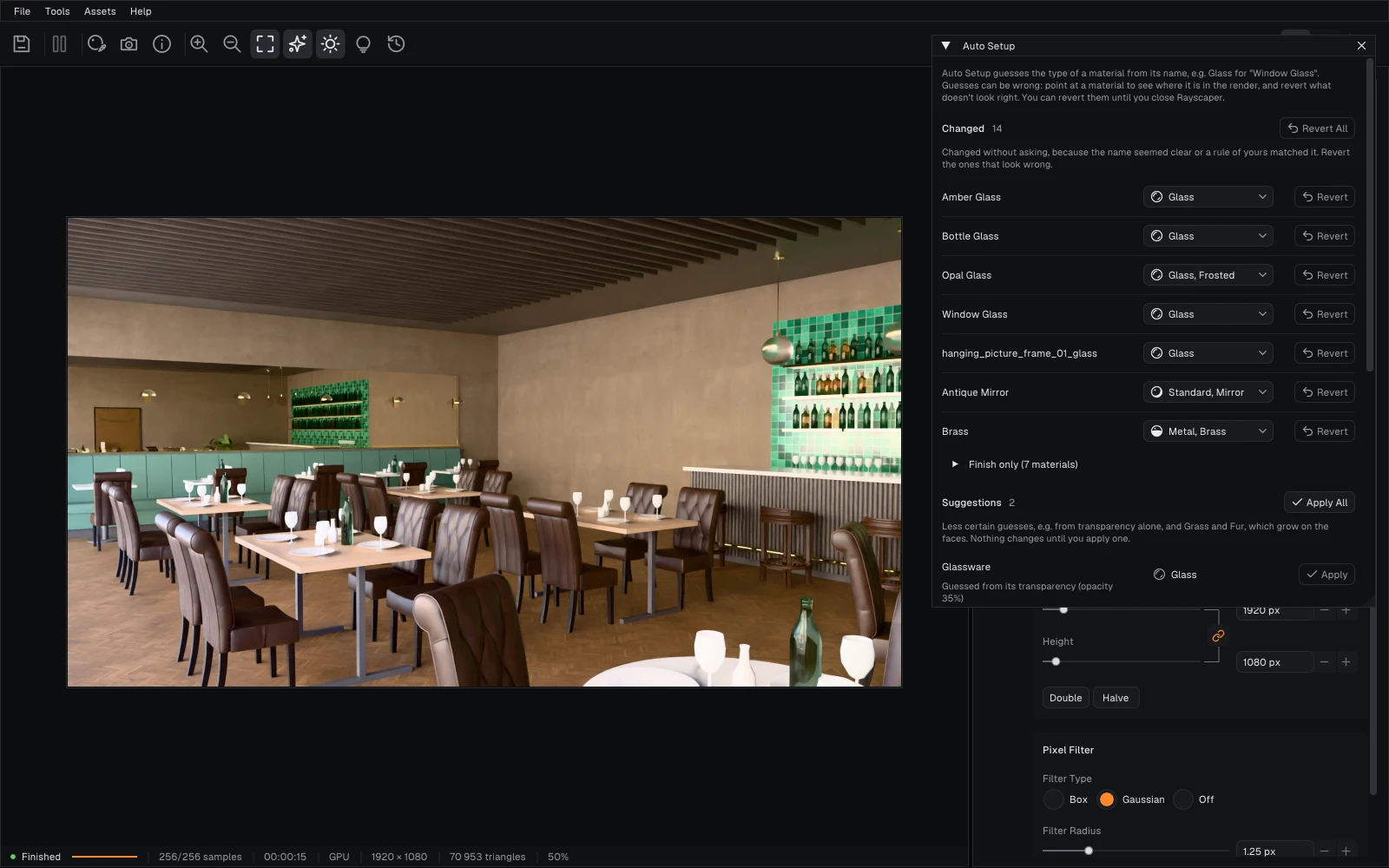
                A SketchUp material is a color and maybe a texture: it doesn't say that a surface is glass, polished brass or a mirror. The name often does. When you render a model for the first time, Rayscaper now reads the names of its materials and sets them up: "Window Glass" becomes Glass, "Brass" becomes polished Metal and "Antique Mirror" a mirror. It reads names in several languages.

                A banner tells you what it changed. Tools > Auto Setup Materials... shows every guess: point at a material to see where it is in the render, and correct or revert what doesn't look right. Guesses it isn't sure of stay suggestions for you to apply.
                auto_setup_review.png

                Lighting for an Interior or an Exterior

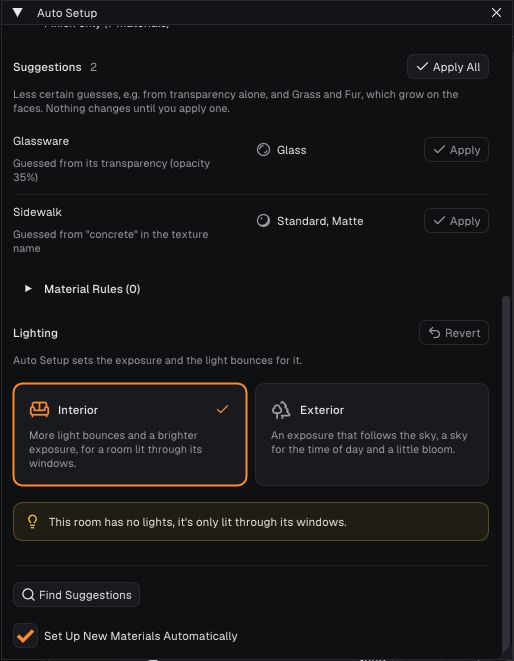
                Auto Setup also asks whether your model is an interior or an exterior, and sets the exposure, light bounces, bloom and sky for it. An interior without lights gets an offer to add one.
                auto_setup_lighting.png

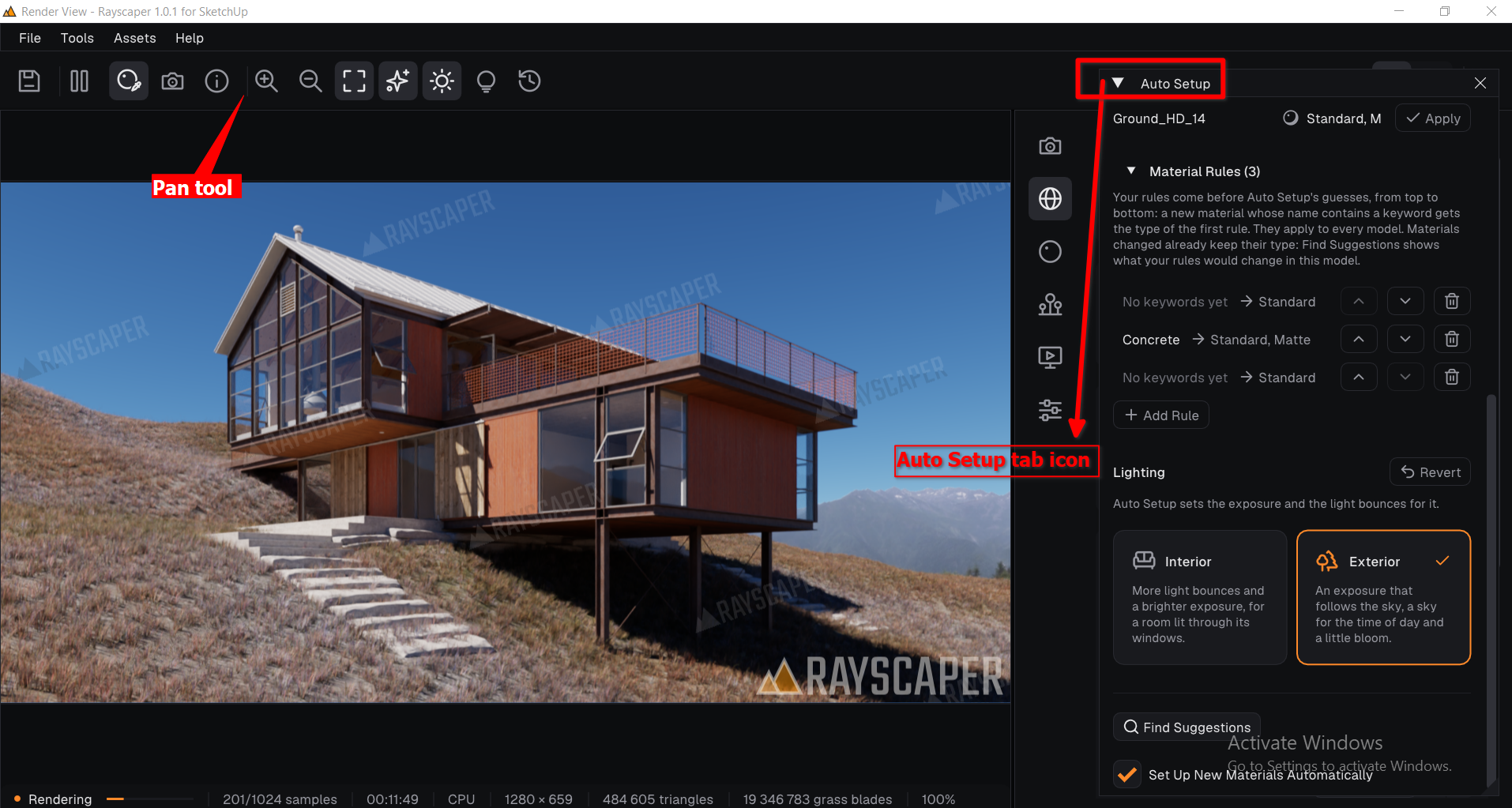
                Material Rules

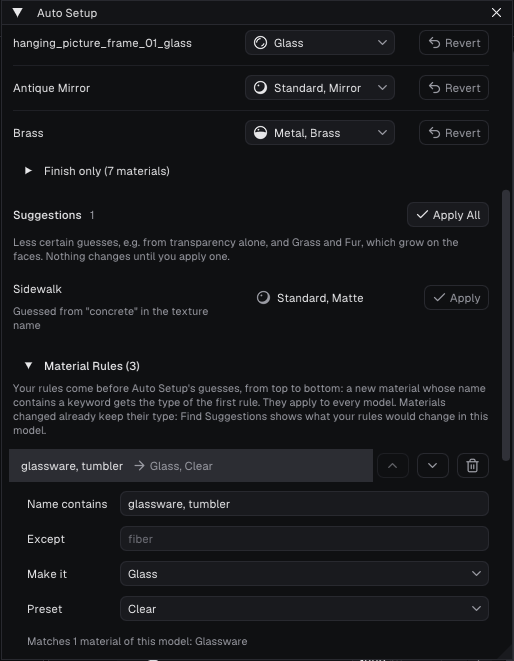
                Do you name your materials your own way, like M_GL_* for glass or "Verre"? Tell Auto Setup what your names mean with material rules. Your rules come before its own guesses and apply to every model.
                auto_setup_rules.png

                See Auto Setup in the manual. If you set up your own materials, you can turn it off there in one click.

                Auto Setup is still a bit experimental: it can guess wrong, and it doesn't know every way people name their materials yet. Your feedback is much appreciated! If it set up a material wrong or missed one, or the lighting doesn't suit your scene, please reply here with the material names (or the model, if you can share it).

                What Changed?

                • Add Auto Setup: when you open a model without Rayscaper settings, Rayscaper sets up its materials from their names. A banner says what it changed, and Tools > Auto Setup Materials... lets you review, correct or revert every guess.
                • Add the lighting of Auto Setup: choose interior or exterior, and it sets the exposure, bounces, bloom and sky for that kind of scene.
                • Add material rules to Auto Setup: tell it what your own material names mean. Your rules come before its own guesses.
                • Animate the field of view between SketchUp scenes in Render Animation, so a zoom between scenes and Two-Point Perspective scenes render as SketchUp shows them. Animations whose scenes have different fields of view now render differently than before.
                • Fix auto exposure blowing out renders with a transparent background.

                Full release notes: rayscaper.com/manual/release-notes

                Help Me Build the Community πŸ‘

                If you like Rayscaper, please share your renders (final or work-in-progress, it doesn't matter)! This is motivating and helps me showcase its capabilities to new users.

                Follow me on X.

                Happy Rendering!
                Thomas

                I'm the developer of Rayscaper: https://rayscaper.com/ - Fast and easy rendering for SketchUp.

                A 2 Replies Last reply
                Reply Quote 0
                • KrassK
                  Krass
                  last edited by

                  Hello Thomas,
                  Thank you. I’d like to know if the "round corner" feature is difficult to develop for your program. I’m referring to that "fake" round corner effect, which generates rounded edges where there weren't any before?

                  Krass

                  A 2 Replies Last reply
                  Reply Quote 0
                  • A
                    Alattab @Krass
                    last edited by

                    @Krass Thank you for what you mentioned regarding rounded edges; I often favored using them in Thea Render. it is related to matrial

                    1 Reply Last reply
                    Reply Quote 0
                    • A
                      Alattab @pixelcruncher
                      last edited by

                      @pixelcruncher It seems that, in the end, you will arrive at something unconquerable.

                      1 Reply Last reply
                      Reply Quote 0
                      • A
                        Alattab @Krass
                        last edited by

                        @Krass I see that your smile is even broader than mine regarding the new update; would it bother you if I offered another suggestion?

                        1 Reply Last reply
                        Reply Quote 0
                        • KrassK
                          Krass
                          last edited by

                          no, of course not

                          Krass

                          A 1 Reply Last reply πŸ‘
                          Reply Quote 0
                          • A
                            Alattab @Krass
                            last edited by

                            @Krass Thank you

                            1 Reply Last reply
                            Reply Quote 0
                            • S
                              sashapepperspray
                              last edited by

                              I have a question about licensing (now that you are out of beta), I bought a license a while ago, until when do I get free updates?

                              pixelcruncherP 1 Reply Last reply
                              Reply Quote 0
                              • A
                                Alattab
                                last edited by

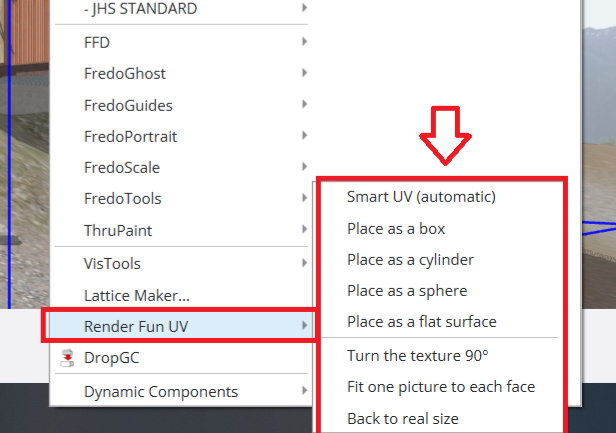
                                I would like to see an option added to change the sky color and use raster images png , jpg, ..... image as background for color enviroment or in postprocessing menu , as well as a dedicated UV menu for Rayscaper.
                                Capture-4.PNG

                                1 Reply Last reply
                                Reply Quote 2
                                • A
                                  Alattab @pixelcruncher
                                  last edited by

                                  @pixelcruncher
                                  This is fantastic; it looks like there might be some strong competition for the ambient occlusion rendering engine.

                                  1 Reply Last reply
                                  Reply Quote 1
                                  • pixelcruncherP
                                    pixelcruncher Extension Creator @sashapepperspray
                                    last edited by

                                    @sashapepperspray

                                    What I'm releasing currently and in the near future will still be available to you with your existing license.

                                    I will announce the plan for the 2.0 release soon and provide more clarity about the upgrade plan. If there are critical bugs or issues in 1.0, I will still make new builds available for 1.0 license holders.

                                    Cheers,
                                    Thomas

                                    I'm the developer of Rayscaper: https://rayscaper.com/ - Fast and easy rendering for SketchUp.

                                    1 Reply Last reply
                                    Reply Quote -1
                                    • pixelcruncherP
                                      pixelcruncher Extension Creator
                                      last edited by pixelcruncher

                                      @alattab - Can you clarify " UV menu for Rayscaper."? Is this for individual image textures, because you can already edit their UVs under the image texture settings. But I presume this is something else?

                                      Also panning works currently with CTRL + Mouse Drag. Was that not clear, or you think there's value in having an explicit button to enable the pan tool?

                                      I'm the developer of Rayscaper: https://rayscaper.com/ - Fast and easy rendering for SketchUp.

                                      1 Reply Last reply
                                      Reply Quote 0
                                      • pixelcruncherP
                                        pixelcruncher Extension Creator
                                        last edited by

                                        Hey, Rayscaper users!

                                        Rayscaper 1.0.2 is available. You can get it via:

                                        • The SketchUcation store.
                                        • Direct download: Rayscaper_Win_1.0.2.rbz.

                                        I recommend upgrading to the latest version.

                                        Glass Presets

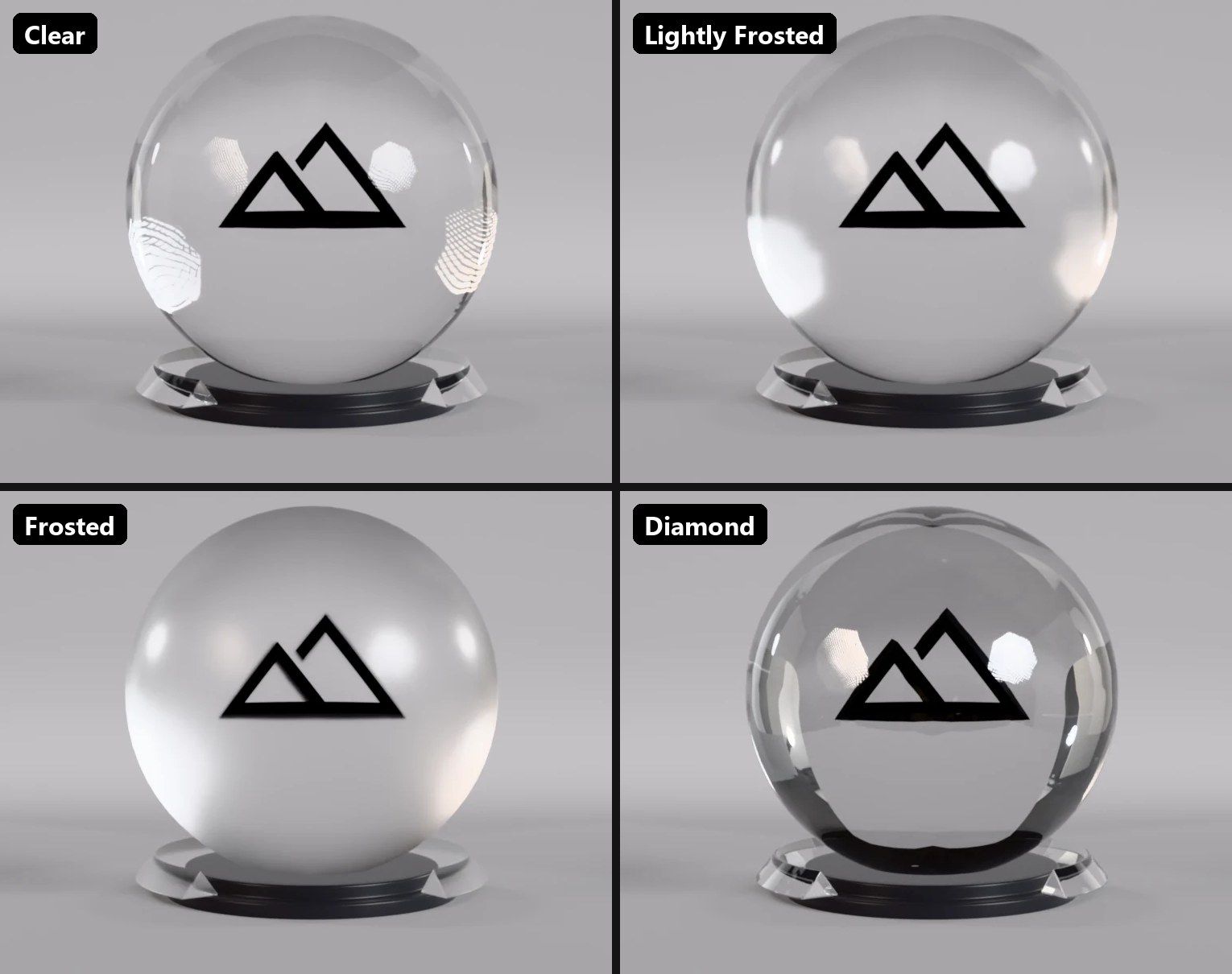
                                        The Glass material now has presets for the kinds of glass you model most: Clear, Window Pane, Lightly Frosted, Frosted, Crystal, Acrylic, Water, Diamond and Anti-Reflective. Pick one and Rayscaper sets the index of refraction, the roughness and Thin for you, and keeps your color. Window Pane is for windows modelled as a single face, Frosted for shower screens and privacy glass, Crystal for wine glasses. See Glass Material.
                                        Glass presets

                                        Viewport Background

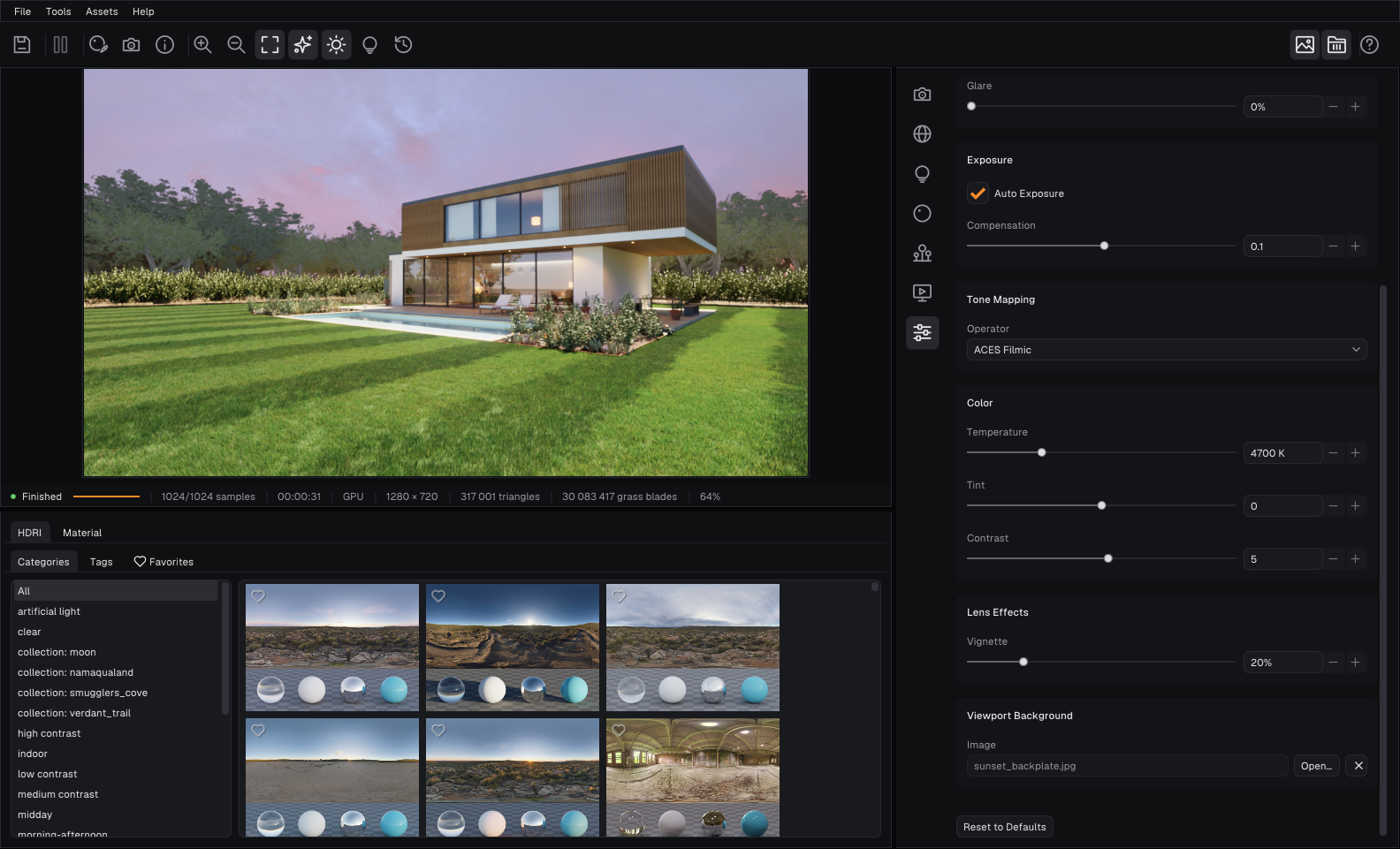
                                        Post Processing has a new Viewport Background section: pick a photo (PNG or JPEG) and Rayscaper shows it behind a transparent render, so you can see your design on the site photo or a backplate while you work. It's only shown in the viewport, so the renders you save stay transparent for your own compositing, and changing it doesn't restart the render. Turn on Transparent in the Environment section to see it, the section offers a button for that, and Match Render to Image when the photo has a different aspect ratio than your render. See Post Processing.
                                        Viewport Background

                                        What Changed?

                                        • Add presets to the Glass material: Clear, Window Pane, Lightly Frosted, Frosted, Crystal, Acrylic, Water, Diamond and Anti-Reflective. A preset sets the IOR, roughness and Thin, and keeps your color.
                                        • Add a Viewport Background to Post Processing: show a photo behind a transparent render to see it composited over a backplate. It's only shown in the viewport, so saved renders stay transparent.
                                        • Fix the GPU denoiser running out of memory, and renders failing, on PCs with two NVIDIA GPUs.

                                        Full release notes: rayscaper.com/manual/release-notes

                                        Help Me Build the Community πŸ‘

                                        If you like Rayscaper, please share your renders (final or work-in-progress, it doesn't matter)! This is motivating and helps me showcase its capabilities to new users.

                                        Follow me on X.

                                        Happy Rendering!
                                        Thomas

                                        I'm the developer of Rayscaper: https://rayscaper.com/ - Fast and easy rendering for SketchUp.

                                        A 1 Reply Last reply πŸ‘
                                        Reply Quote 1
                                        • A
                                          Alattab
                                          last edited by

                                          an example
                                          0123.png

                                          pixelcruncherP 1 Reply Last reply
                                          Reply Quote 0
                                          • A
                                            Alattab @pixelcruncher
                                            last edited by

                                            @pixelcruncher SUPER

                                            1 Reply Last reply
                                            Reply Quote 1

                                            Hello! It looks like you're interested in this conversation, but you don't have an account yet.

                                            Getting fed up of having to scroll through the same posts each visit? When you register for an account, you'll always come back to exactly where you were before, and choose to be notified of new replies (either via email, or push notification). You'll also be able to save bookmarks and upvote posts to show your appreciation to other community members.

                                            With your input, this post could be even better πŸ’—

                                            Register Login
                                            • 1
                                            • 2
                                            • 36
                                            • 37
                                            • 38
                                            • 39
                                            • 40
                                            • 41
                                            • 38 / 41
                                            • First post
                                              Last post
                                            Buy SketchPlus
                                            Buy SUbD
                                            Buy WrapR
                                            Buy eBook
                                            Buy Modelur
                                            Buy Vertex Tools
                                            Buy SketchCuisine
                                            Buy FormFonts

                                            Advertisement